
ElasticSearch入门学习笔记
ElasticSearch入门笔记
分页查询
from: 开始位置
size: 查多少条
GET /credit_enterprise_info/_search

{

  "query": {

    "match": {

      "qymc": "大"

    }

  }

  , "from": 0

  , "size": 5

}
解决数据量很大时 总数只显示10000条
GET /credit_enterprise_info/_search

{

   "track_total_hits": true

}
如修改完之后,通过api查询回来的totalhits还是只有10000条,解决如下:
在查询时候把 track_total_hits 设置为 true。
track_total_hits 设置为false禁用跟踪匹配查询的总点击次数
设置为true就会返回真实的命中条数。
GET 索引名/_search

	{

	 "query": {

		 "match_all": {}

			 },

		 "track_total_hits":true

	}
java代码在构建条件时候加上:
searchSourceBuilder.trackTotalHits(true);
只查询索引内文档数量
GET /credit_enterprise_info/_count
设置查询10000条以后的数据
PUT /credit_enterprise_info/_settings

{

   "index.max_result_window" : "1000000"

}
查询配置
GET /credit_enterprise_info/_settings

返回:

{

  "credit_enterprise_info" : {

    "settings" : {

      "index" : {

        "number_of_shards" : "5",

        "provided_name" : "credit_enterprise_info",

        "max_result_window" : "1000000000",

        "creation_date" : "1630920063923",

        "number_of_replicas" : "1",

        "uuid" : "CXgroui1SyqmWNDlg2-ifQ",

        "version" : {

          "created" : "7020099"

        }

      }

    }

  }

}
精确查询!
term查询是直接通过倒排索引指定的词条进行精确查找的!
- 通过倒排索引
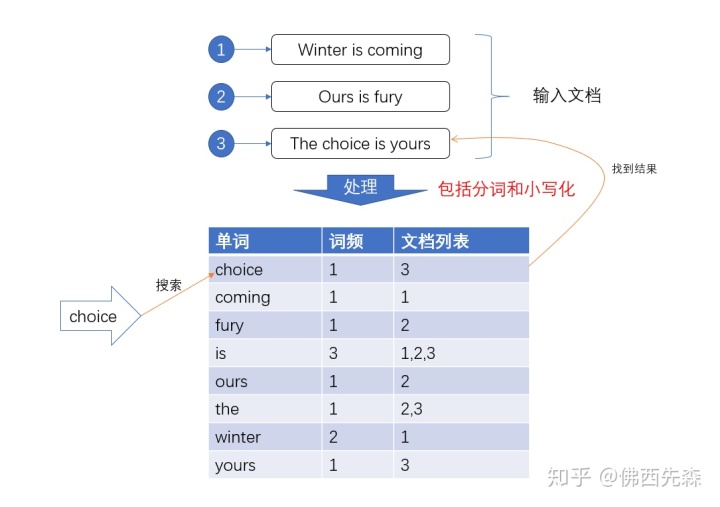
关于分词
trem,直接查询精确的(倒排索引直接查询)
match,会使用分词器解析!(先分析文档,然后在通过分析的文档进行查询!)
两个类型 text keyword
keyword字段类型不会被分词器解析
text类型可以被解析
PUT /testdb/_doc/1

{

  "name": "Java name",

  "desc": "Java desc"

}

PUT /testdb/_doc/2

{

  "name": "Java name",

  "desc": "Java desc2"

}

GET _analyze

{

  "analyzer": "keyword",

  "text": "Java name"

}

GET _analyze

{

  "analyzer": "standard",

  "text": "Java name"

}

GET /testdb/_search

{

  "query": {

    "term": {

      "name": "测试"

    }

  }

}

GET /testdb/_search

{

  "query": {

    "term": {

      "desc": "测试"

    }

  }

}

GET /testdb/_search

{

  "query": {

    "term": {

      "desc": "Java desc"

    }

  }

}
多个值匹配的精确查询
PUT /testdb/_doc/3

{

  "t1": "22",

  "t2": "2020-4-6"

}

PUT /testdb/_doc/4

{

  "t1": "33",

  "t2": "2020-4-7"

}

GET /testdb/_search

{

  "query": {

    "bool": {

      "should": [

        {"term": {

            "t1": "22"

        }},

        {"term": {

            "t1": "33"

        }}

      ]

    }

  }

}
must (and),所有条件都要符合 where id = 1 and name = XXX
must not(not)
should(or),所有条件都要符合 where id = 1 or name = XXX
filter
GET /testdb/_search

{

  "query": {

    "bool": {

      "should": [

        {"term": {

            "t1": "22"

        }},

        {"term": {

            "t1": "33"

        }}

      ]

      , "filter": {

        "range": {

          "t1": {

            "gte": 20,

            "lte": 30

          }

        }

      }

    }

  }

}
- gt 大于
- gte 大于等于
- lt 小于
- lte 小于等于!
匹配多个条件
直接分词 空格
GET /credit_enterprise_info/_search

{

  "query": {

    "match": {

      "qymc": "沈阳 齐齐哈尔"

    }

  }

}
高亮查询
GET /credit_enterprise_info/_search

{

  "query": {

    "match": {

      "qymc": "沈阳 齐齐哈尔"

    }

  }

  , "highlight": {

    "fields": {

      "qymc": {}

    }

  }

}
自定义高亮查询
GET /credit_enterprise_info/_search

{

  "query": {

    "match": {

      "qymc": "沈阳 齐齐哈尔"

    }

  }

  , "highlight": {

    "pre_tags": "<p class='key' style='color:red'>",

    "post_tags": "</p>",

    "fields": {

      "qymc": {}

    }

  }

}

GET /jd_goods/_search

{

	"from": 1,

	"size": 20,

	"timeout": "20s",

	"query": {

		"term": {

			"title": {

				"value": "java",

				"boost": 1.0

			}

		}

	},

	"highlight": {

		"pre_tags": ["<sapn style='color:red'>"],

		"post_tags": ["</span>"],

		"require_field_match": false,

		"fields": {

			"title": {}

		}

	}

}
模糊查询 wildcard
GET /credit_enterprise_info/_search

{

	"from": 0,

	"size": 20,

	"timeout": "20s",

	"query": {

		"bool": {

			"must": [{

				"wildcard": {

					"tyshxydm": "*925309*"

				}

			}],

			"adjust_pure_negative": true,

			"boost": 1.0

		}

	},

	"_source": {

		"includes": ["inserttime", "qymc", "tyshxydm"],

		"excludes": []

	},

	"sort": [{

		"_score": {

			"order": "desc"

		}

	}]

}
这些其实mysql也能做,知识mysql的效率比较低
- 匹配
- 按照条件匹配
- 精确匹配
- 区间范围匹配
- 匹配字段过滤
- 多条件查询
- 高亮查询
索引相关
# 查看全部索引

GET _cat/indices

# 获取一个文档

GET /index/type/id

# 删除索引

DELETE /index

# 查看mapping

GET /index/_mapping

# 创建索引mapping

PUT /index

{

    "mappings": {

      "type": {

        "properties": {

          "id": {

            "type": "integer"

          },

          "industry": {

            "type": "text",

            "index": false

          },

          "report_type": {

            "type": "text",

            "index": false

          },

          "title": {

            "type": "text",

            "index":true

          },

          "update_time": {

            "type": "date",

            "format":"yyyy-MM-dd HH:mm:ss||yyyy-MM-dd||epoch_millis"

          },

          "url": {

            "type": "text",

            "index": false

          }

        }

      }

    }

}

说明

ignore_malformed:true 忽略格式错误的数值

# 部分更新

POST /index/type/id/_update

{

  "doc": {

    "update_time": "2019-11-13 12:12:03"

  }

}

# 查询,并过滤没有删除,分页,时间排序

get /index/_search

{

  "query": {

    "bool": {

      "filter": {

        "bool": {

          "must_not": {

            "term": {

              "is_del": 1

            }

          }

        }

      },

      "must": {

        "match_phrase": {

          "title": "国"

        }

      }

    }

  },

  "size": 10,

  "from": 0,

  "sort": [

    {"publish_date": {"order": "desc"}},

    {"_score": {"order": "desc"}}

    ]

}

# 新增字段

PUT <index>/_mapping/<type>

{

  "properties": {

    "<name>": {

      "type":  "integer"

     }

   }

}
ElasticSearch入门学习笔记的更多相关文章
- Elasticsearch入门学习重点笔记
原文:Elasticsearch入门学习重点笔记 必记知识点 Elasticsearch可以接近实时的搜索和存储大量数据.Elasticsearch是一个近实时的搜索平台.这意味着当你导入一个文档并把 ...
- 【原创】SpringBoot & SpringCloud 快速入门学习笔记(完整示例)
[原创]SpringBoot & SpringCloud 快速入门学习笔记(完整示例) 1月前在系统的学习SpringBoot和SpringCloud,同时整理了快速入门示例,方便能针对每个知 ...
- Hadoop入门学习笔记---part4
紧接着<Hadoop入门学习笔记---part3>中的继续了解如何用java在程序中操作HDFS. 众所周知,对文件的操作无非是创建,查看,下载,删除.下面我们就开始应用java程序进行操 ...
- Hadoop入门学习笔记---part3
2015年元旦,好好学习,天天向上.良好的开端是成功的一半,任何学习都不能中断,只有坚持才会出结果.继续学习Hadoop.冰冻三尺,非一日之寒! 经过Hadoop的伪分布集群环境的搭建,基本对Hado ...
- PyQt4入门学习笔记(三)
# PyQt4入门学习笔记(三) PyQt4内的布局 布局方式是我们控制我们的GUI页面内各个控件的排放位置的.我们可以通过两种基本方式来控制: 1.绝对位置 2.layout类 绝对位置 这种方式要 ...
- PyQt4入门学习笔记(一)
PyQt4入门学习笔记(一) 一直没有找到什么好的pyqt4的教程,偶然在google上搜到一篇不错的入门文档,翻译过来,留以后再复习. 原始链接如下: http://zetcode.com/gui/ ...
- Hadoop入门学习笔记---part2
在<Hadoop入门学习笔记---part1>中感觉自己虽然总结的比较详细,但是始终感觉有点凌乱.不够系统化,不够简洁.经过自己的推敲和总结,现在在此处概括性的总结一下,认为在准备搭建ha ...
- Hadoop入门学习笔记---part1
随着毕业设计的进行,大学四年正式进入尾声.任你玩四年的大学的最后一次作业最后在激烈的选题中尘埃落定.无论选择了怎样的选题,无论最后的结果是怎样的,对于大学里面的这最后一份作业,也希望自己能够尽心尽力, ...
- Scala入门学习笔记三--数组使用
前言 本篇主要讲Scala的Array.BufferArray.List,更多教程请参考:Scala教程 本篇知识点概括 若长度固定则使用Array,若长度可能有 变化则使用ArrayBuffer 提 ...
- OpenCV入门学习笔记
OpenCV入门学习笔记 参照OpenCV中文论坛相关文档(http://www.opencv.org.cn/) 一.简介 OpenCV(Open Source Computer Vision),开源 ...
随机推荐
- JavaScript的闭包和作用域
作用域相关 作用域的概念: 作用域是在运行时代码中的某些特定部分中变量,函数和对象的可访问性.换句话说,作用域决定了代码区块中变量和其他资源的可见性: 作用域的类型: 全局作用域: 最外层函数和在最外 ...
- 安卓逆向 HOOK 第一课 XP的安装以及编写
<meta-data android:name="xposedmodule" android:value="true" /> <meta-da ...
- 列表(list)内置方法补充、字典(dict)内置方法、元组(tuple)内置方法、集合(set)内置方法
目录 一.列表(list)内置方法补充 二.字典(dict)内置方法 三.元组(tuple)内置方法 四.集合(set)内置方法 一.列表(list)内置方法补充 # reverse()颠倒列表内元素 ...
- Vulhub 漏洞学习之:Discuz
Vulhub 漏洞学习之:Discuz 目录 Vulhub 漏洞学习之:Discuz 1 Discuz 7.x/6.x 全局变量防御绕过导致代码执行 1.1 漏洞利用过程 2 Discuz!X ≤3. ...
- Python实战项目1-开发流程需求分析/基础环境搭建
软件开发流程 # 真正的企业里软件从立项到交付整个过程 -立项:确定公司要开发这个软件 公司高层 -软件来源 -产品经理设计出来的---->互联网项目 互联网公司 -用户(医院,政府部门,企业. ...
- ABAP PDF 打印
SPAN { font-family: "Courier New"; font-size: 10pt; color: rgba(0, 0, 0, 1); background: r ...
- java学习日记20230227-dos原理
DOS原理 磁盘操作系统 dis operating system md c:\\temp 创建文件夹 rd c:\\jyltemp 移除文件夹 相对路径和绝对路径 相对路径:从当前目录开始定位形 ...
- WeNet调试
运行: 参照:markdown 问题: CMake Error: Error: generator : Ninja Ninja:提高构建速度 wenet/runtime/libtorch/fc_bas ...
- 关于fetch请求中非表单模式(form)转化为form格式请求成功问题
首先证实一下接口请求可以成功,postman掉通 2.证实接口可以掉通之后,来发现问题 发现根本不是form表单格式3.去操作实现form表单格式 发现form格式貌似已经转换,但是请求还是不对 最后 ...
- 使用iperf测试网卡性能
1.目标 测试网卡通信性能,同时可以通过改变连接方式(从两台PC网线直连,切换到通过交换机连接)测试交换机最高速率性能. 2.使用工具 硬件:两台PC机(本例用win10 64位).数根网线.交换机 ...