
【Istio实际操作篇】Istio入门,10分钟快速安装
@
前言
上一篇讲了什么是Istio的理论篇,这次我们就来实际操作。
想看上一篇理论篇的看这里(看完绝对有所收获):
[Istio是什么?] 还不知道你就out了,一文40分钟快速理解_小叶的技术Logs的博客-CSDN博客
本文说明 请大家务必查看
本文有两个版本,详细版、简洁版。
前者适合新手,后者适合老手(方便大家查找,从而过滤掉某些步骤,节约时间成本) 所以大家按需查看哟。
| 详细版 | 简洁版 |
|---|
简洁版:包含所有步骤,以及命令的执行过程(适合新手)
简洁版:只包含命令(适合有一定熟练度的人)
环境准备
| 系统 | Vcpu | Memory | 集群 |
|---|---|---|---|
| centos7 | 2 | 8 | kubernetes |
详细版
入门:搭建步骤
Istio软件包下载
安装最新软件包
$ curl -L https://istio.io/downloadIstio | sh - # 安装最新软件包
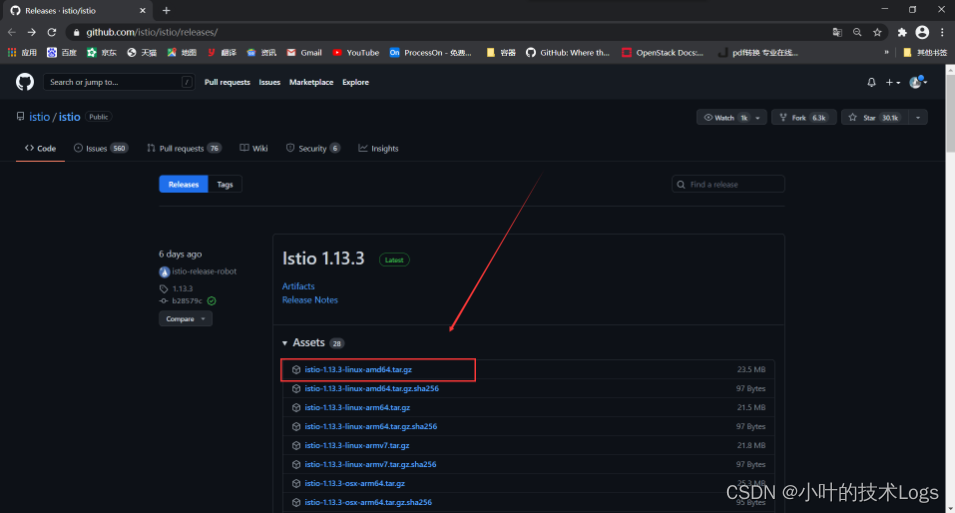
这一条命令如果下载不下来,可以直接访问下载地址:Istio下载
挑选对应的istio版本、下载对应的压缩文件,如图所示:
注意:Istio1.13.3版本,要求kubernetes最低集群版是1.19
解压软件包:
[root@master istio]# ll

total 22704

-rw-r--r-- 1 root root 23245765 Apr 23 10:39 istio-1.12.3-linux-amd64.tar.gz

[root@master istio]# tar -vzxf istio-1.12.3-linux-amd64.tar.gz

istio-1.12.3/

istio-1.12.3/manifest.yaml

istio-1.12.3/bin/

istio-1.12.3/bin/istioctl

istio-1.12.3/manifests/

istio-1.12.3/manifests/examples/

istio-1.12.3/manifests/examples/customresource/

istio-1.12.3/manifests/examples/customresource/istio_v1alpha1_istiooperator_cr.yaml

istio-1.12.3/manifests/examples/user-gateway/
安装目录包含:
- samples/ 目录下的示例应用程序
- bin/ 目录下的 istioctl 客户端二进制文件 .
配置环境变量:
[root@master istio]# cat /etc/profile

export ISTIO_HOME=/root/istio/istio-1.12.3

export PATH=$PATH:$ISTIO_HOME/bin
[root@master istio]# istioctl version

client version: 1.12.3

control plane version: 1.12.3

data plane version: 1.12.3 (10 proxies)
下载Istio
[root@master ~]# istioctl install --set profile=demo -y

Detected that your cluster does not support third party JWT authentication. Falling back to less secure first party JWT. See https://istio.io/v1.12/docs/ops/best-practices/security/#configure-third-party-service-account-tokens for details.

! values.global.jwtPolicy is deprecated; use Values.global.jwtPolicy=third-party-jwt. See http://istio.io/latest/docs/ops/best-practices/security/#configure-third-party-service-account-tokens for more information instead

WARNING: Istio control planes installed: 1.13.3.

WARNING: An older installed version of Istio has been detected. Running this command will overwrite it.

 Istio core installed

 Istiod installed

 Egress gateways installed

 Ingress gateways installed

 Installation complete                                                                                                         Making this installation the default for injection and validation.

Thank you for installing Istio 1.12.  Please take a few minutes to tell us about your install/upgrade experience!  https://forms.gle/FegQbc9UvePd4Z9z7
自动注入 Envoy 边车代理
[root@master ~]#  kubectl label namespace default istio-injection=enabled

namespace/default labeled
卸载
完整卸载 Istio
[root@master istio]# istioctl x uninstall --purge

All Istio resources will be pruned from the cluster

Proceed? (y/N) y

  Removed IstioOperator:istio-system:installed-state.

  Removed PodDisruptionBudget:istio-system:istio-egressgateway.

  Removed PodDisruptionBudget:istio-system:istio-ingressgateway.

  Removed PodDisruptionBudget:istio-system:istiod.

  Removed Deployment:istio-system:istio-egressgateway.

  Removed Deployment:istio-system:istio-ingressgateway.

  Removed Deployment:istio-system:istiod.

  Removed Service:istio-system:istio-egressgateway.

  Removed Service:istio-system:istio-ingressgateway.

  Removed Service:istio-system:istiod.

  Removed ConfigMap:istio-system:istio.

  Removed ConfigMap:istio-system:istio-sidecar-injector.

  Removed Pod:istio-system:istio-egressgateway-6b69dfb9f8-x7zwb.

  Removed Pod:istio-system:istio-ingressgateway-7484f57fd6-hrjjt.

  Removed Pod:istio-system:istiod-7989b7749b-rmslt.
简洁版
安装
[root@master istio]# curl -L https://istio.io/downloadIstio | sh -

[root@master istio]# tar -vzxf istio-1.12.3-linux-amd64.tar.gz

[root@master istio]# cat /etc/profile

export ISTIO_HOME=/root/istio/istio-1.12.3

export PATH=$PATH:$ISTIO_HOME/bin

[root@master ~]# istioctl install --set profile=demo -y

[root@master istio]# kubectl label namespace default istio-injection=enabled
卸载
[root@master istio]# istioctl x uninstall --purge
学习不走弯路,gz号「yeTechLog」
【Istio实际操作篇】Istio入门,10分钟快速安装的更多相关文章
- 5分钟快速安装Redmine项目管理软件
公司还在使用Excel.project.word来管理项目吗?时间一长.项目参与的人多.就出现了断断续续无法连续跟踪的问题.终于忍受不了公司这种陈旧的项目管理手段了,于是花了一些时间研究了市面上常见的 ...
- python scrapy 入门,10分钟完成一个爬虫
在TensorFlow热起来之前,很多人学习python的原因是因为想写爬虫.的确,有着丰富第三方库的python很适合干这种工作. Scrapy是一个易学易用的爬虫框架,尽管因为互联网多变的复杂性仍 ...
- 10分钟快速入门Redis
Redis安装 来源:https://github.com/jaywcjlove/handbook 官方编译安装 $ wget http://download.redis.io/releases/re ...
- TTS-零基础入门-10分钟教你做一个语音功能
在本片博客正式開始之前,大家先跟我做一个简单的好玩的 小语音. 新建一个文本文档,然后再文档里输入这样 一句话 CreateObject("SAPI.SpVoice").Spea ...
- python爬虫入门10分钟爬取一个网站
一.基础入门 1.1什么是爬虫 爬虫(spider,又网络爬虫),是指向网站/网络发起请求,获取资源后分析并提取有用数据的程序. 从技术层面来说就是 通过程序模拟浏览器请求站点的行为,把站点返回的HT ...
- 【Fungus入门】10分钟快速构建Unity中的万能对话系统 / 叙事系统 / 剧情系统
我真的很久没有写过一个完整的攻略了(笑),咸鱼了很久之后还是想来写一个好玩的.这次主要是梳理一下Unity的小众插件Fungus的核心功能,并且快速掌握其使用方法. 官方文档:http://fungu ...
- vuex2 10分钟快速入门
因为太简单了,我直接就贴代码了~ #建立store.js import Vue from 'vue'; import Vuex from 'vuex'; Vue.use(Vuex) export de ...
- pandas入门10分钟——serries其实就是data frame的一列数据
10 Minutes to pandas This is a short introduction to pandas, geared mainly for new users. You can se ...
- 10分钟快速入门vue.js
Vue.js是一个轻巧.高性能.可组件化的MVVM库,一套用于构建用户界面的渐进式框架,上手简单,兼容强大. 官方文档:https://cn.vuejs.org/v2/guide/ 下面我们就直接来使 ...
随机推荐
- python 字典dict 增删改查操作
初始化: a. data_dict = {} b. data_dict1 = dict() c. data_dict2 = {'key':'value'} 新增: a. data_dict[key]= ...
- jQuery对象的创建
1.js类库 JavaScript封装了很多的预定义的对象和实用函数,能帮助使用者建立有高难度交互 客户端页面,并且兼容各大浏览器.跑在浏览器,请求服务器 当前比较流行的js库: jquery EXT ...
- HTML 5的页面结构和HTML 4或早先的HTML有什么不同?
一个典型的Web页面有页眉(header),页脚(footer),导航(navigation),正文(central area)和侧栏(side bar).现在如果是在HTML 4中,HTML部分中的 ...
- springboot gateway 动态路由-01
SpringCloud Gateway 是 Spring Cloud 的一个全新项目,该项目是基于 Spring 5.0,Spring Boot 2.0 和 Project Reactor 等技术开发 ...
- python学习笔记(九)——线程与进程
一.线程 Python 中为我们提供了两个模块来创建线程. _thread threading thread 模块已被废弃.用户可以使用 threading 模块代替.所以,在 Python 中不能再 ...
- Python中 No module named解决方法
对于pycharm安装包失败的原因借解决办法 在pycharm中安装包安装失败:Non-zero exit code (1) 可能是在库中找不到对应版本.解决:cmd中使用命令:pip install ...
- 夏日葵电商:连锁零售店小程序o2o系统解决方案
公众平台"附近小程序"功能上线后,一个主体账号可以同时绑定N+个门店,这对连锁零售店铺来说是重磅福利呀,无论你是通过搜索还是线下扫码进入小程序,线上与线下都完全贯通了,线上多种入口 ...
- IDEA安装配置Scala环境
这里有详细步骤:windows上 IntelliJ IDEA安装scala环境 详细 初学
- Java Web项目与Java项目的区别
一.以下是我对Java Web项目和Java项目这两者的理解以及区别: 1.Java Web项目是基于Java EE类的:而Java项目是基于Java应用程序的. 2.Java Web项目是网页的编码 ...
- ps让图片背景透明
效果图: jpg=>png,背景透明 步骤: 1.选择橡皮工具的第三个 魔术橡皮 保存为png, 按住Ctrl+alt+shift+s 保存: