
SpringBoot+Vue+WebSocket 实现在线聊天
一、前言
本文将基于 SpringBoot + Vue + WebSocket 实现一个简单的在线聊天功能
页面如下:
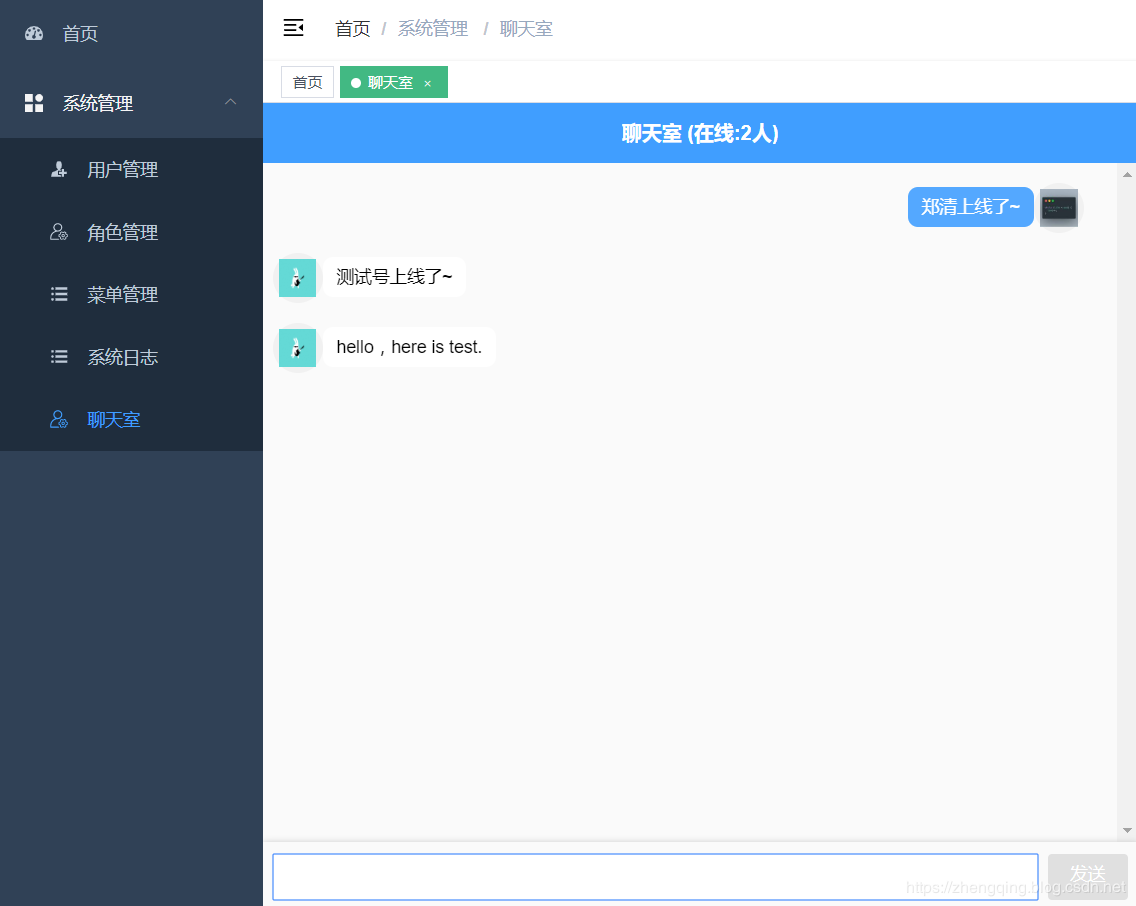
在线体验地址:http://www.zhengqingya.com:8101
二、SpringBoot + Vue + WebSocket 实现在线聊天
1、引入websocket依赖
<dependency>

    <groupId>org.springframework.boot</groupId>

    <artifactId>spring-boot-starter-websocket</artifactId>

</dependency>
2、websocket 配置类
@Configuration

public class WebSocketConfig {

    @Bean

    public ServerEndpointExporter serverEndpointExporter() {

        return new ServerEndpointExporter();

    }

}
3、websocket 处理类Controller
@Slf4j

@Component

@ServerEndpoint("/groupChat/{sid}/{userId}")

public class WebSocketServerController {

    /**

     * 房间号 -> 组成员信息

     */

    private static ConcurrentHashMap<String, List<Session>> groupMemberInfoMap = new ConcurrentHashMap<>();

    /**

     * 房间号 -> 在线人数

     */

    private static ConcurrentHashMap<String, Set<Integer>> onlineUserMap = new ConcurrentHashMap<>();

    /**

     * 收到消息调用的方法,群成员发送消息

     *

     * @param sid:房间号

     * @param userId:用户id

     * @param message:发送消息

     */

    @OnMessage

    public void onMessage(@PathParam("sid") String sid, @PathParam("userId") Integer userId, String message) {

        List<Session> sessionList = groupMemberInfoMap.get(sid);

        Set<Integer> onlineUserList = onlineUserMap.get(sid);

        // 先一个群组内的成员发送消息

        sessionList.forEach(item -> {

            try {

                // json字符串转对象

                MsgVO msg = JSONObject.parseObject(message, MsgVO.class);

                msg.setCount(onlineUserList.size());

                // json对象转字符串

                String text = JSONObject.toJSONString(msg);

                item.getBasicRemote().sendText(text);

            } catch (IOException e) {

                e.printStackTrace();

            }

        });

    }

    /**

     * 建立连接调用的方法,群成员加入

     *

     * @param session

     * @param sid

     */

    @OnOpen

    public void onOpen(Session session, @PathParam("sid") String sid, @PathParam("userId") Integer userId) {

        List<Session> sessionList = groupMemberInfoMap.computeIfAbsent(sid, k -> new ArrayList<>());

        Set<Integer> onlineUserList = onlineUserMap.computeIfAbsent(sid, k -> new HashSet<>());

        onlineUserList.add(userId);

        sessionList.add(session);

        // 发送上线通知

        sendInfo(sid, userId, onlineUserList.size(), "上线了~");

    }

    public void sendInfo(String sid, Integer userId, Integer onlineSum, String info) {

        // 获取该连接用户信息

        User currentUser = ApplicationContextUtil.getApplicationContext().getBean(UserMapper.class).selectById(userId);

        // 发送通知

        MsgVO msg = new MsgVO();

        msg.setCount(onlineSum);

        msg.setUserId(userId);

        msg.setAvatar(currentUser.getAvatar());

        msg.setMsg(currentUser.getNickName() + info);

        // json对象转字符串

        String text = JSONObject.toJSONString(msg);

        onMessage(sid, userId, text);

    }

    /**

     * 关闭连接调用的方法,群成员退出

     *

     * @param session

     * @param sid

     */

    @OnClose

    public void onClose(Session session, @PathParam("sid") String sid, @PathParam("userId") Integer userId) {

        List<Session> sessionList = groupMemberInfoMap.get(sid);

        sessionList.remove(session);

        Set<Integer> onlineUserList = onlineUserMap.get(sid);

        onlineUserList.remove(userId);

        // 发送离线通知

        sendInfo(sid, userId, onlineUserList.size(), "下线了~");

    }

    /**

     * 传输消息错误调用的方法

     *

     * @param error

     */

    @OnError

    public void OnError(Throwable error) {

        log.info("Connection error");

    }

}
4、websocket 消息显示类
@Data

@ApiModel(description = "websocket消息内容")

public class MsgVO {

    @ApiModelProperty(value = "用户id")

    private Integer userId;

    @ApiModelProperty(value = "用户名")

    private String username;

    @ApiModelProperty(value = "用户头像")

    private String avatar;

    @ApiModelProperty(value = "消息")

    private String msg;

    @ApiModelProperty(value = "在线人数")

    private int count;

}
5、前端页面
温馨小提示:当用户登录成功之后,可以发起websocket连接,存在store中...
下面只是单页面的简单实现
<template>

  <div class="chat-box">

    <header>聊天室 (在线:{{count}}人)</header>

    <div class="msg-box" ref="msg-box">

      <div

        v-for="(i,index) in list"

        :key="index"

        class="msg"

        :style="i.userId == userId?'flex-direction:row-reverse':''"

      >

        <div class="user-head">

          <img :src="i.avatar" height="30" width="30" :title="i.username">

        </div>

        <div class="user-msg">

          <span :style="i.userId == userId?' float: right;':''" :class="i.userId == userId?'right':'left'">{{i.content}}</span>

        </div>

      </div>

    </div>

    <div class="input-box">

      <input type="text" ref="sendMsg" v-model="contentText" @keyup.enter="sendText()" />

      <div class="btn" :class="{['btn-active']:contentText}" @click="sendText()">发送</div>

    </div>

  </div>

</template>

<script>

  export default {

    data() {

      return {

        ws: null,

        count: 0,

        userId: this.$store.getters.id, // 当前用户ID

        username: this.$store.getters.name, // 当前用户昵称

        avatar: this.$store.getters.avatar, // 当前用户头像

        list: [], // 聊天记录的数组

        contentText: "" // input输入的值

      };

    },

    mounted() {

      this.initWebSocket();

    },

    destroyed() {

      // 离开页面时关闭websocket连接

      this.ws.onclose(undefined);

    },

    methods: {

      // 发送聊天信息

      sendText() {

        let _this = this;

        _this.$refs["sendMsg"].focus();

        if (!_this.contentText) {

          return;

        }

        let params = {

          userId: _this.userId,

          username: _this.username,

          avatar: _this.avatar,

          msg: _this.contentText,

          count: _this.count

        };

        _this.ws.send(JSON.stringify(params)); //调用WebSocket send()发送信息的方法

        _this.contentText = "";

        setTimeout(() => {

          _this.scrollBottm();

        }, 500);

      },

      // 进入页面创建websocket连接

      initWebSocket() {

        let _this = this;

        // 判断页面有没有存在websocket连接

        if (window.WebSocket) {

          var serverHot =  window.location.hostname;

          let sip = '房间号'

          // 填写本地IP地址 此处的 :9101端口号 要与后端配置的一致!

          var url = 'ws://' + serverHot + ':9101' + '/groupChat/' + sip + '/' + this.userId; // `ws://127.0.0.1/9101/groupChat/10086/聊天室`

          let ws = new WebSocket(url);

          _this.ws = ws;

          ws.onopen = function(e) {

            console.log("服务器连接成功: " + url);

          };

          ws.onclose = function(e) {

            console.log("服务器连接关闭: " + url);

          };

          ws.onerror = function() {

            console.log("服务器连接出错: " + url);

          };

          ws.onmessage = function(e) {

            //接收服务器返回的数据

            let resData = JSON.parse(e.data)

            _this.count = resData.count;

            _this.list = [

              ..._this.list,

              { userId: resData.userId, username: resData.username, avatar: resData.avatar, content: resData.msg }

            ];

          };

        }

      },

      // 滚动条到底部

      scrollBottm() {

          let el = this.$refs["msg-box"];

          el.scrollTop = el.scrollHeight;

      }

    }

  };

</script>

<style lang="scss" scoped>

  .chat-box {

    margin: 0 auto;

    background: #fafafa;

    position: absolute;

    height: 100%;

    width: 100%;

    max-width: 700px;

  header {

    position: fixed;

    width: 100%;

    height: 3rem;

    background: #409eff;

    max-width: 700px;

    display: flex;

    justify-content: center;

    align-items: center;

    font-weight: bold;

    color: white;

    font-size: 1rem;

  }

  .msg-box {

    position: absolute;

    height: calc(100% - 6.5rem);

    width: 100%;

    margin-top: 3rem;

    overflow-y: scroll;

  .msg {

    width: 95%;

    min-height: 2.5rem;

    margin: 1rem 0.5rem;

    position: relative;

    display: flex;

    justify-content: flex-start !important;

  .user-head {

    min-width: 2.5rem;

    width: 20%;

    width: 2.5rem;

    height: 2.5rem;

    border-radius: 50%;

    background: #f1f1f1;

    display: flex;

    justify-content: center;

    align-items: center;

  .head {

    width: 1.2rem;

    height: 1.2rem;

  }

  // position: absolute;

  }

  .user-msg {

    width: 80%;

  // position: absolute;

    word-break: break-all;

    position: relative;

    z-index: 5;

  span {

    display: inline-block;

    padding: 0.5rem 0.7rem;

    border-radius: 0.5rem;

    margin-top: 0.2rem;

    font-size: 0.88rem;

  }

  .left {

    background: white;

    animation: toLeft 0.5s ease both 1;

  }

  .right {

    background: #53a8ff;

    color: white;

    animation: toright 0.5s ease both 1;

  }

  @keyframes toLeft {

    0% {

      opacity: 0;

      transform: translateX(-10px);

    }

    100% {

      opacity: 1;

      transform: translateX(0px);

    }

  }

  @keyframes toright {

    0% {

      opacity: 0;

      transform: translateX(10px);

    }

    100% {

      opacity: 1;

      transform: translateX(0px);

    }

  }

  }

  }

  }

  .input-box {

    padding: 0 0.5rem;

    position: absolute;

    bottom: 0;

    width: 100%;

    height: 3.5rem;

    background: #fafafa;

    box-shadow: 0 0 5px #ccc;

    display: flex;

    justify-content: space-between;

    align-items: center;

  input {

    height: 2.3rem;

    display: inline-block;

    width: 100%;

    padding: 0.5rem;

    border: none;

    border-radius: 0.2rem;

    font-size: 0.88rem;

  }

  .btn {

    height: 2.3rem;

    min-width: 4rem;

    background: #e0e0e0;

    padding: 0.5rem;

    font-size: 0.88rem;

    color: white;

    text-align: center;

    border-radius: 0.2rem;

    margin-left: 0.5rem;

    transition: 0.5s;

  }

  .btn-active {

    background: #409eff;

  }

  }

  }

</style>
本文案例demo源码
https://gitee.com/zhengqingya/xiao-xiao-su
SpringBoot+Vue+WebSocket 实现在线聊天的更多相关文章
- SpringBoot 使用WebSocket打造在线聊天室
教程: https://www.jianshu.com/p/55cfc9fcb69e https://wallimn.iteye.com/blog/2425666 关于websocket基础普及见:h ...
- SpringBoot基于websocket的网页聊天
一.入门简介正常聊天程序需要使用消息组件ActiveMQ或者Kafka等,这里是一个Websocket入门程序. 有人有疑问这个技术有什么作用,为什么要有它?其实我们虽然有http协议,但是它有一个缺 ...
- vue实现简单在线聊天
vue实现简单在线聊天 引用mui的ui库,ES6的 fetch做网络请求 //html <!DOCTYPE html> <html> <head> <met ...
- 使用websocket实现在线聊天功能
很早以前为了快速达到效果,使用轮询实现了在线聊天功能,后来无意接触了socket,关于socket我的理解是进程间通信,首先要有服务器跟客户端,服务的启动监听某ip端口定位该进程,客户端开启socke ...
- 三分钟搭建websocket实时在线聊天,项目经理也不敢这么写
我们先看一下下面这张图: 可以看到这是一个简易的聊天室,两个窗口的消息是实时发送与接收的,这个主要就是用我们今天要讲的websocket实现的. websocket是什么? websocket是一种网 ...
- .NET Core 基于Websocket的在线聊天室
什么是Websocket 我们在传统的客户端程序要实现实时双工通讯第一想到的技术就是socket通讯,但是在web体系是用不了socket通讯技术的,因为http被设计成无状态,每次跟服务器通讯完成后 ...
- 使用WebSocket实现简单的在线聊天室
前言:我自已在网上找好了好多 WebSocket 制作 在线聊天室的案列,发现大佬们写得太高深了 我这种新手看不懂,所以就自已尝试写了一个在线简易聊天室 (我只用了js 可以用jq ) 话不多说,直接 ...
- vue+websocket+express+mongodb实战项目(实时聊天)
继上一个项目用vuejs仿网易云音乐(实现听歌以及搜索功能)后,发现上一个项目单纯用vue的model管理十分混乱,然后我去看了看vuex,打算做一个项目练练手,又不想做一个重复的项目,这次我就放弃颜 ...
- vue+websocket+express+mongodb实战项目(实时聊天)(二)
原项目地址:[ vue+websocket+express+mongodb实战项目(实时聊天)(一)][http://blog.csdn.net/blueblueskyhua/article/deta ...
随机推荐
- 深入理解.NET Core的基元(二) - 共享框架
原文:Deep-dive into .NET Core primitives, part 2: the shared framework 作者:Nate McMaster 译文:深入理解.NET Co ...
- 暑期集训20190730 取模(mod)
[题目描述] 给定一个长度为n的非负整数序列a,你需要支持以下操作: 1:给定l,r,输出a[l]+a[l+1]+…+a[r]. 2:给定l,r,x,将a[l],a[l+1],…,a[r]对x取模. ...
- 题解【洛谷】CF134A
题解 CF134A [Average Numbers] 这题就是简单的模拟. 只不过要优化一下常数什么的 思路: 为了不浪费时间总是取平均数,直接用一个 S 储存总和,每次都减去 a_i 再除以 n ...
- Spring Boot 2.x监控数据可视化(Actuator + Prometheus + Grafana手把手)
TIPS 本文基于Spring Boot 2.1.4,理论支持Spring Boot 2.x所有版本 众所周知,Spring Boot有个子项目Spring Boot Actuator,它为应用提供了 ...
- 欧拉路&&欧拉回路
T1是欧拉路板子,但我不会,直接爆炸.. 这玩意就是个dfs,但我以前一直以为欧拉路只能$O(nm)$求 今天才知道可以$O(n+m)$ 欧拉路判定: 无向:起点终点为奇度点,其余偶度 有向:起点终点 ...
- 「Usaco2005 Dec」清理牛棚(spfa秒杀线段树dp)
约翰的奶牛们从小娇生惯养,她们无法容忍牛棚里的任何脏东西. 约翰发现,如果要使这群有洁癖的奶牛满意,他不得不雇佣她们中的一些来清扫牛棚, 约翰的奶牛中有N(1≤N≤10000)头愿意通过清扫牛棚来挣一 ...
- 分类算法之逻辑回归(Logistic Regression
分类算法之逻辑回归(Logistic Regression) 1.二分类问题 现在有一家医院,想要对病人的病情进行分析,其中有一项就是关于良性\恶性肿瘤的判断,现在有一批数据集是关于肿瘤大小的,任务就 ...
- servlet三大组件
servlet大致可以分为三个:简单servlet.过滤servlet.监听servlet servlet: servlet的创建 创建一个类并实现Servlet接口. 重写service方法. 在服 ...
- Linux常用命令复习
1> 查看文件信息:ls ls是英文单词list的简写,其功能为列出目录的内容,是用户最常用的命令之一,它类似于DOS下的dir命令. Linux文件或者目录名称最长可以有265个字符,“.”代 ...
- 如何对 React 函数式组件进行优化
文章首发个人博客 前言 目的 本文只介绍函数式组件特有的性能优化方式,类组件和函数式组件都有的不介绍,比如 key 的使用.另外本文不详细的介绍 API 的使用,后面也许会写,其实想用好 hooks ...