
Spring Boot2(十四):单文件上传/下载,文件批量上传
文件上传和下载在项目中经常用到,这里主要学习SpringBoot完成单个文件上传/下载,批量文件上传的场景应用。结合mysql数据库、jpa数据层操作、thymeleaf页面模板。
一、准备
添加maven依赖
<!--springboot核心-->

<dependency>

	<groupId>org.springframework.boot</groupId>

	<artifactId>spring-boot-starter</artifactId>

</dependency>

<!--springboot测试-->

<dependency>

	<groupId>org.springframework.boot</groupId>

	<artifactId>spring-boot-starter-test</artifactId>

	<scope>test</scope>

</dependency>

<!--thymeleaf前端模板-->

<dependency>

	<groupId>org.springframework.boot</groupId>

	<artifactId>spring-boot-starter-thymeleaf</artifactId>

</dependency>

<!--springboot-web-->

<dependency>

	<groupId>org.springframework.boot</groupId>

	<artifactId>spring-boot-starter-web</artifactId>

</dependency>

<!--springboot热部署-->

<dependency>

	<groupId>org.springframework.boot</groupId>

	<artifactId>spring-boot-devtools</artifactId>

	<scope>runtime</scope>

</dependency>

<!--jpa-->

<dependency>

	<groupId>org.springframework.boot</groupId>

	<artifactId>spring-boot-starter-data-jpa</artifactId>

</dependency>

<!--lombok-->

<dependency>

	<groupId>org.projectlombok</groupId>

	<artifactId>lombok</artifactId>

	<optional>true</optional>

</dependency>

<!--mysql驱动-->

<dependency>

	<groupId>mysql</groupId>

	<artifactId>mysql-connector-java</artifactId>

	<scope>runtime</scope>

</dependency>
配置文件application.yml
server:

  port: 8081

  tomcat:

    max-swallow-size: 1MB

spring:

  servlet:

    multipart:

      # 默认支持文件上传

      enabled: true

      # 最大支持文件大小

      max-file-size: 50MB

      # 最大支持请求大小

      max-request-size: 100MB

      # 文件支持写入磁盘

      file-size-threshold: 0

      # 上传文件的临时目录

      location: /test

  datasource:

    driver-class-name: com.mysql.cj.jdbc.Driver

    url: jdbc:mysql://127.0.0.1:3306/test?serverTimezone=UTC&useUnicode=true&characterEncoding=utf-8&useSSL=true

    username: root

    password: root

  jpa:

    # 数据库类型

    database: mysql

    #打印SQL

    show-sql: true

    hibernate:

      ddl-auto: update  #第一次启动创建表,之后修改为update

  thymeleaf:

    # 是否启用

    enabled: true

    # 模板编码

    encoding: UTF-8

    # 模板模式

    mode: HTML5

    # 模板存放路径

    prefix: classpath:/templates/

    # 模板后缀

    suffix: .html

    # 启用缓存,建议生产开启

    cache: false

    # 校验模板是否存在

    check-template-location: true

    # Content-type值

    servlet:

      content-type: text/html

    # 加配置静态资源

    resources:

      static-locations: classpath:/

niaobulashi:

  file:

    path: D:\workspace\javaProject\spring-boot-learning\spring-boot-22-updownload\doc

    extension: .gif,.jpeg,.png,.jpg,.doc,.docx,.xls,.xlsx,.ppt,.pptx,.pdf,.txt,.rar,.tif
最下面是自定义的配置属性,定义了文件存放路径和上传文件允许的后缀名称。
需要注意的是:niaobulashi.file.path,为你磁盘上的目录,根据你实际的目录修改。
数据库表sys_file_info
SET FOREIGN_KEY_CHECKS=0;

-- ----------------------------

-- Table structure for `sys_file_info`

-- ----------------------------

DROP TABLE IF EXISTS `sys_file_info`;

CREATE TABLE `sys_file_info` (

  `file_id` int(11) NOT NULL AUTO_INCREMENT COMMENT '文件id',

  `file_name` varchar(50) CHARACTER SET utf8mb4 DEFAULT '' COMMENT '文件名称',

  `file_path` varchar(255) CHARACTER SET utf8mb4 DEFAULT '' COMMENT '文件路径',

  `file_size` varchar(100) CHARACTER SET utf8mb4 DEFAULT '' COMMENT '文件大小',

  PRIMARY KEY (`file_id`)

) ENGINE=InnoDB DEFAULT CHARSET=utf8 COMMENT='文件信息表';
二、代码实现
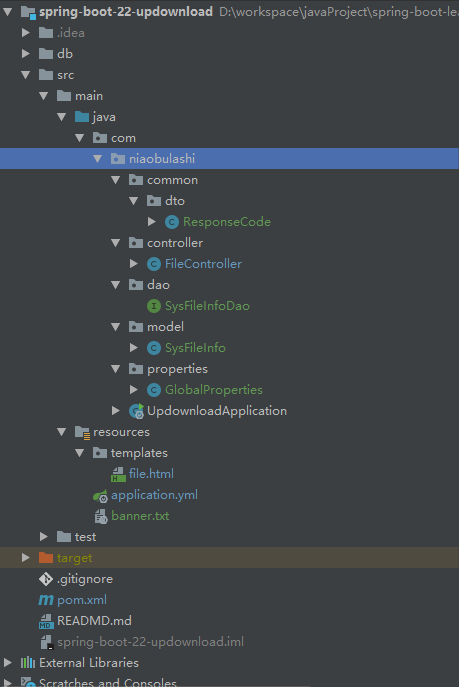
结构目录
页面file.html
<!DOCTYPE html>

<html lang="en">

<head>

    <meta charset="UTF-8">

    <title>Title</title>

</head>

<body>

<p>1、单文件上传</p>

<form action="upload" method="POST" enctype="multipart/form-data">

    文件:<input type="file" name="file"/>

    <input type="submit"/>

</form>

<hr/>

<p>2、文件下载</p>

<form action="download" method="POST" enctype="multipart/form-data">

    文件ID:<input type="text" name="fileId"/>

    <input type="submit" value="下载文件"/>

</form>

<hr/>

<p>3、多文件上传</p>

<form action="batchUpload" method="POST" enctype="multipart/form-data">

    一次选择多个文件的多文件上传:<input type="file" name="files" multiple>

    <input type="submit"/>

</form>

</body>

</html>
统一返回ResponseCode
@Data

@AllArgsConstructor

public class ResponseCode extends HashMap<String, Object> {

    private static final long serialVersionUID = 1L;

    public static final String CODE_TAG = "code";

    public static final String MSG_TAG = "msg";

    public static final String DATA_TAG = "data";

    /**

     * 状态类型

     */

    public enum Type

    {

        /** 成功 */

        SUCCESS(100),

        /** 警告 */

        WARN(200),

        /** 错误 */

        ERROR(300);

        private final int value;

        Type(int value)

        {

            this.value = value;

        }

        public int value()

        {

            return this.value;

        }

    }

    /** 状态类型 */

    private Type type;

    /** 状态码 */

    private int code;

    /** 返回内容 */

    private String msg;

    /** 数据对象 */

    private Object data;

    /**

     * 初始化一个新创建的 AjaxResult 对象

     *

     * @param type 状态类型

     * @param msg 返回内容

     */

    public ResponseCode(Type type, String msg)

    {

        super.put(CODE_TAG, type.value);

        super.put(MSG_TAG, msg);

    }

    /**

     * 初始化一个新创建的 AjaxResult 对象

     *

     * @param type 状态类型

     * @param msg 返回内容

     * @param data 数据对象

     */

    public ResponseCode(Type type, String msg, Object data)

    {

        super.put(CODE_TAG, type.value);

        super.put(MSG_TAG, msg);

        if (data !=null)

        {

            super.put(DATA_TAG, data);

        }

    }

    /**

     * 返回成功消息

     *

     * @return 成功消息

     */

    public static ResponseCode success()

    {

        return ResponseCode.success("操作成功");

    }

    /**

     * 返回成功数据

     *

     * @return 成功消息

     */

    public static ResponseCode success(Object data)

    {

        return ResponseCode.success("操作成功", data);

    }

    /**

     * 返回成功消息

     *

     * @param msg 返回内容

     * @return 成功消息

     */

    public static ResponseCode success(String msg)

    {

        return ResponseCode.success(msg, null);

    }

    /**

     * 返回成功消息

     *

     * @param msg 返回内容

     * @param data 数据对象

     * @return 成功消息

     */

    public static ResponseCode success(String msg, Object data) {

        return new ResponseCode(Type.SUCCESS, msg, data);

    }

    /**

     * 返回警告消息

     *

     * @param msg 返回内容

     * @return 警告消息

     */

    public static ResponseCode warn(String msg)

    {

        return ResponseCode.warn(msg, null);

    }

    /**

     * 返回警告消息

     *

     * @param msg 返回内容

     * @param data 数据对象

     * @return 警告消息

     */

    public static ResponseCode warn(String msg, Object data) {

        return new ResponseCode(Type.WARN, msg, data);

    }

    /**

     * 返回错误消息

     *

     * @return

     */

    public static ResponseCode error() {

        return ResponseCode.error("操作失败");

    }

    /**

     * 返回错误消息

     *

     * @param msg 返回内容

     * @return 警告消息

     */

    public static ResponseCode error(String msg) {

        return ResponseCode.error(msg, null);

    }

    /**

     * 返回错误消息

     *

     * @param msg 返回内容

     * @param data 数据对象

     * @return 警告消息

     */

    public static ResponseCode error(String msg, Object data) {

        return new ResponseCode(Type.ERROR, msg, data);

    }

}
model实体类SysFileInfo
@Data

@Entity

@Table(name = "sys_file_info")

public class SysFileInfo implements Serializable {

    @Id

    @GeneratedValue

    private Integer fileId;

    @Column(nullable = false)

    private String fileName;

    @Column(nullable = false)

    private String filePath;

    @Column(nullable = false)

    private Long fileSize;

}
读取配置文件信息
@Data

@Component

public class GlobalProperties {

    /** 文件存放路径 */

    @Value("${niaobulashi.file.path}")

    private String serverPath;

    /** 文件扩展名 */

    @Value("${niaobulashi.file.extension}")

    private String extension;

}
dao层
public interface SysFileInfoDao extends JpaRepository<SysFileInfo, Integer> {

}
Controller层
关系的地方来了,其中有三部分:单文件上传、下载、批量文件上传
头部分
@Controller

public class FileController {

    private final Logger logger = LoggerFactory.getLogger(this.getClass());

    /**

     * 默认大小 50M

     */

    public static final long DEFAULT_MAX_SIZE = 50 * 1024 * 1024;

    @Autowired

    private SysFileInfoDao sysFileInfoDao;

    @Autowired

    private GlobalProperties globalProperties;

    /**

     * 文件上传页面

     * @return

     */

    @GetMapping("/")

    public String updatePage() {

        return "file";

    }

    ///....具体逻辑在下方

}
单文件上传
/**

 * 单文件上传

 * @param file

 * @return

 */

@PostMapping("/upload")

@ResponseBody

private ResponseCode upload(@RequestParam("file") MultipartFile file) throws Exception {

	// 获取文件在服务器上的存储位置

	String serverPath = globalProperties.getServerPath();

	// 获取允许上传的文件扩展名

	String extension = globalProperties.getExtension();

	File filePath = new File(serverPath);

	logger.info("文件保存的路径为:" + filePath);

	if (!filePath.exists() && !filePath.isDirectory()) {

		logger.info("目录不存在,则创建目录:" + filePath);

		filePath.mkdir();

	}

	// 判断文件是否为空

	if (file.isEmpty()) {

		return ResponseCode.error("文件为空");

	}

	//判断文件是否为空文件

	if (file.getSize() <= 0) {

		return ResponseCode.error("文件大小为空,上传失败");

	}

	// 判断文件大小不能大于50M

	if (DEFAULT_MAX_SIZE != -1 && file.getSize() > DEFAULT_MAX_SIZE) {

		return ResponseCode.error("上传的文件不能大于50M");

	}

	// 获取文件名

	String fileName = file.getOriginalFilename();

	// 获取文件扩展名

	String fileExtension = fileName.substring(fileName.lastIndexOf(".")).toLowerCase();

	// 判断文件扩展名是否正确

	if (!extension.contains(fileExtension)) {

		return ResponseCode.error("文件扩展名不正确");

	}

	SysFileInfo sysFileInfo = new SysFileInfo();

	// 重新生成的文件名

	String saveFileName = System.currentTimeMillis() + fileExtension;

	// 在指定目录下创建该文件

	File targetFile = new File(filePath, saveFileName);

	logger.info("将文件保存到指定目录");

	try {

		file.transferTo(targetFile);

	} catch (IOException e) {

		throw new Exception(e.getMessage());

	}

	// 保存数据

	sysFileInfo.setFileName(fileName);

	sysFileInfo.setFilePath(serverPath + "/" + saveFileName);

	sysFileInfo.setFileSize(file.getSize());

	logger.info("新增文件数据");

	// 新增文件数据

	sysFileInfoDao.save(sysFileInfo);

	return ResponseCode.success("上传成功");

}
下载
下载的逻辑,我在前端通过input输入框输入fileId,后台查询数据库来下载
正常情况下应该是列表,单选或者多选后下载文件的。
/**

 * 下载

 * @param fileId

 * @param request

 * @param response

 * @return

 */

@PostMapping("/download")

@ResponseBody

public ResponseCode downloadFile(@RequestParam("fileId") Integer fileId, HttpServletRequest request, HttpServletResponse response) {

	logger.info("文件ID为:" + fileId);

	// 判断传入参数是否非空

	if (fileId == null) {

		return ResponseCode.error("请求参数不能为空");

	}

	// 根据fileId查询文件表

	Optional<SysFileInfo> sysFileInfo = sysFileInfoDao.findById(fileId);

	if (sysFileInfo.isEmpty()) {

		return ResponseCode.error("下载的文件不存在");

	}

	// 获取文件全路径

	File file = new File(sysFileInfo.get().getFilePath());

	String fileName = sysFileInfo.get().getFileName();

	// 判断是否存在磁盘中

	if (file.exists()) {

		// 设置强制下载不打开

		response.setContentType("application/force-download");

		// 设置文件名

		response.addHeader("Content-Disposition", "attachment;fileName=" + fileName);

		byte[] buffer = new byte[1024];

		FileInputStream fis = null;

		BufferedInputStream bis = null;

		try {

			fis = new FileInputStream(file);

			bis = new BufferedInputStream(fis);

			OutputStream os = response.getOutputStream();

			int i = bis.read(buffer);

			while (i != -1) {

				os.write(buffer, 0, i);

				i = bis.read(buffer);

			}

			return ResponseCode.success("下载成功");

		} catch (Exception e) {

			e.printStackTrace();

		} finally {

			if (bis != null) {

				try {

					bis.close();

				} catch (IOException e) {

					e.printStackTrace();

				}

			}

			if (fis != null) {

				try {

					fis.close();

				} catch (IOException e) {

					e.printStackTrace();

				}

			}

		}

	} else {

		return ResponseCode.error("数据库查询存在,本地磁盘不存在文件");

	}

	return ResponseCode.success("下载失败");

}
批量文件上传
/**

 * 批量文件上传

 * @param files

 * @return

 * @throws Exception

 */

@PostMapping("/batchUpload")

@ResponseBody

public ResponseCode batchUpload(@RequestParam("files") MultipartFile[] files) throws Exception {

	if (files == null) {

		return ResponseCode.error("参数为空");

	}

	for (MultipartFile multipartFile : files) {

		upload(multipartFile);

	}

	return ResponseCode.success("批量上传成功");

}
至此项目完成,开始测试
三、测试

四、源码
emmm,私藏的可爱图片也给你们啦
源码地址:spring-boot-learning
欢迎star、fork,给作者一些鼓励
Spring Boot2(十四):单文件上传/下载,文件批量上传的更多相关文章
- Spring Boot(十四):spring boot整合shiro-登录认证和权限管理
Spring Boot(十四):spring boot整合shiro-登录认证和权限管理 使用Spring Boot集成Apache Shiro.安全应该是互联网公司的一道生命线,几乎任何的公司都会涉 ...
- Spring Boot2(十五):Shiro记住我rememberMe、验证码Kaptcha
接着上次学习的<Spring Boot2(十二):手摸手教你搭建Shiro安全框架>,实现了Shiro的认证和授权.今天继续在这个基础上学习Shiro实现功能记住我rememberMe,以 ...
- shell通过ftp实现上传/下载文件
直接代码,shell文件名为testFtptool.sh: #!/bin/bash ########################################################## ...
- C#实现http协议支持上传下载文件的GET、POST请求
C#实现http协议支持上传下载文件的GET.POST请求using System; using System.Collections.Generic; using System.Text; usin ...
- 在linux命令行利用SecureCRT上传下载文件
一般来说,linux服务器大多是通过ssh客户端来进行远程的登陆和管理的,使用ssh登陆linux主机以后,如何能够快速的和本地机器进行文件的交互呢,也就是上传和下载文件到服务器和本地?与ssh有关的 ...
- 批量执行(Linux命令,上传/下载文件)
前言: 每个公司的网络环境大都划分 办公网络.线上网络,之所以划分的主要原因是为了保证线上操作安全: 对于外部用户而言也只能访问线上网络的特定开放端口,那么是什么控制了用户访问线上网络的呢? 防火墙过 ...
- 上传下载文件到Linux服务器
转自链接:https://blog.csdn.net/drdongshiye/article/details/89430535Mac的终端是十分强大 , 可以通过命令进行上传下载下载文件夹 scp - ...
- rz和sz上传下载文件工具lrzsz
######################### rz和sz上传下载文件工具lrzsz ####################################################### ...
- linux上很方便的上传下载文件工具rz和sz
linux上很方便的上传下载文件工具rz和sz(本文适合linux入门的朋友) ##########################################################&l ...
随机推荐
- Android零基础入门第1节:Android的前世今生
原文:Android零基础入门第1节:Android的前世今生 现在网上有很多各色Android资料了,但相对来说还是比较零散,Android覆盖的范围极广,最近刚好有机会全部拉通整理一遍,也保存起来 ...
- PHPstudy + phpstrom +xdebug 断点调试(windows) - CSDN博客
原文:PHPstudy + phpstrom +xdebug 断点调试(windows) - CSDN博客 php.ini 配置 需要添加如下内容 [XDebug]xdebug.profiler_ou ...
- C++函数不写bool返回值,居然编译运行全部通过,但判断结果就不对了
bool MyStart::IsCoorectParam(QString strParam) { if (strParam=="-aa" || strParam=="-b ...
- SharePoint Add-in Model (App Model) 介绍 – 概念、托管方式、开发语言
SharePoint Add-in Model 是自 2013 版本以来引入的新的扩展性开发模型, SharePoint 开发者可以利用这种新模型来实现往常利用场解决方案 (Farm Solution ...
- SYN3305A型 小型时统设备
SYN3305A型 小型时统设备 产品概述 SYN3305A型小型时统设备是由西安同步电子科技有限公司精心设计.自行研发生产的一款高准确度的锁相石英频率标准.内装OCX0恒温晶体振荡器,利用G ...
- python算法与数据结构-双向链表(40)
一.双向链表的介绍 一种更复杂的链表是“双向链表”或“双面链表”.每个节点有两个链接:一个指向前一个节点,当此节点为第一个节点时,指向空值:而另一个指向下一个节点,当此节点为最后一个节点时,指向空值. ...
- 死磕 java同步系列之CyclicBarrier源码解析——有图有真相
问题 (1)CyclicBarrier是什么? (2)CyclicBarrier具有什么特性? (3)CyclicBarrier与CountDownLatch的对比? 简介 CyclicBarrier ...
- 智能小程序关于Filter过滤器的简单使用
<filter module="swan"> export default { imgurl: (imgUrl) => { var imgurlprefix = ...
- Hive 学习之路(四)—— Hive 常用DDL操作
一.Database 1.1 查看数据列表 show databases; 1.2 使用数据库 USE database_name; 1.3 新建数据库 语法: CREATE (DATABASE|SC ...
- ZooKeeper学习之路(四)—— Java 客户端 Apache Curator
一.基本依赖 Curator是Netflix公司开源的一个Zookeeper客户端,目前由Apache进行维护.与Zookeeper原生客户端相比,Curator的抽象层次更高,功能也更加丰富,是目前 ...