
【mail邮件系统】linux上安装部署sendmail邮件系统
sendmail是linux系统中一个邮箱系统,在系统中配置好sendmail就可以直接使用它来发送邮箱。
sendmail的配置文件
/etc/mail/sendmail.cf :Sendmail的主配置文件;

/etc/mail/access :中继访问控制;

/etc/mail/domaintable ;域名映射;

/etc/mail/local-host-names ;本地主机别名;

/etc/mail/mailertable :为特定的域指定特殊的路由规则;

/etc/mail/virtusertable :虚拟域配置。
中继的配置:是指一台服务器接受并传递源地址和目的地址都不是本服务器的邮件。
在两个文件中进行设置:
/etc/mail/relay-domains

/etc/mail/access。
一、安装软件
[root@VM_0_10_centos ~]# yum -y install sendmail sendmail-cf
启动saslauthd服务进行SMTP验证(默认是安装的,如果没有,就手动安装)
[root@VM_0_10_centos ~]# systemctl restart saslauthd
二、邮件服务配置
1)需关闭防火墙
[root@VM_0_10_centos ~]# systemctl stopfirewalld

[root@VM_0_10_centos ~]# systemctl status firewalld
2)配置Senmail的SMTP认证
将下面两行内容前面的dnl去掉。在sendmail文件中,dnl表示该行为注释行,是无效的,因此通过去除行首的dnl字符串可以开启相应的设置行。
[root@VM_0_10_centos ~]# vim /etc/mail/sendmail.mc

TRUST_AUTH_MECH(`EXTERNAL DIGEST-MD5 CRAM-MD5 LOGIN PLAIN')dnl

define(`confAUTH_MECHANISMS', `EXTERNAL GSSAPI DIGEST-MD5 CRAM-MD5 LOGIN PLAIN')dnl

3) 设置Sendmail服务的网络访问权限(如果是直接本机调用,可以不用操作,采用默认的127.0.0.1。不过最后还是改成0.0.0.0)
将127.0.0.1改为0.0.0.0,意思是任何主机都可以访问Sendmail服务。
如果仅让某一个网段能够访问到Sendmail服务,将127.0.0.1改为形如192.168.1.0/24的一个特定网段地址。
[root@VM_0_10_centos ~]# vim /etc/mail/sendmail.mc

DAEMON_OPTIONS(`Port=smtp,Addr=0.0.0.0, Name=MTA')dnl

4)生成配置文件
Sendmail的配置文件由m4来生成,m4工具在sendmail-cf包中。如果系统无法识别m4命令,说明sendmail-cf软件包没有安装
# 修改之前先备份

[root@VM_0_10_centos ~]# cp -r /etc/mail/sendmail.cf /etc/mail/sendmail.cf.bak

[root@VM_0_10_centos ~]#  m4 /etc/mail/sendmail.mc > /etc/mail/sendmail.cf
5)启动服务(如果发现sendmail dead but subsys locked,那就执行"service postfix status"查看postfix是否默认开启了,如果开启的话,就关闭postfix,然后再启动或重启sendmail服务即可。)
[root@VM_0_10_centos ~]# systemctl restart sendmail

[root@VM_0_10_centos ~]# systemctl restart saslauthd

[root@VM_0_10_centos ~]# systemctl status postfix(如果是开启的,将status改为stop即可)
将服务加入到开机自启
[root@VM_0_10_centos ~]# systemctl enable sendmail.service

[root@VM_0_10_centos ~]# systemctl enable saslauthd.service

Created symlink from /etc/systemd/system/multi-user.target.wants/saslauthd.service to /usr/lib/systemd/system/saslauthd.se

rvice.

[root@VM_0_10_centos ~]# systemctl list-unit-files | grep sendmail

sendmail.service                              enabled

[root@VM_0_10_centos ~]# systemctl list-unit-files | grep saslauthd

saslauthd.service                             enabled
三、测试发送邮箱
1)第一种方式:安装sendmail即可使用。
# 默认好像已经安装

[root@VM_0_10_centos ~]# yum -y install mailx
PS:创建一个邮件内容文件,然后发邮件(注意-s参数后的邮件标题要用单引号,不能使用双引号,否则发邮件会失败!)
[root@VM_0_10_centos ~]# echo 'This is test mail' > /root/testmail.txt

[root@VM_0_10_centos ~]# cat /root/testmail.txt

This is test mail

[root@VM_0_10_centos ~]# mail -s 'Test Mail' qqMail@qq.com < /root/testmail.txt
PS:我这边使用的是qq.com,发送邮件并未接收到,可能是需要在qq邮箱开启授权码。然后在服务器上进行配置才行,操作如下
先开启授权码:

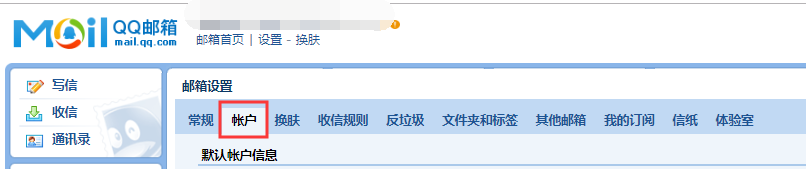
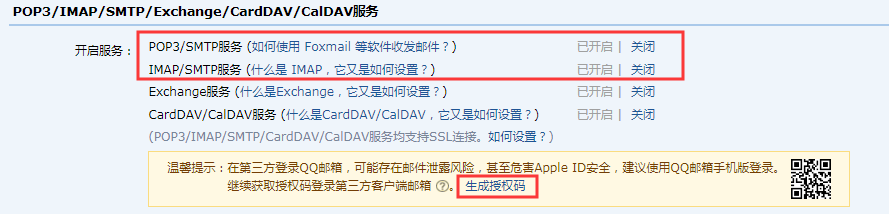
往下滑动,开启签名两个服务表示已经开启了smtp功能。点击生 成授权码 按照提示继续操作就可以获取授权码了
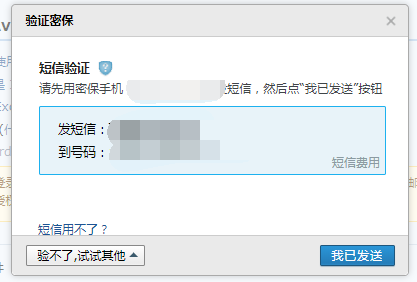
发送之后点击我已发送,生成授权码即可。
编辑配置文件:
[root@VM_0_10_centos ~]# vi /etc/mail.rc

set from=qqMail@qq.com      # 对方收到邮件时显示的发件人

set smtp=smtps://smtp.qq.com:465        # 第三方发邮件的smtp服务器地址

set smtp-auth-user=qqMail@qq.com   # 第三方发邮件的用户名

set smtp-auth-password=*********** # 授权码

set ssl-verify=ignore

set nss-config-dir=/root/.certs/

set smtp-auth=login     # SMTP的认证方式
# set smtp-use-starttls # 如果配置这个会报错SSL/TLS handshake failed: SSL received a malformed Alert record
加入上面配置保存以后,重启邮件服务:
# systemctl restart sendmail

# systemctl restart saslauthd
运行以下命令测试发送邮件,如果没有意外,我们的邮箱很快就能收到从服务器发过来的测试邮件了。
在这里报错:

# 创建/root/.certs目录

# mkdir -p /root/.certs

[root@VM_0_10_centos .certs]# echo -n | openssl s_client -connect smtp.qq.com:465 | sed -ne '/-BEGIN CERTIFICATE-/,

/-END CERTIFICATE-/p' >qq.crt
depth=2 C = US, O = DigiCert Inc, OU = www.digicert.com, CN = DigiCert Global Root CA

verify return:1

depth=1 C = US, O = DigiCert Inc, OU = www.digicert.com, CN = Secure Site CA G2

verify return:1

depth=0 C = CN, ST = Guangdong, L = Shenzhen, O = Tencent Technology (Shenzhen) Company Limited, OU = \E4\BC\81\E4\B8\9A\E

5\BE\AE\E4\BF\A1\E4\BA\A7\E5\93\81\E9\83\A8, CN = *.exmail.qq.comverify return:1

DONE

[root@VM_0_10_centos .certs]# certutil -A -n "GeoTrust SSL CA" -t "C,," -d /root/.certs/ -i qq.crt

[root@VM_0_10_centos .certs]#  certutil -A -n "GeoTrust Global CA" -t "C,," -d /root/.certs/ -i qq.crt

[root@VM_0_10_centos .certs]# certutil -L -d /root/.certs/

Certificate Nickname                                         Trust Attributes

                                                             SSL,S/MIME,JAR/XPI

GeoTrust SSL CA                                              C,,

[root@VM_0_10_centos .certs]# certutil -A -n "GeoTrust SSL CA - G3" -t "Pu,Pu,Pu" -d ./ -i qq.crt

Notice: Trust flag u is set automatically if the private key is present.
这样配置还是没有解决,查看日志/var/log/mailog(可能是主机没有解析到的原因)
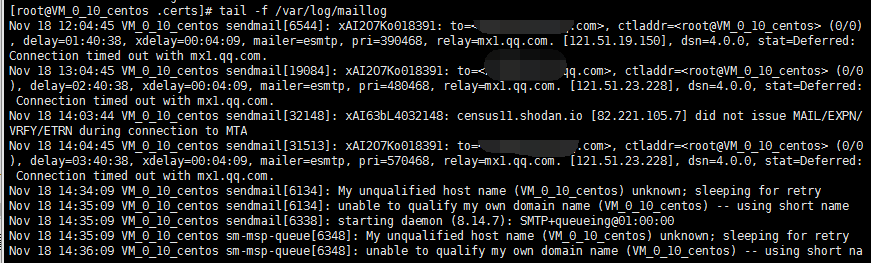
解决:设置/etc/hosts添加如下内容,然后保存退出,重启服务
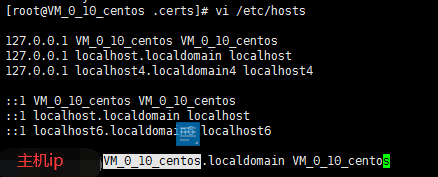
好吧,还是没解决
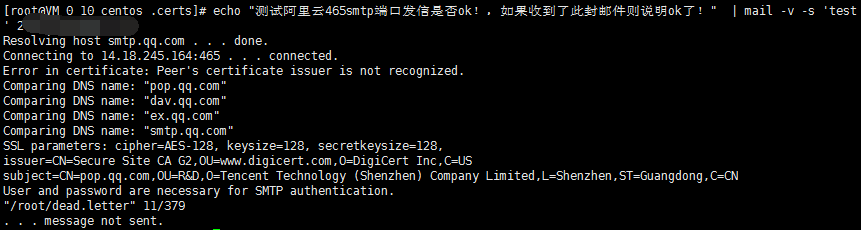
后面按照这个博客的试了下,也出现了问题https://blog.csdn.net/qq_43277505/article/details/85337072

意思是:来自地址的501邮件必须与授权用户相同,查看mail.rc配配置文件发现是from后面的qq.com写成了163.com
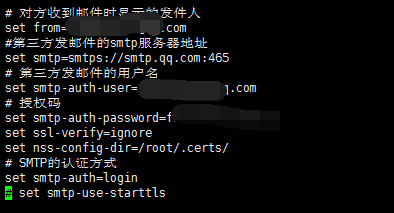
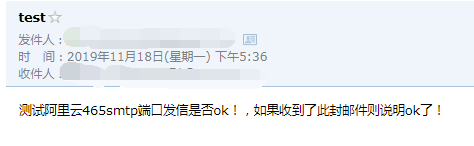
绕了这么大圈终于解决了,开森
这里是直接输入,然后结合管道符发送,还可以从文件读取(-s表示主题)
# mail -s 'Test Mail' **@qq.com < /root/testmail.txt
[root@VM_0_10_centos .certs]# echo "测试阿里云465smtp端口发信是否ok!,如果收到了此封邮件则说明ok了!"  | mail -v -s 'test

' **@qq.comResolving host smtp.qq.com . . . done.

Connecting to 14.18.245.164:465 . . . connected.

Comparing DNS name: "pop.qq.com"

Comparing DNS name: "dav.qq.com"

Comparing DNS name: "ex.qq.com"

Comparing DNS name: "smtp.qq.com"

SSL parameters: cipher=AES-128, keysize=128, secretkeysize=128,

issuer=CN=Secure Site CA G2,OU=www.digicert.com,O=DigiCert Inc,C=US

subject=CN=pop.qq.com,OU=R&D,O=Tencent Technology (Shenzhen) Company Limited,L=Shenzhen,ST=Guangdong,C=CN

220 smtp.qq.com Esmtp QQ Mail Server

>>> EHLO VM_0_10_centos

250-smtp.qq.com

250-PIPELINING

250-SIZE 73400320

250-AUTH LOGIN PLAIN

250-AUTH=LOGIN

250-MAILCOMPRESS

250 8BITMIME

>>> AUTH LOGIN

334 VXNlcm5hbWU6

>>> MjM2MDQxNTg3MUBxcS5jb20=

334 UGFzc3dvcmQ6

>>> ZndkY29va2JvdWV5ZWJhaQ==

235 Authentication successful

>>> MAIL FROM:<**@qq.com>

250 Ok

>>> RCPT TO:<**@qq.com>

250 Ok

>>> DATA

354 End data with <CR><LF>.<CR><LF>

>>> .

250 Ok: queued as

>>> QUIT

221 Bye
如果是发送给多个邮件,就使用-c参数,如下:
# echo "This is test mail" | mail -s 'test' -c **@qq.com **@163.com

参考博客:
https://www.cnblogs.com/kevingrace/p/6143977.html
https://blog.csdn.net/qq_43277505/article/details/85337072(推荐)
【mail邮件系统】linux上安装部署sendmail邮件系统的更多相关文章
- Kibana在Linux上安装部署及使用说明
Kibana安装及使用说明 Kibana是一个针对Elasticsearch的开源分析及可视化平台,用来搜索.查看交互存储在Elasticsearch索引中的数据. 官方地址:https://www. ...
- 怎么在linux上安装部署jenkins
怎么在linux上安装部署jenkins 作为一个非科班出身自学的小白,踩过很多的坑,特此留下记录 以下在虚拟机上示例 系统:linux(centos7) 操作方式:xshell连接终端操作 教程之前 ...
- Kafka在Linux上安装部署及样例测试
Kafka是一个分布式的.可分区的.可复制的消息系统.它提供了普通消息系统的功能,但具有自己独特的设计.这个独特的设计是什么样的呢 介绍 Kafka是一个分布式的.可分区的.可复制的消息系统.它提供了 ...
- ElasticSearch在linux上安装部署(转)
一.安装准备工作安装参考文档: ELK官网:https://www.elastic.co/ ELK官网文档:https://www.elastic.co/guide/index.html ELK中文手 ...
- linux 上安装部署python
一般在linux中使用python 需要安装pyenv 进行版本控制 因为linux6.9自带的Python是2.6的 同时很多命令都是基于2.6开发的 所以系统环境不能改 我们要开发 只能用pyen ...
- Logstash在Linux上安装部署
Logstash 简介: Logstash 是一个实时数据收集引擎,可收集各类型数据并对其进行分析,过滤和归纳.按照自己条件分析过滤出符合数据导入到可视化界面.它可以实现多样化的数据源数据全量或增量传 ...
- Linux上安装使用boost入门指导
Data Mining Linux上安装使用boost入门指导 获得boost boost分布 只需要头文件的库 使用boost建立一个简单的程序 准备使用boost二进制文件库 把你的程序链接到bo ...
- linux上安装配置samba服务器
linux上安装配置samba服务器 在linux上安装配置samba服务器 在这给大家介绍一个不错的家伙,samba服务.如果您正在犯愁,如何在Windows和Linux之间实现资源共享,就请看看这 ...
- Node.js~在linux上的部署~pm2管理工具的使用
之前写了两篇关于在linux上部署nodejs的文章,大家如果没有基础可以先看前两篇<Node.js~在linux上的部署>,<Node.js~在linux上的部署~外网不能访问no ...
随机推荐
- Linux网络相关、firewalld和netfilter、netfilter5表5链介绍、iptables语法 使用介绍
第7周第3次课(5月9日) 课程内容: 10.11 Linux网络相关10.12 firewalld和netfilter10.13 netfilter5表5链介绍10.14 iptables语法 扩展 ...
- 带着canvas去流浪系列之七 绘制水球图
[摘要] 用原生canvasAPI实现百度echarts 示例代码托管在:http://www.github.com/dashnowords/blogs 一. 任务说明 使用原生canvasAPI绘制 ...
- Python常用转义字符
\ 在行尾时是 续行符 \\ 反斜杠符号 \' 单引号 \" 双引号 \a 响铃 \b 退格 \e 转义 \000 空 \n 换行 \v 纵向制表符 \t ...
- 洛谷 题解 P2727 【01串 Stringsobits】
本蒟蒻又双叒叕被爆踩辣! P2727 01串 Stringsobits 其实只要理解了就会觉得这是个傻逼题! 这题给的标签是 dp,搜索,数论 但是可以用二分的思路做! Solution: 从最高位开 ...
- Python计算IV值
更多大数据分析.建模等内容请关注公众号<bigdatamodeling> 在对变量分箱后,需要计算变量的重要性,IV是评估变量区分度或重要性的统计量之一,python计算IV值的代码如下: ...
- NAT(地址解析协议)
第七部分,也是本次更新的最后一部分,NAT(Network Address Translation),即地址解析协议.通俗理解,地址解析协议就是当一个单位只拥有一个公网ip地址,当内网中的主机想要访问 ...
- 国内加速git下载速度
主要是配置hosts文件 151.101.72.133 assets-cdn.github.com151.101.73.194 github.global.ssl.fastly.net192.30.2 ...
- 【CentOS7】设置静态IP地址
[CentOS7]设置静态IP地址 转载:https://www.cnblogs.com/yangchongxing/p/10645871.html 图像化修改 nmtui 查看当前网卡名称 # if ...
- 9月腾讯、百度、阿里高频的29道SSM框架面试题解析
一.Spring面试题 1.Spring 在ssm中起什么作用? Spring:轻量级框架 作用:Bean工厂,用来管理Bean的生命周期和框架集成. 两大核心:1.IOC/DI(控制反转/依赖注入) ...
- 搞清楚Spring Cloud架构原理的这4个点,轻松应对面试
前言 现在分布式系统基本上都是标配了,如果你现在还在玩儿单机,没有接触过这些东西的话,权当是为你打开一扇新的大门吧. 大的单体项目 以前我们做单机系统的时候,所有的代码都在一个项目里面,只是不同的模块 ...