
C# Task 多任务 限制Task并发数量
LimitedTaskScheduler:
using System;

using System.Collections.Concurrent;

using System.Collections.Generic;

using System.Linq;

using System.Runtime.InteropServices;

using System.Text;

using System.Threading;

using System.Threading.Tasks;

namespace Utils

{

    public class LimitedTaskScheduler : TaskScheduler, IDisposable

    {

        #region 外部方法

        [DllImport("kernel32.dll", EntryPoint = "SetProcessWorkingSetSize")]

        public static extern int SetProcessWorkingSetSize(IntPtr process, int minSize, int maxSize);

        #endregion

        #region 变量属性事件

        private BlockingCollection<Task> _tasks = new BlockingCollection<Task>();

        List<Thread> _threadList = new List<Thread>();

        private int _threadCount = ;

        private int _timeOut = Timeout.Infinite;

        private Task _tempTask;

        #endregion

        #region 构造函数

        public LimitedTaskScheduler(int threadCount = )

        {

            CreateThreads(threadCount);

        }

        #endregion

        #region override GetScheduledTasks

        protected override IEnumerable<Task> GetScheduledTasks()

        {

            return _tasks;

        }

        #endregion

        #region override TryExecuteTaskInline

        protected override bool TryExecuteTaskInline(Task task, bool taskWasPreviouslyQueued)

        {

            return false;

        }

        #endregion

        #region override QueueTask

        protected override void QueueTask(Task task)

        {

            _tasks.Add(task);

        }

        #endregion

        #region 资源释放

        /// <summary>

        /// 资源释放

        /// 如果尚有任务在执行,则会在调用此方法的线程上引发System.Threading.ThreadAbortException,请使用Task.WaitAll等待任务执行完毕后,再调用该方法

        /// </summary>

        public void Dispose()

        {

            _timeOut = ;

            foreach (Thread item in _threadList)

            {

                item.Abort();

            }

            _threadList.Clear();

            GC.Collect();

            GC.WaitForPendingFinalizers();

            if (Environment.OSVersion.Platform == PlatformID.Win32NT)

            {

                SetProcessWorkingSetSize(System.Diagnostics.Process.GetCurrentProcess().Handle, -, -);

            }

        }

        #endregion

        #region 创建线程池

        /// <summary>

        /// 创建线程池

        /// </summary>

        private void CreateThreads(int? threadCount = null)

        {

            if (threadCount != null) _threadCount = threadCount.Value;

            _timeOut = Timeout.Infinite;

            for (int i = ; i < _threadCount; i++)

            {

                Thread thread = new Thread(new ThreadStart(() =>

                {

                    Task task;

                    while (_tasks.TryTake(out task, _timeOut))

                    {

                        TryExecuteTask(task);

                    }

                }));

                thread.IsBackground = true;

                thread.Start();

                _threadList.Add(thread);

            }

        }

        #endregion

        #region 全部取消

        /// <summary>

        /// 全部取消

        /// </summary>

        public void CancelAll()

        {

            while (_tasks.TryTake(out _tempTask)) { }

        }

        #endregion

    }

}
ThreadHelper(Run方法没有使用LimitedTaskScheduler,Run2方法使用了LimitedTaskScheduler):
using System;

using System.Windows.Threading;

using System.Threading;

using System.Threading.Tasks;

namespace Utils

{

    /// <summary>

    /// 线程帮助类(处理单线程任务)

    /// </summary>

    public class ThreadHelper

    {

        private static LimitedTaskScheduler _defaultScheduler = new LimitedTaskScheduler();

        /// <summary>

        /// 执行

        /// 例:ThreadHelper.Run(() => { }, (ex) => { });

        /// </summary>

        /// <param name="doWork">在线程中执行</param>

        /// <param name="errorAction">错误处理</param>

        public static System.Threading.Tasks.Task Run2(Action doWork, LimitedTaskScheduler scheduler = null, Action<Exception> errorAction = null)

        {

            if (scheduler == null) scheduler = _defaultScheduler;

            System.Threading.Tasks.Task task = System.Threading.Tasks.Task.Factory.StartNew(() =>

            {

                try

                {

                    if (doWork != null)

                    {

                        doWork();

                    }

                }

                catch (Exception ex)

                {

                    if (errorAction != null) errorAction(ex);

                    LogUtil.LogError(ex);

                }

            }, CancellationToken.None, TaskCreationOptions.None, scheduler);

            return task;

        }

        /// <summary>

        /// 执行

        /// 例:ThreadHelper.Run(() => { }, (ex) => { });

        /// </summary>

        /// <param name="doWork">在线程中执行</param>

        /// <param name="errorAction">错误处理</param>

        public static System.Threading.Tasks.Task Run(Action doWork, LimitedTaskScheduler scheduler = null, Action<Exception> errorAction = null)

        {

            System.Threading.Tasks.Task task = System.Threading.Tasks.Task.Factory.StartNew(() =>

            {

                try

                {

                    if (doWork != null)

                    {

                        doWork();

                    }

                }

                catch (Exception ex)

                {

                    if (errorAction != null) errorAction(ex);

                    LogUtil.LogError(ex);

                }

            });

            return task;

        }

        /// <summary>

        /// 封装Dispatcher.BeginInvoke

        /// 例:ThreadHelper.BeginInvoke(this.Dispatcher, () => { }, (ex) => { });

        /// </summary>

        /// <param name="errorAction">错误处理</param>

        public static void BeginInvoke(Dispatcher dispatcher, Action action, Action<Exception> errorAction = null)

        {

            dispatcher.InvokeAsync(new Action(() =>

            {

                try

                {

                    DateTime dt = DateTime.Now;

                    action();

                    double d = DateTime.Now.Subtract(dt).TotalSeconds;

                    if (d > 0.01) LogUtil.Log("ThreadHelper.BeginInvoke UI耗时:" + d + "秒 " + action.Target.ToString());

                }

                catch (Exception ex)

                {

                    if (errorAction != null) errorAction(ex);

                    LogUtil.LogError(ex);

                }

            }), DispatcherPriority.Background);

        }

    }

}
测试方法:
private void Test23()

{

    //变量定义

    DateTime dt = DateTime.Now;

    Random rnd = new Random();

    int taskCount = ;

    LimitedTaskScheduler scheduler = new LimitedTaskScheduler();

    //生成测试数据

    BlockingCollection<double> _data = new BlockingCollection<double>();

    for (int i = ; i < taskCount; i++)

    {

        _data.Add(rnd.NextDouble());

    }

    //数据计算

    Thread thread = new Thread(new ThreadStart(() =>

    {

        dt = DateTime.Now;

        for (int i = ; i < taskCount; i++)

        {

            ThreadHelper.Run(() =>

            {

                Thread.Sleep();

                double a;

                if (_data.TryTake(out a))

                {

                    double r = Math.PI * a;

                }

            }, scheduler);

        }

        double d = DateTime.Now.Subtract(dt).TotalSeconds;

        this.BeginInvoke(new Action(() =>

        {

            textBox1.Text += "调用" + taskCount + "次ThreadHelper.Run耗时:" + d.ToString() + "秒\r\n";

        }));

    }));

    thread.IsBackground = true;

    thread.Start();

    //数据计算耗时

    Thread thread2 = new Thread(new ThreadStart(() =>

    {

        while (_data.Count > )

        {

            Thread.Sleep();

        }

        double d = DateTime.Now.Subtract(dt).TotalSeconds;

        this.BeginInvoke(new Action(() =>

        {

            textBox1.Text += "数据计算结束,耗时:" + d.ToString() + "秒\r\n";

        }));

    }));

    thread2.IsBackground = true;

    thread2.Start();

    scheduler.Dispose();

}

private LimitedTaskScheduler _scheduler = new LimitedTaskScheduler();

private void Test24()

{

    //点击按钮耗时

    DateTime dt = DateTime.Now;

    ThreadHelper.Run(() =>

    {

        double d = DateTime.Now.Subtract(dt).TotalSeconds;

        this.BeginInvoke(new Action(() =>

        {

            textBox1.Text += "点击按钮耗时:" + d.ToString() + "秒\r\n";

        }));

    }, _scheduler);

}
事件方法:
private void button1_Click(object sender, EventArgs e)

{

    Test23();

}

private void button2_Click(object sender, EventArgs e)

{

    Test24();

}
测试操作步骤:
依次点击3次button1和1次button2
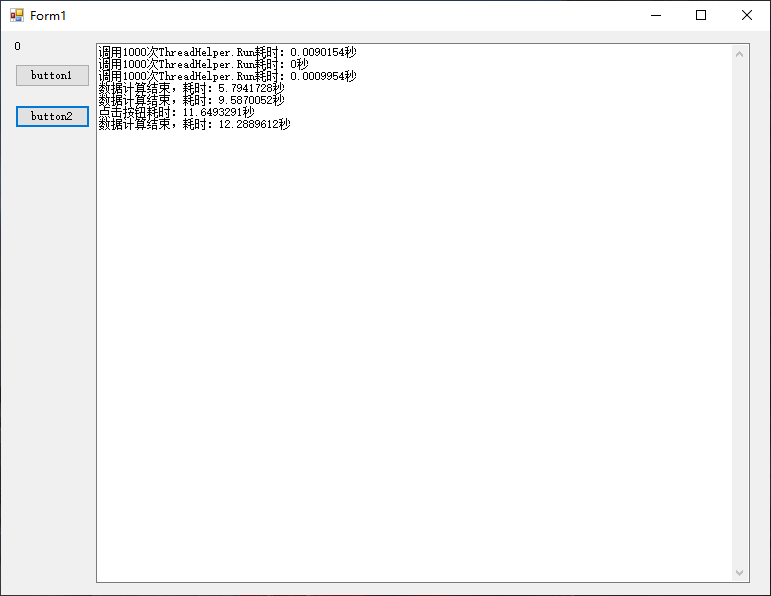
使用Run测试结果:
使用Run2测试结果:
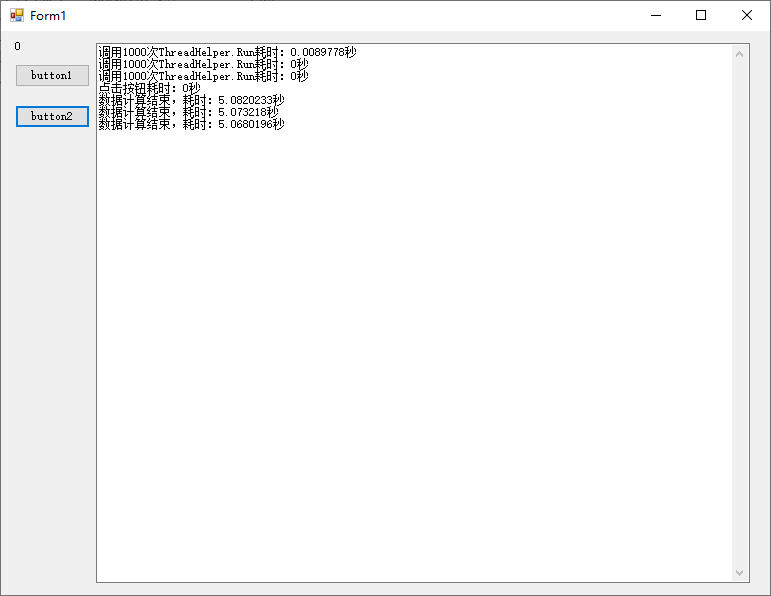
结论:使用Run,点击button2时,卡了好几秒才出来结果,而使用Run2,点击button2时,立即显示结果,button2的操作本身应该耗时极少。
现实意义:当一批耗时任务无脑使用Task.Factory.StartNew时,另一个使用Task.Factory.StartNew的任务就无法及时响应了。
C# Task 多任务 限制Task并发数量的更多相关文章
- C# 多任务之 Task
Task 是什么 ? Task 是一个类, 它表示一个操作不返回一个值,通常以异步方式执行. Task 对象是一个的中心思想 基于任务的异步模式 首次引入.NET Framework 4 中. 继承层 ...
- C# 执行固定个数任务自行控制进入线程池的线程数量,多任务同时但是并发数据限定
思路来源:http://bbs.csdn.NET/topics/390819824,引用该页面某网友提供的方法. 题目:我现在有100个任务,需要多线程去完成,但是要限定同时并发数量不能超过5个. 原 ...
- async和enterproxy控制并发数量
聊聊并发与并行 并发我们经常提及之,不管是web server,app并发无处不在,操作系统中,指一个时间段中几个程序处于已经启动运行到完毕之间,且这几个程序都是在同一处理机上运行,并且任一个时间点只 ...
- Spring的任务调度@Scheduled注解——task:scheduler和task:executor的解析
原文地址: https://blog.csdn.net/yx0628/article/details/80873774 一个简单的Spring定时任务的 demo,全部代码见下载地址:https:// ...
- 【C# Task】理解Task中的ConfigureAwait配置同步上下文
原文:https://devblogs.microsoft.com/dotnet/configureawait-faq/ 作者:Stephen 翻译:xiaoxiaotank 静下心来,你一定会有收获 ...
- Task.Run Vs Task.Factory.StartNew
在.Net 4中,Task.Factory.StartNew是启动一个新Task的首选方法.它有很多重载方法,使它在具体使用当中可以非常灵活,通过设置可选参数,可以传递任意状态,取消任务继续执行,甚至 ...
- Task.Run Vs Task.Factory.StartNew z
在.Net 4中,Task.Factory.StartNew是启动一个新Task的首选方法.它有很多重载方法,使它在具体使用当中可以非常灵活,通过设置可选参数,可以传递任意状态,取消任务继续执行,甚至 ...
- MapReduce作业的map task和reduce task调度参数
MapReduce作业可以细分为map task和reduce task,而MRAppMaster又将map task和reduce task分为四种状态: 1.pending:刚启动但尚未向reso ...
- C# Task的使用---Task的启动
.NET 4.0包含的新名称空间System.Threading.Tasks,它包含的类抽象出了线程功能.任务表示应完成的某个单元的工作.这个单元的工作可以在单独的线程中运行,也可以以同步的方式启动一 ...
随机推荐
- Tensorflow Serving Docker compose 部署服务细节(Ubuntu)
[摘要] Tensorflow Serving 是tf模型持久化的重要工具,本篇介绍如何通过Docker compose搭建并调试TensorFlow Serving TensorFlow Servi ...
- TypeError: 'list' object cannot be interpreted as an integer
TypeError: 'list' object cannot be interpreted as an integer 类型错误,不能将list对象转换为一个整数. 错误代码,例如如下例子: arg ...
- 用C在GBA上写光线追踪(0)配置开发编译环境
前段时间用C#写了一个光线追踪程序,可以渲染圆球,平面这种基本图形,反射,光照,阴影,都大致尝试做了一下. ↑ C#实现的光线追踪 ↑ GBA上C实现的光线追踪 然而,在我打算继续深入优化的时 ...
- php上传下载文件
之前做一个上传下载的项目,发现网上的和自己需求不是很一样,翻阅了下书籍和整理了下网上的一些代码.做了一个上传下载的demo,上传通过php本身的uploadfile函数,并返回以时间戳命名的文件名后, ...
- UILabel(label控件)的详细使用及特殊效果
转自:http://blog.sina.com.cn/s/blog_af73e7a70101ahlm.html UILabel *label = [[UILabelalloc] initWithFra ...
- 关于maven-assembly-plugin插件打包,有部分无法打包的情况解决方法
今天在使用maven-assembly-plugin 对生产者进行打包,然后在linux中发布时.将包打包之后,发现mybtis的xml无法识别,然后查看原因说是没有这个包,我当时就纳闷了,都是基操( ...
- 线段树+lazy标记 2019年8月10日计蒜客联盟周赛 C.小A的题
题目链接:https://nanti.jisuanke.com/t/40852 题意:给定一个01串s,进行m次操作,|s|<=1e6,m<=5e5 操作有两种 l r 0,区间[l,r] ...
- 2017 CCPC杭州 题解
2017CCPC杭州题目PDF Problem A. Super-palindrome 题解: 给你一个字符串,每一步可以将一个字符替换为另一个字符,问你最少多少步可以使得,该字符串任意奇数子串为回文 ...
- JS页面跳转加密解密URL参数
页面跳转加密参数 window.location.href="foot.html?"+btoa(encodeURIComponent("goodid="+goo ...
- 从零开始的openGL——五、光线追踪
前言 前面介绍了基本图形.模型.曲线的绘制,但是,在好像还没有感受到那种3D游戏里一些能惊艳到自己的效果,即真实感还不是很足.这篇文章中介绍的光线追踪,是实现真实感必不可少的.拿下面的两张图片来对比 ...