
与karma、angular的第一次亲密接触
首先要了解什么是karma,karma干嘛用的,它的好朋友jasmine又是啥?这些文章可以帮助你:
karma干嘛的?
angular与karma1
angular与karma2
看了以上几篇文章之后,我们基本上就可以启动我们最简单的一个karma测试例子了。然后我们还要有webpack对吧:
karma-webpack插件
这些都配置好,我们的karma配置文件就成了这个样子:
// Karma configuration

// Generated on Sun Dec 04 2016 19:19:27 GMT+0800 (中国标准时间)

module.exports = function(config) {

  config.set({

    // base path that will be used to resolve all patterns (eg. files, exclude)

    basePath: '',

    // frameworks to use

    // available frameworks: https://npmjs.org/browse/keyword/karma-adapter

    frameworks: ['jasmine'],

    // list of files / patterns to load in the browser

    files: [

      'test/**/*.js'

    ],

    // list of files to exclude

    exclude: [

    ],

    // preprocess matching files before serving them to the browser

    // available preprocessors: https://npmjs.org/browse/keyword/karma-preprocessor

    preprocessors: {

        'test/**/*.js': ['webpack','coverage']

    },

    // test results reporter to use

    // possible values: 'dots', 'progress'

    // available reporters: https://npmjs.org/browse/keyword/karma-reporter

    reporters: ['progress','coverage'],

    // web server port

    port: 9876,

    // enable / disable colors in the output (reporters and logs)

    colors: true,

    // level of logging

    // possible values: config.LOG_DISABLE || config.LOG_ERROR || config.LOG_WARN || config.LOG_INFO || config.LOG_DEBUG

    logLevel: config.LOG_INFO,

    // enable / disable watching file and executing tests whenever any file changes

    autoWatch: true,

    // start these browsers

    // available browser launchers: https://npmjs.org/browse/keyword/karma-launcher

    browsers: ['Chrome'],

    // Continuous Integration mode

    // if true, Karma captures browsers, runs the tests and exits

    singleRun: false,

    // Concurrency level

    // how many browser should be started simultaneous

    concurrency: Infinity,

    webpack: {

        module: {

            debug: true,

            module: {

                loaders: [

                   // nothing here yet! We'll add more stuff in Part 2

                ]

            }

        }

    },

    webpackServer: {

        noInfo: true // prevent console spamming when running in Karma!

    },

    plugins: [

        'karma-chrome-launcher',

        'karma-webpack',

        'karma-jasmine',

        'karma-coverage'

    ],

    coverageReporter: {

      type : 'html',

      dir : 'coverage/'

    }

  })

}
app.js中的内容
var angular = require('angular');

var mamApp = angular.module("mamApp",[

    require('angular-ui-router'),

    require('./modules/listsModule.js'),

    require('./modules/detailModule.js')

    ]);

mamApp.controller('mamAppModuleCtrl', function($scope,$http,$state,$stateParams) {

    var listType = $stateParams.listType;

    var state = $state.current.name;

    $scope.listType = listType;

    $scope.menuData = [

        {

            id:"appManage",

            name:"应用管理"

        }

    ];

});
test文件夹里写了一个testIndex.js。
var angular = require('angular');

var mocks = require('angular-mocks');

var mamApp = require('../src/js/app.js');

describe("mamApp", function() {

    var scope;

    beforeEach(angular.mock.module('mamApp'));

    beforeEach(angular.mock.inject(function ($rootScope, $controller) {

        scope = $rootScope.$new();

        $controller('mamAppModuleCtrl', {$scope: scope});

    }));

    it("menuData", function() {

        expect(scope.menuData[0].id==="appManage").toBe(true);

    });

    it("listType", function() {

        scope.listType="white";

        expect(scope.listType=="white").toBe(true);

    });

});
然后开跑,cmd里输入:karma start
ok,没问题,顺利运行。控制台打出两个绿色的success。
那我现在要测试listsModule这个子模块了,它是app的依赖模块,想当然的代码写成这样:
新建一个文件:testListModule.js
var angular = require('angular');

var mocks = require('angular-mocks');

var mamApp = require('../src/js/app.js');

describe("listsModuleWhite", function() {

    var scope;

    beforeEach(angular.mock.module('listsModule'));

    beforeEach(angular.mock.inject(function ($rootScope,$http,$state,$stateParams,$controller) {

        scope = $rootScope.$new();

        $stateParams.listType="white";

        $controller('listsModuleCtrl', {$scope: scope,$http:$http,$state:$state,$stateParams:$stateParams});

    }));

    it("when listType is white scope.listType should be white", function() {

        expect(scope.listType==="white").toBe(true);

    });

    it("when listType is white btnsShow should be false", function() {

        expect(scope.btnsShow).toBe(false);

    });

    it("when listType is white scope.colNames[1].html should be 版本号", function() {

        expect(scope.colNames[1].html==="版本号").toBe(true);

    });

});
运行起来报错。。。一个是报多次引用angular的错误,另外总是报找不到的stateprovider,经过错误分析应该改成这样:
describe("listsModuleWhite", function() {

    var scope;

    beforeEach(angular.mock.module('mamApp'));//注意这行

    beforeEach(angular.mock.module('listsModule'));

    beforeEach(angular.mock.inject(function ($rootScope,$http,$state,$stateParams,$controller) {

        scope = $rootScope.$new();

        $stateParams.listType="white";

        $controller('listsModuleCtrl', {$scope: scope,$http:$http,$state:$state,$stateParams:$stateParams});

    }));

    it("when listType is white scope.listType should be white", function() {

        expect(scope.listType==="white").toBe(true);

    });

    it("when listType is white btnsShow should be false", function() {

        expect(scope.btnsShow).toBe(false);

    });

    it("when listType is white scope.colNames[1].html should be 版本号", function() {

        expect(scope.colNames[1].html==="版本号").toBe(true);

    });

});
注意这行:
beforeEach(angular.mock.module('mamApp')); 把它加在子模块的实例化之前。就解决了哪些unknown provider的错误。
那么好,我们继续写一个文件测试DetailModule,当然是模仿前一个写成这样:
describe("detailModuleWhite", function() {

    var scope;

    beforeEach(angular.mock.module('mamApp'));

    beforeEach(angular.mock.module('detailModule'));

    beforeEach(angular.mock.inject(function ($rootScope,$http,$state,$stateParams,$controller) {

        scope = $rootScope.$new();

        $stateParams.listType="white";

        $controller('detailModuleCtrl', {$scope: scope,$http:$http,$state:$state,$stateParams:$stateParams});

    }));

    it("when listType is white scope.listType should be white", function() {

        expect(scope.listType==="white").toBe(true);

    });

    it("when listType is white params should be ...", function() {

        expect(scope.params.deviceNum).toBe(0);

        expect(scope.params.backBtnName=="返回白名单列表").toBe(true);

    });

});
然后又报错,说angular undefined。
仔细分析了一下,各种方法都测了一遍,最后发现是代码执行顺序错误了。Detail这个文件应为名字开头是D,先于Index(开头是I)文件运行了。所以我就把“Index”文件改了个名字叫“1ndex”,这样代码又顺利运行了。
然后仔细回想了一下,配置文件里,files配置的是一个array,而且是有顺序的。所以我把index文件名改回来,把karma.config.js的内容稍微改一行:
    files: [

      'test/index.js','test/modules/**/*.js'

    ],
除了index.js,其他要测试的文件都放到modules文件夹内。
同时为了让coverage分析准确,把index.js的内容改为:
var angular = require('angular');

var mocks = require('angular-mocks');

var mamApp = require('../src/js/app.js');
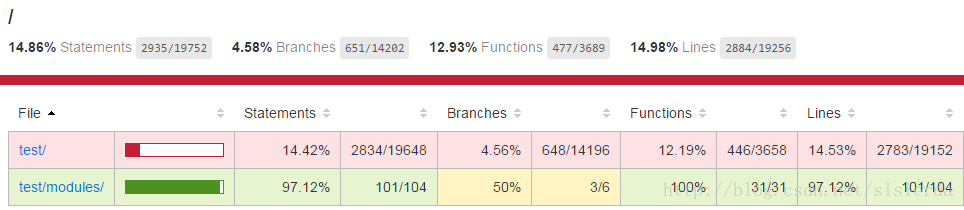
实际的测试内容代码,放到一个新建的testMamApp.js文件内,再把这个文件放入modules文件夹内。弄完以后的结构如下:
test:.

│  Index.js

│

└─modules

        testDetailModule.js

        testListModule.js

        testMamApp.js
好了,这样karma就可以陪伴我们一起愉快的开发了。
与karma、angular的第一次亲密接触的更多相关文章
- 第四章 跨平台图像显示库——SDL 第一节 与SDL第一次亲密接触
http://blog.csdn.net/visioncat/article/details/1596576 GCC for Win32 开发环境介绍(5) 第四章 跨平台图像显示库——SDL 第一节 ...
- 多线程第一次亲密接触 CreateThread与_beginthreadex本质区别
本文将带领你与多线程作第一次亲密接触,并深入分析CreateThread与_beginthreadex的本质区别,相信阅读本文后你能轻松的使用多线程并能流畅准确的回答CreateThread与_beg ...
- 【阿里云产品公测】与云引擎ACE第一次亲密接触
阿里云用户:林哥神话 公测当然是第一次了.这个第一次亲密接触,但话又说回来对ACE我一直都不是那感兴趣的,但是看到阿里介绍还是那般神奇,再加上200无代金券来更加给力.最后就申请了这次公测. 平时一直 ...
- Linux就是这个范儿之第一次亲密接触(3)
原创作品,允许转载,转载时请务必以超链接形式标明文章原始出处 .作者信息和本声明.否则将追究法律责 1.4 返璞归真的命令行 有一种说法,现代计算机不是靠电力驱动,而是靠“鼠标”.多少应用程序的界面需 ...
- 我和Python的第一次亲密接触 - 零基础入门学习Python001
我和Python的第一次亲密接触 让编程改变世界 Change the world by program 小甲鱼经常说,学习一门编程语言就是要深入其中,要把编程语言想象为你的女朋友你的情人,这样你学习 ...
- 第一次亲密接触MSF
第一次亲密接触MSF Metasploit Framework介绍 Metasploit是一款开源安全漏洞检测工具,附带数百个已知的软件漏洞,并保持频繁更新.被安全社区冠以“可以黑掉整个宇宙”之名的强 ...
- [OS] 多线程--第一次亲密接触CreateThread与_beginthreadex本质区别
转自:http://blog.csdn.net/morewindows/article/details/7421759 本文将带领你与多线程作第一次亲密接触,并深入分析CreateThread与_be ...
- Linux认知之旅【01 与Linux第一次亲密接触】!
一.搜索LINUX,了解它的前世今生! linux很厉害,应用在很多方面,我知道有超算.IOT.树莓派. 而且好多开发人员都在用这个系统.linux作为服务器使用,常年不用重启,不宕机,很少受病毒影响 ...
- Linux就是这个范儿之第一次亲密接触(2)
原创作品,允许转载,转载时请务必以超链接形式标明文章原始出处 .作者信息和本声明.否则将追究法律责 1.2 不一样的图形操作 几乎所有Linux的新用户都会认为Linux的图形界面是相当的绚丽又多彩. ...
随机推荐
- 命令行代理神器 proxychains
因为某些原因,我们需要在命令行下载一些国外的资源,这个时候如果使用 wget,curl,或者 aria2c 的时候,往往又没有速度.这个时候我们需要使用代理来进行加速. 我本地搭的有 ss,但 ss ...
- 记录一些html5和css3的一部分属性
html5 标签1 video:视频 属性: src:视频的url autoplay:视频在就绪后马上播放 controls:向用户显示控件2 audio:音频 属性类似于video3 属性:drag ...
- 如何在Vue项目中使用Typescript
0.前言 本快速入门指南将会教你如何在Vue项目中使用TypeScript进行开发.本指南非常灵活,它可以将TypeScript集成到现有的Vue项目中任何一个阶段. 1.初始化项目 首先,创建一个新 ...
- PyCharm安装及使用教程
1 PyCharm下载 PyCharm的下载安装非常简单,可以直接到Jetbrains公司官网下载,具体步骤如下: (1)打开Pycharm官网http://www.jetbrains.com,选择 ...
- redis 数据库主从不一致问题解决方案
在聊数据库与缓存一致性问题之前,先聊聊数据库主库与从库的一致性问题. 问:常见的数据库集群架构如何? 答:一主多从,主从同步,读写分离. 如上图: (1)一个主库提供写服务 (2)多个从库提供读服务 ...
- 微擎修改 icon.jpg 后项目主页未变
微擎修改 icon.jpg 后项目主页Logo未变 产生原因: 设置了自定义图标,但系统未找到该图标,就选择使用默认的起始图标 解决办法: 在项目根目录位置上传一个图标名为 icon-custom.j ...
- (三)初识NumPy(数据CSV文件存取和多维数据的存取)
本章主要介绍的是数据的CSV文件存取和多维数据的存取. 一.数据的CSV文件存取 1.CSV的写文件: np.savetxt(frame, array, fmt='%.18e', delimiter= ...
- 搭建Nginx七层反向代理
基于https://www.cnblogs.com/Dfengshuo/p/11911406.html这个基础上,在来补充下七层代理的配置方式.简单理解下四层和七层协议负载的区别吧,四层是网络层,负载 ...
- easyui+ef实现省市区三级联动
1.引用easyui样式及脚本文件 2.数据库创建表(自联表)及数据建模(Code First) use DataBase go CREATE TABLE OP_SJ ( CID UNIQUEIDEN ...
- 检测当前IE浏览器的版本
检测当前IE浏览器的版本(注意:在非IE浏览器中是看不到效果的) 使用示例如下:低于IE8弹窗提示 <!--[if lte IE 8]><script>alert('您当前浏览 ...