
Oracle分组函数之ROLLUP用法
rollup函数
本博客简单介绍一下oracle分组函数之rollup的用法,rollup函数常用于分组统计,也是属于oracle分析函数的一种
环境准备
create table dept as select * from scott.dept;

create table emp as select * from scott.emp;
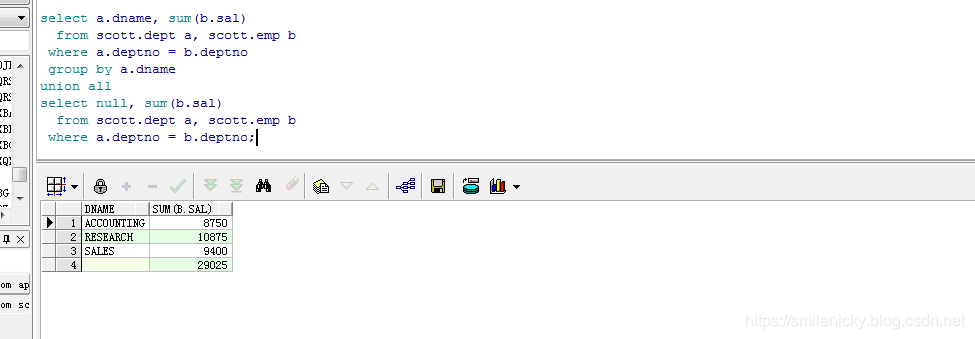
业务场景:求各部门的工资总和及其所有部门的工资总和
这里可以用union来做,先按部门统计工资之和,然后在统计全部部门的工资之和
select a.dname, sum(b.sal)

  from scott.dept a, scott.emp b

 where a.deptno = b.deptno

 group by a.dname

union all

select null, sum(b.sal)

  from scott.dept a, scott.emp b

 where a.deptno = b.deptno;
上面是用union来做,然后用rollup来做,语法更简单,而且性能更好
select a.dname, sum(b.sal)

  from scott.dept a, scott.emp b

 where a.deptno = b.deptno

 group by rollup(a.dname);
业务场景:基于上面的统计,再加需求,现在要看看每个部门岗位对应的工资之和
select a.dname, b.job, sum(b.sal)

  from scott.dept a, scott.emp b

 where a.deptno = b.deptno

 group by a.dname, b.job

union all//各部门的工资之和

select a.dname, null, sum(b.sal)

  from scott.dept a, scott.emp b

 where a.deptno = b.deptno

 group by a.dname

union all//所有部门工资之和

select null, null, sum(b.sal)

  from scott.dept a, scott.emp b

 where a.deptno = b.deptno;
用rollup实现,语法更简单
select a.dname, b.job, sum(b.sal)

  from scott.dept a, scott.emp b

 where a.deptno = b.deptno

 group by rollup(a.dname, b.job);
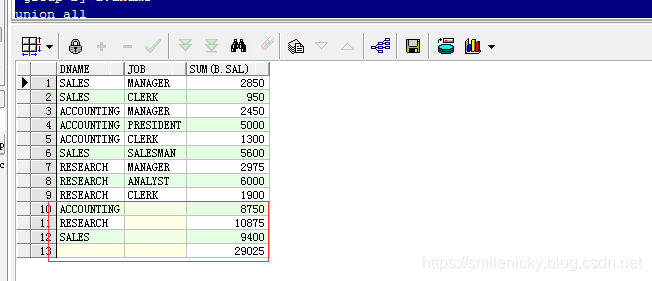
假如再加个时间统计的,可以用下面sql:
select to_char(b.hiredate, 'yyyy') hiredate, a.dname, b.job, sum(b.sal)

  from scott.dept a, scott.emp b

 where a.deptno = b.deptno

 group by rollup(to_char(b.hiredate, 'yyyy'), a.dname, b.job);
cube函数
select a.dname, b.job, sum(b.sal)

  from scott.dept a, scott.emp b

 where a.deptno = b.deptno

 group by cube(a.dname, b.job);
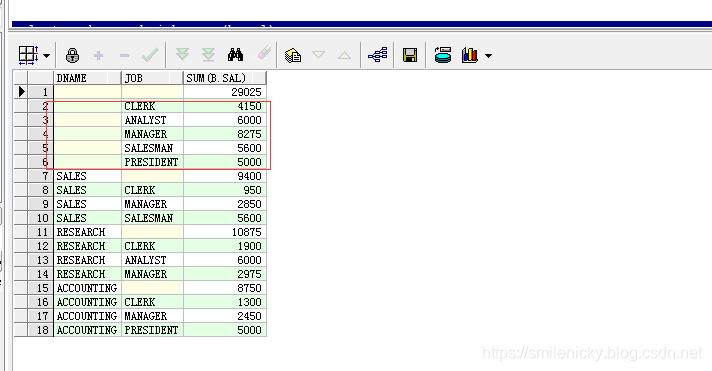
cube函数是维度更细的统计,语法和rollup类似
假设有n个维度,那么rollup会有n个聚合,cube会有2n个聚合
rollup统计列
rollup(a,b) 统计列包含:(a,b)、(a)、()
rollup(a,b,c) 统计列包含:(a,b,c)、(a,b)、(a)、()
....cube统计列
cube(a,b) 统计列包含:(a,b)、(a)、(b)、()
cube(a,b,c) 统计列包含:(a,b,c)、(a,b)、(a,c)、(b,c)、(a)、(b)、(c)、()
....
Oracle分组函数之ROLLUP用法的更多相关文章
- [转]【ROLLUP】Oracle分组函数之ROLLUP魅力
原创:http://blog.itpub.net/519536/viewspace-610995 本文通过演示给出Oracle ROLLUP分组函数的用法,体验一下Oracle在统计查询领域中的函数魅 ...
- Oracle分组函数之ROLLUP
功能介绍: 首先是进行无字段的聚合,然后在对字段进行从左到右依次组合后聚合 创建表: Create Table score ( classID Int, studentName ), subject ...
- 【转】【CUBE】Oracle分组函数之CUBE魅力
http://blog.itpub.net/519536/viewspace-610997/ Oracle的CUBE与ROLLUP功能很相似,也是在数据统计分析领域的一把好手. 关于ROLLUP的查 ...
- Oracle分组函数之CUBE魅力
Oracle的CUBE与ROLLUP功能很相似,也是在数据统计分析领域的一把好手. 关于ROLLUP的查询统计功能请参考文章<Oracle分组函数之ROLLUP魅力>(http://www ...
- oracle 分组函数执行分析
先上例了: select job as "JOB1", avg(sal) as "avg sal" from scott.emp group by " ...
- Oracle分组函数以及数据分组
简单总结一下对于数据的分组和分组函数. 本文所举实例,数据来源oracle用户scott下的emp,dept ,salgrade 3表:数据如下: 一.分组函数 1.sum()求和函数.max()求最 ...
- Oracle 分组函数
分组函数的介绍 分组函数作用于一组数据,并对一组数据返回一个值. (引用网上的一张图) 分组函数的使用规则 SELECT [column,] group_function(column) FROM t ...
- Oracle分组函数实例
分组函数也叫聚合函数.如果在查询只想要查分组函数,那么跟平时的查询语句并无不同: SQL ,,,,) ; SUM(T.PRIZENUM) AVG(T.PRIZENUM) --------------- ...
- oracle 分组函数、视图
组函数 分组函数作用于一组数据,对每一组返回一个值 组函数类型: 1.计数 count(列名 或 表达式) 对满足的行数进行统计 2.求和 sum(列名 或 表达式 ...
随机推荐
- [UWP开发]NavigationView基础使用方法
原文:[UWP开发]NavigationView基础使用方法 [UWP开发]NavigationView基础使用方法 NavigationView是秋季创意者更新(16299)引入的新控件,用于生成W ...
- PHP中遍历关联数组的方法
下面介绍PHP中遍历关联数组的三种方法:foreach <?php $sports = array( 'football' => 'good', 'swimming' => 'ver ...
- PV操作例题解析
虽然自己看了书,老师讲了课,以为对PV操作理解了,可是遇到题的时候还是不会思考.以下这道题,花了非常长时间才弄明确,如今把思路写出来,大家共同探讨下. 大家都来思考: 信号量S1.S2.S3.S4分别 ...
- OpenCV调试利器——Image Watch插件的安装和使用
各大编译工具在调试的时候都可以实时查看变量的值,了解变量值的变动情况,在图像处理相关的程序调试中,是否也可以实时查看内存中图像变量的图形信息以及图像上指定区域或点位的数值变化情况呢? 在工业机器视觉领 ...
- 2 abp 领域层创建实体
领域层: LearningMpaAbp.Core项目 基础服务层:EntityFramework对应的项目 1 在领域层新建Tasks文件夹 在文件夹下新建Task类 但是注意 Task类必须要继 ...
- Oracle 如何删除掉一个用户下的所有对象
create or replace procedure drop_all as cursor cur_obj is select uo.OBJECT_NAME, uo.OBJECT_TYPE from ...
- requireJS简单的学习门户网站
总结 requireJS.这翻译成中国"必须js".说白了就是装js文件与.如何装好了?.这是继AMD标准化的模块化装.除了AMD另一种规范称为CMD规范.跟随CMD兼容模块加载. ...
- #748 – 获得按下时对应位置点的大小(Getting the Size of a Contact Point during Raw Touch)
原文:#748 – 获得按下时对应位置点的大小(Getting the Size of a Contact Point during Raw Touch) 原文地址:https://wpf.2000t ...
- Android数组和开发List之间的转换
1.List转换到一个数组.(这里List它是实体是ArrayList) 转让ArrayList的toArray方法. toArray public <T> T[] toArray(T[] ...
- asp .net 大文件传输配置
asp .net config配置 需要在配置文件里面设置文件上传限定的两个属性值:maxAllowedContentLength,maxRequestLength 允许上传文件的长度,和请求的长度, ...