
SpringBoot开源项目学习总结
一、实现日期格式数据类型的转换
首先,定义DateConverter实现Converter<String, Date>接口:
 package com.stevlu.common;

 import org.springframework.core.convert.converter.Converter;

 import java.text.ParseException;

 import java.text.SimpleDateFormat;

 import java.util.Date;

 /**

  * Created by Steven Lu on 2018/11/21.

  */

 public class DateConverter implements Converter<String, Date> {

     private SimpleDateFormat simpleDateFormat = new SimpleDateFormat("yyyy-MM-dd");

     @Override

     public Date convert(String s) {

         if ("".equals(s) || s == null) {

             return null;

         }

         try {

             return simpleDateFormat.parse(s);

         } catch (ParseException e) {

             e.printStackTrace();

         }

         return null;

     }

 }
然后,在一个JAVA配置类中将该转换器注册进去:
 package com.stevlu.config;

 import org.springframework.context.annotation.Bean;

 import org.springframework.context.annotation.Configuration;

 import org.springframework.format.FormatterRegistry;

 import org.springframework.web.servlet.config.annotation.WebMvcConfigurerAdapter;

 import com.stevlu.common.DateConverter;

 import java.util.concurrent.ExecutorService;

 import java.util.concurrent.Executors;

 /**

  * Created by Steven Lu on 2018/11/21.

  */

 @Configuration

 public class WebMvcConfig extends WebMvcConfigurerAdapter {

     @Override

     public void addFormatters(FormatterRegistry registry) {

         registry.addConverter(new DateConverter());

     }

     @Bean

     public ExecutorService executorService() {

         return Executors.newCachedThreadPool();

     }

 }
这样就在SpringBoot项目中实现了字符串类型数据转换成日期类型数据的功能。
二、项目开发思路思考
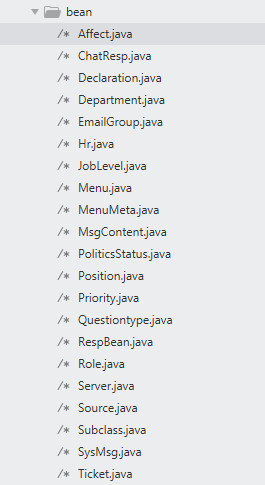
1、首先,可以在项目中定义需要使用到的pojo对象,以此来实现与数据库的对象关系映射,需要注意的对象中的属性最好能与数据库中的字段名称保持一致,如下图所示:
 package com.stevlu.bean;

 import com.fasterxml.jackson.annotation.JsonIgnore;

 import org.springframework.security.core.GrantedAuthority;

 import org.springframework.security.core.authority.SimpleGrantedAuthority;

 import org.springframework.security.core.userdetails.UserDetails;

 import java.util.ArrayList;

 import java.util.Collection;

 import java.util.List;

 /**

  * Created by Steven Lu on 2018/10/30.

  */

 public class Hr implements UserDetails {

     private Long id;

     private String name;

     private String phone;

     private String email;

     private String address;

     private boolean enabled;

     private String username;

     private String password;

     private Long dept;

     private List<Role> roles;

     private String userface;

     public String getUserface() {

         return userface;

     }

     public void setUserface(String userface) {

         this.userface = userface;

     }

     public List<Role> getRoles() {

         return roles;

     }

     public void setRoles(List<Role> roles) {

         this.roles = roles;

     }

     public Long getId() {

         return id;

     }

     public void setId(Long id) {

         this.id = id;

     }

     public String getName() {

         return name;

     }

     public void setName(String name) {

         this.name = name;

     }

     public String getPhone() {

         return phone;

     }

     public void setPhone(String phone) {

         this.phone = phone;

     }

     public String getEmail() {

         return email;

     }

     public void setEmail(String email) {

         this.email = email;

     }

     public String getAddress() {

         return address;

     }

     public void setAddress(String address) {

         this.address = address;

     }

     @Override

     public boolean isEnabled() {

         return enabled;

     }

     public void setEnabled(boolean enabled) {

         this.enabled = enabled;

     }

     @Override

     public String getUsername() {

         return username;

     }

     @JsonIgnore

     @Override

     public boolean isAccountNonExpired() {

         return true;

     }

     @JsonIgnore

     @Override

     public boolean isAccountNonLocked() {

         return true;

     }

     @JsonIgnore

     @Override

     public boolean isCredentialsNonExpired() {

         return true;

     }

     public void setUsername(String username) {

         this.username = username;

     }

     @JsonIgnore

     @Override

     public Collection<? extends GrantedAuthority> getAuthorities() {

         List<GrantedAuthority> authorities = new ArrayList<>();

         for (Role role : roles) {

             authorities.add(new SimpleGrantedAuthority(role.getName()));

         }

         return authorities;

     }

     @Override

     public String getPassword() {

         return password;

     }

     public void setPassword(String password) {

         this.password = password;

     }

     public Long getDept() {

         return dept;

     }

     public void setDept(Long dept) {

         this.dept = dept;

     }

 }
Hr.java
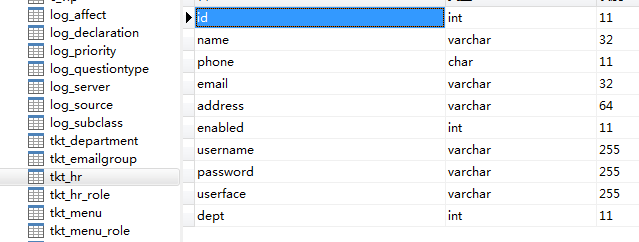
数据库中相应字段
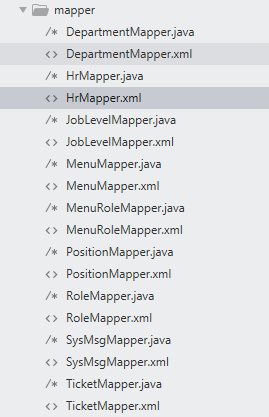
2、然后思考项目中可能用到的数据库相关操作,增删改查,一对多,多对多的联系等。清楚完需要用的操作后,就可以开始编写Mybatis中mapper接口和mapper.xml文件了,详细的mapper.xml文件定义方法见之前的博客。(使用mapper接口的方法,mybatis配置文件会自动帮我们生成接口的实现类)
 <?xml version="1.0" encoding="UTF-8" ?>

 <!DOCTYPE mapper

         PUBLIC "-//mybatis.org//DTD Mapper 3.0//EN"

         "http://mybatis.org/dtd/mybatis-3-mapper.dtd">

 <mapper namespace="com.stevlu.mapper.HrMapper">

     <resultMap id="BaseResultMap" type="com.stevlu.bean.Hr">

         <id column="id" property="id"/>

         <result column="name" property="name"/>

         <result column="phone" property="phone"/>

         <result column="email" property="email"/>

         <result column="address" property="address"/>

         <result column="enabled" property="enabled"/>

         <result column="username" property="username"/>

         <result column="password" property="password"/>

         <result column="userface" property="userface"/>

         <result column="dept" property="dept"/>

     </resultMap>

     <resultMap id="lazyLoadRoles" type="com.stevlu.bean.Hr" extends="BaseResultMap">

         <collection property="roles" ofType="com.stevlu.bean.Role" select="com.stevlu.mapper.HrMapper.getRolesByHrId"

                     column="id"></collection>

     </resultMap>

     <resultMap id="eagerLoadRoles" type="com.stevlu.bean.Hr" extends="BaseResultMap">

         <collection property="roles" ofType="com.stevlu.bean.Role">

             <id property="id" column="rid"/>

             <result property="name" column="rname"/>

             <result property="nameZh" column="rnameZh"/>

         </collection>

     </resultMap>

     <select id="loadUserByUsername" resultMap="lazyLoadRoles">

         select * from tkt_hr WHERE username=#{username}

     </select>

     <select id="getRolesByHrId" resultType="com.stevlu.bean.Role">

         SELECT r.* FROM tkt_hr_role h, tkt_role r where h.rid=r.id AND h.hrid=#{id}

     </select>

     <insert id="hrReg">

         INSERT INTO tkt_hr set username=#{username},password=#{password}

     </insert>

     <update id="hrUpdatep" parameterType="com.stevlu.bean.Hr">

         update tkt_hr

         <set>

             <if test="password != null">

                 password = #{password,jdbcType=VARCHAR},

             </if>

         </set>

         where username = #{username}

     </update>

     <select id="getHrsByKeywords" resultMap="eagerLoadRoles">

         select h.*, r.id as rid, r.name as rname, r.nameZh as rnameZh from tkt_hr h

             left join tkt_hr_role h_r on h.id = h_r.hrid

             left join tkt_role r on h_r.rid = r.id

         where h.id not in

             (select h_r.hrid from tkt_hr_role h_r, tkt_role r where h_r.rid = r.id and r.nameZh = '系统管理员')

         <if test="keywords!='all' and keywords!=''">

             and h.username like '%' || #{keywords} ||'%'

         </if>

         order by h.id

     </select>

     <select id="getHrById" resultMap="eagerLoadRoles">

         select h.*,r.id AS rid,r.name AS rname,r.nameZh AS rnameZh from ((tkt_hr h left join tkt_hr_role

         h_r on ((h.id = h_r.hrid))) left join tkt_role r on ((h_r.rid = r.id))) where h.id=#{hrId}

     </select>

     <update id="updateHr" parameterType="com.stevlu.bean.Hr">

         update tkt_hr

         <set>

             <if test="name != null">

                 name = #{name,jdbcType=VARCHAR},

             </if>

             <if test="phone != null">

                 phone = #{phone,jdbcType=CHAR},

             </if>

             <if test="email != null">

                 email = #{email,jdbcType=VARCHAR},

             </if>

             <if test="address != null">

                 address = #{address,jdbcType=VARCHAR},

             </if>

             <if test="enabled != null">

                 enabled = #{enabled,jdbcType=BIT},

             </if>

             <if test="username != null">

                 username = #{username,jdbcType=VARCHAR},

             </if>

             <if test="password != null">

                 password = #{password,jdbcType=VARCHAR},

             </if>

             <if test="userface != null">

                 userface = #{userface,jdbcType=VARCHAR},

             </if>

             <if test="dept != null">

                 dept = #{dept,jdbcType=INTEGER},

             </if>

         </set>

         where id = #{id}

     </update>

     <update id="updateHrDept" parameterType="com.stevlu.bean.Hr">

         update tkt_hr

         <set>

             <if test="dept != null">

                 dept = #{dept,jdbcType=INTEGER},

             </if>

         </set>

         where id = #{id}

     </update>

     <update id="updateHrPhone" parameterType="com.stevlu.bean.Hr">

         update tkt_hr

         <set>

             <if test="phone != null">

                 phone = #{phone,jdbcType=INTEGER},

             </if>

         </set>

         where id = #{id}

     </update>

     <update id="updateHrEmail" parameterType="com.stevlu.bean.Hr">

         update tkt_hr

         <set>

             <if test="email != null">

                 email = #{email,jdbcType=VARCHAR},

             </if>

         </set>

         where id = #{id}

     </update>

     <update id="updateHrUsername" parameterType="com.stevlu.bean.Hr">

         update tkt_hr

         <set>

             <if test="username != null">

                 username = #{username,jdbcType=VARCHAR},

             </if>

         </set>

         where id = #{id}

     </update>

     <update id="updateHrName" parameterType="com.stevlu.bean.Hr">

         update tkt_hr

         <set>

             <if test="name != null">

                 name = #{name,jdbcType=VARCHAR},

             </if>

         </set>

         where id = #{id}

     </update>

     <delete id="deleteRoleByHrId" parameterType="Long">

         DELETE FROM tkt_hr_role where hrid=#{hrId}

     </delete>

     <insert id="addRolesForHr">

         INSERT INTO tkt_hr_role(id,hrid,rid) select SEQ_TKT_HR_ROLE_NEWID.NEXTVAL, tmp.* from (

         <foreach collection="rids" separator="union all" item="rid">

             select #{hrId}, #{rid} from dual

         </foreach>

         ) tmp

     </insert>

     <delete id="deleteHr" parameterType="Long">

         DELETE FROM tkt_hr WHERE id=#{hrId}

     </delete>

     <select id="getAllHr" resultType="com.stevlu.bean.Hr">

         select * from tkt_hr

         <if test="currentId!=null">

             WHERE id !=#{currentId}

         </if>

     </select>

 </mapper>
 package com.stevlu.mapper;

 import org.apache.ibatis.annotations.Param;

 import com.stevlu.bean.Hr;

 import com.stevlu.bean.Role;

 import java.util.List;

 /**

  * Created by Steven Lu on 2018/10/30.

  */

 public interface HrMapper {

     Hr loadUserByUsername(String username);

     List<Role> getRolesByHrId(Long id);

     int hrReg(@Param("username") String username, @Param("password") String password);

     int hrUpdatep(@Param("username") String username, @Param("password") String password);

     List<Hr> getHrsByKeywords(@Param("keywords") String keywords);

     int updateHr(Hr hr);

     int updateHrDept(Hr hr);

     int updateHrPhone(Hr hr);

     int updateHrEmail(Hr hr);

     int updateHrUsername(Hr hr);

     int updateHrName(Hr hr);

     int deleteRoleByHrId(Long hrId);

     int addRolesForHr(@Param("hrId") Long hrId, @Param("rids") Long[] rids);

     Hr getHrById(Long hrId);

     int deleteHr(Long hrId);

     List<Hr> getAllHr(@Param("currentId") Long currentId);

 }
要想让配置的mapper文件和mapper接口生效,需要在配置类中加上包扫描的注解,当然在全局配置文件中也可以设置。
package com.stevlu;

import org.mybatis.spring.annotation.MapperScan;

import org.springframework.boot.SpringApplication;

import org.springframework.boot.autoconfigure.SpringBootApplication;

@SpringBootApplication

@MapperScan("com.stevlu.mapper")

public class WebSocketServerApplication {

    public static void main(String[] args) {

        SpringApplication.run(WebSocketServerApplication.class, args);

    }

}
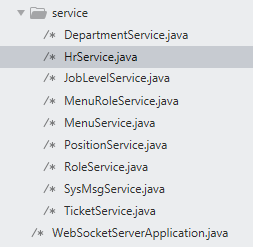
3、操作数据库的mapper接口定义完成之后,我们就可以在service层调用定义好的mapper接口。(service层可以对传经来的参数进行一些处理)
 package com.stevlu.service;

 import org.springframework.beans.factory.annotation.Autowired;

 import org.springframework.security.core.userdetails.UserDetails;

 import org.springframework.security.core.userdetails.UserDetailsService;

 import org.springframework.security.core.userdetails.UsernameNotFoundException;

 import org.springframework.security.crypto.bcrypt.BCryptPasswordEncoder;

 import org.springframework.stereotype.Service;

 import org.springframework.transaction.annotation.Transactional;

 import com.stevlu.bean.Hr;

 import com.stevlu.common.HrUtils;

 import com.stevlu.mapper.HrMapper;

 import java.util.List;

 /**

  * Created by Steven Lu on 2018/10/30.

  */

 @Service

 @Transactional

 public class HrService implements UserDetailsService {

     @Autowired

     HrMapper hrMapper;

     @Override

     public UserDetails loadUserByUsername(String s) throws UsernameNotFoundException {

         Hr hr = hrMapper.loadUserByUsername(s);

         if (hr == null) {

             throw new UsernameNotFoundException("用户名不对");

         }

         return hr;

     }

     public int hrReg(String username, String password) {

         // 如果用户名存在,返回错误

         if (hrMapper.loadUserByUsername(username) != null) {

             return -1;

         }

         BCryptPasswordEncoder encoder = new BCryptPasswordEncoder();

         String encode = encoder.encode(password);

         return hrMapper.hrReg(username, encode);

     }

     public int hrUpdatep(String username, String oldPassword, String newPassword, String encodedPassword) {

         // 如果旧密码错误,返回错误

         BCryptPasswordEncoder encoder = new BCryptPasswordEncoder();

         if (encoder.matches(oldPassword, encodedPassword)) {

             String encode = encoder.encode(newPassword);

             return hrMapper.hrUpdatep(username, encode);

         } else {

             return -1;

         }

     }

     public List<Hr> getHrsByKeywords(String keywords) {

         return hrMapper.getHrsByKeywords(keywords);

     }

     public int updateHr(Hr hr) {

         return hrMapper.updateHr(hr);

     }

     public int updateHrDept(Hr hr) {

         return hrMapper.updateHrDept(hr);

     }

     public int updateHrPhone(Hr hr) {

         return hrMapper.updateHrPhone(hr);

     }

     public int updateHrEmail(Hr hr) {

         return hrMapper.updateHrEmail(hr);

     }

     public int updateHrUsername(Hr hr) {

         return hrMapper.updateHrUsername(hr);

     }

     public int updateHrName(Hr hr) {

         return hrMapper.updateHrName(hr);

     }

     public int updateHrRoles(Long hrId, Long[] rids) {

         int i = hrMapper.deleteRoleByHrId(hrId);

         return hrMapper.addRolesForHr(hrId, rids);

     }

     public Hr getHrById(Long hrId) {

         return hrMapper.getHrById(hrId);

     }

     public int deleteHr(Long hrId) {

         return hrMapper.deleteHr(hrId);

     }

     public List<Hr> getAllHrExceptAdmin() {

         return hrMapper.getAllHr(HrUtils.getCurrentHr().getId());

     }

     public List<Hr> getAllHr() {

         return hrMapper.getAllHr(null);

     }

 }
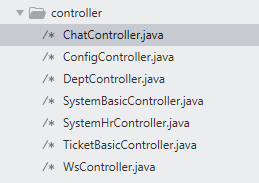
4、编写controller层,用于实现url请求的映射,由于项目是RESTful风格的,所以要注意url路径设计的技巧,以及HTTP请求的类型是什么,一般为(get查询,post增加,delete删除,put更新)
示例代码;
 package com.stevlu.controller;

 import org.springframework.beans.factory.annotation.Autowired;

 import org.springframework.web.bind.annotation.PathVariable;

 import org.springframework.web.bind.annotation.RequestMapping;

 import org.springframework.web.bind.annotation.RequestMethod;

 import org.springframework.web.bind.annotation.RestController;

 import com.stevlu.bean.*;

 import com.stevlu.service.*;

 import java.util.HashMap;

 import java.util.List;

 import java.util.Map;

 /**

  * Created by Steven Lu on 2018/11/21.

  */

 @RestController

 @RequestMapping("/system/basic")

 public class SystemBasicController {

     @Autowired

     RoleService roleService;

     @Autowired

     MenuService menuService;

     @Autowired

     MenuRoleService menuRoleService;

     @Autowired

     DepartmentService departmentService;

     @Autowired

     PositionService positionService;

     @Autowired

     JobLevelService jobLevelService;

     @Autowired

     TicketService ticketService;

     @RequestMapping(value = "/role/{rid}", method = RequestMethod.DELETE)

     public RespBean deleteRole(@PathVariable Long rid) {

         if (roleService.deleteRoleById(rid) == 1) {

             return new RespBean("success", "删除成功!");

         }

         return new RespBean("error", "删除失败!");

     }

     @RequestMapping(value = "/addRole", method = RequestMethod.POST)

     public RespBean addNewRole(String role, String roleZh) {

         if (roleService.addNewRole(role, roleZh) == 1) {

             return new RespBean("success", "添加成功!");

         }

         return new RespBean("error", "添加失败!");

     }

     @RequestMapping(value = "/menuTree/{rid}", method = RequestMethod.GET)

     public Map<String, Object> menuTree(@PathVariable Long rid) {

         Map<String, Object> map = new HashMap<>();

         List<Menu> menus = menuService.menuTree();

         map.put("menus", menus);

         List<Long> selMids = menuService.getMenusByRid(rid);

         map.put("mids", selMids);

         return map;

     }

     @RequestMapping(value = "/updateMenuRole", method = RequestMethod.PUT)

     public RespBean updateMenuRole(Long rid, Long[] mids) {

         if (menuRoleService.updateMenuRole(rid, mids) == mids.length) {

             return new RespBean("success", "更新成功!");

         }

         return new RespBean("error", "更新失败!");

     }

     @RequestMapping("/roles")

     public List<Role> allRoles() {

         return roleService.roles();

     }

     @RequestMapping(value = "/dep", method = RequestMethod.POST)

     public Map<String, Object> addDep(Department department) {

         Map<String, Object> map = new HashMap<>();

         int result = departmentService.addDep(department);

         if (result >= 1) {

             map.put("status", "success");

             map.put("msg", department);

             return map;

         }

         map.put("status", "error");

         map.put("msg", "添加失败!");

         return map;

     }

     @RequestMapping(value = "/dep/{did}", method = RequestMethod.DELETE)

     public RespBean deleteDep(@PathVariable Long did) {

         int result = departmentService.deleteDep(did);

         if (result > 0) {

             return new RespBean("success", "删除成功!");

         } else if (result == -1) {

             return new RespBean("error", "部门正被员工使用,取消关联前无法删除!");

         }

         return new RespBean("error", "删除失败!");

     }

     @RequestMapping(value = "/dep/{pid}", method = RequestMethod.GET)

     public List<Department> getDepByPid(@PathVariable Long pid) {

         return departmentService.getDepByPid(pid);

     }

     @RequestMapping(value = "/deps", method = RequestMethod.GET)

     public List<Department> getAllDeps() {

         return departmentService.getAllDeps();

     }

     @RequestMapping(value = "/position", method = RequestMethod.POST)

     public RespBean addPos(Position pos) {

         int result = positionService.addPos(pos);

         if (result == 1) {

             return new RespBean("success", "添加成功!");

         } else if (result == -1) {

             return new RespBean("error", "职位名重复,添加失败!");

         }

         return new RespBean("error", "添加失败!");

     }

     @RequestMapping(value = "/positions", method = RequestMethod.GET)

     public List<Position> getAllPos() {

         return positionService.getAllPos();

     }

     @RequestMapping("/position/{pids}")

     public RespBean deletePosById(@PathVariable String pids) {

         if (positionService.deletePosById(pids)) {

             return new RespBean("success", "删除成功!");

         }

         return new RespBean("error", "删除失败!");

     }

     @RequestMapping(value = "/position", method = RequestMethod.PUT)

     public RespBean updatePosById(Position position) {

         if (positionService.updatePosById(position) == 1) {

             return new RespBean("success", "修改成功!");

         }

         return new RespBean("error", "修改失败!");

     }

     @RequestMapping(value = "/joblevel", method = RequestMethod.POST)

     public RespBean addJobLevel(JobLevel jobLevel) {

         int result = jobLevelService.addJobLevel(jobLevel);

         if (result == 1) {

             return new RespBean("success", "添加成功!");

         } else if (result == -1) {

             return new RespBean("error", "职称名重复,添加失败!");

         }

         return new RespBean("error", "添加失败!");

     }

     @RequestMapping(value = "/joblevels", method = RequestMethod.GET)

     public List<JobLevel> getAllJobLevels() {

         return jobLevelService.getAllJobLevels();

     }

     @RequestMapping(value = "/joblevel/{ids}", method = RequestMethod.DELETE)

     public RespBean deleteJobLevelById(@PathVariable String ids) {

         if (jobLevelService.deleteJobLevelById(ids)) {

             return new RespBean("success", "删除成功!");

         }

         return new RespBean("error", "删除失败!");

     }

     @RequestMapping(value = "/joblevel", method = RequestMethod.PUT)

     public RespBean updateJobLevel(JobLevel jobLevel) {

         if (jobLevelService.updateJobLevel(jobLevel) == 1) {

             return new RespBean("success", "修改成功!");

         }

         return new RespBean("error", "修改失败!");

     }

 }
最后不要忘记在application.properties文件中配置数据库的连接属性,mybatis配置文件所在的路径等相关配置。
# EMBEDDED SERVER CONFIGURATION (ServerProperties)

server.port=8082

server.session-timeout=1800

server.context-path=

server.tomcat.max-threads=0

server.tomcat.uri-encoding=UTF-8

server.tomcat.basedir=target/tomcat

# HTTP encoding (HttpEncodingProperties)

spring.http.encoding.charset=UTF-8

spring.http.encoding.enabled=true

spring.http.encoding.force=true

#datasource

spring.datasource.type=com.alibaba.druid.pool.DruidDataSource

spring.datasource.driver-class-name=com.mysql.jdbc.Driver

spring.datasource.url=jdbc:mysql://localhost:3306/travel?serverTimezone=UTC&characterEncoding=utf-8

spring.datasource.username=root

spring.datasource.password=root

#spring.datasource.url=jdbc:oracle:thin:@//192.168.103.235:1521/taf

#spring.datasource.username=elite_ynj

#spring.datasource.password=EYuc1809#

mybatis.config-location=classpath:/mybatis-config.xml
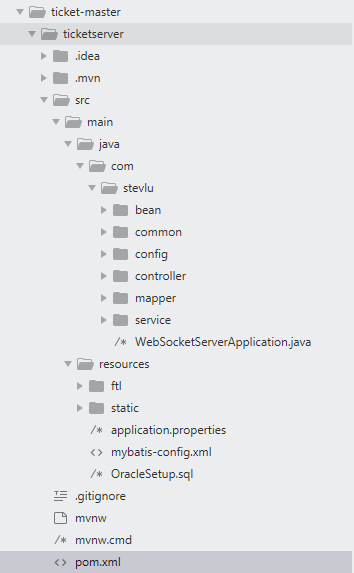
该工程一个完整的目录结构如下:
SpringBoot开源项目学习总结的更多相关文章
- Github 上 10 个值得学习的 Springboot 开源项目
Spring Boot 几乎继承了所有 Spring 框架的优点,同时还可以让项目的配置更简化.编码更简化.部署更方便.近两年受到很多开发者的追捧,也是火热的不行! 下面给大家整理了 10 个 Git ...
- 转:从开源项目学习 C 语言基本的编码规则
从开源项目学习 C 语言基本的编码规则 每个项目都有自己的风格指南:一组有关怎样为那个项目编码约定.一些经理选择基本的编码规则,另一些经理则更偏好非常高级的规则,对许多项目而言则没有特定的编码规则,项 ...
- Halo 开源项目学习(七):缓存机制
基本介绍 我们知道,频繁操作数据库会降低服务器的系统性能,因此通常需要将频繁访问.更新的数据存入到缓存.Halo 项目也引入了缓存机制,且设置了多种实现方式,如自定义缓存.Redis.LevelDB ...
- android开源项目学习
FBReaderJ FBReaderJ用于Android平台的电子书阅读器,它支持多种电子书籍格式包括:oeb.ePub和fb2.此外还支持直接读取zip.tar和gzip等压缩文档. 项目地址:ht ...
- php开源项目学习二次开发的计划
开源项目: cms 国内 dedecms cmstop 国外 joomla, drupal 电商 国内 ecshop 国外 Magento 论坛 discuz 博客 wordpress 学习时 ...
- github开源项目学习-front-end-collect
About 项目地址 项目预览demo(githubio加载较慢) 开源项目fork自:https://github.com/foru17/front-end-collect 此文章是对此开源项目使用 ...
- 如何高效地在github上找开源项目学习?
1.高级条件组合(精确搜索) in:readme 微服务 stars:>1000 in:readme spring security stars:>3000 in:name python ...
- ASP.NET MVC 开源项目学习之ProDinner (二)
下面我们来看第二层:Data 这一层相对来说是对Core层的具体实现了. 从命名可以看出来,这和数据库相关. 1.Db.cs CodeFirst模式的本地数据库类,继承了DbContext. pr ...
- [Android 开源项目学习]Android的UITableView(1)
最近由于项目加急,手里有好多看了差不多的开源项目,其中好多是大家经常用到的.图片的缓存BitmapFun(Android的文档中),AfinalMap,下拉刷新PullToRefresh等等 ...
随机推荐
- 实现日、周、月排行统计 sql
在如今很多系统中,都需要进行日.周.月排行统计,但是在网上寻找 了一番,发现很多都是相对的周.月排行,即周排行则用当前时间减去7天.这样我个人认为并不恰当.如月排行中,假设今天是4月22日,则从3月2 ...
- 【code】flex_进度条样式
近期打算吧硬盘中的资料记录在博客中,实用的就当是个分享,无用的就当是个备份,还望大家不要见怪. 一共4个文件: JinDuTiaoItem.mxml: <?xml version="1 ...
- 开拓新途径找出新方法,上海SEO公司分享3个操作看看是否可行
开拓新途径找出新方法,上海SEO公司分享3个操作看看是否可行 内容收录,外链公布,流量点击.用户体验.这是SEO优化的几个核心和重点.也是SEO站长每天都在绞尽脑汁进行操作的SEO重心,影响着非常多人 ...
- Android学习笔记-tween动画之java实现
Android动画分为Tween动画和Frame动画,近期学习了,体tween动画,现在讲学习的心得以及相关知识介绍如下. Tween又称为补间动画,可以把对象进行缩小.放大.旋转和渐变等操作. ...
- 2016/1/20 笔记 1, 包 引入 static 已经补充到类里 2,继承
继承 1,关键字 extends 2,子类自动继承父类非私有的属性和方法 也叫成员变量 成员方法 3,super代表的是父类 调用父类的方法 默认在构造函数中生成 ...
- Codeforces 690 C3. Brain Network (hard) LCA
C3. Brain Network (hard) Breaking news from zombie neurology! It turns out that – contrary to prev ...
- Python执行系统命令并获得输出的几种方法
[root@a upfc]# ./ffmpeg-linux64-v3.3.1 -i a.mp3 ffmpeg version N-86111-ga441aa90e8-static http://joh ...
- mystr = '{}{}{}'.format(mystr, random.randint(0, 9), adurl)
mystr = '{}{}{}'.format(mystr, random.randint(0, 9), adurl)
- neo4j 张一鸣 8
头条关注 粉丝关系 张一鸣 8
- centos7 安装8188eu驱动小记
最小化安装把lsusb和lspci装上 使用lsusb 和lspci的命令, centos上的安装命令: yum -y install usbutils yum -y install pciutils ...