
(十四)Python3 字符串格式化
Python3 字符串格式化
字符串的格式化方法分为两种,分别为占位符(%)和format方式。占位符方式在Python2.x中用的比较广泛,随着Python3.x的使用越来越广,format方式使用的更加广泛。
一 占位符(%)
%% 百分号标记
%c 字符及其ASCII码
%s 字符串
%d 有符号整数(十进制)
%u 无符号整数(十进制)
%o 无符号整数(八进制)
%x 无符号整数(十六进制)
%X 无符号整数(十六进制大写字符)
%e 浮点数字(科学计数法)
%E 浮点数字(科学计数法,用E代替e)
%f 浮点数字(用小数点符号)
%g 浮点数字(根据值的大小采用%e或%f)
%G 浮点数字(类似于%g)
%p 指针(用十六进制打印值的内存地址)
%n 存储输出字符的数量放进参数列表的下一个变量中
%d
实例(Python3.0+):
age = 29

print("my age is %d" %age)

#my age is 29
%s
实例(Python3.0+):
name = "makes"

print("my name is %s" %name)

#my name is makes
%f
实例(Python3.0+):
print("%6.3f" % 2.3)

#2.300

print("%f" %2.3)

#2.300000
%%
实例(Python3.0+):
tp1="percent %.2f %%" % 89.1234566

print (tp1)

#percent 89.12 %
%()type
实例(Python3.0+):
info="I am %(name)s , %(age)d years old ." %{"name":"Lucy","age":8}

print(info)

#I am Lucy , 8 years old
字符串格式控制%[(name)][flag][width][.][precision]type
name:可为空,数字(占位),命名(传递参数名,不能以数字开头)以字典格式映射格式化,其为键名
flag:标记格式限定符号,包含+-#和0,+表示右对齐(会显示正负号),-左对齐,前面默认为填充空格(即默认右对齐),0表示填充0,#表示八进制时前面补充0,16进制数填充0x,二进制填充0b
width:宽度(最短长度,包含小数点,小于width时会填充)
precision:小数点后的位数,与C相同
type:输入格式类型,请看上面
info="I am %(name)-10s , %(age)d years old ." %{"name":"Lucy","age":8}

print(info)

#I am Lucy       , 8 years old .
补充:
user='root'

uid=0

gid=0

print(user,uid,gid,sep=":" )

#root:0:0
二 format方法
位置映射
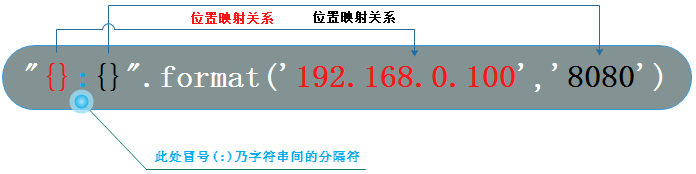
实例(Python3.0+):
print("{}:{}".format('192.168.0.100',8888))

#192.168.0.100:8888
关键字映射
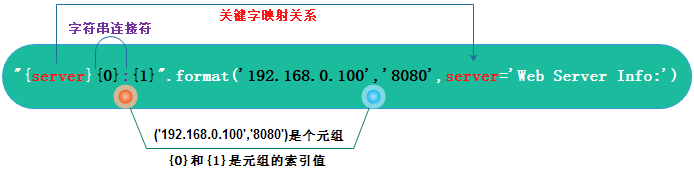
实例(Python3.0+):
print("{server}{1}:{0}".format(8888,'192.168.1.100',server='Web Server Info :'))

#Web Server Info :192.168.1.100:8888
元素访问
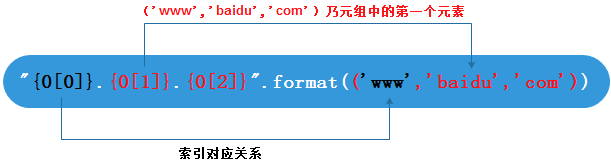
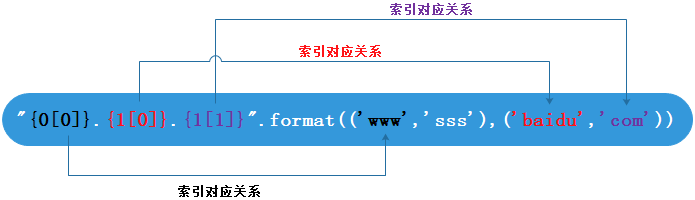
实例(Python3.0+):
print("{0[0]}.{0[1]}".format(('baidu','com')))

#baidu.com
填充对齐
- ^、<、>分别是居中、左对齐、右对齐
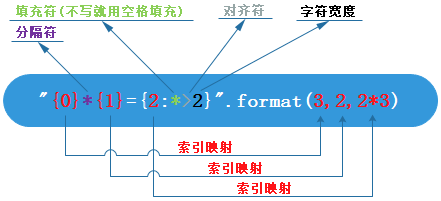
实例1(Python3.0+)
print("{0}*{1}={2:0>2}".format(3,2,2*3))

#3*2=06

print("{:*^30}".format('centered'))

#***********centered***********
实例2(Python3.0+):九九乘法表
for i in range(1,10):

    a = 1

    while a <= i:

        print("{0}*{1}={2:0>2}".format(a,i,a*i),end="\t")

        a +=1

    print()

"""

1*1=01

1*2=02  2*2=04

1*3=03  2*3=06  3*3=09

1*4=04  2*4=08  3*4=12  4*4=16

1*5=05  2*5=10  3*5=15  4*5=20  5*5=25

1*6=06  2*6=12  3*6=18  4*6=24  5*6=30  6*6=36

1*7=07  2*7=14  3*7=21  4*7=28  5*7=35  6*7=42  7*7=49

1*8=08  2*8=16  3*8=24  4*8=32  5*8=40  6*8=48  7*8=56  8*8=64

1*9=09  2*9=18  3*9=27  4*9=36  5*9=45  6*9=54  7*9=63  8*9=72  9*9=81

"""
精度设置
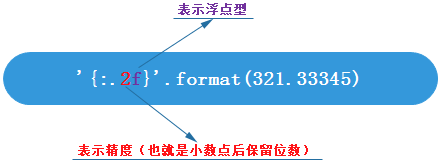
实例(Python3.0+):
print("{:.3f}".format(2.1415))

#2.142

print("{:.10f}".format(3.1415))

#3.1415000000
更多使用:
print("{:,}".format(123456))#输出1234,56

print("{a:w^8}".format(a="8"))#输出www8wwww,填充w

print("%.5f" %5)#输出5.000000

print("%-7s3" %("python"))#输出python 3

print("%.3e" %2016)#输出2.016e+03,也可以写大E

print("%d %s" %(123456,"myblog"))#输出123456 myblog

print("%(what)s is %(year)d" % {"what":"this year","year":2016})#输出this year is 2016

print("{0}{1}".format("hello","fun"))#输出hellofun,这与CSharp的格式化字符(占位符)相似

print("{}{}{}".format("spkk",".","cn"))#输出spkk.cn

print("{a[0]}{a[1]}{a[2]}".format(a=["spkk",".","cn"]))#输出spkk.cn

print("{dict[host]}{dict[dot]}{dict[domain]}".format(dict={"host":"www","domain":"spkk.cn","dot":"."}))#输出www.spkk.cn

print("{a}{b}".format(a="python",b="3"))#输出python3

print("{who} {doing} {0}".format("python",doing="like",who="I"))#输出I like python

print ('number:{1:d}:{2:.2f}:{3:e}:{4:%}'.format(*[1,2,3000,4,5,])) #输出 number:2:3000.00:4.000000e+00:500.000000%

print ('number:{num:o}:{num:0>.2f}:{num:b}:{num:x}:{num:X}'.format(num=15)) #输出 number:17:15.00:1111:f:F
 1 print("{:,}".format(123456))#输出1234,56

 2

 3 print("{a:w^8}".format(a="8"))#输出www8wwww,填充w

 4

 5 print("%.5f" %5)#输出5.000000

 6

 7 print("%-7s3" %("python"))#输出python 3

 8

 9 print("%.3e" %2016)#输出2.016e+03,也可以写大E

10

11 print("%d %s" %(123456,"myblog"))#输出123456 myblog

12

13 print("%(what)s is %(year)d" % {"what":"this year","year":2016})#输出this year is 2016

14

15 print("{0}{1}".format("hello","fun"))#输出hellofun,这与CSharp的格式化字符(占位符)相似

16

17 print("{}{}{}".format("spkk",".","cn"))#输出spkk.cn

18

19 print("{a[0]}{a[1]}{a[2]}".format(a=["spkk",".","cn"]))#输出spkk.cn

20

21 print("{dict[host]}{dict[dot]}{dict[domain]}".format(dict={"host":"www","domain":"spkk.cn","dot":"."}))#输出www.spkk.cn

22

23 print("{a}{b}".format(a="python",b="3"))#输出python3

24

25 print("{who} {doing} {0}".format("python",doing="like",who="I"))#输出I like python
(十四)Python3 字符串格式化的更多相关文章
- python学习(二十四) 字符串格式化
1: Test 1 a = 'city' b = 'country' print(" aaa %s bbb %s " % (a, b)) result: aaa city bbb ...
- Java开发笔记(三十五)字符串格式化
前面介绍了字符串变量的四种赋值方式,对于简单的赋值来说完全够用了,即便是两个字符串拼接,也只需通过加号把两个目标串连起来即可.但对于复杂的赋值来说就麻烦了,假设现在需要拼接一个很长的字符串,字符串内部 ...
- Python3 字符串格式化
1.字符串的格式化: 按照统一的规格去输出成为一个新的字符串 2.字符串格式化的方法: 1)format方法 fomat()有两个参数位置参数和关键字参数用中括号括起来{ } #{0}{1}为位置参数 ...
- Java开发笔记(三十四)字符串的赋值及类型转换
不管是基本的char字符型,还是包装字符类型Character,它们的每个变量只能存放一个字符,无法满足对一串字符的加工.为了能够直接操作一连串的字符,Java设计了专门的字符串类型String,该类 ...
- python3字符串格式化format()函数的简单用法
format()函数 """ 测试 format()函数 """ def testFormat(): # format()函数中有几个元素, ...
- C语言从零开始(十四)-字符串处理
在软件开发过程中,字符串的操作相当频繁.在标准C语言库中提供了很多字符串处理的函数.今天我们来介绍一些常用的字符串处理函数.1. 字符串输入输出1.1 printf() scanf() 之前我们学习过 ...
- Python3 字符串格式化(%操作符)
格式符 格式符为真实值预留位置,并控制显示的格式.格式符可以包含有一个类型码,用以控制显示的类型,如下: %s 字符串 (采用str()的显示) %r 字符串 (采用repr()的显示) ...
- Linux学习(十四)磁盘格式化、磁盘挂载、手动增加swap空间
一.磁盘格式化 分好去的磁盘需要格式化之后才可以使用.磁盘分区一般用mke2fs命令或者mkfs.filesystemtype.这个filesystemtype分为ext4,ext3,xfs等等.xf ...
- LeetCode第十四题-字符串数组中最长的共同前缀
Longest Common Prefix 问题简介: 编写一个函数来查找字符串数组中最长的公共前缀字符串,如果没有公共前缀,则返回空字符串"" 举例: 1: 输入: [“xwq” ...
随机推荐
- (DP ST表 线段树)51NOD 1174 区间中最大的数
给出一个有N个数的序列,编号0 - N - 1.进行Q次查询,查询编号i至j的所有数中,最大的数是多少. 例如: 1 7 6 3 1.i = 1, j = 3,对应的数为7 6 3,最大的数为7. ...
- 【爬坑系列】之kubernetes环境搭建:二进制安装与镜像安装
准备: 网上教如何编译与安装kubernetes的教程很多,需要提前准备的也很多,比如关闭selinux,防火墙啦....但有一点一定要注意,编译kubernetes源码时要求有2G内存,这个可是实打 ...
- WPF-按钮美化
我们不多哔哔,先放图: 美化按钮背景: 当我们用系统默认的按钮风格似乎太老套,而且不太美观,某些情况下我们需要对按钮进行美化和重绘,只有这样才能满足我们的需要 按钮美化思维引导: 图中1 为控件Bor ...
- 作为一个程序员,你了解 win 上有哪些必装的软件吗
关于 win 的一些基础必知内容之前已经分享过,没有看过的可以戳此处→Windows 使用之那些你还不知道操作 新系统安装的第一个软件 Google Chrome 毫无疑问,作为程序员应该是首选的浏览 ...
- 利用动态扫描和定时器1在数码管上显示出从765432开始以1/10秒的速度往下递减 直至765398并保持此数,与此同时利用定时器0以500MS速度进行流水灯从上至下移动 ,当数码管上数减到停止时,实验板上流水灯出停止然后全部开始闪烁,3秒后(用 T0定时)流水灯全部关闭,数码管上显示出“HELLO”,到此保持住
#include <reg52.h> #include <intrins.h> #define uchar unsigned char #define uint unsigne ...
- [IOI1998]Picture
Description 在一个平面上放置一些矩形,所有的边都为垂直或水平.每个矩形可以被其它矩形部分或完全遮盖,所有矩形合并成区域的边界周长称为轮廓周长. 要求:计算轮廓周长. 数据规模: 0≤矩形数 ...
- 题解报告:NYOJ 题目139 我排第几个(康托展开)
描述 现在有"abcdefghijkl”12个字符,将其所有的排列中按字典序排列,给出任意一种排列,说出这个排列在所有的排列中是第几小的? 输入 第一行有一个整数n(0<n<=1 ...
- Android偏好设置(7)自定义Preference,和PreferenceDialog
Building a Custom Preference The Android framework includes a variety of Preference subclasses that ...
- c#中stringbuilder的方法总结
String 对象是不可改变的.每次使用 System.String 类中的方法之一时,都要在内存中创建一个新的字符串对象,这就需要为该新对象分配新的空间.在需要对字符串执行重复修改的情况下,与创建新 ...
- linux下redis安装访问
下载编译安装 wget http://download.redis.io/releases/redis-3.0.1.tar.gz tar xvf redis-3.0.1.tar.gz mv redis ...