
idea14远程调试linux下的tomcat
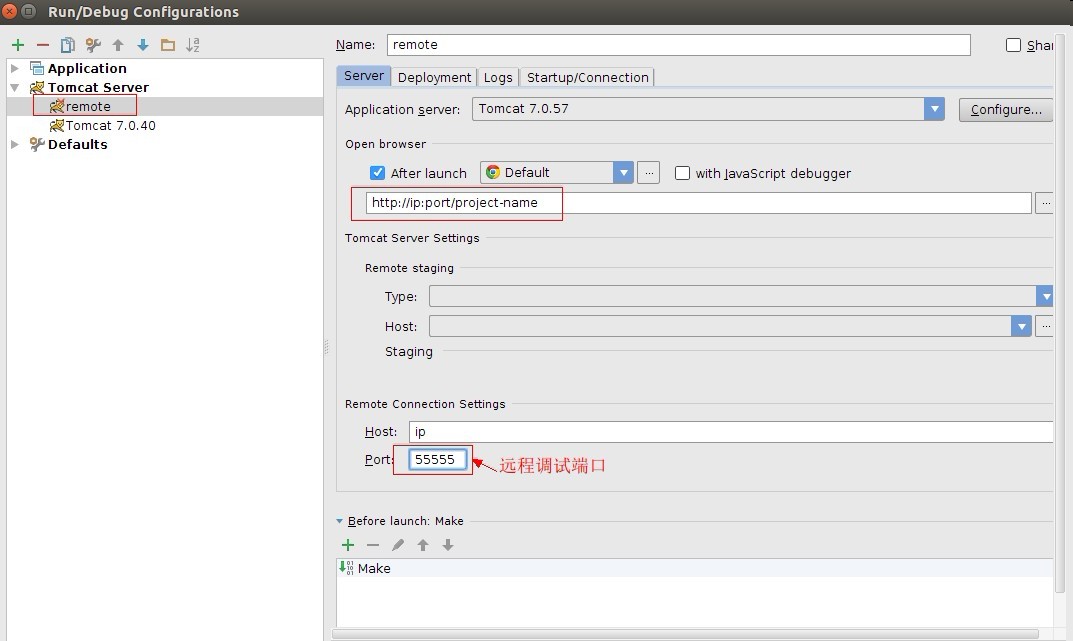
进入到idea的tomcat的run/debug配置,新建个remote tomcat,然后填写相关信息,如上图(注意远程调试端口)。
再选择Startup/Connection,如下图所示:
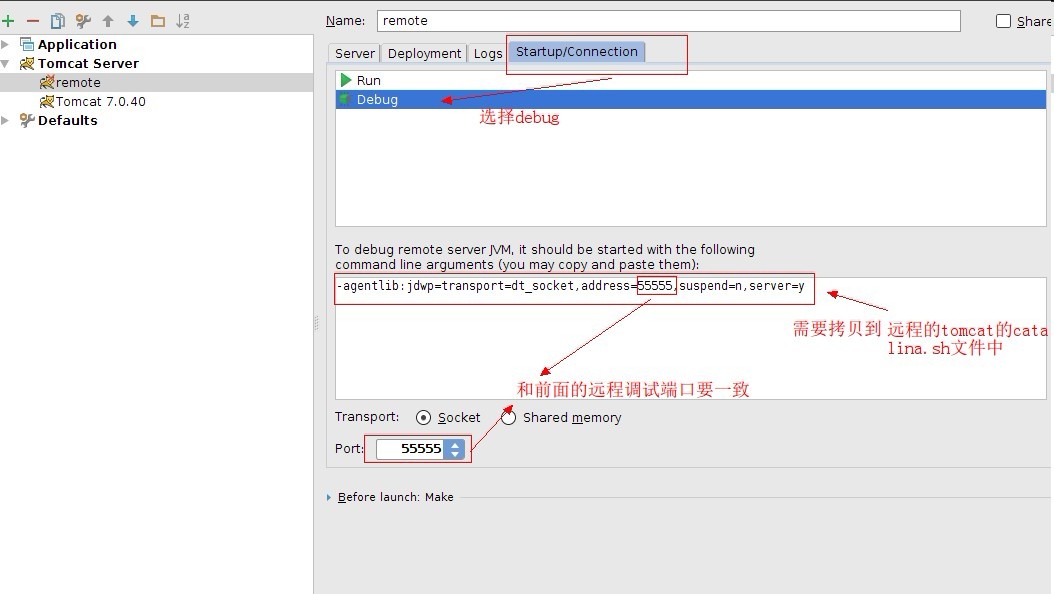
到此,idea已经配置好了,接下来将图上说的那段拷贝到远程的tomcat的catalina.sh文件中。
登陆到远程服务器,进入到tomcat的bin目录下,vi打开catalina.sh文件:
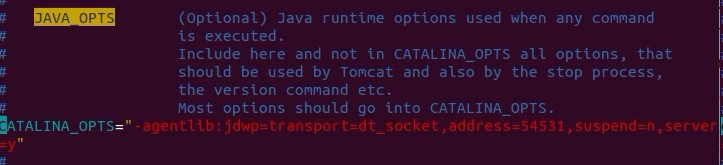
找到第一个JAVA_OPTS,添加:
JAVA_OPTS="-agentlib:jdwp=transport=dt_socket,address=54531,suspend=n,server=y"或者
CATALINA_OPTS="-agentlib:jdwp=transport=dt_socket,address=54531,suspend=n,server=y"
填一个即可。
重启下tomcat。
netstat -an | grep 55555,查看下55555端口是否打开,打开说民设置成功。
这样既可以使用idea远程调试了。
另外最好的方式就是不要去改动默认的sh文件,那就是自己写的debug.sh。
将startup.sh拷贝一份,改名为debug.sh.
打开,内容如下:
#!/bin/sh
# Licensed to the Apache Software Foundation (ASF) under one or more
# contributor license agreements. See the NOTICE file distributed with
# this work for additional information regarding copyright ownership.
# The ASF licenses this file to You under the Apache License, Version 2.0
# (the "License"); you may not use this file except in compliance with
# the License. You may obtain a copy of the License at
#
# http://www.apache.org/licenses/LICENSE-2.0
#
# Unless required by applicable law or agreed to in writing, software
# distributed under the License is distributed on an "AS IS" BASIS,
# WITHOUT WARRANTIES OR CONDITIONS OF ANY KIND, either express or implied.
# See the License for the specific language governing permissions and
# limitations under the License.
# -----------------------------------------------------------------------------
# Start Script for the CATALINA Server
# -----------------------------------------------------------------------------
# Better OS/400 detection: see Bugzilla 31132
os400=false
case "`uname`" in
OS400*) os400=true;;
esac
# resolve links - $0 may be a softlink
PRG="$0"
while [ -h "$PRG" ] ; do
ls=`ls -ld "$PRG"`
link=`expr "$ls" : '.*-> \(.*\)$'`
if expr "$link" : '/.*' > /dev/null; then
PRG="$link"
else
PRG=`dirname "$PRG"`/"$link"
fi
done
PRGDIR=`dirname "$PRG"`
EXECUTABLE=catalina.sh
# Check that target executable exists
if $os400; then
# -x will Only work on the os400 if the files are:
# 1. owned by the user
# 2. owned by the PRIMARY group of the user
# this will not work if the user belongs in secondary groups
eval
else
if [ ! -x "$PRGDIR"/"$EXECUTABLE" ]; then
echo "Cannot find $PRGDIR/$EXECUTABLE"
echo "The file is absent or does not have execute permission"
echo "This file is needed to run this program"
exit 1
fi
fi
export CATALINA_OPTS="-agentlib:jdwp=transport=dt_socket,address=55555,suspend=n,server=y"
exec "$PRGDIR"/"$EXECUTABLE" start "$@"
增加红色部分即可。
root@×××:/usr/local/tomcat/bin# sh debug.sh
Using CATALINA_BASE: /usr/local/tomcat
Using CATALINA_HOME: /usr/local/tomcat
Using CATALINA_TMPDIR: /usr/local/tomcat/temp
Using JRE_HOME: /usr/lib/jdk/jre
Using CLASSPATH: /usr/local/tomcat/bin/bootstrap.jar:/usr/local/tomcat/bin/tomcat-juli.jar
Tomcat started.
root@×××:/usr/local/tomcat/bin# netstat -ano|grep 55555
tcp 0 0 0.0.0.0:55555 0.0.0.0:* LISTEN off (0.00/0/0)
root@×××:/usr/local/tomcat/bin#
如果按上面步骤执行后,看见设置的端口已经被监听,说明配置成功。
idea14远程调试linux下的tomcat的更多相关文章
- idea远程调试linux下的tomcat
要远程调试代码,首先的保障本地的代码和远程tomcat的代码是同一份 首先在本地idea配置一个远程tomcat服务器 host就填写远程主机ip port填写访问的端口(不是调试端口) 然后在Sta ...
- 使用Windows上的Eclipse 远程调试 linux下的Tomcat
1:修改Linux上Tomcat的catalina.sh,第一行添加declare -x CATALINA_OPTS="-Xdebug -Xrunjdwp:transport=dt_sock ...
- 转载:JProfiler远程监控LINUX上的Tomcat过程细讲
来源于xuwanbest的博客 所谓"工欲善其事,必先利其器",好的工具确能起到事半工倍的作用.我用到的最多的就两个JConsole 和JProfiler .JConsole监 ...
- Linux下配置Tomcat服务器
Linux下配置Tomcat服务器和Windows下其实差不多,可以去官网下载安装包释放或者在线下载,只是当时下载的windows.zip文件,现在下载.tar.gz格式的即可,下面使用命令行的方式安 ...
- Linux下部署tomcat
在Linux系统下,重启Tomcat使用命令操作的! 首先,进入Tomcat下的bin目录 cd /usr/local/tomcat/bin 使用Tomcat关闭命令 ./shutdown.sh 查看 ...
- Linux下安装Tomcat服务器和部署Web应用
一.上传Tomcat服务器
- linux下查看tomcat和jdk版本号
linux下查看tomcat和jdk版本号的命令: 这个需要进入到bin目录下面 ,执行"./version.sh"命令 [root@hncsweb bin]# ./version ...
- 转】Linux下安装Tomcat服务器和部署Web应用
原博文出自于: http://www.cnblogs.com/xdp-gacl/p/4097608.html 感谢! 一.上传Tomcat服务器
- jmeter测试本地myeclips调试状态下的tomcat程序死锁
在myeclipse调试状态下的tomcat程序,用jmeter测试,居然发生死锁,调试两天无果,直接运行tomcat而不通过myeclipse,无死锁,真是又好气又好笑..
随机推荐
- Java 类型信息 —— 获取泛型类型的类对象(.class)
How to get a class instance of generics type T 考虑泛型类Foo<T>,在其成员中,如果想获取类型(type)T的类实例(class inst ...
- bzoj 1782: [Usaco2010 Feb]slowdown 慢慢游【dfs序+线段树】
考虑每头牛到达之后的影响,u到达之后,从1到其子树内的点需要放慢的都多了一个,p为u子树内点的牛ans会加1 用线段树维护dfs序,每次修改子树区间,答案直接单点查询p即可 #include<i ...
- P2600 [ZJOI2008]瞭望塔
传送门 暴力也行,退火也行,不是很明白为啥还要用半平面交-- 总之就是把原来的所有限制看成一堆半平面 根据黄学长的博客塔肯定建在转折处最优 //minamoto #include<bits/st ...
- [Swift]圆周率π
★★★★★★★★★★★★★★★★★★★★★★★★★★★★★★★★★★★★★★★★➤微信公众号:山青咏芝(shanqingyongzhi)➤博客园地址:山青咏芝(https://www.cnblogs. ...
- 洛谷P5398 [Ynoi2018]GOSICK(二次离线莫队)
题面 传送门 题解 维包一生推 首先请确保您会二次离线莫队 那么我们现在的问题就是怎么转移了,对于\(i\)和前缀\([1,r]\)的贡献,我们拆成\(b_i\)和\(c_i\)两部分,其中\(b_i ...
- python自动化学习笔记10-数据驱动DDT与yml的应用
在测试工作中,针对某一API接口,或者某一个用户界面的输入框,需要设计大量相关的用例,每一个用例包含实际输入的各种可能的数据.通常的做法是,将测试数据存放到一个数据文件里,然后从数据文件读取,在脚本中 ...
- 水题 Codeforces Round #105 (Div. 2) B. Escape
题目传送门 /* 水题:这题唯一要注意的是要用double,princess可能在一个小时之内被dragon赶上 */ #include <cstdio> #include <alg ...
- myeclipse中js文件报错
这几天在myeclipse中添加文件时,会报错,但是代码是从官网上下载的,没有错误,只是myeclipse的检查较为严格.在网上找到解决方案,希望可以帮到强迫症的人. 解决步骤: 1.window→P ...
- offset家族基本简介
Offset家族简介 offset这个单词本身是--偏移,补偿,位移的意思. js中有一套方便的获取元素尺寸的办法就是offset家族: offsetWidth和offsetHight 以及offse ...
- Android APK瘦身之webp图片
webp格式是谷歌推出的一种有损压缩格式,这种图片格式相比png或者jpg格式的图片损失的质量几乎可以忽略不计,但是压缩后图片的体积却比png或者jpg要小很多.亲测一个100kb的png图片经过we ...