
idea14远程调试linux下的tomcat
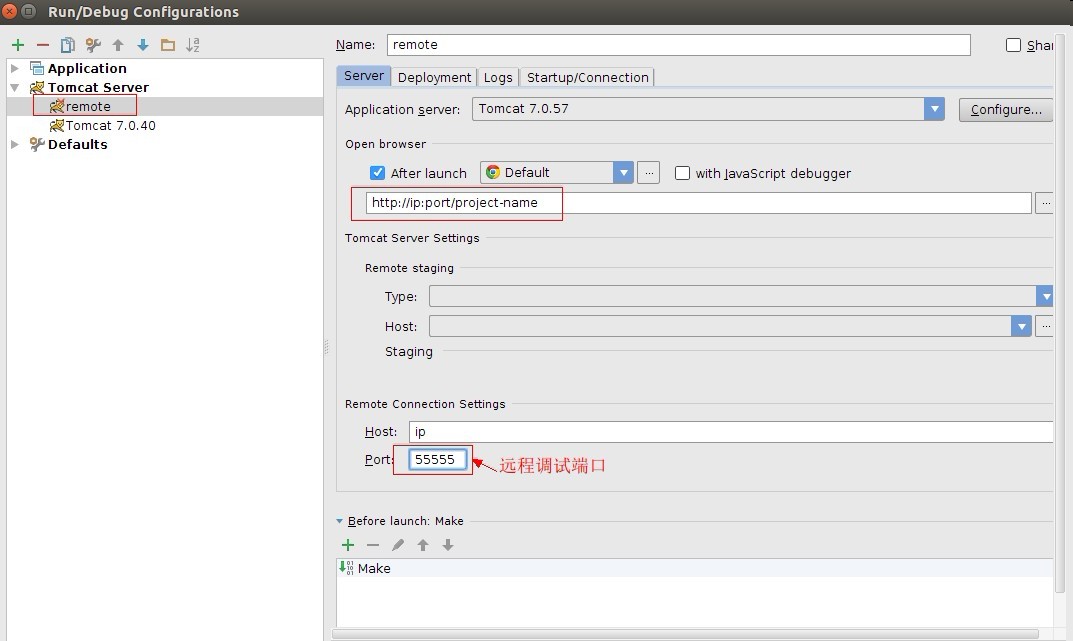
进入到idea的tomcat的run/debug配置,新建个remote tomcat,然后填写相关信息,如上图(注意远程调试端口)。
再选择Startup/Connection,如下图所示:
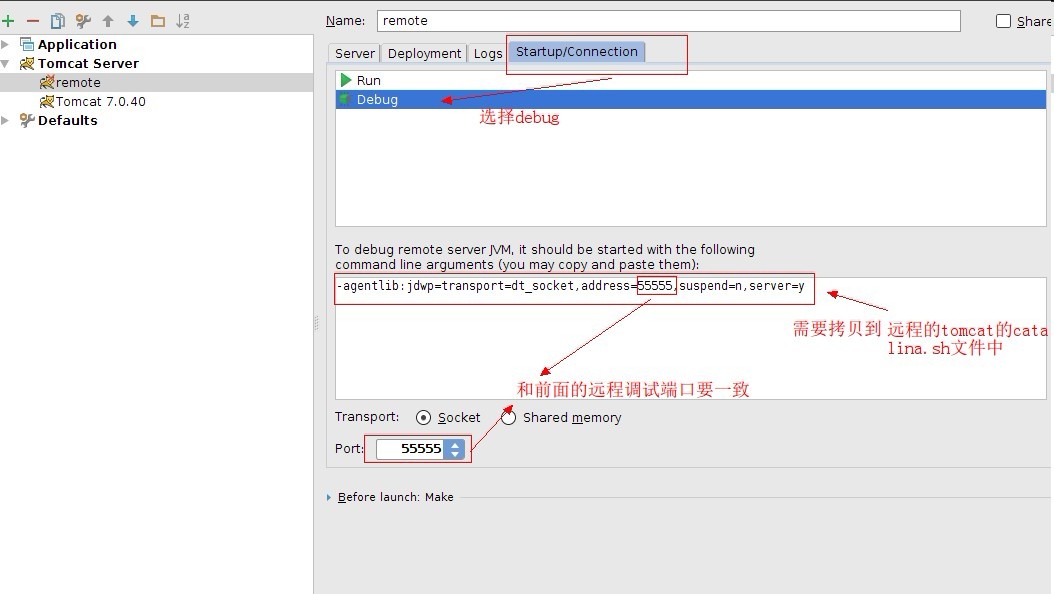
到此,idea已经配置好了,接下来将图上说的那段拷贝到远程的tomcat的catalina.sh文件中。
登陆到远程服务器,进入到tomcat的bin目录下,vi打开catalina.sh文件:
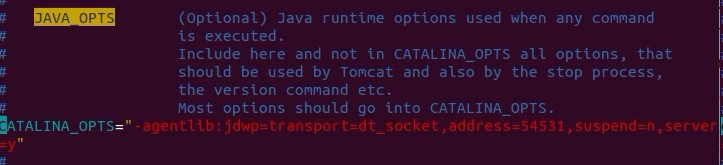
找到第一个JAVA_OPTS,添加:
JAVA_OPTS="-agentlib:jdwp=transport=dt_socket,address=54531,suspend=n,server=y"或者
CATALINA_OPTS="-agentlib:jdwp=transport=dt_socket,address=54531,suspend=n,server=y"
填一个即可。
重启下tomcat。
netstat -an | grep 55555,查看下55555端口是否打开,打开说民设置成功。
这样既可以使用idea远程调试了。
另外最好的方式就是不要去改动默认的sh文件,那就是自己写的debug.sh。
将startup.sh拷贝一份,改名为debug.sh.
打开,内容如下:
#!/bin/sh
# Licensed to the Apache Software Foundation (ASF) under one or more
# contributor license agreements. See the NOTICE file distributed with
# this work for additional information regarding copyright ownership.
# The ASF licenses this file to You under the Apache License, Version 2.0
# (the "License"); you may not use this file except in compliance with
# the License. You may obtain a copy of the License at
#
# http://www.apache.org/licenses/LICENSE-2.0
#
# Unless required by applicable law or agreed to in writing, software
# distributed under the License is distributed on an "AS IS" BASIS,
# WITHOUT WARRANTIES OR CONDITIONS OF ANY KIND, either express or implied.
# See the License for the specific language governing permissions and
# limitations under the License.
# -----------------------------------------------------------------------------
# Start Script for the CATALINA Server
# -----------------------------------------------------------------------------
# Better OS/400 detection: see Bugzilla 31132
os400=false
case "`uname`" in
OS400*) os400=true;;
esac
# resolve links - $0 may be a softlink
PRG="$0"
while [ -h "$PRG" ] ; do
ls=`ls -ld "$PRG"`
link=`expr "$ls" : '.*-> \(.*\)$'`
if expr "$link" : '/.*' > /dev/null; then
PRG="$link"
else
PRG=`dirname "$PRG"`/"$link"
fi
done
PRGDIR=`dirname "$PRG"`
EXECUTABLE=catalina.sh
# Check that target executable exists
if $os400; then
# -x will Only work on the os400 if the files are:
# 1. owned by the user
# 2. owned by the PRIMARY group of the user
# this will not work if the user belongs in secondary groups
eval
else
if [ ! -x "$PRGDIR"/"$EXECUTABLE" ]; then
echo "Cannot find $PRGDIR/$EXECUTABLE"
echo "The file is absent or does not have execute permission"
echo "This file is needed to run this program"
exit 1
fi
fi
export CATALINA_OPTS="-agentlib:jdwp=transport=dt_socket,address=55555,suspend=n,server=y"
exec "$PRGDIR"/"$EXECUTABLE" start "$@"
增加红色部分即可。
root@×××:/usr/local/tomcat/bin# sh debug.sh
Using CATALINA_BASE: /usr/local/tomcat
Using CATALINA_HOME: /usr/local/tomcat
Using CATALINA_TMPDIR: /usr/local/tomcat/temp
Using JRE_HOME: /usr/lib/jdk/jre
Using CLASSPATH: /usr/local/tomcat/bin/bootstrap.jar:/usr/local/tomcat/bin/tomcat-juli.jar
Tomcat started.
root@×××:/usr/local/tomcat/bin# netstat -ano|grep 55555
tcp 0 0 0.0.0.0:55555 0.0.0.0:* LISTEN off (0.00/0/0)
root@×××:/usr/local/tomcat/bin#
如果按上面步骤执行后,看见设置的端口已经被监听,说明配置成功。
idea14远程调试linux下的tomcat的更多相关文章
- idea远程调试linux下的tomcat
要远程调试代码,首先的保障本地的代码和远程tomcat的代码是同一份 首先在本地idea配置一个远程tomcat服务器 host就填写远程主机ip port填写访问的端口(不是调试端口) 然后在Sta ...
- 使用Windows上的Eclipse 远程调试 linux下的Tomcat
1:修改Linux上Tomcat的catalina.sh,第一行添加declare -x CATALINA_OPTS="-Xdebug -Xrunjdwp:transport=dt_sock ...
- 转载:JProfiler远程监控LINUX上的Tomcat过程细讲
来源于xuwanbest的博客 所谓"工欲善其事,必先利其器",好的工具确能起到事半工倍的作用.我用到的最多的就两个JConsole 和JProfiler .JConsole监 ...
- Linux下配置Tomcat服务器
Linux下配置Tomcat服务器和Windows下其实差不多,可以去官网下载安装包释放或者在线下载,只是当时下载的windows.zip文件,现在下载.tar.gz格式的即可,下面使用命令行的方式安 ...
- Linux下部署tomcat
在Linux系统下,重启Tomcat使用命令操作的! 首先,进入Tomcat下的bin目录 cd /usr/local/tomcat/bin 使用Tomcat关闭命令 ./shutdown.sh 查看 ...
- Linux下安装Tomcat服务器和部署Web应用
一.上传Tomcat服务器
- linux下查看tomcat和jdk版本号
linux下查看tomcat和jdk版本号的命令: 这个需要进入到bin目录下面 ,执行"./version.sh"命令 [root@hncsweb bin]# ./version ...
- 转】Linux下安装Tomcat服务器和部署Web应用
原博文出自于: http://www.cnblogs.com/xdp-gacl/p/4097608.html 感谢! 一.上传Tomcat服务器
- jmeter测试本地myeclips调试状态下的tomcat程序死锁
在myeclipse调试状态下的tomcat程序,用jmeter测试,居然发生死锁,调试两天无果,直接运行tomcat而不通过myeclipse,无死锁,真是又好气又好笑..
随机推荐
- 【HDU 3652】 B-numbers
[题目链接] 点击打开链接 [算法] 数位DP f[i][j][k][l]表示i位数,第一位为j,除以13的余数为k,是/否包括子串“13”的方案数 当然,我们也可以先打表,然后,对于每次询问,二分即 ...
- POJ1050 To the Max 最大子矩阵
POJ1050 给定一个矩阵,求和最大的子矩阵. 将每一列的值进行累加,枚举起始行和结束行,然后就可以线性优化了 复杂度O(n^3) #include<cstdio> #include&l ...
- bzoj1898 [Zjoi2005]Swamp 沼泽鳄鱼——矩阵快速幂
题目:https://www.lydsy.com/JudgeOnline/problem.php?id=1898 求到达方案数...还是矩阵快速幂: 能够到达就把邻接矩阵那里赋成1,有鳄鱼的地方从各处 ...
- 用C#读取txt文件的方法(转)
.使用FileStream读写文件 文件头: using System; using System.Collections.Generic; using System.Text; using Syst ...
- 昆石VOS3000_2.1.2.0完整安装包及安装脚本
安装包下载地址 http://www.51voip.org/post/57.html 安装教程: 上传安装包 ·给整个目录授权 chmod 777 /root/vosintsall 1.安装前准备 首 ...
- MySQL - MyCat 实现读写分离
前言 MyCat是一个彻底开源的,面向企业应用开发的大数据库集群,支持事务.ACID.可以替代MySQL的加强版数据库.其功能有可以视为MySQL集群的企业级数据库,用来替代昂贵的Oracle集群.融 ...
- Commons-FileUpload 常用API
ServerFileUpload类的常用方法 方法名称 方法描述 public void setSizeMax(long sizeMax) 设置请求信息实体内容的最大允许的字节数 public Lis ...
- bzoj 1741: [Usaco2005 nov]Asteroids 穿越小行星群【最大点覆盖】
二分图最大点覆盖模型,因为对于一个点(x,y)显然只要选x或者y就好了,于是连边,跑最大匹配=最大点覆盖(不会证) #include<iostream> #include<cstdi ...
- 论文翻译-SELF TRAINING AUTONOMOUS DRIVING AGENT
文献地址 链接:https://pan.baidu.com/s/1gHrpnOf1FXLp9u8OJ2-oCg 提取码:y2w6 作者 Shashank Kotyan, Danilo Vasconce ...
- O(1)的快速乘
那么 有位神仙已经说了O(1)的算法(当然不是我) 这是一种骚操作 直接放代码了啊 inline LL mul(LL a,LL b,LL Mod){ LL lf = a * ( b >> ...