
WPF DataGrid分页功能实现代码 修改原作者不能实现的部分
这两天需要给Datagrid加个分页,查找了一些相关的文章,发现有一个写了一个控件比较好,地址是 http://blog.csdn.net/zdw_wym/article/details/8221894
感谢这位大神12年的帖子,但是照着做了以后,发现除了点击数字和GO按钮好使意外,神马“首页、上一页、下一页、末页”都不好使。
继续找寻相关的资料和查看大神的源码,发现有的地方写的不对,因为textblock没有click事件,而大神写了click事件,所以没有得到触发,介于这个问题,我稍作了修改。
即给textblock添加里MouseLeftButtonUp事件,操作得以实现。
下面贴出全部源码,有需要的,可以使用
翻页控件xml文件
<UserControl x:Class="ImgProWPF.Paging"

             xmlns="http://schemas.microsoft.com/winfx/2006/xaml/presentation"

             xmlns:x="http://schemas.microsoft.com/winfx/2006/xaml"

             xmlns:mc="http://schemas.openxmlformats.org/markup-compatibility/2006"

             xmlns:d="http://schemas.microsoft.com/expression/blend/2008"

             mc:Ignorable="d">

    <UserControl.Resources>

        <Style x:Key="PageTextBlock1" TargetType="{x:Type TextBlock}">

            <Setter Property="VerticalAlignment" Value="Center"/>

            <Setter Property="HorizontalAlignment" Value="Left"/>

            <Setter Property="FontSize" Value=""/>

            <Setter Property="FontWeight" Value="Bold"/>

            <Setter Property="Foreground" Value="#FF333333"/>

        </Style>

        <!--首页上一页等-->

        <Style x:Key="PageTextBlock2" TargetType="{x:Type TextBlock}">

            <Setter Property="VerticalAlignment" Value="Center"/>

            <Setter Property="HorizontalAlignment" Value="Left"/>

            <Setter Property="Margin" Value="0,10,0,0"/>

            <Setter Property="Width" Value=""/>

            <Setter Property="Height" Value=""/>

            <Setter Property="FontSize" Value=""/>

            <Setter Property="Cursor" Value="Hand"/>

            <Setter Property="Foreground" Value="#FF333333"/>

            <Style.Triggers>

                <Trigger Property="IsMouseOver" Value="True">

                    <Setter Property="Foreground" Value="#FF000000"/>

                    <Setter Property="FontWeight" Value="Bold"/>

                </Trigger>

            </Style.Triggers>

        </Style>

        <!--中间页数-->

        <Style x:Key="PageTextBlock3" TargetType="{x:Type TextBlock}">

            <Setter Property="VerticalAlignment" Value="Center"/>

            <Setter Property="HorizontalAlignment" Value="Left"/>

            <Setter Property="Margin" Value="0,10,0,0"/>

            <Setter Property="Height" Value=""/>

            <Setter Property="Width" Value=""/>

            <Setter Property="FontSize" Value=""/>

            <Setter Property="Cursor" Value="Hand"/>

            <Setter Property="Foreground" Value="#FF333333"/>

            <Style.Triggers>

                <Trigger Property="IsMouseOver" Value="True">

                    <Setter Property="Foreground" Value="#FF000000"/>

                    <Setter Property="FontWeight" Value="Bold"/>

                </Trigger>

                <Trigger Property="IsEnabled" Value="False">

                    <Setter Property="Foreground" Value="#FF000000"/>

                    <Setter Property="FontWeight" Value="Bold"/>

                </Trigger>

            </Style.Triggers>

        </Style>

        <Style x:Key="PageTextBox" TargetType="{x:Type TextBox}">

            <Setter Property="Height" Value=""/>

            <Setter Property="Width" Value=""/>

            <Setter Property="BorderBrush" Value="{x:Null}"/>

            <Setter Property="HorizontalAlignment" Value="Left"/>

            <Setter Property="VerticalAlignment" Value="Bottom"/>

            <Style.Triggers>

                <Trigger Property="IsReadOnly" Value="True">

                    <Setter Property="Background" Value="#FFCCCCCC"/>

                </Trigger>

            </Style.Triggers>

        </Style>

        <Style x:Key="PageButton" TargetType="{x:Type Button}">

            <Setter Property="Height" Value=""/>

            <Setter Property="Width" Value=""/>

            <Setter Property="HorizontalAlignment" Value="Left"/>

            <Setter Property="VerticalAlignment" Value="Bottom"/>

        </Style>

    </UserControl.Resources>

    <Grid>

        <Border CornerRadius="" Background="Transparent" BorderBrush="{x:Null}">

            <Grid HorizontalAlignment="Stretch" Margin="5 0 5 0" VerticalAlignment="Top" Width="Auto" Height="">

                <Grid.ColumnDefinitions>

                    <ColumnDefinition Width=""/>

                    <ColumnDefinition Width="" MinWidth=""/>

                </Grid.ColumnDefinitions>

                <TextBlock Name="tbkRecords" Grid.Column="" Style="{StaticResource PageTextBlock1}"/>

                <StackPanel Orientation="Horizontal" HorizontalAlignment="Right" Grid.Column="">

                    <Grid>

                        <Grid.RowDefinitions>

                            <RowDefinition Height=""/>

                        </Grid.RowDefinitions>

                        <Grid.ColumnDefinitions>

                            <ColumnDefinition Width=""/>

                            <ColumnDefinition Width=""/>

                            <ColumnDefinition Width="*"/>

                            <ColumnDefinition Width=""/>

                            <ColumnDefinition Width=""/>

                            <ColumnDefinition Width=""/>

                            <ColumnDefinition Width=""/>

                        </Grid.ColumnDefinitions>

                        <TextBlock Grid.Column="" Name="btnFirst" Text="首页" IsEnabled="False" Style="{StaticResource PageTextBlock2}" MouseLeftButtonDown="btnFirst_MouseLeftButtonDown" MouseLeftButtonUp="btnFirst_MouseLeftButtonUp"/>

                        <TextBlock Grid.Column="" Name="btnPrev" Text="上一页" IsEnabled="False" Style="{StaticResource PageTextBlock2}" MouseLeftButtonDown="btnPrev_MouseLeftButtonDown" MouseLeftButtonUp="btnPrev_MouseLeftButtonUp"/>

                        <Grid Grid.Column="" Name="grid">

                            <Grid.RowDefinitions>

                                <RowDefinition Height=""/>

                            </Grid.RowDefinitions>

                        </Grid>

                        <TextBlock Grid.Column="" x:Name="btnNext" Text="下一页" IsEnabled="False" Style="{StaticResource PageTextBlock2}" MouseLeftButtonDown="btnNext_MouseLeftButtonDown" MouseLeftButtonUp="btnNext_MouseLeftButtonUp"/>

                        <TextBlock Grid.Column="" x:Name="btnLast" Text="末页" IsEnabled="False" Style="{StaticResource PageTextBlock2}" MouseLeftButtonDown="btnLast_MouseLeftButtonDown" MouseLeftButtonUp="btnLast_MouseLeftButtonUp"/>

                        <TextBox Grid.Column="" x:Name="pageGo" MaxLength="" IsReadOnly="True" Style="{StaticResource PageTextBox}"/>

                        <Button Grid.Column="" x:Name="btnGo" Content="GO" IsEnabled="False" Style="{StaticResource PageButton}" Click="btnGo_Click"/>

                    </Grid>

                </StackPanel>

            </Grid>

        </Border>

    </Grid>

</UserControl>
Paging.xaml
翻页控件.cs文件
using System;

using System.Collections.Generic;

using System.Linq;

using System.Text;

using System.Threading.Tasks;

using System.Windows;

using System.Windows.Controls;

using System.Windows.Data;

using System.Windows.Documents;

using System.Windows.Input;

using System.Windows.Media;

using System.Windows.Media.Imaging;

using System.Windows.Navigation;

using System.Windows.Shapes;

using System.Data;

using System.Text.RegularExpressions;

namespace ImgProWPF

{

    /// <summary>

    /// Paging.xaml 的交互逻辑

    /// </summary>

    public partial class Paging : UserControl

    {

        public Paging()

        {

            InitializeComponent();

        }

        #region 参数

        private DataTable _dt = new DataTable();

        //每页显示多少条

        private int pageNum = ;

        //当前是第几页

        private int pIndex = ;

        //对象

        private DataGrid grdList;

        //最大页数

        private int MaxIndex = ;

        //一共多少条

        private int allNum = ;

        #endregion

        #region 初始化数据

        public void ShowPages(DataGrid grd, DataTable ds, int Num)

        {

            if (ds == null || ds.Rows.Count == )

                return;

            if (ds.Rows.Count == )

                return;

            DataTable dt = ds;

            this._dt = dt.Clone();

            this.grdList = grd;

            this.pageNum = Num;

            this.pIndex = ;

            foreach (DataRow r in dt.Rows)

                this._dt.ImportRow(r);

            SetMaxIndex();

            ReadDataTable();

            if(this.MaxIndex>)

            {

                this.pageGo.IsReadOnly = false;

                this.btnGo.IsEnabled = true;

            }

        }

        #endregion

        #region 画数据

        private void ReadDataTable()

        {

            try

            {

                DataTable tmpTable = new DataTable();

                tmpTable = this._dt.Clone();

                int first = this.pageNum * (this.pIndex - );

                first = (first > ) ? first : ;

                //如果总数量大于每页显示数量

                if (this._dt.Rows.Count >= this.pageNum * this.pIndex)

                {

                    for (int i = first; i < pageNum * this.pIndex; i++)

                    {

                        tmpTable.ImportRow(this._dt.Rows[i]);

                    }

                }

                else

                {

                    for (int i = first; i < this._dt.Rows.Count; i++)

                    {

                        tmpTable.ImportRow(this._dt.Rows[i]);

                    }

                }

                this.grdList.ItemsSource = tmpTable.DefaultView;

                tmpTable.Dispose();

            }

            catch

            {

                MessageBox.Show("错误");

            }

            finally

            {

                DisplayPagingInfo();

            }

        }

        #endregion

        #region 画每页显示的数据

        private void DisplayPagingInfo()

        {

            if (this.pIndex == )

            {

                this.btnPrev.IsEnabled = false;

                this.btnFirst.IsEnabled = false;

            }

            else

            {

                this.btnPrev.IsEnabled = true;

                this.btnFirst.IsEnabled = true;

            }

            if (this.pIndex == this.MaxIndex)

            {

                this.btnNext.IsEnabled = false;

                this.btnLast.IsEnabled = false;

            }

            else

            {

                this.btnNext.IsEnabled = true;

                this.btnLast.IsEnabled = true;

            }

            this.tbkRecords.Text = string.Format("每页{0}条/共{1}条", this.pageNum, this.allNum);

            int first = (this.pIndex - ) >  ? (this.pIndex - ) : ;

            int last = (first + ) > this.MaxIndex ? this.MaxIndex : (first + );

            this.grid.Children.Clear();

            for (int i = first; i <= last; i++)

            {

                ColumnDefinition cdf = new ColumnDefinition();

                this.grid.ColumnDefinitions.Add(cdf);

                TextBlock tbl = new TextBlock();

                tbl.Text = i.ToString();

                tbl.Style = FindResource("PageTextBlock3") as Style;

                tbl.MouseLeftButtonUp += new MouseButtonEventHandler(tbl_MouseLeftButtonUp);

                tbl.MouseLeftButtonDown += new MouseButtonEventHandler(tbl_MouseLeftButtonDown);

                if (i == this.pIndex)

                    tbl.IsEnabled = false;

                Grid.SetColumn(tbl, this.grid.ColumnDefinitions.Count - );

                Grid.SetRow(tbl, );

                this.grid.Children.Add(tbl);

            }

        }

        #endregion

        #region 首页

        /// <summary>

        /// 首页

        /// </summary>

        /// <param name="sender"></param>

        /// <param name="e"></param>

        private void btnFirst_MouseLeftButtonUp(object sender, MouseButtonEventArgs e)

        {

            this.pIndex = ;

            ReadDataTable();

        }

        private void btnFirst_MouseLeftButtonDown(object sender, MouseButtonEventArgs e)

        {

            e.Handled = true;

        }

        #endregion

        #region 上一页

        /// <summary>

        /// 上一页

        /// </summary>

        /// <param name="sender"></param>

        /// <param name="e"></param>

        private void btnPrev_MouseLeftButtonUp(object sender, MouseButtonEventArgs e)

        {

            if (this.pIndex <= )

                return;

            this.pIndex--;

            ReadDataTable();

        }

        private void btnPrev_MouseLeftButtonDown(object sender, MouseButtonEventArgs e)

        {

            e.Handled = true;

        }

        #endregion

        #region 下一页

        /// <summary>

        /// 下一页

        /// </summary>

        /// <param name="sender"></param>

        /// <param name="e"></param>

        private void btnNext_MouseLeftButtonUp(object sender, MouseButtonEventArgs e)

        {

            if (this.pIndex >= this.MaxIndex)

                return;

            this.pIndex++;

            ReadDataTable();

        }

        private void btnNext_MouseLeftButtonDown(object sender, MouseButtonEventArgs e)

        {

            e.Handled = true;

        }

        #endregion

        #region 末页

        /// <summary>

        /// 末页

        /// </summary>

        /// <param name="sender"></param>

        /// <param name="e"></param>

        private void btnLast_MouseLeftButtonUp(object sender, MouseButtonEventArgs e)

        {

            this.pIndex = this.MaxIndex;

            ReadDataTable();

        }

        private void btnLast_MouseLeftButtonDown(object sender, MouseButtonEventArgs e)

        {

            e.Handled = true;

        }

        #endregion

        #region 设置最多页面

        /// <summary>

        /// 设置最多页面

        /// </summary>

        private void SetMaxIndex()

        {

            //多少页

            int Pages = this._dt.Rows.Count / pageNum;

            if (this._dt.Rows.Count != (Pages * pageNum))

            {

                if (_dt.Rows.Count < (Pages * pageNum))

                    Pages--;

                else

                    Pages++;

            }

            this.MaxIndex = Pages;

            this.allNum = this._dt.Rows.Count;

        }

        #endregion

        #region 跳转到多少页

        /// <summary>

        /// 跳转到多少页

        /// </summary>

        /// <param name="sender"></param>

        /// <param name="e"></param>

        private void btnGo_Click(object sender, RoutedEventArgs e)

        {

            if(IsNumber(this.pageGo.Text))

            {

                int pageNum = int.Parse(this.pageGo.Text);

                if(pageNum>&&pageNum<=this.MaxIndex)

                {

                    this.pIndex = pageNum;

                    ReadDataTable();

                }

                else if(pageNum>this.MaxIndex)

                {

                    this.pIndex = this.MaxIndex;

                    ReadDataTable();

                }

            }

            this.pageGo.Text = "";

        }

        #endregion

        #region 分页数字的点击触发事件

        private void tbl_MouseLeftButtonUp(object sender, MouseButtonEventArgs e)

        {

            TextBlock tbl = sender as TextBlock;

            if (tbl == null)

                return;

            int index = int.Parse(tbl.Text.ToString());

            this.pIndex = index;

            if (index > this.MaxIndex)

                this.pIndex = this.MaxIndex;

            if (index < )

                this.pIndex = ;

            ReadDataTable();

        }

        private void tbl_MouseLeftButtonDown(object sender, MouseButtonEventArgs e)

        {

            e.Handled = true;

        }

        #endregion

        private static Regex RegNumber = new Regex("^[0-9]+$");

        #region 判断是否是数字

        public static bool IsNumber(string valString)

        {

            Match m = RegNumber.Match(valString);

            return m.Success;

        }

        #endregion

    }

}
Paging.xaml.cs
主页调用xml文件
<local:Paging x:Name="GridPaging"/>
主页调用.cs文件
        public void Band()

        {

            DBConfig DB = new DBConfig();

            ds = DB.SearchAll(txtSearch.Text);

            DGInformation.ItemsSource = null;

            DGInformation.ItemsSource = ds.Tables[].DefaultView;//Datagrid数据绑定

            GridPaging.ShowPages(this.DGInformation, ds.Tables[], );//分页部分

        }
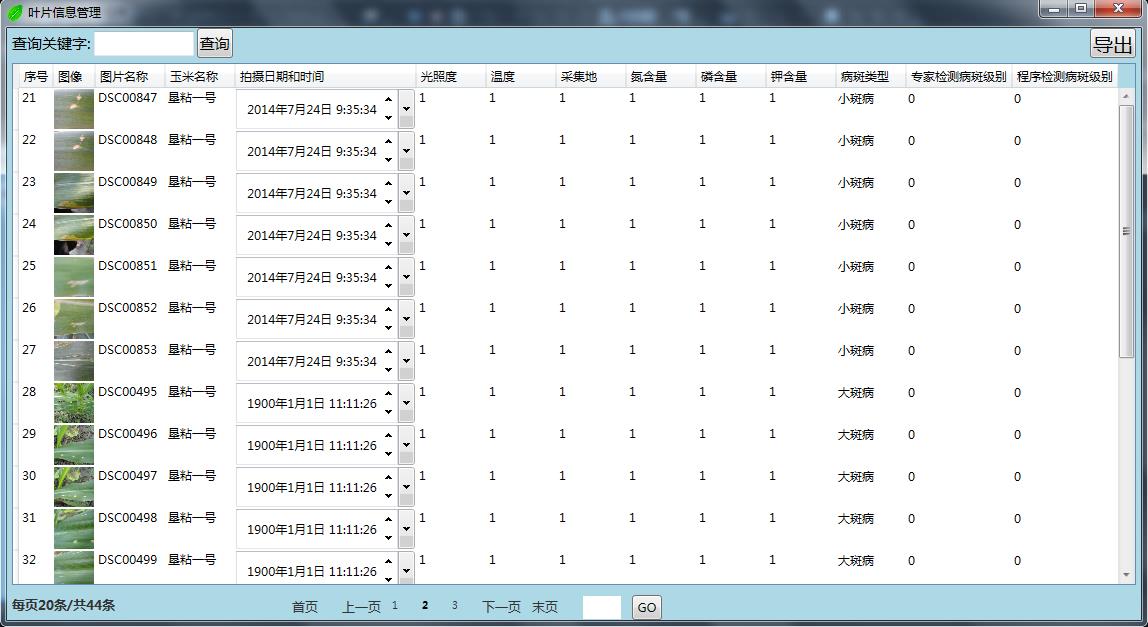
效果图展示


不知道是数据源里包含图片的原因还是什么原因,在翻页的时候,会很慢,等很长时间才能翻页,这个问题,不知道是控件引起的,还是我绑定数据引起的,等解决了,我会在本帖说明。
还有一点就是,我启用了WPF里的datagrid的序号,不过这个不像WEB里的分页以后序号是连贯的,这个是重新分配,这个也是一个需要解决的问题。
实验证明,翻页缓慢是由使用datagrid自身的排序导致的,因此,采用SQL直接查询序号,同原有数据一同绑定到datagrid,问题解决。

WPF DataGrid分页功能实现代码 修改原作者不能实现的部分的更多相关文章
- WPF DataGrid分页功能实现代码
在Silverlight中DataGrid分页可以结合DataPager控件很容易实现,但是在WPF中没有类似的,需要手动实现这样一个控件: 1.创建一个UserControl,DP.xaml,代码如 ...
- WPF做验证码,小部分修改原作者内容
原文地址:http://www.cnblogs.com/tianguook/p/4142346.html 首先感谢aparche大牛的帖子,因为过两天可能要做个登录的页面,因此,需要用到验证码,从而看 ...
- 静态页分页功能js代码
<!DOCTYPE html PUBLIC "-//W3C//DTD XHTML 1.0 Transitional//EN" "http://www.w3.org/ ...
- WPF之 DataGrid分页
接着上一篇WPF之 DataGrid数据绑定,继续讲述WPF中DataGrid分页. 由于分页经常用到,就做了一个自定义控件,由于当时的局限性,只支持DataTable数据源,不过木关系,网上很多其他 ...
- WPF DataGrid的分页实现
原理:其实分页功能的实现大家都清楚,无非就是把一个记录集通过运算来刷选里面对应页码的记录. 接来下我们再次添加新的代码 <Grid> <DataGrid Name="da ...
- 一行代码调用实现带字段选取+条件判断+排序+分页功能的增强ORM框架
问题:3行代码 PDF.NET是一个开源的数据开发框架,它的特点是简单.轻量.快速,易上手,而且是一个注释完善的国产开发框架,受到不少朋友的欢迎,也在我们公司的项目中多次使用.但是,PDF.NET比起 ...
- 分页查询关键代码 多条件查询关键代码 删除选中商品关键代码 修改要先回显再修改 修改要先回显再修改 同一业务集中使用同一servlet的方法
分页查询关键代码: 通过servlet转发回来的各种信息进行分页的设计(转发回的信息有 分页查询的List集合 查询的页码 查询的条数 查询的数据库总条数 查询的总页码) 从开始时循环10次出现十个数 ...
- 简单的beego分页功能代码
一个简单的beego分页小插件(源代码在最下面): 支持条件查询 支持参数保留 支持自定义css样式 支持表/视图 支持参数自定义 默认为pno 支持定义生成链接的个数 使用方式: 1)action中 ...
- WPF DataGrid常用属性记录
WPF DataGrid常用属性记录 组件常用方法: BeginEdit:使DataGrid进入编辑状态. CancelEdit:取消DataGrid的编辑状态. CollapseRowGroup:闭 ...
随机推荐
- DateTable利用NPOI导出Excel 公共方法
protected void Export_Excel(DataTable dt) { string filename = "学生基本信息.xls"; ) { filename = ...
- 栈的JS实现
栈,是一种特殊的线性表,其插入及删除的操作都在线性表的同一端进行.这一端称为栈顶,另一端称为栈底.就类似于餐厅里的一摞盘子,后放的盘子在上方,也会先被人拿走.栈具有"后进先出"的逻 ...
- [翻译svg教程]svg 中的g元素
svg 中的<g>元素用来组织svg元素.如果一组svg元素被g元素包裹了,你可以通过对g元素进行变换(transform),被g元素包裹的元素也将被变换,就好这些被svg包裹的元素是一个 ...
- 【模拟】POJ 3087
直达–>POJ 3087 Shuffle'm Up 题意:一开始没怎么看明白,注意现是从S2里拿牌放在最底下,再放S1,这样交叉放(我一开始以为是S1和S2随意哪个先放,分别模拟取最小),然后在 ...
- Java技术体系图
Java程序员高级特性 反射.泛型.注释符.自动装箱和拆箱.枚举类.可变 参数.可变返回类型.增强循环.静态导入 核心编程 ...
- Centos7强制卸载Mariadb
之前安装过Mariadb 10.2.1版本,现在安装10.1.19版本,提示安装成功了,其实是失败的.MariaDB-server 提示已经安装,通过 rpm qa|grep MariaDB 查看 发 ...
- Altium Designer之AD16在Win10系统下无法切换走线/布线模式的解决办法
有些童鞋会在Win10下使用AD16的时候发现,走线模式/布线模式(切换直角,45°,弧形等)不能切换. 问题出在输入法上,一般是切换到英文输入法即可解决,但是有一种情况是win10系统自带输入法有时 ...
- vim插件之tabular,代码对齐强迫症必备
本周整理一批别人写的代码,要处理好所有的注释和缩进. 碰到那种大片的赋值或者注释或者宏定义,但又没对齐的,简直太难看了. 于是手工对了几个,觉得确实不是人干的活,心想这种需求应该有工具自动搞定才对啊, ...
- MVC辅助方法
我相信很多人虽然经常用mvc去做一些东西,但是可能很少使用mvcHtml辅助方法 首先我们要创建一个mvc项目 二创建一个HtmlHelper文件夹 三编写文件 四调用辅助方法 调用辅助方法 和使用其 ...
- java读写Properties属性文件公用方法
Java中有个比较重要的类Properties(Java.util.Properties),主要用于读取Java的配置文件. 它提供了几个主要的方法: 1. getProperty ( String ...