
ABAP 邮件
function zint_send_email.
*"----------------------------------------------------------------------
*"*"區域介面:
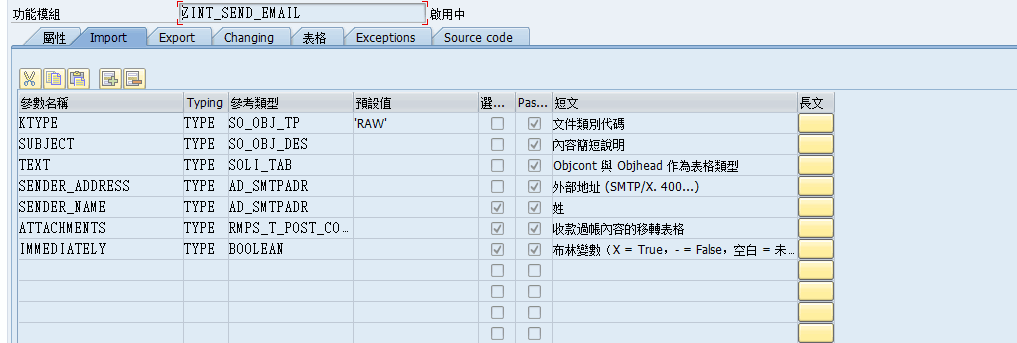
*" IMPORTING
*" VALUE(KTYPE) TYPE SO_OBJ_TP DEFAULT 'RAW'
*" VALUE(SUBJECT) TYPE SO_OBJ_DES
*" VALUE(TEXT) TYPE SOLI_TAB
*" VALUE(SENDER_ADDRESS) TYPE AD_SMTPADR
*" VALUE(SENDER_NAME) TYPE AD_SMTPADR OPTIONAL
*" VALUE(ATTACHMENTS) TYPE RMPS_T_POST_CONTENT OPTIONAL
*" VALUE(IMMEDIATELY) TYPE BOOLEAN OPTIONAL
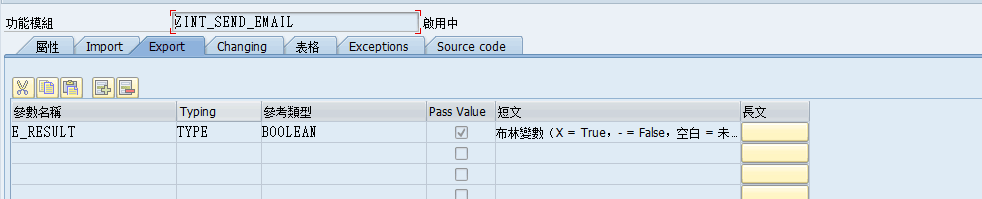
*" EXPORTING
*" VALUE(E_RESULT) TYPE BOOLEAN
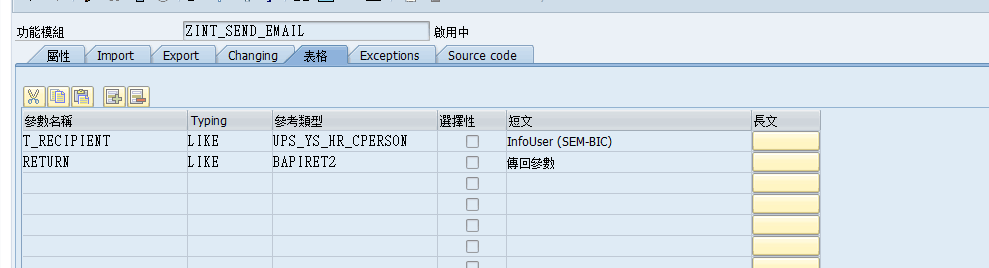
*" TABLES
*" T_RECIPIENT STRUCTURE UPS_YS_HR_CPERSON
*" RETURN STRUCTURE BAPIRET2
*"----------------------------------------------------------------------
data:send_request type ref to cl_bcs,
document type ref to cl_document_bcs,
sender_id type ref to if_sender_bcs,
fail type ref to cx_bcs,
recipient type ref to if_recipient_bcs.
data:w_return like bapiret2,
w_rename type ad_smtpadr,
w_attachment like line of attachments,
w_attachment_subject type sood-objdes.
*BREAK CP900.
refresh return.
clear e_result.
e_result = 'X'.
if ktype is initial.
w_return-type = 'E'.
w_return-message = '未指定文件類別代碼'.
w_return-parameter = 'KTYPE'.
append w_return to return.
clear e_result.
endif.
if subject is initial.
w_return-type = 'E'.
w_return-message = '未指定郵件主題'.
w_return-parameter = 'SUBJECT'.
append w_return to return.
clear e_result.
endif.
if text[] is initial.
w_return-type = 'E'.
w_return-message = '未指定郵件內容'.
w_return-parameter = 'TEXT'.
append w_return to return.
clear e_result.
endif.
if sender_address is initial.
w_return-type = 'E'.
w_return-message = '未指定發送人郵件地址'.
w_return-parameter = 'SENDER_ADDRESS'.
append w_return to return.
clear e_result.
endif.
if t_recipient[] is initial.
w_return-type = 'E'.
w_return-message = '未指定接收人郵件地址'.
w_return-parameter = 'RECIPIENT'.
append w_return to return.
clear e_result.
endif.
clear w_return.
check e_result is not initial.
try.
* 第一步: 创建发送请求
send_request = cl_bcs=>create_persistent( ).
* 第二步: 创建整理发送内容
document = cl_document_bcs=>create_document(
i_type = ktype
i_text = text
i_subject = subject ).
* 增加附件內容
loop at attachments into w_attachment.
w_attachment_subject = w_attachment-subject.
document->add_attachment(
exporting
i_attachment_type = w_attachment-objtp
i_attachment_subject = w_attachment_subject
i_att_content_hex = w_attachment-cont_hex ).
endloop.
* 第三步: 添加邮件内容到发送请求
send_request->set_document( document ).
* 第四步:設置發送人出件地址
sender_id = cl_cam_address_bcs=>create_internet_address(
i_address_string = sender_address
i_address_name = sender_name ).
send_request->set_sender( sender_id ).
* 第五步: 接收者邮件地址转换
loop at t_recipient where cperson ne '99999999'.
w_rename = t_recipient-emnam.
recipient = cl_cam_address_bcs=>create_internet_address(
i_address_string = t_recipient-e_mail
i_address_name = w_rename ).
send_request->add_recipient( recipient ).
endloop.
loop at t_recipient where cperson eq '99999999'.
w_rename = t_recipient-emnam.
recipient = cl_cam_address_bcs=>create_internet_address(
i_address_string = t_recipient-e_mail
i_address_name = w_rename ).
* SEND_REQUEST->ADD_RECIPIENT( RECIPIENT ).
call method send_request->add_recipient
exporting
i_recipient = recipient
i_copy = 'X'.
endloop.
* 第六步,設置狀態屬性
send_request->set_status_attributes(
i_requested_status = 'E'
i_status_mail = 'E' ).
send_request->set_send_immediately( immediately ).
* 第七步: 正式发送并提交作业
send_request->send( i_with_error_screen = 'X' ).
commit work and wait.
catch cx_bcs into fail.
e_result = ''.
w_return-type = 'E'.
w_return-message = fail->get_text( ).
append w_return to return.
clear w_return.
endtry.
endfunction.
ABAP 邮件的更多相关文章
- ABAP发邮件函数
步骤: 一.检查输入参数, (1)未指定文件類別代碼,(2)未指定郵件主題, (3)未指定郵件內容, (4)未指定發送人郵件地址, (5)未指定接收人郵件地址, 二.调用发送功能, (1)创建发送请求 ...
- ABAP 发邮件(三)
[转自http://blog.sina.com.cn/s/blog_7c7b16000101bnxk.html]SAP ABAP 发邮件方法三(OO) *&------------------ ...
- 【ABAP系列】SAP 如何用ABAP实现自动发送外部邮件
公众号:SAP Technical 本文作者:matinal 原文出处:http://www.cnblogs.com/SAPmatinal/ 原文链接:[ABAP系列]SAP 如何用ABAP实现自动发 ...
- 【ABAP系列】SAP ABAP实现发送外部邮件(添加附件)功能
公众号:SAP Technical 本文作者:matinal 原文出处:http://www.cnblogs.com/SAPmatinal/ 原文链接:[MM系列]SAP ABAP实现发送外部邮件(添 ...
- 【ABAP系列】SAP ABAP模块-任意report作为附件以邮件形式发送
公众号:SAP Technical 本文作者:matinal 原文出处:http://www.cnblogs.com/SAPmatinal/ 原文链接:[ABAP系列]SAP ABAP模块-任意rep ...
- ABAP开发顾问必备:SAP ABAP开发技术总结
声明:原创作品,转载时请注明文章来自SAP师太技术博客( 博/客/园www.cnblogs.com):www.cnblogs.com/jiangzhengjun,并以超链接形式标明文章原始出处,否则将 ...
- ABAP常用函数集锦
函数名 描述 SD_VBAP_READ_WITH_VBELN 根据销售订单读取表vbap中的信息EDIT_LINES 把READ_TEXT返回的LINES中的行按照TDFORMAT=“*”重新组织VI ...
- ABAP 常用FUNCTION集锦(转)
此文章从网上抄摘,目的用于自己记录 DYNP_VALUES_READ – 读取SCREEN字段的值,也可以用来读取报表SELECTION SCREEN. DYNP_VALUES_UPDATE – 更新 ...
- abap 常用 function
ABAP常用函数总结 alv .smartform. excel .text.邮件 .远程访问,FTP服务器... **********常用功能function REUSE_ALV_GRID_DI ...
随机推荐
- Linux 配置yum本地安装源
cat /etc/system-release Red Hat Enterprise Linux Server release 7.0 (Maipo) 1 使用本地源得先挂载ISO光盘文件 # 可以创 ...
- 转载 vue的基础使用
转载https://www.cnblogs.com/majj/p/9957597.html#top vue的介绍 前端框架和库的区别 nodejs的简单使用 vue的起步 指令系统 组件的使用 过滤器 ...
- uC/OSii之任务划分
满足以下几个指标将会使软件设计比较简洁高效. 满足实时性指标 任务数目合理 简化软件系统 降低资源需求 设备依赖性划分:主要是对于一些输入输出设备进行划分,输入输出设备分为主动型和被动性.主动型有一个 ...
- 杭电 2141 Can you find it? (二分法)
Description Give you three sequences of numbers A, B, C, then we give you a number X. Now you need t ...
- 如何查看Laravel版本号的三种方法
1.PHP artisan --version 2.vim vendor/laravel/framework/src/Illuminate/Foundation/Application.php 3:可 ...
- Jedis 工具类
package com.pig4cloud.pigx.admin.utils; import redis.clients.jedis.*; import java.util.ArrayList; im ...
- unittest多线程执行用例
前言 假设执行一条脚本(.py)用例一分钟,那么100个脚本需要100分钟,当你的用例达到一千条时需要1000分钟,也就是16个多小时... 那么如何并行运行多个.py的脚本,节省时间呢?这就用到多线 ...
- eclispe使用
eclipse 快捷键 ctrl+shif+o :去除多余引用 ctrl+shift+x :转大写 ctrl+shift+y :转小写 ctrl+o :查找方法 Alt+ ← :回 ...
- 线程&线程池
线程 进程和线程: 进程只是用来把资源集中到一起(进程只是一个资源单位,或者说资源集合),而线程才是cpu上的执行单位. 注意:两个都是过程 线程一个特点: 一个进程中,多个线程共享资源 线程和进程区 ...
- [vijos1891]学姐的逛街计划
学姐的逛街计划 描述 doc 最近太忙了, 每天都有课. 这不怕, d ...