
ABAP 邮件
function zint_send_email.
*"----------------------------------------------------------------------
*"*"區域介面:
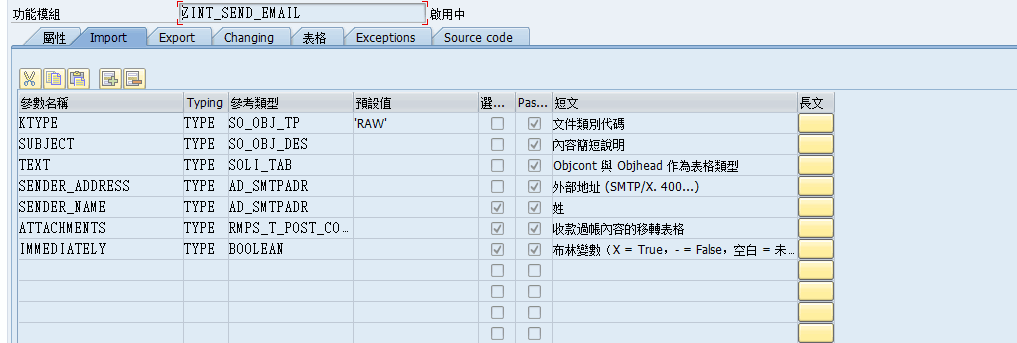
*" IMPORTING
*" VALUE(KTYPE) TYPE SO_OBJ_TP DEFAULT 'RAW'
*" VALUE(SUBJECT) TYPE SO_OBJ_DES
*" VALUE(TEXT) TYPE SOLI_TAB
*" VALUE(SENDER_ADDRESS) TYPE AD_SMTPADR
*" VALUE(SENDER_NAME) TYPE AD_SMTPADR OPTIONAL
*" VALUE(ATTACHMENTS) TYPE RMPS_T_POST_CONTENT OPTIONAL
*" VALUE(IMMEDIATELY) TYPE BOOLEAN OPTIONAL
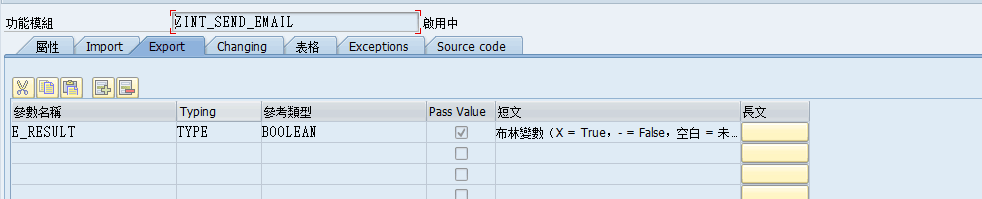
*" EXPORTING
*" VALUE(E_RESULT) TYPE BOOLEAN
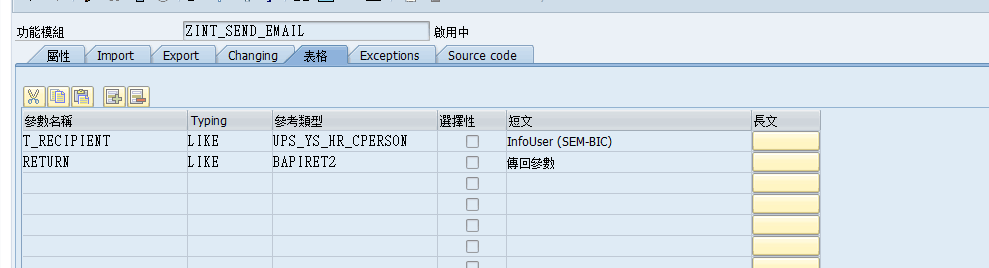
*" TABLES
*" T_RECIPIENT STRUCTURE UPS_YS_HR_CPERSON
*" RETURN STRUCTURE BAPIRET2
*"----------------------------------------------------------------------
data:send_request type ref to cl_bcs,
document type ref to cl_document_bcs,
sender_id type ref to if_sender_bcs,
fail type ref to cx_bcs,
recipient type ref to if_recipient_bcs.
data:w_return like bapiret2,
w_rename type ad_smtpadr,
w_attachment like line of attachments,
w_attachment_subject type sood-objdes.
*BREAK CP900.
refresh return.
clear e_result.
e_result = 'X'.
if ktype is initial.
w_return-type = 'E'.
w_return-message = '未指定文件類別代碼'.
w_return-parameter = 'KTYPE'.
append w_return to return.
clear e_result.
endif.
if subject is initial.
w_return-type = 'E'.
w_return-message = '未指定郵件主題'.
w_return-parameter = 'SUBJECT'.
append w_return to return.
clear e_result.
endif.
if text[] is initial.
w_return-type = 'E'.
w_return-message = '未指定郵件內容'.
w_return-parameter = 'TEXT'.
append w_return to return.
clear e_result.
endif.
if sender_address is initial.
w_return-type = 'E'.
w_return-message = '未指定發送人郵件地址'.
w_return-parameter = 'SENDER_ADDRESS'.
append w_return to return.
clear e_result.
endif.
if t_recipient[] is initial.
w_return-type = 'E'.
w_return-message = '未指定接收人郵件地址'.
w_return-parameter = 'RECIPIENT'.
append w_return to return.
clear e_result.
endif.
clear w_return.
check e_result is not initial.
try.
* 第一步: 创建发送请求
send_request = cl_bcs=>create_persistent( ).
* 第二步: 创建整理发送内容
document = cl_document_bcs=>create_document(
i_type = ktype
i_text = text
i_subject = subject ).
* 增加附件內容
loop at attachments into w_attachment.
w_attachment_subject = w_attachment-subject.
document->add_attachment(
exporting
i_attachment_type = w_attachment-objtp
i_attachment_subject = w_attachment_subject
i_att_content_hex = w_attachment-cont_hex ).
endloop.
* 第三步: 添加邮件内容到发送请求
send_request->set_document( document ).
* 第四步:設置發送人出件地址
sender_id = cl_cam_address_bcs=>create_internet_address(
i_address_string = sender_address
i_address_name = sender_name ).
send_request->set_sender( sender_id ).
* 第五步: 接收者邮件地址转换
loop at t_recipient where cperson ne '99999999'.
w_rename = t_recipient-emnam.
recipient = cl_cam_address_bcs=>create_internet_address(
i_address_string = t_recipient-e_mail
i_address_name = w_rename ).
send_request->add_recipient( recipient ).
endloop.
loop at t_recipient where cperson eq '99999999'.
w_rename = t_recipient-emnam.
recipient = cl_cam_address_bcs=>create_internet_address(
i_address_string = t_recipient-e_mail
i_address_name = w_rename ).
* SEND_REQUEST->ADD_RECIPIENT( RECIPIENT ).
call method send_request->add_recipient
exporting
i_recipient = recipient
i_copy = 'X'.
endloop.
* 第六步,設置狀態屬性
send_request->set_status_attributes(
i_requested_status = 'E'
i_status_mail = 'E' ).
send_request->set_send_immediately( immediately ).
* 第七步: 正式发送并提交作业
send_request->send( i_with_error_screen = 'X' ).
commit work and wait.
catch cx_bcs into fail.
e_result = ''.
w_return-type = 'E'.
w_return-message = fail->get_text( ).
append w_return to return.
clear w_return.
endtry.
endfunction.
ABAP 邮件的更多相关文章
- ABAP发邮件函数
步骤: 一.检查输入参数, (1)未指定文件類別代碼,(2)未指定郵件主題, (3)未指定郵件內容, (4)未指定發送人郵件地址, (5)未指定接收人郵件地址, 二.调用发送功能, (1)创建发送请求 ...
- ABAP 发邮件(三)
[转自http://blog.sina.com.cn/s/blog_7c7b16000101bnxk.html]SAP ABAP 发邮件方法三(OO) *&------------------ ...
- 【ABAP系列】SAP 如何用ABAP实现自动发送外部邮件
公众号:SAP Technical 本文作者:matinal 原文出处:http://www.cnblogs.com/SAPmatinal/ 原文链接:[ABAP系列]SAP 如何用ABAP实现自动发 ...
- 【ABAP系列】SAP ABAP实现发送外部邮件(添加附件)功能
公众号:SAP Technical 本文作者:matinal 原文出处:http://www.cnblogs.com/SAPmatinal/ 原文链接:[MM系列]SAP ABAP实现发送外部邮件(添 ...
- 【ABAP系列】SAP ABAP模块-任意report作为附件以邮件形式发送
公众号:SAP Technical 本文作者:matinal 原文出处:http://www.cnblogs.com/SAPmatinal/ 原文链接:[ABAP系列]SAP ABAP模块-任意rep ...
- ABAP开发顾问必备:SAP ABAP开发技术总结
声明:原创作品,转载时请注明文章来自SAP师太技术博客( 博/客/园www.cnblogs.com):www.cnblogs.com/jiangzhengjun,并以超链接形式标明文章原始出处,否则将 ...
- ABAP常用函数集锦
函数名 描述 SD_VBAP_READ_WITH_VBELN 根据销售订单读取表vbap中的信息EDIT_LINES 把READ_TEXT返回的LINES中的行按照TDFORMAT=“*”重新组织VI ...
- ABAP 常用FUNCTION集锦(转)
此文章从网上抄摘,目的用于自己记录 DYNP_VALUES_READ – 读取SCREEN字段的值,也可以用来读取报表SELECTION SCREEN. DYNP_VALUES_UPDATE – 更新 ...
- abap 常用 function
ABAP常用函数总结 alv .smartform. excel .text.邮件 .远程访问,FTP服务器... **********常用功能function REUSE_ALV_GRID_DI ...
随机推荐
- kafka flumn sparkstreaming java实现监听文件夹内容保存到Phoenix中
ps:具体Kafka Flumn SparkStreaming的使用 参考前几篇博客 2.4.6.4.1 配置启动Kafka (1) 在slave机器上配置broker 1) 点击CDH上的kafk ...
- 大数据学习——mapreduce运营商日志增强
需求 1.对原始json数据进行解析,变成普通文本数据 2.求出每个人评分最高的3部电影 3.求出被评分次数最多的3部电影 数据 https://pan.baidu.com/s/1gPsQXVYSQE ...
- xtu summer individual-4 B - Party All the Time
Party All the Time Time Limit: 2000ms Memory Limit: 32768KB This problem will be judged on HDU. Orig ...
- OO第三次作业总结(JML)
第三单元的课题是JML, 即java建模语言.JML是一种描述接的语言.通过前置条件和后置条件,描述一个模块的行为.本单元我们扮演一个项目中的一员,完成自己的一小部分工作,最终实现整个项目.而限制我们 ...
- PTA 04-树6 Complete Binary Search Tree (30分)
题目地址 https://pta.patest.cn/pta/test/16/exam/4/question/669 5-7 Complete Binary Search Tree (30分) A ...
- 七牛云赵之健:多维度融合赋能视频 AI 的实践
6 月 30 日下午,赵之健在七牛架构师实践日第二十九期进行了<多维度融合赋能视频 AI 的实践>为题的实战分享. 作者简介: 赵之健,七牛人工智能实验室资深算法工程师, 七 ...
- 楼房重建(bzoj 2957)
Description 小A的楼房外有一大片施工工地,工地上有N栋待建的楼房.每天,这片工地上的房子拆了又建.建了又拆.他经常无聊地看着窗外发呆,数自己能够看到多少栋房子. 为了简化问题,我们考虑这些 ...
- UVA12345 (带修改的莫队)
UVA12345 Dynamic len Problem : 给一个序列,每次询问一个区间里面的数字种类数量,或者修改某一个位置的值. Solution : 第一关键字分块排序左端点,第二关键字分块排 ...
- 2018 百度之星 初赛 第六题 HDU6349
三原色图 Accepts: 281 Submissions: 1261 Time Limit: 1500/1000 MS (Java/Others) Memory Limit: 262144/ ...
- 压力测试webbench(转)
最近app需要搭建后台,故此研究一下,靠谱的后台服务器..网传nginx 能达到的并发数量比apache 高. LAMP or LNMP ? 根据需求测试结果来进行选择. 首先是安装LNMP测试完后 ...