
Suricata的所有运行方式模式(图文详解)
不多说,直接上干货!
suricata的基本组成。Suricata是由所谓的线程(threads)、线程模块 (thread-modules)和队列(queues)组成。Suricata是一个多线程的程序,因此在同一时刻会有多个线程在工作。线程模块是依据 功能来划分的,比如一个模块用于解析数据包,另一个模块用于检测数据包等。每个数据包可能会有多个不同的线程进行处理,队列就是用于将数据包从一个线程传 递到另一个线程。与此同时,一个线程可以拥有多个线程模块,但是在某一时刻只有一个模块在运行(原文是If they have more modules, they can only be active on a a time.看不大懂,感觉是这个意思)。
Suricata支持多种运行模式。运行模式决定了不同的线程如何用于IDS。
以下命令可以查看所有 可用的运行模式。
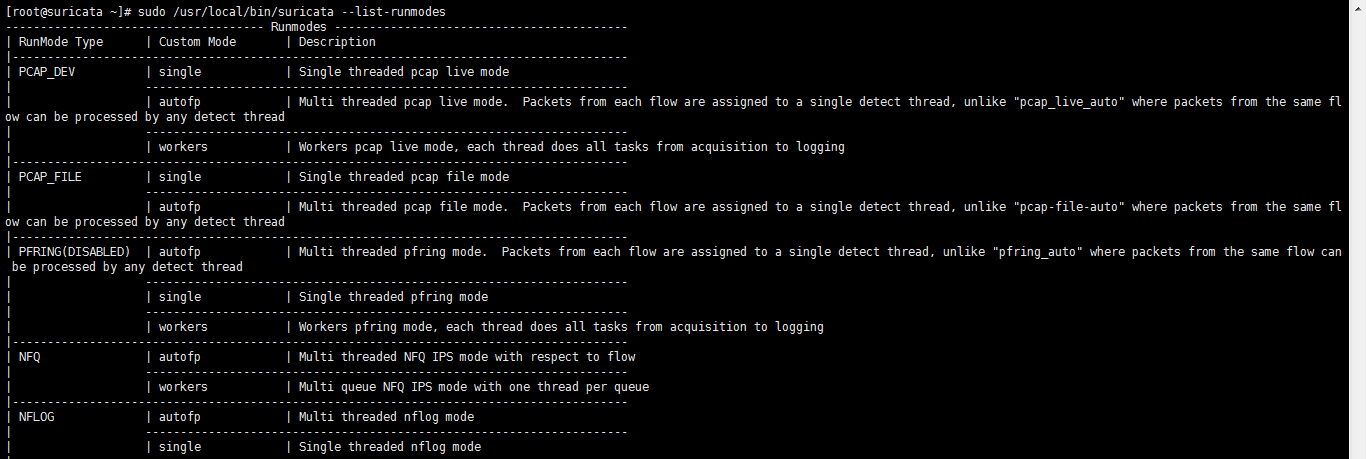
[root@suricata ~]# sudo /usr/local/bin/suricata --list-runmodes

------------------------------------- Runmodes ------------------------------------------

| RunMode Type  | Custom Mode       | Description

|----------------------------------------------------------------------------------------

| PCAP_DEV          | single            | Single threaded pcap live mode

|                   ---------------------------------------------------------------------

|                   | autofp            | Multi threaded pcap live mode.  Packets from each flow are assigned to a single detect thread, unlike "pcap_live_auto" where packets from the same flow can be processed by any detect thread

|                   ---------------------------------------------------------------------

|                   | workers           | Workers pcap live mode, each thread does all tasks from acquisition to logging

|----------------------------------------------------------------------------------------

| PCAP_FILE         | single            | Single threaded pcap file mode

|                   ---------------------------------------------------------------------

|                   | autofp            | Multi threaded pcap file mode.  Packets from each flow are assigned to a single detect thread, unlike "pcap-file-auto" where packets from the same flow can be processed by any detect thread

|----------------------------------------------------------------------------------------

| PFRING(DISABLED)  | autofp            | Multi threaded pfring mode.  Packets from each flow are assigned to a single detect thread, unlike "pfring_auto" where packets from the same flow can be processed by any detect thread

|                   ---------------------------------------------------------------------

|                   | single            | Single threaded pfring mode

|                   ---------------------------------------------------------------------

|                   | workers           | Workers pfring mode, each thread does all tasks from acquisition to logging

|----------------------------------------------------------------------------------------

| NFQ               | autofp            | Multi threaded NFQ IPS mode with respect to flow

|                   ---------------------------------------------------------------------

|                   | workers           | Multi queue NFQ IPS mode with one thread per queue

|----------------------------------------------------------------------------------------

| NFLOG             | autofp            | Multi threaded nflog mode

|                   ---------------------------------------------------------------------

|                   | single            | Single threaded nflog mode

|                   ---------------------------------------------------------------------

|                   | workers           | Workers nflog mode

|----------------------------------------------------------------------------------------

| IPFW              | autofp            | Multi threaded IPFW IPS mode with respect to flow

|                   ---------------------------------------------------------------------

|                   | workers           | Multi queue IPFW IPS mode with one thread per queue

|----------------------------------------------------------------------------------------

| ERF_FILE          | single            | Single threaded ERF file mode

|                   ---------------------------------------------------------------------

|                   | autofp            | Multi threaded ERF file mode.  Packets from each flow are assigned to a single detect thread

|----------------------------------------------------------------------------------------

| ERF_DAG           | autofp            | Multi threaded DAG mode.  Packets from each flow are assigned to a single detect thread, unlike "dag_auto" where packets from the same flow can be processed by any detect thread

|                   ---------------------------------------------------------------------

|                   | single            | Singled threaded DAG mode

|                   ---------------------------------------------------------------------

|                   | workers           | Workers DAG mode, each thread does all  tasks from acquisition to logging

|----------------------------------------------------------------------------------------

| AF_PACKET_DEV     | single            | Single threaded af-packet mode

|                   ---------------------------------------------------------------------

|                   | workers           | Workers af-packet mode, each thread does all tasks from acquisition to logging

|                   ---------------------------------------------------------------------

|                   | autofp            | Multi socket AF_PACKET mode.  Packets from each flow are assigned to a single detect thread.

|----------------------------------------------------------------------------------------

| NETMAP(DISABLED)  | single            | Single threaded netmap mode

|                   ---------------------------------------------------------------------

|                   | workers           | Workers netmap mode, each thread does all tasks from acquisition to logging

|                   ---------------------------------------------------------------------

|                   | autofp            | Multi threaded netmap mode.  Packets from each flow are assigned to a single detect thread.

|----------------------------------------------------------------------------------------

| UNIX_SOCKET       | single            | Unix socket mode

|----------------------------------------------------------------------------------------

[root@suricata ~]#
Suricata的运行方式就是上面介绍的线程(threads)、线程模块(thread-modules)和队列(queues)三种元素的不 同组合方式。
上图中的RunMode Type并不是配置文件中的runmodes选项,而是后面的Custom Mode也就是自定义模式才可以在此处设置。比如默认的Runmodes是autofp,在线实时检测流量的模式中其结构如下,单线程模块获取数据包和解码,多线程模块检测。
以下大家也可以去官网看。
https://redmine.openinfosecfoundation.org/projects/suricata/wiki/Runmodes
Example of the default runmode:(即这是Suricata的的默认运行模式:autofp)
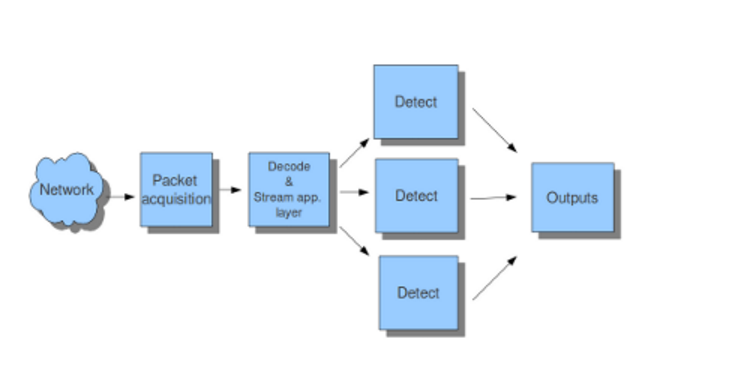
Suricata使用的默认运行模式是autofp(代表“自动流绑定负载均衡模式”)。在这种模式下,来自每一路流的数据包被分配给单一的检测线程。流被分配给了未处理数据包数量最少的线程。
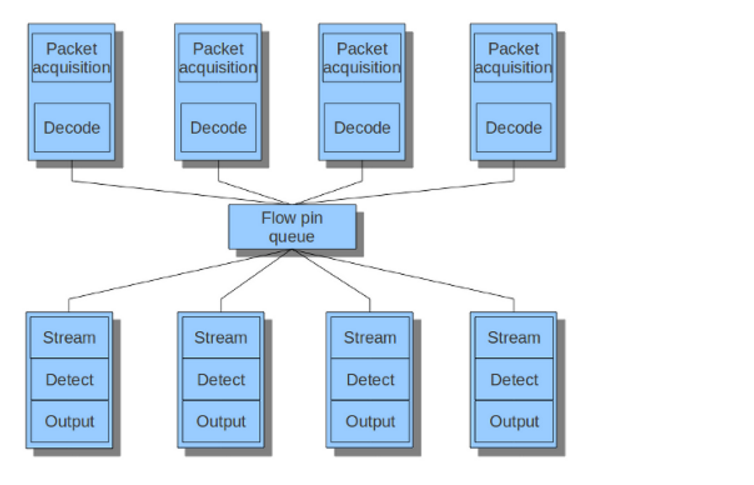
In the pfring mode, every flow follows its own fixed route in the runmode.
Suricata的所有运行方式模式(图文详解)的更多相关文章
- Activity启动模式图文详解
转载自:http://jcodecraeer.com/a/anzhuokaifa/androidkaifa/2015/0520/2897.html 英文原文:Understand Android A ...
- Centos 7 进入单用户模式图文详解
由于昨晚做了一个很傻X的事情,所以有幸进入了CentOS 7 的单用户模式. CentOS 7 在进入单用户的时候和6.x做了很多的改变, 下面让我们来看看如何进入单用户模式. 如何进入CentOS ...
- Stamus Networks的产品SELKS(Suricata IDPS、Elasticsearch 、Logstash 、Kibana 和 Scirius )的下载和安装(带桌面版和不带桌面版)(图文详解)
不多说,直接上干货! SELKS是什么? SELKS 是Stamus Networks的产品,它是基于Debian的自启动运行发行,面向网络安全管理.它基于自己的图形规则管理器提供一套完整的.易于使 ...
- Window下PHP三种运行方式图文详解,window下的php是不是单进程的?
Window下PHP三种运行方式图文详解,window下的php是不是单进程的? PHP运行目前为止主要有三种方式: a.以模块加载的方式运行,初学者可能不容易理解,其实就是将PHP集成到Apache ...
- 基于CentOS6.5或Ubuntu14.04下Suricata里搭配安装 ELK (elasticsearch, logstash, kibana)(图文详解)
前期博客 基于CentOS6.5下Suricata(一款高性能的网络IDS.IPS和网络安全监控引擎)的搭建(图文详解)(博主推荐) 基于Ubuntu14.04下Suricata(一款高性能的网络ID ...
- suricata.yaml (一款高性能的网络IDS、IPS和网络安全监控引擎)默认配置文件(图文详解)
不多说,直接上干货! 前期博客 基于CentOS6.5下Suricata(一款高性能的网络IDS.IPS和网络安全监控引擎)的搭建(图文详解)(博主推荐) 或者 基于Ubuntu14.04下Suric ...
- 基于CentOS6.5下Suricata(一款高性能的网络IDS、IPS和网络安全监控引擎)的搭建(图文详解)(博主推荐)
不多说,直接上干货! 为什么,要写这篇论文? 是因为,目前科研的我,正值研三,致力于网络安全.大数据.机器学习研究领域! 论文方向的需要,同时不局限于真实物理环境机器实验室的攻防环境.也不局限于真实物 ...
- Cocos2d-x win7 + vs2010 配置图文详解
Cocos2d-x win7 + vs2010 配置图文详解 下载最新版的cocos2d-x.打开浏览器,输入cocos2d-x.org,然后选择Download,本教程写作时最新版本为cocos2d ...
- Hadoop集群搭建安装过程(三)(图文详解---尽情点击!!!)
Hadoop集群搭建安装过程(三)(图文详解---尽情点击!!!) 一.JDK的安装 安装位置都在同一位置(/usr/tools/jdk1.8.0_73) jdk的安装在克隆三台机器的时候可以提前安装 ...
- HTML标签----图文详解
国庆节快乐,还在加班的童鞋,良辰必有重谢! 本文主要内容 头标签 排版标签:<p> <br> <hr> <center> ...
随机推荐
- Java设计模式-设计模式的六种原则
所谓无招胜有招,练一门功夫分为内功和外功. 外功好比招式,就是所谓的23种设计模式.而内功呢,就是心法,那就是这6种法则.光会外功那是花拳绣腿,内功修为才是境地. 如此众多的设计模式,学完2遍.3遍可 ...
- random模块的使用
random模块用于生成随机数 import random print random.random() #用于生成小于1大于0的数 print random.randint(1,5) #生成大于等于1 ...
- Making User-Managed Backups-17.3、Making User-Managed Backups of Offline Tablespaces and Datafiles
17.3.Making User-Managed Backups of Offline Tablespaces and Datafiles 备份离线的表空间时.须要注意下面指导原则: (1)不能离线s ...
- BZOJ 2243: [SDOI2011]染色 树链剖分+线段树区间合并
2243: [SDOI2011]染色 Description 给定一棵有n个节点的无根树和m个操作,操作有2类: 1.将节点a到节点b路径上所有点都染成颜色c: 2.询问节点a到节点b路径上的颜色段数 ...
- C++明确规定,不能获取构造函数和析构函数的地址
C++标准明确规定,不能获取构造函数和析构函数的地址,因此也无法形成指向他们的成员函数指针. 指向成员函数的指针可以,指向构造函数析构函数的不行.因为构造函数和析构函数都是没有返回值的,无法声明一个没 ...
- Enterprise Architect 生成项目类图
Enterprise Architect使用教程: https://blog.csdn.net/chenglc1612/article/details/81083151 主要流程 --到此-自动生成完 ...
- JS数组array常用方法
JS数组array常用方法 1.检测数组 1)检测对象是否为数组,使用instanceof 操作符 if(value instanceof Array) { //对数组执行某些操作 } 2)获取对象的 ...
- 就是要第一个出场的albus 【BZOJ】 线性基
就是我代码里读入之后的那一部分. 1.(一下a[]为原数组 a'[]为线性基) 线性基 中的a'[i]其实 是 原来的a[]中的某个子集(2^n个子集中的某个) 异或出来的 可能会有其他的子集与它异 ...
- SimpliciTI 地址分配
1.多个ED节点和AP正确连接后,AP都会给ED分配一个相应的地址.当某个ED出现意外,比如电源问题,和AP断开连接,AP并不将该ED节点的地址消除.当该ED恢复正常,重新申请加入网络时,AP会检测该 ...
- LR:HTML-based script和URL-based script方式录制的区别
转http://www.cnblogs.com/xiaojinniu425/p/6275257.html 一.区别: 为了更加直观的区别这两种录制方式,我们可以分别使用这两种方式录制同一场景(打开百度 ...