
ASP.NET MVC+Bootstrap个人博客之文章打赏(六)
看到新浪微博、百度百家等等平台上都带有文章“打赏”功能,觉得很新鲜,于是也想在自己的博客中加入“打赏”功能。
当然,加入打赏功能并非是真的想要让别人打赏。因为只有那些真正能引起共鸣,发人深思,让人受益匪浅的文章才值得打赏,值得点赞。而我的博客站仅仅是用作记录笔记,当做自己的知识库(如果能不经意间帮助别人那是再好不过了)。
加入打赏功能纯粹是“觉得好玩”,就是这么简单,Just have a fun!(博主喜欢折腾,看见一个酷炫的功能就想去实现它)
先看一下这个打赏的Icon长什么样吧! 去站点试试打赏?=>www.zynblog.com
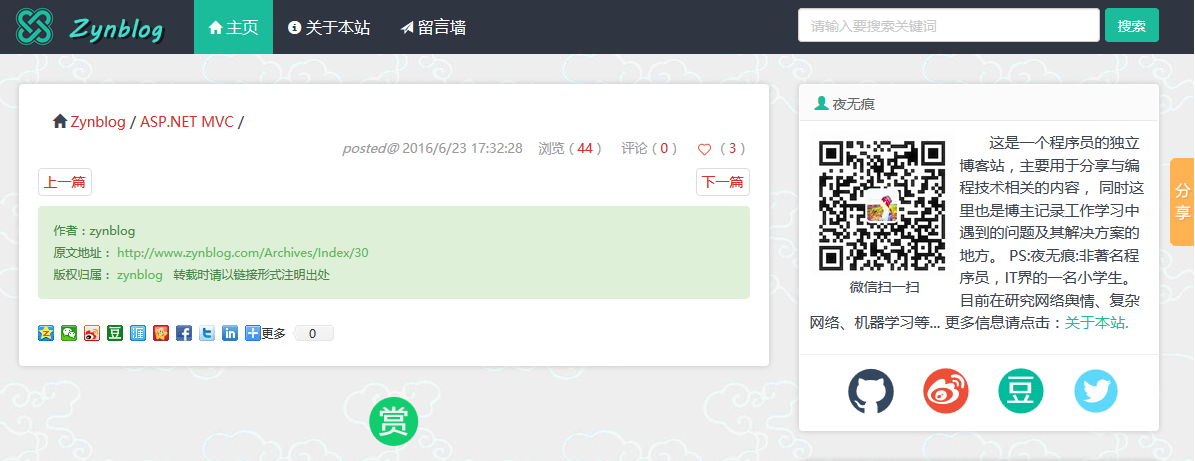
(小站地址:http://www.zynblog.com)
点击“打赏Icon”后会弹出一个二维码界面,各位老板可以选择使用是使用支付宝打赏还是微信打赏:
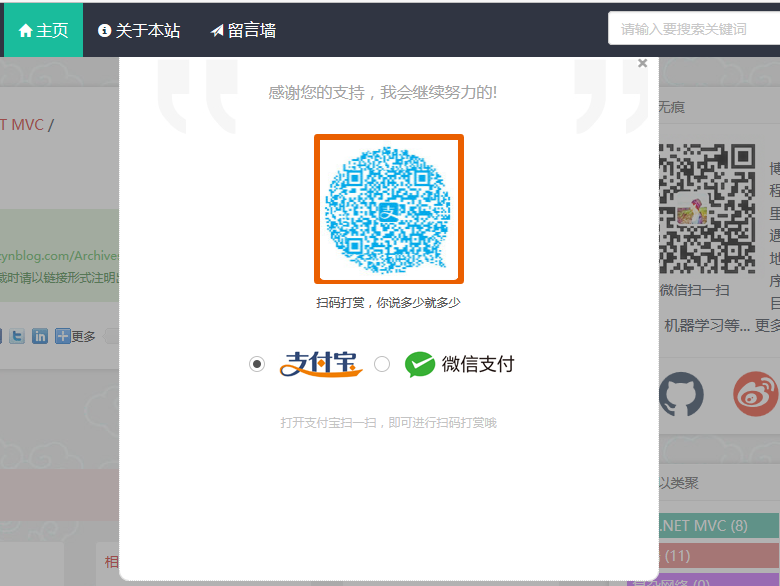
具体代码如下:(时间仓促,并为将其扩展为插件)
HTML:
        <!--打赏按钮-->

        <div style="margin-bottom:20px;">

         <a title="打赏,支持一下" class="dashang" onclick="dashangToggle()" href="javascript:void(0)">

         </a>

        </div>
打赏遮罩层HTML:
<div class="content">

    <div class="hide_box"><!--遮罩--></div>

    <div class="shang_box">

        <a class="shang_close" href="javascript:void(0)" onclick="dashangToggle()" title="关闭">

            <img src="/Content/dashangimg/close.jpg" alt="取消">

        </a>

        <div class="shang_tit">

            <p>感谢您的支持,我会继续努力的!</p>

        </div>

        <div class="shang_payimg">

            <img src="/Content/dashangimg/alipayimg.jpg" alt="扫码支持" title="扫一扫">

        </div>

        <div class="pay_explain">扫码打赏,你说多少就多少</div>

        <div class="shang_payselect">

            <div class="pay_item checked" data-id="alipay">

                <span class="radiobox"></span>

                <span class="pay_logo">

                    <img src="/Content/dashangimg/alipay.jpg" alt="支付宝">

                </span>

            </div>

            <div class="pay_item" data-id="weixinpay">

                <span class="radiobox"></span>

                <span class="pay_logo">

                    <img src="/Content/dashangimg/wechat.jpg" alt="微信">

                </span>

            </div>

        </div>

        <div class="shang_info">

            <p>打开<span id="shang_pay_txt">支付宝</span>扫一扫,即可进行扫码打赏哦</p>

        </div>

    </div>

</div>
主要的JS:
 //打赏
 jQuery(".pay_item").click(function () {
     jQuery(this).addClass('checked').siblings('.pay_item').removeClass('checked');
     var dataid = jQuery(this).attr('data-id');
     jQuery(".shang_payimg img").attr("src", "/Content/dashangimg/" + dataid + "img.jpg");
     jQuery("#shang_pay_txt").text(dataid == "alipay" ? "支付宝" : "微信");
 });
 function dashangToggle() {
    jQuery(".hide_box").fadeToggle();
    jQuery(".shang_box").fadeToggle();
 };
顺带提供CSS:
 .hide_box {

     z-index:;

     filter: alpha(opacity=50);

     background: #666;

     opacity: 0.5;

     -moz-opacity: 0.5;

     left:;

     top:;

     height: 99%;

     width: 100%;

     position: fixed;

     display: none;

 }

 .shang_box {

     width: 540px;

     height: 540px;

     padding: 10px;

     background-color: #fff;

     border-radius: 10px;

     position: fixed;

     z-index:;

     left: 50%;

     top: 50%;

     margin-left: -280px;

     margin-top: -280px;

     border: 1px dotted #dedede;

     display: none;

 }

     .shang_box img {

         border: none;

         border-width:;

     }

 .dashang {

     display: block;

     margin: 5px auto;

     text-align: center;

     transition: all 0.3s;

     width:50px;

     height:50px;

      background: url(../dashangimg/dashang.png) no-repeat scroll 0% 0% transparent;

 }

 .dashang:hover {

         background: url(../dashangimg/dashanghover.png) no-repeat scroll 0% 0% transparent;

     }

 .shang_close {

     float: right;

     display: inline-block;

 }

 .shang_logo {

     display: block;

     text-align: center;

     margin: 20px auto;

 }

 .shang_tit {

     width: 100%;

     height: 75px;

     text-align: center;

     line-height: 66px;

     color: #a3a3a3;

     font-size: 16px;

     background: url('../dashangimg/cy-reward-title-bg.jpg');

     font-family: 'Microsoft YaHei';

     margin-top: 7px;

     margin-right: 2px;

 }

     .shang_tit p {

         color: #a3a3a3;

         text-align: center;

         font-size: 16px;

     }

 .shang_payimg {

     width: 150px;

     height: 150px;

     border: 6px solid #EA5F00;

     margin: 0 auto;

     border-radius: 3px;

 }

     .shang_payimg img {

         display: block;

         text-align: center;

         width: 140px;

         height: 140px;

     }

 .pay_explain {

     text-align: center;

     margin: 10px auto;

     font-size: 12px;

     color: #545454;

 }

 .radiobox {

     width: 16px;

     height: 16px;

     background: url('../dashangimg/radio2.jpg');

     display: block;

     float: left;

     margin-top: 5px;

     margin-right: 14px;

 }

 .checked .radiobox {

     background: url('../dashangimg/radio1.jpg');

 }

 .shang_payselect {

     text-align: center;

     margin: 0 auto;

     margin-top: 40px;

     cursor: pointer;

     height: 60px;

     width: 280px;

 }

     .shang_payselect .pay_item {

         display: inline-block;

         margin-right: 10px;

         float: left;

     }

 .shang_info {

     clear: both;

 }

     .shang_info p, .shang_info a {

         color: #C3C3C3;

         text-align: center;

         font-size: 12px;

         text-decoration: none;

         line-height: 2em;

     }
打赏样式
最后再提供几个打赏图标吧,喜欢的话就收藏起来吧:


ASP.NET MVC+Bootstrap个人博客之文章打赏(六)的更多相关文章
- ASP.NET MVC+Bootstrap个人博客之praise.js点赞特效插件(二)
1. 为啥要做这个点赞插件? praise.js是一款小巧的jQuery点赞插件,使用简便,效果美观. 在做个人博客时遇到了文章点赞问题.联想到各大社交网络中的点赞特效:手势放大.红心放大等等, ...
- ASP.NET MVC+Bootstrap个人博客之praise.js点赞特效插件(二)
1. 为啥要做这个点赞插件? praise.js是一款小巧的jQuery点赞插件,使用简便,效果美观. 在做个人博客时遇到了文章点赞问题.联想到各大社交网络中的点赞特效:手势放大.红心放大等等, ...
- ASP.NET MVC+Bootstrap个人博客之修复UEditor编辑时Bug(四)
我的个人博客站在使用百度富文本编辑器UEditor修改文章时,遇到了一些问题,(不知是bug,还是我没有配置好).但总算找到了解决方法,在此记录下来. 小站首页文章列表显示为(显示去除HTML标签后的 ...
- ASP.NET MVC+Bootstrap个人博客之后台dataTable数据列表(五)
jQuery dataTables 插件是一个优秀的表格插件,是后台工程师的福音!它提供了针对数据表格的排序.浏览器分页.服务器分页.查询.格式化等功能.dataTables 官网也提供了大量的演示 ...
- ASP.NET MVC+Bootstrap个人博客之修复UEditor编辑时Bug(四)
我的个人博客站在使用百度富文本编辑器UEditor修改文章时,遇到了一些问题,(不知是bug,还是我没有配置好).但总算找到了解决方法,在此记录下来. 遇到的问题: 正常来讲,进入文章修改页,只需将U ...
- ASP.NET MVC+Bootstrap个人博客之打造清新分页Helper(三)
有点另类,分页直接是在后台拼接好html,然后发送到前台的: 1. 分页容器: <div class="pagination"> <ul> //****** ...
- ASP.NET MVC Liu_Cabbage 个人博客
RightControl_Blog 介绍 前台使用燕十三博客前端模板,后台基于RightControl .NET通用角色权限管理系统搭建,已完成.项目地址:http://www.baocaige.to ...
- ASP.NET MVC使用Bootstrap系列(5)——创建ASP.NET MVC Bootstrap Helpers
阅读目录 序言 内置的HTML Helpers 创建自定义的Helpers 使用静态方法创建Helpers 使用扩展方法创建Helpers 创建Fluent Helpers 创建自动闭合的Helper ...
- Asp.Net MVC+BootStrap+EF6.0实现简单的用户角色权限管理
这是本人第一次写,写的不好的地方还忘包含.写这个的主要原因是想通过这个来学习下EF的CodeFirst模式,本来也想用AngularJs来玩玩的,但是自己只会普通的绑定,对指令这些不是很熟悉,所以就基 ...
随机推荐
- AES算法加密java实现
package cn.itcast.coderUtils; import java.security.Key; import javax.crypto.Cipher; import javax.cry ...
- linux nginx service nginx restart [fail]
命令:nginx -t 查看失败原因: nginx: [emerg] "fastcgi_pass" directive is duplicate in /etc/nginx/sit ...
- 《modern operating system》 chapter 6 DEADLOCKS 笔记
DEADLOCKS Both processes are blocked and will remain so forever. This situation is called a deadlock ...
- jquery全选,取消全选
近期项目又用到了这个全选和取消全选的操作. 曾经总是自己写纯JS.如今既然知道怎么写了.那怎样用JQ写得更简洁呢.这样也能学到新的东西.假设乎百度一下果然发现了好东东.感谢OSC的iuhoay. 代码 ...
- break return continue
1.return 语句的作用 (1) return 从当前的方法中退出,返回到该调用的方法的语句处,继续执行 (2) return 返回一个值给调用该方法的语句,返回值的数据类型必须与方法的声明中的返 ...
- mktemp temp race attack 临时文件隐患
/tmp 安全隐患 -/tmp 在家目录 程序目录下 创建 临时文件
- BAPI 关闭和删除PR
当PR在SAP里面已不再使用时,可使用批量使用以下两个BAPI进行处理: BAPI_REQUISITION_DELETE,进行删除处理, (速度快) BAPI_PR_CHANGE,进行关闭,但不删除( ...
- Servlet8
一.Annotation 进行配置不需要 web.xml 新建new Servlet 时,不需要在web.xml 文件中生成Servlet的相关信息 import java.io.IOExceptio ...
- HDU - 2066 一个人的旅行(最短路径)(模板)
d.每组的第一行是三个整数T,S和D,表示有T条路,和草儿家相邻的城市的有S个(草儿家到这个城市的距离设为0),草儿想去的地方有D个: 求D个城市中距离草儿家最近的距离. s.进行1次单源最短路,找出 ...
- I.MX6 Android shutdown shell command
/******************************************************************************* * I.MX6 Android shu ...