
EasyUI Datagrid的简单使用
此前同样写过EasyUI Datagrid的demo,好记性不如烂笔头,何况记性也不是那么好,赶紧记录一下。照搬上一篇EasyUI Tree的格式。
实现效果:获取数据库表的数据,在EasyUI Datagrid上展示出来并使用分页控件进行分页。
项目、框架、数据库:创建的是Maven项目,采用Spring+SpringMVC+Mybatis框架,数据库SQL Server 2005
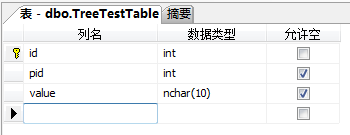
1.创建数据库表
表结构:
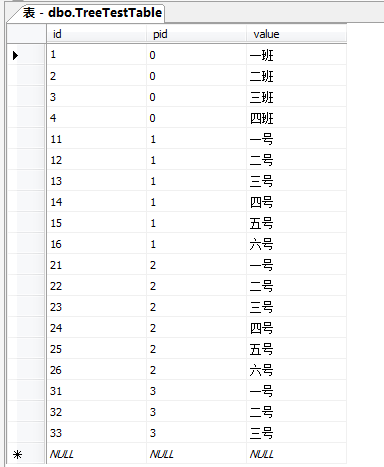
表数据:
2.通过mybatis逆向工程映射TreeTestTable(表名略丑)
TreeTestTable表的实体类代码:
package com.lwl.EasyUIDemo.bean;

public class TreeTestTable {

    private Integer id;

    private Integer pid;

    private String value;

    set/get方法...

}
3.编写DatagridBean类(由于实际使用中表结构不同,因此需要编写一个类用于将获取到的数据对象转为前端Datagrid能够读取并加载的数据格式):
package com.lwl.EasyUIDemo.pojo;

import java.util.List;

public class DatagridBean {

    private int page;        // 当前第几页

    private int total;        // 数据总条数

    private List<?> rows;    // 数据列表

    public DatagridBean(int page, long total, List<?> rows) {

        this.page = page;

        this.total = (int)total;

        this.rows = rows;

    }

    set/get方法...

}
4.编写Controller层代码:
package com.lwl.EasyUIDemo.controller;

import java.util.List;

import org.springframework.beans.factory.annotation.Autowired;

import org.springframework.stereotype.Controller;

import org.springframework.web.bind.annotation.RequestMapping;

import org.springframework.web.bind.annotation.RequestParam;

import org.springframework.web.bind.annotation.ResponseBody;

import com.alibaba.fastjson.JSON;

import com.github.pagehelper.PageHelper;

import com.github.pagehelper.PageInfo;

import com.lwl.EasyUIDemo.bean.TreeTestTable;

import com.lwl.EasyUIDemo.pojo.DatagridBean;import com.lwl.EasyUIDemo.service.TreeTestTableService;

@Controller

public class TestController {

    @Autowired

    private TreeTestTableService treeService;

    /**

     * DataGrid数据获取

     */

    @RequestMapping("/getDatagrid")

    @ResponseBody

    public JSON getList(int page,int rows){

        PageHelper.startPage(page, rows);

        List<TreeTestTable> list = treeService.getData();

        PageInfo<TreeTestTable> pageInfo = new PageInfo<>(list);

        DatagridBean datagridBean = new DatagridBean(page, pageInfo.getTotal(),list);

        return (JSON) JSON.toJSON(datagridBean);

    }

}
5.对照controller层方法所引用的service方法来创建service接口:
package com.lwl.EasyUIDemo.service;

import java.util.List;

import com.lwl.EasyUIDemo.bean.TreeTestTable;

public interface TreeTestTableService {

    /**

     * 获取表的全部数据

     * @return

     */

    List<TreeTestTable> getData();

}
Service实现类:
package com.lwl.EasyUIDemo.serviceImpl;

import java.util.List;

import org.springframework.beans.factory.annotation.Autowired;

import org.springframework.stereotype.Service;

import com.lwl.EasyUIDemo.bean.TreeTestTable;

import com.lwl.EasyUIDemo.bean.TreeTestTableExample;

import com.lwl.EasyUIDemo.dao.TreeTestTableMapper;

import com.lwl.EasyUIDemo.service.TreeTestTableService;

@Service

public class TreeTestTableServiceImpl implements TreeTestTableService {

    @Autowired

    private TreeTestTableMapper tableMapper;

    /**

     * 获取表的全部数据

     */

    public List<TreeTestTable> getData() {

        return tableMapper.selectByExample(null);

    }

}
6.编写jsp页面(关于EasyUI的使用格式等请自行查看EasyUI API文档):
<%@ page language="java" contentType="text/html; charset=utf-8"

    pageEncoding="utf-8"%>

<% pageContext.setAttribute("path", request.getContextPath()); %>

<!DOCTYPE>

<html>

<head>

<title>EasyUI实例</title>

<!-- 载入easyui样式及图标样式 -->

<link rel="stylesheet" type="text/css" href="${path }/easyui/themes/default/easyui.css">

<link rel="stylesheet" type="text/css" href="${path }/easyui/themes/icon.css">

<!-- 载入jquery支持文件(必须写在其他js文件前)、easyui支持文件、easyui中文支持文件 -->

<script type="text/javascript" src="${path }/easyui/jquery.min.js"></script>

<script type="text/javascript" src="${path }/easyui/jquery.easyui.min.js"></script>

<script type="text/javascript" src="${path }/easyui/locale/easyui-lang-zh_CN.js"></script>

</head>

<body>

<table id="dg"></table>

<script>

$('#dg').datagrid({

    url:'getDatagrid',

    columns:[[

        {field:'id',title:'节点',width:100},

        {field:'pid',title:'父节点',width:100},

        {field:'value',title:'内容',width:100}

    ]],

    striped:true,    // 斑马线

    pagination:true,// 分页

});

</script>

</body>

</html>
运行看一下效果:
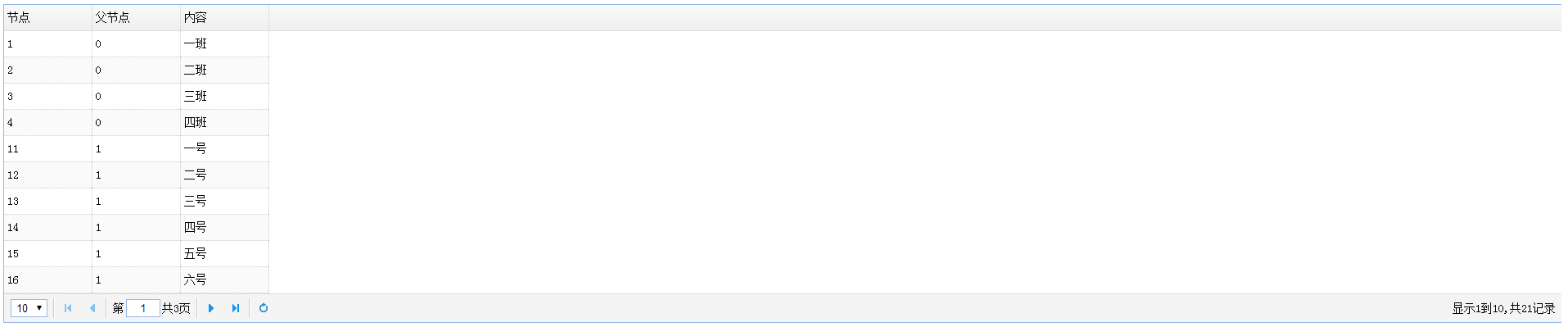
需要注意的重点是DatagridBean的编写与controller请求数据的接收,数据的返回。
以上仅仅是本人接触EasyUI Datagrid编写的简单例子,有任何理解或做法上的错误,欢迎批评指正!
EasyUI Datagrid的简单使用的更多相关文章
- EasyUI datagrid简单运用
jquery的前端框架挺多的,有easyUI ,bootstrap...,对于做系统软件或许easyUI比较好,因为里面控件很丰富,而bootstrap非常简洁大方,但是控件相 对比较少,特别是复杂的 ...
- easyui datagrid中 多表头方法总结
easyui datagrid中怎么设置表头成多行显示呢?其实很简单,就是给datagrid的columns属性设置成多个数组就行了.下面直接看例子吧,这是一个两行表头的,按照此方法,还可以设置三行表 ...
- easyUI datagrid editor扩展dialog
easyUI datagrid简单使用:着重两点1.editor对象的click事件:2.将dialog窗体内的值填写到当前正编辑的单元格内 <!DOCTYPE html> <htm ...
- easyUI datagrid笔记
easyUI datagrid 简单使用与注意细节 背景: 业余爱好,使用了一下easyUI的搜索框与数据表格,并把两者整合起来进行使用. 使用前提(引入需要的js and css): <lin ...
- EasyUI DataGrid分页数据绑定
记录东西感觉很痛苦,总结东西很痛苦,麻烦,不过为了下次的方便和知识的牢固以后要坚持总结. EasyUI DataGrid分页数据绑定 在解决方案中新建两个文件FormMain.aspx(html也可以 ...
- [转载]再次谈谈easyui datagrid 的数据加载
这篇文章只谈jQuery easyui datagrid 的数据加载,因为这也是大家谈论最多的内容.其实easyui datagrid加载数据只有两种方式:一种是ajax加载目标url返回的json数 ...
- Easyui Datagrid rownumbers行号四位、五位显示不完全的解决办法
Easyui Datagrid rownumbers行号四位.五位显示不完全的解决办法(引) 方法一: 相信很多人在使用easyui的时候都遇到过这个问题,当我们设置成显示Rownumber的时候,你 ...
- 反射实体自动生成EasyUi DataGrid模板 第二版--附项目源码
之前写过一篇文章,地址 http://www.cnblogs.com/Bond/p/3469798.html 大概说了下怎么通过反射来自动生成对应EasyUi datagrid的模板,然后贴了很多 ...
- 解决easyui datagrid加载数据时,checkbox列没有根据checkbox的值来确定是否选中
背景: 昨天帮朋友做一个easyui datagrid的小实例时,才发现easyui datagrid的checkbox列,没有根据值为true或false来选中checkbox,当时感觉太让人失 ...
随机推荐
- npm 是干什么的?
网上的 npm 教程主要都在讲怎么安装.配置和使用 npm,却不告诉新人「为什么要使用 npm」.今天我就来讲讲这个话题. 本文目标读者是「不太了解 npm 的新人」,大神您别看了,不然又说我啰嗦了 ...
- sql语句如何查询当天,一周,一月的数据的语句
sql查询当天,一周,一个月数据的语句 --查询当天: select * from info where DateDiff(dd,datetime,getdate())=0 --查询24小时内的: ...
- bzoj 2060: [Usaco2010 Nov]Visiting Cows 拜访奶牛【树形dp】
设f[u][0/1]为u这个点不选/选,转移的时候从儿子转移,f[u][1]=sum(f[son][0])+1,f[u][0]=sum(max(f[son][0],f[e[i].to][1])) #i ...
- [App Store Connect帮助]六、测试 Beta 版本(2)输入测试信息以供外部测试
如果您向外部测试员分发您的 App,您需要输入关于您 App 的额外 TestFlight 测试信息以供“Beta 版 App 审核”.您可以在添加 App 至您的帐户时,或在您邀请外部测试员时输入此 ...
- spring 异常处理
1. 实现接口 HandlerExceptionResolver 捕获异常 2.@ExceptionHandler 在方法添加注解,捕获本地controller异常 3.@ControllerAdvi ...
- 浅谈算法——splay
BST(二叉查找树)是个有意思的东西,种类巨TM多,然后我们今天不讲其他的,我们今天就讲splay 首先,如果你不知道Splay是啥,你也得知道BST是啥 如上图就是一棵优美的BST,它对于每个点保证 ...
- ACM_寒冰王座(完全背包)
寒冰王座 Time Limit: 2000/1000ms (Java/Others) Problem Description: 不死族的巫妖王发工资拉,死亡骑士拿到一张N元的钞票(记住,只有一张钞票) ...
- 用Movie显示gif(2)GifView
1,类 import android.annotation.SuppressLint; import android.content.Context; import android.content.r ...
- [译]curl_multi_info_read
curl_multi_info_read - read multi stack informationals读取multi stack中的信息 SYNOPSIS#include <curl/cu ...
- Ceph在手,天下我有
有人问我,你是如何做到统一存储的?我微微一笑,大声告诉他:Ceph在手,天下我有. Ceph是一个统一的分布式存储系统,旨在实现出色的性能,可靠性和可扩展性.认了OpenStack做大哥之后更是一发不 ...