
anaconda 如何更换镜像源
今天需要对anaconda更换其镜像源。
故而做一个小记:
一 查看anaconda的本源方法
电脑路径:C:\Users\14269,找到 .condarc 文件。

打开.condarc文件,可看见目前anaconda的源链接。

上图就是没有做任何改变的anaconda的本源。
二 更换anaconda的镜像源。
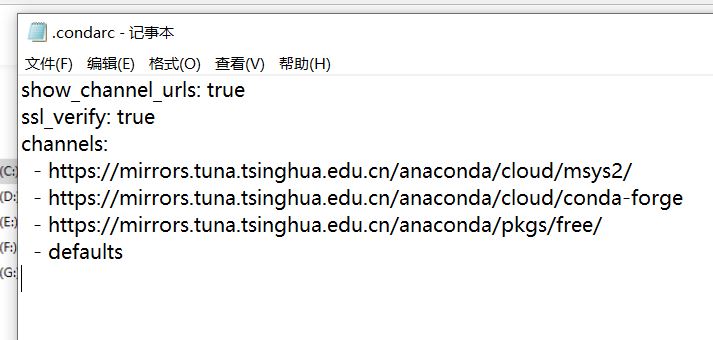
在打开的 .condarc文件中输入如下代码:
show_channel_urls: true

ssl_verify: true

channels:

  - https://mirrors.tuna.tsinghua.edu.cn/anaconda/cloud/msys2/

  - https://mirrors.tuna.tsinghua.edu.cn/anaconda/cloud/conda-forge

  - https://mirrors.tuna.tsinghua.edu.cn/anaconda/pkgs/free/

  - defaults
上述为清华镜像源,可以更换为其他镜像源。
三 代码更换镜像源
清华镜像源:
conda config --add channels https://mirrors.tuna.tsinghua.edu.cn/anaconda/pkgs/free/

conda config --add channels https://mirrors.tuna.tsinghua.edu.cn/anaconda/cloud/conda-forge

conda config --add channels https://mirrors.tuna.tsinghua.edu.cn/anaconda/cloud/msys2/

conda config --set show_channel_urls yes
中科大镜像源:
conda config --add channels https://mirrors.ustc.edu.cn/anaconda/pkgs/main/

conda config --add channels https://mirrors.ustc.edu.cn/anaconda/pkgs/free/

conda config --add channels https://mirrors.ustc.edu.cn/anaconda/cloud/conda-forge/

conda config --add channels https://mirrors.ustc.edu.cn/anaconda/cloud/msys2/

conda config --add channels https://mirrors.ustc.edu.cn/anaconda/cloud/bioconda/

conda config --add channels https://mirrors.ustc.edu.cn/anaconda/cloud/menpo/

conda config --set show_channel_urls yes
四 删源
conda config --remove-key channels
有问题,先待定
至此,结束。
参考:
Anaconda之conda换国内源_你的大数据学长-CSDN博客_anaconda换源
Anaconda 换国内源、删源最全集锦_荒川之神-CSDN博客
anaconda 如何更换镜像源的更多相关文章
- 树莓派配置wifi网络+更换镜像源
刚安装完系统后,采用的是树莓派通过网线连接笔记本wifi共享方式联网,后面考虑不使用网线,让树莓派使用wifi联网. 一.配置无线网络 1.通过ssh登录树莓派,输入用户名和密码后,输入如下命令进入图 ...
- pip 更换镜像源
国内的pip源 阿里云:https://mirrors.aliyun.com/pypi/simple/ 清华:https://pypi.tuna.tsinghua.edu.cn/simple 中国科技 ...
- Anaconda配置国内镜像源
1. 为conda配置(清华)镜像源 使用conda进行安装时,访问的是国外的网络,所以下载和安装包时会特别慢.我们需要更换到国内镜像源地址,这里我更换到国内的清华大学地址.(永久添加镜像) Wind ...
- centos7更换镜像源
更换软件源 由于国外的软件源在yum 安装时比较慢,更换为国内的源,以阿里的源的更换方式 下载wgetyum install wget -y echo 备份当前的yum源mv /etc/yum.rep ...
- ubuntu16.04更换镜像源
1.备份原有 cp /etc/apt/sources.list /etc/apt/sources.list.old 2.打开阿里巴巴镜像源: https://opsx.alibaba.com/mir ...
- Ubuntu更换镜像源
不同的源 当修改sources.list文件时,我们需要将下面任意一个镜像源的代码复制粘贴到该文件中. 阿里源 # 阿里镜像源 deb http://mirrors.aliyun.com/ubuntu ...
- pip安装更换镜像源
说明 有时候网不好,pip安装非常慢,所以需要更换源,特记录如下 国内镜像地址: # 清华大学 https://pypi.tuna.tsinghua.edu.cn/simple # 豆瓣 http ...
- kali linux 更换镜像源
编辑sources.list文件 leafpad /etc/apt/sources.list #aliyun 阿里云 deb http://mirrors.aliyun.com/kali kali-r ...
- ubuntu18.04 更换镜像源
废话不多说,直接上图了 1. 首先选software & update 2. 点这个,然后选择others,选择China 建议选择清华源,不建议选择mirrors.aliyun.com,因为 ...
随机推荐
- 学习java 7.20
学习内容: Stream流 Stream流的生成方式 中间操作方法 终结操作方法 Stream流的收集操作 类加载 类加载器的作用 将.class文件加载到内存中,并为之生成对应的java.lang. ...
- ceph安装部署
环境准备 测试环境是4台虚拟机,所有机器都是刚刚安装好系统(minimal),只配置完网卡和主机名的centos7.7,每个osd增加一块磁盘,/dev/sdb ceph-admin ---- adm ...
- Flink(四)【IDEA执行查看Web UI】
1.导入依赖 <!-- flink Web UI --> <dependency> <groupId>org.apache.flink</groupId> ...
- 零基础学习java------21---------动态代理,java8新特性(lambda, stream,DateApi)
1. 动态代理 在一个方法前后加内容,最简单直观的方法就是直接在代码上加内容(如数据库中的事务),但这样写不够灵活,并且代码可维护性差,所以就需要引入动态代理 1.1 静态代理实现 在讲动态代理之前, ...
- c学习 - 算法
简介: 一个程序包括两方面内容:数据结构.算法 数据结构:对数据的描述,包括数据的类型和数据的组织形式 算法:对操作的描述,即操作步骤 (程序=算法+数据结构) 算法是灵魂,数据结构是加工对象,语言是 ...
- Linux环境下为普通用户添加sudo权限
系统环境:Centos6.5 1.背景: sudo是Linux系统管理指令,是允许系统管理员让普通用户执行一些或者全部root命令的一个工具.Linux系统下,为了安全,一般来说我们操作都是在普通用户 ...
- vue-cli4脚手架搭建一
涉及内容 html css javascript node.js npm webpack 2.9.6是常用版本 vue-cli4是基于webpack的 webpack是基于node ...
- Tomcat(2):配置Tomcat
1,打开IDEA创建一个项目 2,配置Tomcat服务器 3,运行 5,成功 t t
- cookie,sessionStorage,loclaStorage,HTML5应用程序缓存
cookie Cookie 是一些数据,由服务器生成,发送给浏览器,一旦用户从该网站或服务器退出,Cookie 就存储在用户本地的硬盘上,下一次请求同一网站时会把该cookie发送给服务器.Cooki ...
- 【C/C++】函数的分文件编写
创建同名的头文件(.h)和cpp文件. 在头文件里写函数声明,在cpp文件中写函数定义. 在cpp文件中写#include "xx.h" //自定义头文件名 框架(include ...