
anaconda 如何更换镜像源
今天需要对anaconda更换其镜像源。
故而做一个小记:
一 查看anaconda的本源方法
电脑路径:C:\Users\14269,找到 .condarc 文件。

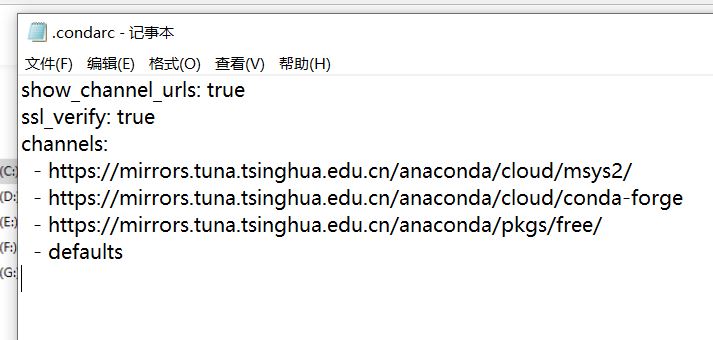
打开.condarc文件,可看见目前anaconda的源链接。

上图就是没有做任何改变的anaconda的本源。
二 更换anaconda的镜像源。
在打开的 .condarc文件中输入如下代码:
show_channel_urls: true

ssl_verify: true

channels:

  - https://mirrors.tuna.tsinghua.edu.cn/anaconda/cloud/msys2/

  - https://mirrors.tuna.tsinghua.edu.cn/anaconda/cloud/conda-forge

  - https://mirrors.tuna.tsinghua.edu.cn/anaconda/pkgs/free/

  - defaults
上述为清华镜像源,可以更换为其他镜像源。
三 代码更换镜像源
清华镜像源:
conda config --add channels https://mirrors.tuna.tsinghua.edu.cn/anaconda/pkgs/free/

conda config --add channels https://mirrors.tuna.tsinghua.edu.cn/anaconda/cloud/conda-forge

conda config --add channels https://mirrors.tuna.tsinghua.edu.cn/anaconda/cloud/msys2/

conda config --set show_channel_urls yes
中科大镜像源:
conda config --add channels https://mirrors.ustc.edu.cn/anaconda/pkgs/main/

conda config --add channels https://mirrors.ustc.edu.cn/anaconda/pkgs/free/

conda config --add channels https://mirrors.ustc.edu.cn/anaconda/cloud/conda-forge/

conda config --add channels https://mirrors.ustc.edu.cn/anaconda/cloud/msys2/

conda config --add channels https://mirrors.ustc.edu.cn/anaconda/cloud/bioconda/

conda config --add channels https://mirrors.ustc.edu.cn/anaconda/cloud/menpo/

conda config --set show_channel_urls yes
四 删源
conda config --remove-key channels
有问题,先待定
至此,结束。
参考:
Anaconda之conda换国内源_你的大数据学长-CSDN博客_anaconda换源
Anaconda 换国内源、删源最全集锦_荒川之神-CSDN博客
anaconda 如何更换镜像源的更多相关文章
- 树莓派配置wifi网络+更换镜像源
刚安装完系统后,采用的是树莓派通过网线连接笔记本wifi共享方式联网,后面考虑不使用网线,让树莓派使用wifi联网. 一.配置无线网络 1.通过ssh登录树莓派,输入用户名和密码后,输入如下命令进入图 ...
- pip 更换镜像源
国内的pip源 阿里云:https://mirrors.aliyun.com/pypi/simple/ 清华:https://pypi.tuna.tsinghua.edu.cn/simple 中国科技 ...
- Anaconda配置国内镜像源
1. 为conda配置(清华)镜像源 使用conda进行安装时,访问的是国外的网络,所以下载和安装包时会特别慢.我们需要更换到国内镜像源地址,这里我更换到国内的清华大学地址.(永久添加镜像) Wind ...
- centos7更换镜像源
更换软件源 由于国外的软件源在yum 安装时比较慢,更换为国内的源,以阿里的源的更换方式 下载wgetyum install wget -y echo 备份当前的yum源mv /etc/yum.rep ...
- ubuntu16.04更换镜像源
1.备份原有 cp /etc/apt/sources.list /etc/apt/sources.list.old 2.打开阿里巴巴镜像源: https://opsx.alibaba.com/mir ...
- Ubuntu更换镜像源
不同的源 当修改sources.list文件时,我们需要将下面任意一个镜像源的代码复制粘贴到该文件中. 阿里源 # 阿里镜像源 deb http://mirrors.aliyun.com/ubuntu ...
- pip安装更换镜像源
说明 有时候网不好,pip安装非常慢,所以需要更换源,特记录如下 国内镜像地址: # 清华大学 https://pypi.tuna.tsinghua.edu.cn/simple # 豆瓣 http ...
- kali linux 更换镜像源
编辑sources.list文件 leafpad /etc/apt/sources.list #aliyun 阿里云 deb http://mirrors.aliyun.com/kali kali-r ...
- ubuntu18.04 更换镜像源
废话不多说,直接上图了 1. 首先选software & update 2. 点这个,然后选择others,选择China 建议选择清华源,不建议选择mirrors.aliyun.com,因为 ...
随机推荐
- centos 7的命令变化
1.service -> systemctl命令 2.ifconfig -> ip 命令 3.netstat -> ss命令 4.route -> ip route命令 5.t ...
- 【模板】二分图最大匹配(匈牙利算法)/洛谷P3386
题目链接 https://www.luogu.com.cn/problem/P3386 题目大意 给定一个二分图,其左部点的个数为 \(n\),右部点的个数为 \(m\),边数为 \(e\),求其最大 ...
- 前端4 — jQuery — 更新完毕
1.下载jQuery 网址:Download jQuery | jQuery 最好下载最新版的,因为有什么bug问题,最新版的都会有,所以学技术就用最新版的,实际开发用的时候就要讲究了 2.开始用j ...
- 【STM8】STM8S介绍(编程环境、烧录、芯片内容)(Vcap需要一个电容接地)
这篇博客的介绍大纲 [1]我使用的开发板和烧录器 [2]编程环境 [3]烧录软件和界面 [4]芯片内容 [1]我使用的开发板和烧录器 首先,我用的是STM8S003F3P6这款开发板,淘宝上就有了,5 ...
- Linux基础命令---vmstat显示虚拟内存状态
vmstat vmstat指令用来显示虚拟内存使用状态,同时也可以显示进程.cpu活动情况.vmstat报告有关进程.内存.分页.块IO.陷阱和CPU活动的信息.生成的第一份报告给出了自上次重新启动以 ...
- 3.2 go WaitGroup代码示例
sync.WaitGroup提供了一种安全的多协程处理方法,内部使用race.atomic来处理,避免了资源竞争及锁的产生. 主要的方法有Add.Done.Wait,可以等待一组协程全部执行完毕后,主 ...
- HDC2021技术分论坛:进程崩溃/应用卡死,故障频频怎么办?
作者:jiwenqiang,DFX技术专家 提到开发一个产品,我们通常首先想到的是要实现什么样的功能,但是除了功能之外,非功能属性也会很大程度上影响一个产品的体验效果,比如不定时出现的应用卡死.崩溃 ...
- Python循环控制
一.比较符 和算术操作符一样,布尔操作符也有操作顺序.在所有算术和比较操作符求值后,Python 先求值 not 操作符,然后是 and 操作符,然后是 or 操作符. 二.if控制 if name ...
- shell脚本 微信/钉钉验证登录服务器
一.简介 登录用户需要二次验证码进行验证 可以配合 监控用户登录,发送通知给企业微信/钉钉 来使用 脚本放到/etc/profile.d/ 目录,登录的时候自动触发 二.微信脚本 1.需要修改Crop ...
- tableau创建点位地图
一.双击省/自治区字段 二.双击销售额字段,标记类型改为圆 三.省/自治区字段设置标签显示,圆的大小和颜色细节调整,最终结果如下图所示