
Java 使用 Apache commons-math3 线性拟合、非线性拟合实例(带效果图)
Java 使用 CommonsMath3 的线性和非线性拟合实例,带效果图
例子查看
版本说明
- JDK:1.8
- commons-math:3.6.1
一些基础知识
- 线性:两个变量之间存在一次方函数关系,就称它们之间存在线性关系。也就是如下的函数:
\]
- 非线性:除了线性其他的都是非线性,例如:
\]
矩阵:矩阵(Matrix)是一个按照长方阵列排列的复数或实数集合,可以理解为平面或者空间的坐标点。
看大佬怎么说之>>B站-线性代数的本质 - 系列合集微分、积分:互为逆过程,一句话概括,微分就是求导,求某个点的极小变化量的斜率。积分是求一些列变化点的和,几何意义是面积
看大佬怎么说之>>B站-微积分的本质 - 系列合集拟合:形象的说,拟合就是把平面上一系列的点,用一条光滑的曲线连接起来的过程。找到一条最符合这些散点的曲线,使得尽可能多的落在曲线上。常用的方法是
最小二乘法。也就是最小二乘问题
添加依赖
Maven 中添加依赖
<!-- https://mvnrepository.com/artifact/org.apache.commons/commons-math3 -->

<dependency>

    <groupId>org.apache.commons</groupId>

    <artifactId>commons-math3</artifactId>

    <version>3.6.1</version>

</dependency>
如果你是 Gradle
// https://mvnrepository.com/artifact/org.apache.commons/commons-math3

compile group: 'org.apache.commons', name: 'commons-math3', version: '3.6.1'
如何使用和验证
- 假设函数已知
- 根据函数并添加随机数
R生成一系列散点数据(蓝色) - 进行拟合,根据拟合结果生成拟合曲线
- 对比结果曲线(绿色)和散点曲线
例如:
\]
首先根绝函数生成 \(x\) 取任意实数时的以及所对应的 \(f(x)\) 得到数据集 \(xy\)
\]
然后对这组数据进行拟合,然后和已知函数 \(f(x)\) 对比斜率 \(k\) 以及截距 \(b\)
1. 线性拟合
线性函数:
\]
假设函数为:
\]
生成数据集合:
/**

 *

 * y = kx + b

 * f(x) = 1.5x + 0.5

 *

 * @return

 */

public static double[][] linearScatters() {

    List<double[]> data = new ArrayList<>();

    for (double x = 0; x <= 10; x += 0.1) {

        double y = 1.5 * x + 0.5;

        y += Math.random() * 4 - 2; // 随机数

        double[] xy = {x, y};

        data.add(xy);

    }

    return data.stream().toArray(double[][]::new);

}
进行拟合
public static Result linearFit(double[][] data) {

    List<double[]> fitData = new ArrayList<>();

    SimpleRegression regression = new SimpleRegression();

    regression.addData(data); // 数据集

	/*

	 * RegressionResults 中是拟合的结果

	 * 其中重要的几个参数如下:

	 *   parameters:

	 *      0: b

	 *      1: k

	 *   globalFitInfo

	 *      0: 平方误差之和, SSE

	 *      1: 平方和, SST

	 *      2: R 平方, RSQ

	 *      3: 均方误差, MSE

	 *      4: 调整后的 R 平方, adjRSQ

	 *

	 * */

    RegressionResults results = regression.regress();

    double b = results.getParameterEstimate(0);

    double k = results.getParameterEstimate(1);

    double r2 = results.getRSquared();

    // 重新计算生成拟合曲线

    for (double[] datum : data) {

        double[] xy = {datum[0], k * datum[0] + b};

        fitData.add(xy);

    }

    StringBuilder func = new StringBuilder();

    func.append("f(x) =");

    func.append(b >= 0 ? " " : " - ");

    func.append(Math.abs(b));

    func.append(k > 0 ? " + " : " - ");

    func.append(Math.abs(k));

    func.append("x");

    return new Result(fitData.stream().toArray(double[][]::new), func.toString());

}
拟合效果
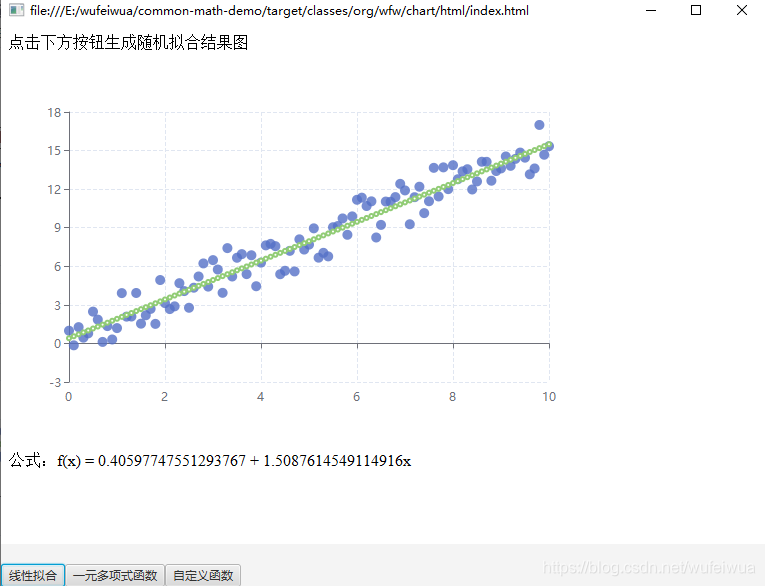
线性拟合比较简单,主要是 SimpleRegression 类的 regress() 方法,默认使用 最小二乘法优化器
2. 非线性(曲线)拟合(一元多项式)
非线性函数
\]
假设函数为
\]
生成数据集合:
/**

*

* f(x) = 1 + 2x + 3x^2

*

* @return

*/

public static double[][] curveScatters() {

	List<double[]> data = new ArrayList<>();

	for (double x = 0; x <= 20; x += 1) {

	    double y = 1 + 2 * x + 3 * x * x;

	    y += Math.random() * 60 - 10; // 随机数

	    double[] xy = {x, y};

	    data.add(xy);

	}

	return data.stream().toArray(double[][]::new);

}
进行拟合
public static Result curveFit(double[][] data) {

   ParametricUnivariateFunction function = new PolynomialFunction.Parametric();/*多项式函数*/

   double[] guess = {1, 2, 3}; /*猜测值 依次为 常数项、1次项、二次项*/

   // 初始化拟合

   SimpleCurveFitter curveFitter = SimpleCurveFitter.create(function,guess);

   // 添加数据点

   WeightedObservedPoints observedPoints = new WeightedObservedPoints();

   for (double[] point : data) {

       observedPoints.add(point[0], point[1]);

   }

   /*

    * best 为拟合结果

    * 依次为 常数项、1次项、二次项

    * 对应 y = a + bx + cx^2 中的 a, b, c

    * */

   double[] best = curveFitter.fit(observedPoints.toList());

   /*

   * 根据拟合结果重新计算

   * */

   List<double[]> fitData = new ArrayList<>();

   for (double[] datum : data) {

       double x = datum[0];

       double y = best[0] + best[1] * x + best[2] * x * x; // y = a + bx + cx^2

       double[] xy = {x, y};

       fitData.add(xy);

   }

   StringBuilder func = new StringBuilder();

   func.append("f(x) =");

   func.append(best[0] > 0 ? " " : " - ");

   func.append(Math.abs(best[0]));

   func.append(best[1] > 0 ? " + " : " - ");

   func.append(Math.abs(best[1]));

   func.append("x");

   func.append(best[2] > 0 ? " + " : " - ");

   func.append(Math.abs(best[2]));

   func.append("x^2");

   return new Result(fitData.stream().toArray(double[][]::new), func.toString());

}
拟合效果
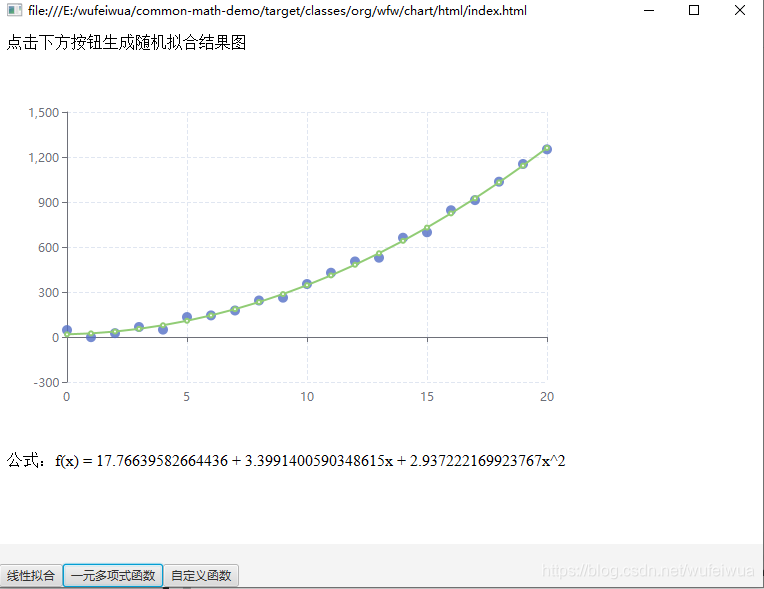
一元多项式曲线的拟合多了一些步骤。但是总归也是不难的。主要是 SimpleCurveFitter 类以及 ParametricUnivariateFunction 接口。
3. 自定义函数拟合(一元多项式)
总得来说,貌似线性和一元多项式都不难。不过,实际工作或者学术中,一般都是自定义的函数。
假设有一元多项式函数:
\]
需要拟合出 a,b,c,d 四个参数的值。
方法:
- 实现
ParametricUnivariateFunction接口 - 自定义函数,实现
value方法 - 解偏微分方程,实现
gradient方法 - 设置需要拟合的点
- 调用
SimpleCurveFitter#fit方法进行拟合
不着急写代码,先看ParametricUnivariateFunction 这个接口的源码:
/**

 * An interface representing a real function that depends on one independent

 * variable plus some extra parameters.

 *

 * @since 3.0

 */

public interface ParametricUnivariateFunction {

    /**

     * Compute the value of the function.

     * 计算函数的值

     * @param x Point for which the function value should be computed.

     * @param parameters Function parameters.

     * @return the value.

     */

    double value(double x, double ... parameters);

    /**

     * Compute the gradient of the function with respect to its parameters.

     * 计算函数相对于某个参数的导数

     * @param x Point for which the function value should be computed.

     * @param parameters Function parameters.

     * @return the value.

     */

    double[] gradient(double x, double ... parameters);

}
value方法很简单,就是说计算函数 \(F(x)\) 的值。说人话就是自定义函数的gradient方法为返回一个数组,其实意思就是求偏微分方程,对每一个要拟合的参数求导就行
不会偏微分方程? 点这里
按格式输入你的方程=>输入自变量=>输入求导阶数(一般都是 1 阶)=>计算
好了开始写代码吧,假设函数如下:
\]
- 自定义
MyFunction实现ParametricUnivariateFunction接口:
static class MyFunction implements ParametricUnivariateFunction {

	public double value(double x, double ... parameters) {

		double a = parameters[0];

		double b = parameters[1];

		double c = parameters[2];

		double d = parameters[3];

		return d + ((a - d) / (1 + Math.pow(x / c, b)));

	}

	public double[] gradient(double x, double ... parameters) {

		double a = parameters[0];

		double b = parameters[1];

		double c = parameters[2];

		double d = parameters[3];

		double[] gradients = new double[4];

		double den = 1 + Math.pow(x / c, b);

		gradients[0] = 1 / den; // 对 a 求导

		gradients[1] = -((a - d) * Math.pow(x / c, b) * Math.log(x / c)) / (den * den); // 对 b 求导

		gradients[2] = (b * Math.pow(x / c, b - 1) * (x / (c * c)) * (a - d)) / (den * den); // 对 c 求导

		gradients[3] = 1 - (1 / den); // 对 d 求导

		return gradients;

	}

}
生成数据散点
/**

*

* <pre>

*     f(x) = d + ((a - d) / (1 + Math.pow(x / c, b)))

*     a = 1500

*     b = 0.95

*     c = 65

*     d = 35000

* </pre>

*

* @return

*/

public static double[][] customizeFuncScatters() {

    MyFunction function = new MyFunction();

    List<double[]> data = new ArrayList<>();

    for (double x = 7; x <= 10000; x *= 1.5) {

        double y = function.value(x, 1500, 0.95, 65, 35000);

        y += Math.random() * 5000 - 2000; // 随机数

        double[] xy = {x, y};

        data.add(xy);

    }

    return data.stream().toArray(double[][]::new);

}
拟合自定义函数
public static Result customizeFuncFit(double[][] scatters) {

    ParametricUnivariateFunction function = new MyFunction();/*多项式函数*/

    double[] guess = {1500, 0.95, 65, 35000}; /*猜测值 依次为 a b c d 。必须和 gradient 方法返回数组对应。如果不知道都设置为 1*/

    // 初始化拟合

    SimpleCurveFitter curveFitter = SimpleCurveFitter.create(function,guess);

    // 添加数据点

    WeightedObservedPoints observedPoints = new WeightedObservedPoints();

    for (double[] point : scatters) {

        observedPoints.add(point[0], point[1]);

    }

   /*

    * best 为拟合结果 对应 a b c d

    * 可能会出现无法拟合的情况

    * 需要合理设置初始值

    * */

    double[] best = curveFitter.fit(observedPoints.toList());

    double a = best[0];

    double b = best[1];

    double c = best[2];

    double d = best[3];

    // 根据拟合结果生成拟合曲线散点

    List<double[]> fitData = new ArrayList<>();

    for (double[] datum : scatters) {

        double x = datum[0];

        double y = function.value(x, a, b, c, d);

        double[] xy = {x, y};

        fitData.add(xy);

    }

    // f(x) = d + ((a - d) / (1 + Math.pow(x / c, b)))

    StringBuilder func = new StringBuilder();

    func.append("f(x) =");

    func.append(d > 0 ? " " : " - ");

    func.append(Math.abs(d));

    func.append(" ((");

    func.append(a > 0 ? "" : "-");

    func.append(Math.abs(a));

    func.append(d > 0 ? " - " : " + ");

    func.append(Math.abs(d));

    func.append(" / (1 + ");

    func.append("(x / ");

    func.append(c > 0 ? "" : " - ");

    func.append(Math.abs(c));

    func.append(") ^ ");

    func.append(b > 0 ? " " : " - ");

    func.append(Math.abs(b));

    return new Result(fitData.stream().toArray(double[][]::new), func.toString());

}
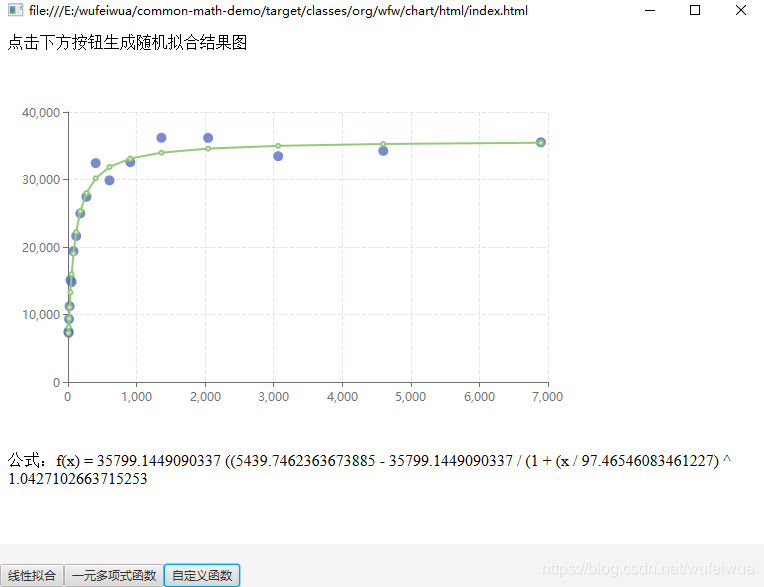
拟合效果
4. 多元多项式拟合
我用的 javafx8 版本不支持 WebGL 所以无法通过按钮直接直观展示拟合效果。我用拟合前得数据和拟合后重新计算的数据进行对比
** 方程 **
\]
4.1 构造数据
假设: \(a = 20, b = 2, c = 12\) ,则函数 \(f\) 为 \(f(x_1,x_2) = y = 20 + 2 * x_1 + 12 * sin(x_2)\)
根据这个函数构造数据
/**

     * 生成随机数

     */

public static double[][] randomX() {

    List<double[]> data = new ArrayList<>();

    for (double i = 0; i < 10; i += 0.1) {

        double x1 = Math.cos(i);

        double x2 = Math.sin(i);

        data.add(new double[]{x1, x2});

    }

    return data.stream().toArray(double[][]::new);

}

/**

     * f(x1,x2) = y = a + b * x1 + c * sin(x2)

     * @param arr

     * @return

     */

public static double[] randomY(double[][] arr) {

    if (arr != null && arr.length > 0) {

        int len = arr.length;

        double[] y = new double[len];

        for (int i = 0; i < len; i++) {

            // f(x1,x2) = y = 20 + x1 + 12 * sin(x2)

            double[] x = arr[i];

            // 构造数据

            y[i] = functionConstructorY(x);

        }

        return y;

    }

    return null;

}

/**

     * 已知的函数为: f(x1,x2) = y = 20 + 2 * x1 + 12 * sin(x2)

     * 即:f(x1,x2) = y = a + b * x1 + c * sin(x2) 中

     * a = 20, b = 2, c = 12

     * @param x

     * @return

     */

public static double functionConstructorY(double[] x) {

    double x1 = x[0], x2 = x[1];

    return 20 + 2 * x1 + Math.sin(10 * x2);

}
4.2 拟合
多元多项式的拟合主要用到 MultipleLinearRegression 接口,它有三个实现方式。我们选择最小二乘法的实现 OLSMultipleLinearRegression
/**

 * 多元多项式数据

 * 已知: f(x1,x2) = y = a + b * x1 + c * sin(x2)

 *

 */

public static double[][] multiVarPolyScatters() {

    double[][] x = randomX();

    double[] y = randomY(x);

    OLSMultipleLinearRegression ols = new OLSMultipleLinearRegression();

    ols.newSampleData(y, x);

    // ct 拟合的常数项(系数)。对应 a,b,c

    double[] ct = ols.estimateRegressionParameters();

}
4.3 验证
根据上面的拟合结果重新计算 \(f(x_1,x_2)\) 的值
/**

* f(x1,x2) = y = a + b * x1 + c * sin(x2)

* @param ct 拟合的常数项(系数)。对应 a,b,c

* @param x x 的值。对应 x1,x2

* @return

*/

public static double functionValueY(double[] ct, double[] x) {

    double a = ct[0], b = ct[1], c = ct[2];

    double x1 = x[0], x2 = x[1];

    return a + b * x1 + Math.sin(c * x2);

}

/**

* 多元多项式数据

* 已知: f(x1,x2) = y = a + b * x1 + c * sin(x2)

* @return

* arr[0] 对应所有的 y 的值

* arr[1] 对应所有的 x1 的值

* arr[2] 对应所有的 x2 的值

*/

public static double[][] multiVarPolyScatters() {

    double[][] x = randomX();

    double[] y = randomY(x);

    OLSMultipleLinearRegression ols = new OLSMultipleLinearRegression();

    ols.newSampleData(y, x);

    // ct 即为拟合结果

    double[] ct = ols.estimateRegressionParameters();

    double[] valueY = new double[x.length];

    for (int i = 0; i < x.length; i++) {

        // 重新计算 y 的值。与原有构造的 y 对比

        valueY[i] = functionValueY(ct, x[i]);

    }

    // 散点数据用于 Echarts 画图

    double[][] data = new double[x.length][3];// x1, x2, y

    for (int i = 0; i < valueY.length; i++) {

    	// ==================== x1 ====== x2 ======= y ====

    	data[i] = new double[]{x[i][0], x[i][1], valueY[i]};

    }

    return data;

}
4.4 画图
Echarts 3D画图的工具在 https://echarts.apache.org/examples/zh/editor.html?c=line3d-orthographic&gl=1 这个地方。我们将构造数据的函数改为我们的
// ...

var data = [];

// Parametric curve

for (var t = 0; t < 10; t += 0.1) {

    // 这里改成我们的函数。其他的都不变

    var x =  Math.cos(t);

    var y =  Math.sin(t);

    var z = 20 + 2 * x + 12 * Math.sin(y);

    data.push([x, y, z]);

}

// ...
那可以得到这样一张图

然后我们运行 org.wfw.chart.data.MultipleLinearRegressionData#main() 方法后将得到的数据整个赋值给 data 覆盖也行。我们就得到了如下的图

拟合的结果是 $$ a = 20.01068756847646, b = 2.036022472817587, c = 10.571979017911016 $$ 和我们一开始的确定好的值也差不多
4.5 多说两句
calculateRSquared()计算 \(R^2\)calculateAdjustedRSquared()计算 \(ajdRSQ\) ,调整后的 \(R^2\)estimateRegressionParameters()拟合常数项
关于
newSampleData()方法参数的 y 和 x 样本
/**

     * Loads model x and y sample data, overriding any previous sample.

     *

     * Computes and caches QR decomposition of the X matrix.

     * @param y the [n,1] array representing the y sample

     * @param x the [n,k] array representing the x sample

     * @throws MathIllegalArgumentException if the x and y array data are not

     *             compatible for the regression

     */

    public void newSampleData(double[] y, double[][] x) throws MathIllegalArgumentException {

        validateSampleData(x, y);

        newYSampleData(y);

        newXSampleData(x);

    }
源码是这样的,y 就是 \(f(x_1,x_2)\) 的值,而 x 中的 k 代表的是 \(x_1,x_2\) 的值,是顺序对应的
Java 使用 Apache commons-math3 线性拟合、非线性拟合实例(带效果图)的更多相关文章
- CloudSim4.0报错NoClassDefFoundError,Caused by: java.lang.ClassNotFoundException: org.apache.commons.math3.distribution.UniformRealDistribution
今天下载了CloudSim 4.0的代码,运行其中自带的示例程序,结果有一部分运行错误: 原因是找不到org.apache.commons.math3.distribution.UniformReal ...
- Apache Commons Math3学习笔记(2) - 多项式曲线拟合(转)
多项式曲线拟合:org.apache.commons.math3.fitting.PolynomialCurveFitter类. 用法示例代码: // ... 创建并初始化输入数据: double[] ...
- Java 利用Apache Commons Net 实现 FTP文件上传下载
package woxingwosu; import java.io.BufferedInputStream; import java.io.BufferedOutputStream; import ...
- java 调用apache.commons.codec的包简单实现MD5加密
转自:https://blog.csdn.net/mmd1234520/article/details/70210002/ import java.security.MessageDigest; im ...
- Java使用Apache Commons Net实现FTP功能
maven依赖: <!-- https://mvnrepository.com/artifact/commons-net/commons-net --> <dependency> ...
- Java使用Apache Commons Exec运行本地命令行命令
首先在pom.xml中添加Apache Commons Exec的Maven坐标: <!-- https://mvnrepository.com/artifact/org.apache.comm ...
- Java:Apache Commons 工具类介绍及简单使用
Apache Commons包含了很多开源的工具,用于解决平时编程经常会遇到的问题,减少重复劳动.下面是我这几年做开发过程中自己用过的工具类做简单介绍. Commons简介 组件 功能介绍 commo ...
- Java使用Apache Commons Net的FtpClient进行下载时会宕掉的一种优化方法
在使用FtpClient进行下载测试的时候,会发现一个问题,就是我如果一直重复下载一批文件,那么经常会宕掉. 也就是说程序一直停在那里一动不动了. 每个人的情况都不一样,我的情况是因为我在本地之前就有 ...
- apache commons math 示例代码
apache commons Math是一组偏向科学计算为主的函数,主要是针对线性代数,数学分析,概率和统计等方面. 我虽然是数学专业毕业,当年也是抱着<数学分析>啃,但是好久不用,这些概 ...
随机推荐
- 《MySQL面试小抄》索引失效场景验证
我是肥哥,一名不专业的面试官! 我是囧囧,一名积极找工作的小菜鸟! 囧囧表示:小白面试最怕的就是面试官问的知识点太笼统,自己无法快速定位到关键问题点!!! 本期主要面试考点 面试官考点之什么情况下会索 ...
- Vue开发项目全流程
只记录vue项目开发流程,不说明怎样安装node和vue-cli等 确认安装 安装好node之后,可查看是否安装成功,有版本则安装成功.输入node -v 查看vue是否安装成功,有版本则安装成功.输 ...
- js更改HTML样式
<!DOCTYPE HTML><html><head><meta http-equiv="Content-Type" content=&q ...
- 使用CI/CD工具Github Action发布jar到Maven中央仓库
之前发布开源项目Payment Spring Boot到Maven中央仓库我都是手动执行mvn deploy,在CI/CD大行其道的今天使用这种方式有点"原始".于是我一直在寻求一 ...
- 暑假自学java第十二天
1, 创建String 字符串 Java 中的字符串是一连串的字符,与其他计算机语言将字符串作为字符数组处理不同,Java将字符串作为String类型对象来处理.将字符串作为内置的对象处理,允许Jav ...
- MySql:mysql命令行导入导出sql文件
命令行导入 方法一:未连接数据库时方法 #导入命令示例 mysql -h ip -u userName -p dbName < sqlFilePath (结尾没有分号) -h : 数据库所在的主 ...
- Mybatis学习(2)以接口的方式编程
前面一章,已经搭建好了eclipse,mybatis,mysql的环境,并且实现了一个简单的查询.请注意,这种方式是用SqlSession实例来直接执行已映射的SQL语句: session.selec ...
- 0、springboot
在线新建springboot项目 https://start.spring.io/ 参考地址 https://github.com/battcn/spring-boot2-learning 博客 ht ...
- idea中IDEA优化配置,提高启动和运行速度
IDEA优化配置,提高启动和运行速度 IDEA默认启动配置主要考虑低配置用户,参数不高,导致 启动慢,然后运行也不流畅,这里我们需要优化下启动和运行配置: 找到idea安装的bin目录: D:\ide ...
- springboot项目启动,停止,重启
参考博客 https://www.cnblogs.com/c-h-y/p/10460061.html 打包插件,可以指定启动类 <build> <plugins> <pl ...