
Convolutional Neural Network-week2编程题1(Keras tutorial - 笑脸识别)
本次我们将:
- 学习到一个高级的神经网络的框架,能够运行在包括TensorFlow和CNTK的几个较低级别的框架之上的框架。
看看如何在几个小时内建立一个深入的学习算法。 - 为什么我们要使用Keras框架呢?Keras是为了使深度学习工程师能够很快地建立和实验不同的模型的框架,正如TensorFlow是一个比Python更高级的框架,Keras是一个更高层次的框架,并提供了额外的抽象方法。最关键的是Keras能够以最短的时间让想法变为现实。
import numpy as np

from keras import layers

from keras.layers import Input, Dense, Activation, ZeroPadding2D, BatchNormalization, Flatten, Conv2D

from keras.layers import AveragePooling2D, MaxPooling2D, Dropout, GlobalMaxPooling2D, GlobalAveragePooling2D

from keras.models import Model

from keras.preprocessing import image

from keras.utils import layer_utils

from keras.utils.data_utils import get_file

from keras.applications.imagenet_utils import preprocess_input

import pydot

from IPython.display import SVG

from keras.utils.vis_utils import model_to_dot

from keras.utils import plot_model

from kt_utils import *

import keras.backend as K

K.set_image_data_format('channels_last')

import matplotlib.pyplot as plt

from matplotlib.pyplot import imshow

%matplotlib inline
注意:正如你所看到的,我们已经从Keras中导入了很多功能, 只需直接调用它们即可轻松使用它们。 比如:X = Input(…) 或者X = ZeroPadding2D(…).
1. 任务描述
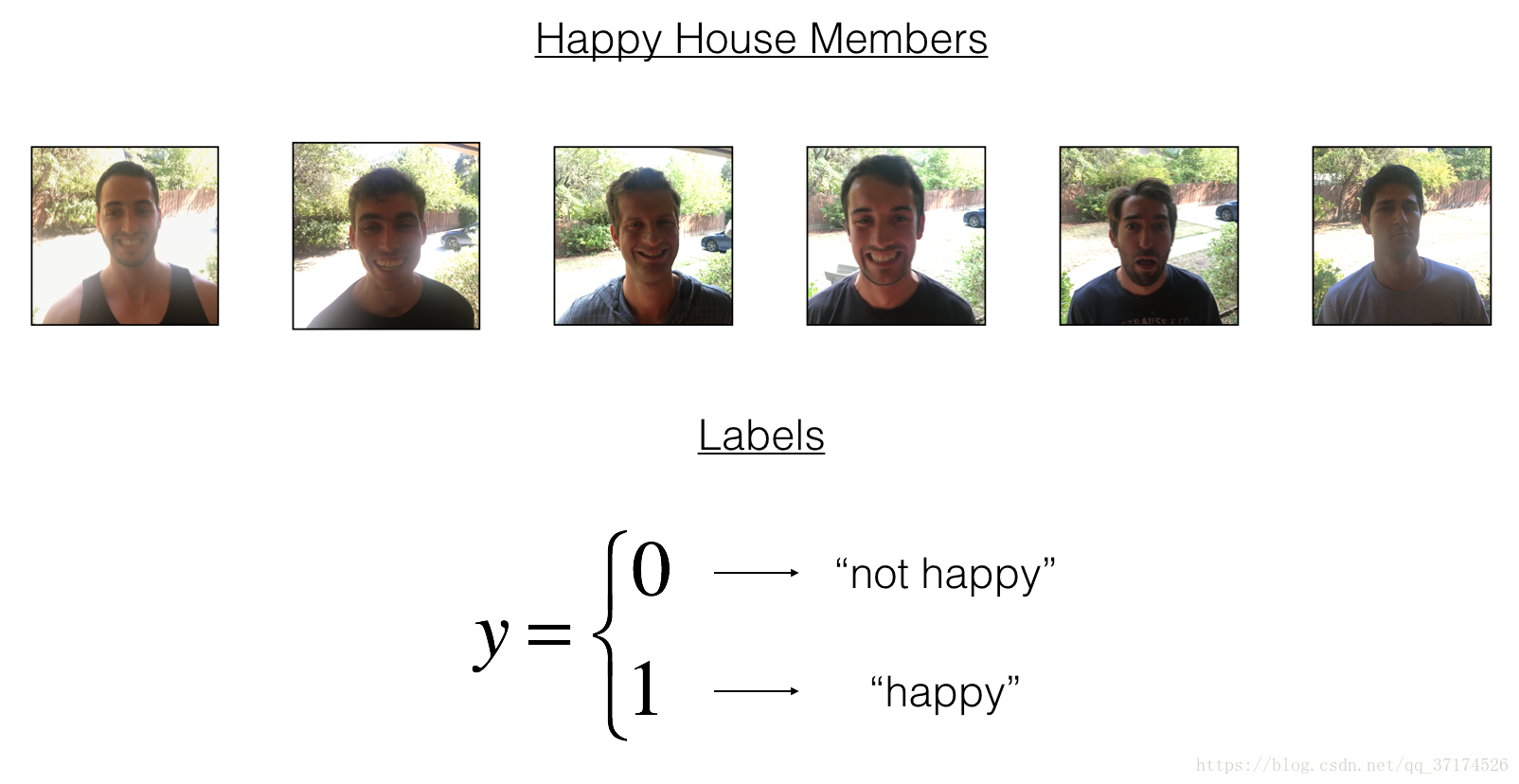
建立一个算法,它使用来自前门摄像头的图片来检查这个人是否快乐,只有在人高兴的时候,门才会打开。
你收集了你的朋友和你自己的照片,被前门的摄像头拍了下来。数据集已经标记好了
X_train_orig, Y_train_orig, X_test_orig, Y_test_orig, classes = load_dataset()

# Normalize image vectors

X_train = X_train_orig/255.

X_test = X_test_orig/255.

# Reshape

Y_train = Y_train_orig.T

Y_test = Y_test_orig.T

print ("number of training examples = " + str(X_train.shape[0]))

print ("number of test examples = " + str(X_test.shape[0]))

print ("X_train shape: " + str(X_train.shape))

print ("Y_train shape: " + str(Y_train.shape))

print ("X_test shape: " + str(X_test.shape))

print ("Y_test shape: " + str(Y_test.shape))
number of training examples = 600
number of test examples = 150
X_train shape: (600, 64, 64, 3)
Y_train shape: (600, 1)
X_test shape: (150, 64, 64, 3)
Y_test shape: (150, 1)
Details of the "Happy" dataset:
Images are of shape (64,64,3)
Training: 600 pictures
Test: 150 pictures
2. Building a model in Keras
Keras非常适合快速制作模型,它可以在很短的时间内建立一个很优秀的模型.
Here is an example of a model in Keras:
def model(input_shape):

    # Define the input placeholder as a tensor with shape input_shape. Think of this as your input image!

    X_input = Input(input_shape)

    # Zero-Padding: pads the border of X_input with zeroes

    X = ZeroPadding2D((3, 3))(X_input)

    # CONV -> BN -> RELU Block applied to X

    X = Conv2D(32, (7, 7), strides = (1, 1), name = 'conv0')(X)

    X = BatchNormalization(axis = 3, name = 'bn0')(X)

    X = Activation('relu')(X)

    # MAXPOOL

    X = MaxPooling2D((2, 2), name='max_pool')(X)

    # FLATTEN X (means convert it to a vector) + FULLYCONNECTED

    X = Flatten()(X)

    X = Dense(1, activation='sigmoid', name='fc')(X)

    # Create model. This creates your Keras model instance, you'll use this instance to train/test the model.

    model = Model(inputs = X_input, outputs = X, name='HappyModel')

    return model
注意:
Keras框架使用的变量名和我们以前使用的numpy和TensorFlow变量不一样。它不是在前向传播的每一步上创建新变量(比如X, Z1, A1, Z2, A2,…)以便于不同层之间的计算。
在Keras中,我们使用X覆盖了所有的值,没有保存每一层结果,我们只需要最新的值,唯一例外的就是
X_input,我们将它分离出来是因为它是输入的数据,我们要在最后的创建模型那一步中用到。
# GRADED FUNCTION: HappyModel

def HappyModel(input_shape):

    """

    Implementation of the HappyModel.

    Arguments:

    input_shape -- shape of the images of the dataset

    Returns:

    model -- a Model() instance in Keras

    """

    ### START CODE HERE ###

    # Feel free to use the suggested outline in the text above to get started, and run through the whole

    # exercise (including the later portions of this notebook) once. The come back also try out other

    # network architectures as well.

    X_input = Input(input_shape)

    # 使用0填充: X_input周围填充0, p=3

    X = ZeroPadding2D((3, 3))(X_input)

    # 使用CONV -> Batch归一化 -> Relu

    X = Conv2D(32, (3, 3), strides = (1, 1), name = 'conv0')(X)

    X = BatchNormalization(axis=3, name='bn0')(X)

    X = Activation('relu')(X)

    # MaxPool: 最大值池化层

    X = MaxPooling2D((2, 2), name='max_pool')(X)

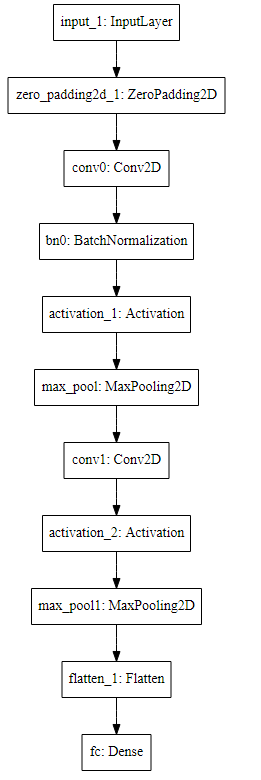
    X = Conv2D(16, (3, 3), strides = (1, 1), name = 'conv1')(X)  # 优化后

    X = Activation('relu')(X)

    X = MaxPooling2D((2, 2), name='max_pool1')(X)

    # Flatten层, 矩阵-->向量

    # 全连接层(full Connected)

    X = Flatten()(X)

    X = Dense(1, activation='sigmoid', name='fc')(X)

    model = Model(inputs = X_input, outputs = X, name='HappyModel')

    ### END CODE HERE ###

    return model
设计好模型,训练并测试模型需要:
创建一个模型实体。
编译模型,可以使用这个语句:
model.compile(optimizer = "...", loss = "...", metrics = ["accuracy"])。训练模型:
model.fit(x = ..., y = ..., epochs = ..., batch_size = ...)。评估模型:
model.evaluate(x = ..., y = ...)。
# step 1. create the model.

happyModel = HappyModel(X_train.shape[1:])

# step 2. compile the model to configure the learning process. accuracy是评价指标

happyModel.compile(optimizer = 'adam', loss = 'binary_crossentropy', metrics = ['accuracy'])

# step 3. 训练模型

happyModel.fit(x = X_train, y = Y_train, epochs = 40, batch_size = 50)

# step 4. 评价模型, 在测试集上评价

preds = happyModel.evaluate(x = X_test, y = Y_test)

print()

print ("Loss = " + str(preds[0]))

print ("Test Accuracy = " + str(preds[1]))
Epoch 1/40

600/600 [==============================] - 20s - loss: 0.7217 - acc: 0.6300

Epoch 2/40

600/600 [==============================] - 21s - loss: 0.4625 - acc: 0.8083

Epoch 3/40

600/600 [==============================] - 19s - loss: 0.3341 - acc: 0.8667

Epoch 4/40

600/600 [==============================] - 24s - loss: 0.2439 - acc: 0.9167

Epoch 5/40

600/600 [==============================] - 22s - loss: 0.1956 - acc: 0.9367

Epoch 6/40

600/600 [==============================] - 21s - loss: 0.1750 - acc: 0.9350

Epoch 7/40

600/600 [==============================] - 20s - loss: 0.1411 - acc: 0.9600

Epoch 8/40

600/600 [==============================] - 29s - loss: 0.1271 - acc: 0.9583

Epoch 9/40

600/600 [==============================] - 33s - loss: 0.1177 - acc: 0.9667

Epoch 10/40

600/600 [==============================] - 29s - loss: 0.0918 - acc: 0.9767

Epoch 11/40

600/600 [==============================] - 30s - loss: 0.0772 - acc: 0.9833

Epoch 12/40

600/600 [==============================] - 23s - loss: 0.0734 - acc: 0.9817

Epoch 13/40

600/600 [==============================] - 20s - loss: 0.0716 - acc: 0.9867

Epoch 14/40

600/600 [==============================] - 20s - loss: 0.0724 - acc: 0.9800

Epoch 15/40

600/600 [==============================] - 19s - loss: 0.0598 - acc: 0.9867

Epoch 16/40

600/600 [==============================] - 20s - loss: 0.0667 - acc: 0.9833

Epoch 17/40

600/600 [==============================] - 19s - loss: 0.0566 - acc: 0.9850

Epoch 18/40

600/600 [==============================] - 22s - loss: 0.0449 - acc: 0.9917

Epoch 19/40

600/600 [==============================] - 21s - loss: 0.0475 - acc: 0.9917

Epoch 20/40

600/600 [==============================] - 21s - loss: 0.0533 - acc: 0.9850

Epoch 21/40

600/600 [==============================] - 21s - loss: 0.0468 - acc: 0.9883

Epoch 22/40

600/600 [==============================] - 20s - loss: 0.0391 - acc: 0.9933

Epoch 23/40

600/600 [==============================] - 19s - loss: 0.0367 - acc: 0.9917

Epoch 24/40

600/600 [==============================] - 20s - loss: 0.0339 - acc: 0.9900

Epoch 25/40

600/600 [==============================] - 21s - loss: 0.0436 - acc: 0.9883

Epoch 26/40

600/600 [==============================] - 20s - loss: 0.0314 - acc: 0.9900

Epoch 27/40

600/600 [==============================] - 21s - loss: 0.0295 - acc: 0.9900

Epoch 28/40

600/600 [==============================] - 21s - loss: 0.0295 - acc: 0.9933

Epoch 29/40

600/600 [==============================] - 20s - loss: 0.0261 - acc: 0.9917

Epoch 30/40

600/600 [==============================] - 21s - loss: 0.0286 - acc: 0.9933

Epoch 31/40

600/600 [==============================] - 22s - loss: 0.0237 - acc: 0.9933

Epoch 32/40

600/600 [==============================] - 23s - loss: 0.0192 - acc: 0.9983

Epoch 33/40

600/600 [==============================] - 22s - loss: 0.0218 - acc: 0.9967

Epoch 34/40

600/600 [==============================] - 21s - loss: 0.0272 - acc: 0.9950

Epoch 35/40

600/600 [==============================] - 19s - loss: 0.0188 - acc: 0.9983

Epoch 36/40

600/600 [==============================] - 19s - loss: 0.0166 - acc: 0.9933

Epoch 37/40

600/600 [==============================] - 19s - loss: 0.0193 - acc: 0.9983

Epoch 38/40

600/600 [==============================] - 19s - loss: 0.0134 - acc: 0.9967

Epoch 39/40

600/600 [==============================] - 20s - loss: 0.0147 - acc: 0.9983

Epoch 40/40

600/600 [==============================] - 19s - loss: 0.0174 - acc: 0.9983

<keras.callbacks.History at 0x1cc49470>
150/150 [==============================] - 1s

Loss = 0.10337299724419911

Test Accuracy = 0.9733333309491475
准确度大于80%就算正常,如果你的准确度没有大于80%,你可以尝试改变模型:
X = Conv2D(32, (3, 3), strides = (1, 1), name = 'conv0')(X)

X = BatchNormalization(axis = 3, name = 'bn0')(X)

X = Activation('relu')(X)
直到 height and width dimensions 十分小, channels数 十分大(≈32 for example)
- 你可以在每个块后面使用最大值池化层,它将会减少宽、高的维度。
- Change your optimizer. 这里使用的是Adam
- 如果模型难以运行,并且遇到了内存不够的问题,那么就降低batch_size (12通常是一个很好的折中方案)
- Run on more epochs, until you see the train accuracy plateauing.
Note: If you perform hyperparameter tuning on your model, the test set actually becomes a dev set, and your model might end up overfitting to the test (dev) set. But just for the purpose of this assignment, we won't worry about that here.
3. 总结
模型构建过程,Create -> Compile -> Fit/Train -> Evaluate/Test.
4. 测试你的图片
### START CODE HERE ###

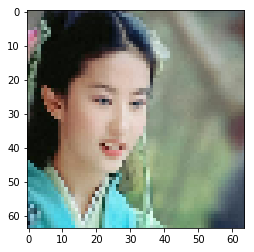
img_path = 'images/smail01.png'

### END CODE HERE ###

img = image.load_img(img_path, target_size=(64, 64))

imshow(img)

x = image.img_to_array(img)

x = np.expand_dims(x, axis=0)

x = preprocess_input(x)

print(happyModel.predict(x))
[[1.]]
### START CODE HERE ###

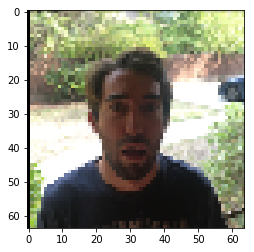
img_path = 'images/smail08.png'

### END CODE HERE ###

img = image.load_img(img_path, target_size=(64, 64))

imshow(img)

x = image.img_to_array(img)

x = np.expand_dims(x, axis=0)

x = preprocess_input(x)

print(happyModel.predict(x))
[[0.]]
5. 其他一些有用的功能
model.summary():打印出你的每一层的大小细节plot_model(): 绘制出布局图
happyModel.summary()
______________________________________________________________

Layer (type)                 Output Shape              Param #

=================================================================

input_3 (InputLayer)         (None, 64, 64, 3)         0

_________________________________________________________________

zero_padding2d_3 (ZeroPaddin (None, 70, 70, 3)         0

_________________________________________________________________

conv0 (Conv2D)               (None, 68, 68, 32)        896

_________________________________________________________________

bn0 (BatchNormalization)     (None, 68, 68, 32)        128

_________________________________________________________________

activation_3 (Activation)    (None, 68, 68, 32)        0

_________________________________________________________________

max_pool (MaxPooling2D)      (None, 34, 34, 32)        0

_________________________________________________________________

flatten_3 (Flatten)          (None, 36992)             0

_________________________________________________________________

fc (Dense)                   (None, 1)                 36993

=================================================================

Total params: 38,017

Trainable params: 37,953

Non-trainable params: 64

_________________________________________________________________
执行下面:
需要安装:Graphviz, 参考这个https://www.cnblogs.com/shuodehaoa/p/8667045.html
执行:pip install pydot-ng & pip install graphviz
plot_model(happyModel, to_file='HappyModel.png')

SVG(model_to_dot(happyModel).create(prog='dot', format='svg'))
Convolutional Neural Network-week2编程题1(Keras tutorial - 笑脸识别)的更多相关文章
- 《ABCNN: Attention-Based Convolutional Neural Network for Modeling Sentence Pairs》
代码: keras:https://github.com/phdowling/abcnn-keras tf:https://github.com/galsang/ABCNN 本文是Wenpeng Yi ...
- ISSCC 2017论文导读 Session 14 Deep Learning Processors,A 2.9TOPS/W Deep Convolutional Neural Network
最近ISSCC2017大会刚刚举行,看了关于Deep Learning处理器的Session 14,有一些不错的东西,在这里记录一下. A 2.9TOPS/W Deep Convolutional N ...
- ISSCC 2017论文导读 Session 14 Deep Learning Processors,A 2.9TOPS/W Deep Convolutional Neural Network SOC
最近ISSCC2017大会刚刚举行,看了关于Deep Learning处理器的Session 14,有一些不错的东西,在这里记录一下. A 2.9TOPS/W Deep Convolutional N ...
- 论文阅读(Weilin Huang——【TIP2016】Text-Attentional Convolutional Neural Network for Scene Text Detection)
Weilin Huang--[TIP2015]Text-Attentional Convolutional Neural Network for Scene Text Detection) 目录 作者 ...
- 卷积神经网络(Convolutional Neural Network,CNN)
全连接神经网络(Fully connected neural network)处理图像最大的问题在于全连接层的参数太多.参数增多除了导致计算速度减慢,还很容易导致过拟合问题.所以需要一个更合理的神经网 ...
- Convolutional Neural Network in TensorFlow
翻译自Build a Convolutional Neural Network using Estimators TensorFlow的layer模块提供了一个轻松构建神经网络的高端API,它提供了创 ...
- 卷积神经网络(Convolutional Neural Network, CNN)简析
目录 1 神经网络 2 卷积神经网络 2.1 局部感知 2.2 参数共享 2.3 多卷积核 2.4 Down-pooling 2.5 多层卷积 3 ImageNet-2010网络结构 4 DeepID ...
- HYPERSPECTRAL IMAGE CLASSIFICATION USING TWOCHANNEL DEEP CONVOLUTIONAL NEURAL NETWORK阅读笔记
HYPERSPECTRAL IMAGE CLASSIFICATION USING TWOCHANNEL DEEP CONVOLUTIONAL NEURAL NETWORK 论文地址:https:/ ...
- A NEW HYPERSPECTRAL BAND SELECTION APPROACH BASED ON CONVOLUTIONAL NEURAL NETWORK文章笔记
A NEW HYPERSPECTRAL BAND SELECTION APPROACH BASED ON CONVOLUTIONAL NEURAL NETWORK 文章地址:https://ieeex ...
随机推荐
- Mybatis(四)——
test https://www.cnblogs.com/chiaki/p/14529418.html
- 【曹工杂谈】Maven底层容器Plexus Container的前世今生,一代芳华终落幕
Maven底层容器Plexus Container的前世今生,一代芳华终落幕 前言 说实话,我非常地纠结,大家平时只是用Maven,对于内部的实现其实也不关心,我现在非要拉着大家给大家讲.这就有个问题 ...
- www迁移
www迁移主要就是2部分: 1)官网页面架构,即 ./drupal/index.php 2)官网图片,即 ./drupal/assets/ 目录下的文件 1. 在ubuntu上搭建基础v1.0环境 2 ...
- Element UI:DatePicker的终止日期与起始日期关联
Template // 起始日期 <el-date-picker v-model="queryParams.startTime" :picker-options=" ...
- Scanner类、匿名对象、Random类、ArrayList集合、String类、static静态类、math类和Arrays工具类
一.Scanner类 1.除了八种基本数据类型,其他都是引用类型: 引用类型使用三步骤: 2.Scanner类 引用jdk提供的类,Scanner在java.util包下,不在java.lang包(S ...
- 以人为本打造“超职季”IP,58同城精准匹配企业招聘与打工人
撰文 |懂懂 编辑 | 秦言 来源:懂懂笔记 在大手笔培育IP的背后,58同城是如何考量的? 在餐厅当服务员的李阿姨今年54岁了.她的女儿马上研究生毕业,非常喜欢陈伟霆,手机屏保都是他.李阿姨没想到, ...
- VS Code + WSL 搭建 RaspberryPi Pico 开发环境
前面老周写一堆 .NET 与树莓派相关的水文.其实使用的是.net的 IOT 库,并不只是树莓派,其他运行 Linux 的开发板都适用,只要有 GPIO 就行.老周好像在哪看到过,有 USB 转GPI ...
- 有个计算机专业的学妹问我:我这个zip文件密码破解运行起来为什么内存爆了?
1.这篇博文的由来 2.跑下错误代码,找病根 先把学妹发给我的错误代码放上,能发现他为了提高速度加了多线程的代码,很聪明哦: import zipfile import itertools from ...
- 38KHz,NEC红外模拟发送和接收程序
/*************************************************************************************************/ ...
- 在PHP中如何为匿名函数指定this?
在之前的文章中,我们已经学习过匿名函数的使用,没有看过的小伙伴可以进入传送门先去了解下闭包匿名函数的用法,传送:还不知道PHP有闭包?那你真OUT了. 关于闭包匿名函数,在JS中有个很典型的问题就是要 ...