
SpringCloud微服务实战——搭建企业级开发框架(二十六):自定义扩展OAuth2实现短信验证码登录
现在手机验证码登录似乎是每个网站必备的功能,OAuth2支持扩展自定义授权模式,前面介绍了如何在系统集成短信通知服务,这里我们进行OAuth2的授权模式自定义扩展,使系统支持短信验证码登录。
1、在gitegg-oauth中新增SmsCaptchaTokenGranter 自定义短信验证码令牌授权处理类
/**

 * 短信验证码模式

 */

public class SmsCaptchaTokenGranter extends AbstractTokenGranter {

    private static final String GRANT_TYPE = "sms_captcha";

    private final AuthenticationManager authenticationManager;

    private UserDetailsService userDetailsService;

    private IUserFeign userFeign;

    private ISmsFeign smsFeign;

    private RedisTemplate redisTemplate;

    private CaptchaService captchaService;

    private String captchaType;

    public SmsCaptchaTokenGranter(AuthenticationManager authenticationManager,

                                  AuthorizationServerTokenServices tokenServices, ClientDetailsService clientDetailsService,

                                  OAuth2RequestFactory requestFactory, RedisTemplate redisTemplate, IUserFeign userFeign, ISmsFeign smsFeign, CaptchaService captchaService,

                                  UserDetailsService userDetailsService, String captchaType) {

        this(authenticationManager, tokenServices, clientDetailsService, requestFactory, GRANT_TYPE);

        this.redisTemplate = redisTemplate;

        this.captchaService = captchaService;

        this.captchaType = captchaType;

        this.smsFeign = smsFeign;

        this.userFeign = userFeign;

        this.userDetailsService = userDetailsService;

    }

    protected SmsCaptchaTokenGranter(AuthenticationManager authenticationManager,

                                  AuthorizationServerTokenServices tokenServices, ClientDetailsService clientDetailsService,

                                  OAuth2RequestFactory requestFactory, String grantType) {

        super(tokenServices, clientDetailsService, requestFactory, grantType);

        this.authenticationManager = authenticationManager;

    }

    @Override

    protected OAuth2Authentication getOAuth2Authentication(ClientDetails client, TokenRequest tokenRequest) {

        Map<string, string=""> parameters = new LinkedHashMap<>(tokenRequest.getRequestParameters());

        // 获取验证码类型

        String captchaType = parameters.get(CaptchaConstant.CAPTCHA_TYPE);

        // 判断传入的验证码类型和系统配置的是否一致

        if (!StringUtils.isEmpty(captchaType) && !captchaType.equals(this.captchaType)) {

            throw new UserDeniedAuthorizationException(ResultCodeEnum.INVALID_CAPTCHA_TYPE.getMsg());

        }

        if (CaptchaConstant.IMAGE_CAPTCHA.equalsIgnoreCase(captchaType)) {

            // 图片验证码验证

            String captchaKey = parameters.get(CaptchaConstant.CAPTCHA_KEY);

            String captchaCode = parameters.get(CaptchaConstant.CAPTCHA_CODE);

            // 获取验证码

            String redisCode = (String)redisTemplate.opsForValue().get(CaptchaConstant.IMAGE_CAPTCHA_KEY + captchaKey);

            // 判断验证码

            if (captchaCode == null || !captchaCode.equalsIgnoreCase(redisCode)) {

                throw new UserDeniedAuthorizationException(ResultCodeEnum.INVALID_CAPTCHA.getMsg());

            }

        } else {

            // 滑动验证码验证

            String captchaVerification = parameters.get(CaptchaConstant.CAPTCHA_VERIFICATION);

            CaptchaVO captchaVO = new CaptchaVO();

            captchaVO.setCaptchaVerification(captchaVerification);

            ResponseModel responseModel = captchaService.verification(captchaVO);

            if (null == responseModel || !RepCodeEnum.SUCCESS.getCode().equals(responseModel.getRepCode())) {

                throw new UserDeniedAuthorizationException(ResultCodeEnum.INVALID_CAPTCHA.getMsg());

            }

        }

        String phoneNumber = parameters.get(TokenConstant.PHONE_NUMBER);

        String smsCode = parameters.get(TokenConstant.SMS_CODE);

        String code = parameters.get(TokenConstant.CODE);

        // Protect from downstream leaks of password

        parameters.remove(TokenConstant.CODE);

        Result<boolean> checkResult = smsFeign.checkSmsVerificationCode(smsCode, phoneNumber, code);

        if (null == checkResult || !checkResult.getData()) {

            throw new InvalidGrantException(("Could not authenticate user: " + phoneNumber));

        }

        UserDetails userDetails = this.userDetailsService.loadUserByUsername(phoneNumber);

        Authentication userAuth = new UsernamePasswordAuthenticationToken(userDetails, null, userDetails.getAuthorities());

        ((AbstractAuthenticationToken)userAuth).setDetails(parameters);

        OAuth2Request storedOAuth2Request = getRequestFactory().createOAuth2Request(client, tokenRequest);

        return new OAuth2Authentication(storedOAuth2Request, userAuth);

    }

}
2、自定义GitEggTokenGranter,支持多种token模式
/**

 * 自定义token

 */

public class GitEggTokenGranter {

    /**

     * 自定义tokenGranter

     */

    public static TokenGranter getTokenGranter(final AuthenticationManager authenticationManager,

                                               final AuthorizationServerEndpointsConfigurer endpoints, RedisTemplate redisTemplate, IUserFeign userFeign,

                                               ISmsFeign smsFeign, CaptchaService captchaService, UserDetailsService userDetailsService, String captchaType) {

        // 默认tokenGranter集合

        List<tokengranter> granters = new ArrayList<>(Collections.singletonList(endpoints.getTokenGranter()));

        // 增加验证码模式

        granters.add(new CaptchaTokenGranter(authenticationManager, endpoints.getTokenServices(),

            endpoints.getClientDetailsService(), endpoints.getOAuth2RequestFactory(), redisTemplate, captchaService,

            captchaType));

        // 增加短信验证码模式

        granters.add(new SmsCaptchaTokenGranter(authenticationManager, endpoints.getTokenServices(),

                endpoints.getClientDetailsService(), endpoints.getOAuth2RequestFactory(), redisTemplate, userFeign, smsFeign, captchaService,

                userDetailsService, captchaType));

        // 组合tokenGranter集合

        return new CompositeTokenGranter(granters);

    }

}
3、GitEggOAuthController中增加获取短信验证码的方法
    @ApiOperation("发送短信验证码")

    @PostMapping("/sms/captcha/send")

    public Result sendSmsCaptcha(@RequestBody SmsVerificationDTO smsVerificationDTO) {

        Result<object> sendResult = smsFeign.sendSmsVerificationCode(smsVerificationDTO.getSmsCode(), smsVerificationDTO.getPhoneNumber());

        return sendResult;

    }
4、前端页面增加短信验证码登录方式
        <a-tab-pane key="phone_account" :tab="$t('user.login.tab-login-mobile')" class="color:#1890ff;">

          <a-form-item>

            <a-input size="large" type="text" :placeholder="$t('user.login.mobile.placeholder')" v-decorator="['phoneNumber', {rules: [{ required: true, pattern: /^1[34578]\d{9}$/, message: $t('user.phone-number.required') }], validateTrigger: 'change'}]">

              <a-icon slot="prefix" type="mobile" :style="{ color: '#1890ff' }">

            </a-icon></a-input>

          </a-form-item>

          <a-row :gutter="16">

            <a-col class="gutter-row" :span="16">

              <a-form-item>

                <a-input size="large" type="text" :placeholder="$t('user.login.mobile.verification-code.placeholder')" v-decorator="['captcha', {rules: [{ required: true, message: $t('user.verification-code.required') }], validateTrigger: 'blur'}]">

                  <a-icon slot="prefix" type="mail" :style="{ color: '#1890ff' }">

                </a-icon></a-input>

              </a-form-item>

            </a-col>

            <a-col class="gutter-row" :span="8">

              <a-button class="getCaptcha" tabindex="-1" :disabled="state.smsSendBtn" @click.stop.prevent="getCaptcha" v-text="!state.smsSendBtn && $t('user.register.get-verification-code') || (state.time+' s')"></a-button>

            </a-col>

          </a-row>

        </a-tab-pane>
getCaptcha (e) {

      e.preventDefault()

      const { form: { validateFields }, state } = this

      validateFields(['phoneNumber'], { force: true }, (err, values) => {

        if (!err) {

          state.smsSendBtn = true

          const interval = window.setInterval(() => {

            if (state.time-- <= 0) {

              state.time = 60

              state.smsSendBtn = false

              window.clearInterval(interval)

            }

          }, 1000)

          const hide = this.$message.loading('验证码发送中..', 0)

          getSmsCaptcha({ phoneNumber: values.phoneNumber, smsCode: 'aliLoginCode' }).then(res => {

            setTimeout(hide, 2500)

            this.$notification['success']({

              message: '提示',

              description: '验证码获取成功,您的验证码为:' + res.result.captcha,

              duration: 8

            })

          }).catch(err => {

            setTimeout(hide, 1)

            clearInterval(interval)

            state.time = 60

            state.smsSendBtn = false

            this.requestFailed(err)

          })

        }

      })

    },

    stepCaptchaSuccess () {

      this.loginSuccess()

    },

    stepCaptchaCancel () {

      this.Logout().then(() => {

        this.loginBtn = false

        this.stepCaptchaVisible = false

      })

    },
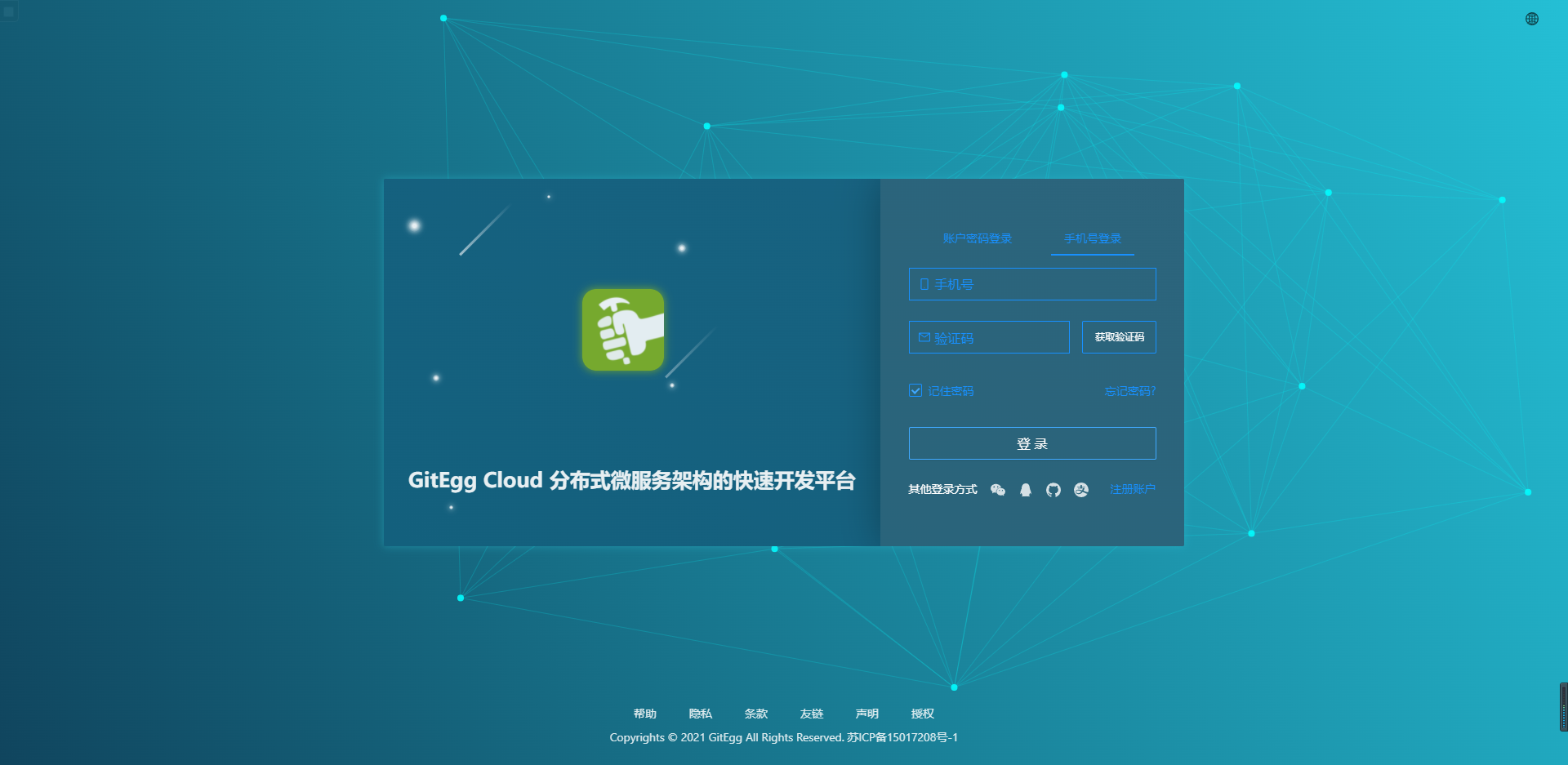
5、通过短信验证码登录界面
源码地址:
Gitee: https://gitee.com/wmz1930/GitEgg
GitHub: https://github.com/wmz1930/GitEgg
SpringCloud微服务实战——搭建企业级开发框架(二十六):自定义扩展OAuth2实现短信验证码登录的更多相关文章
- SpringCloud微服务实战——搭建企业级开发框架(十六):集成Sentinel高可用流量管理框架【自定义返回消息】
Sentinel限流之后,默认的响应消息为Blocked by Sentinel (flow limiting),对于系统整体功能提示来说并不统一,参考我们前面设置的统一响应及异常处理方式,返回相同的 ...
- SpringCloud微服务实战——搭建企业级开发框架(十二):OpenFeign+Ribbon实现负载均衡
Ribbon是Netflix下的负载均衡项目,它主要实现中间层应用程序的负载均衡.为Ribbon配置服务提供者地址列表后,Ribbon就会基于某种负载均衡算法,自动帮助服务调用者去请求.Ribbo ...
- SpringCloud微服务实战——搭建企业级开发框架(十):使用Nacos分布式配置中心
随着业务的发展.微服务架构的升级,服务的数量.程序的配置日益增多(各种微服务.各种服务器地址.各种参数),传统的配置文件方式和数据库的方式已无法满足开发人员对配置管理的要求: 安全性:配置跟随源代码保 ...
- SpringCloud微服务实战——搭建企业级开发框架(十四):集成Sentinel高可用流量管理框架【限流】
Sentinel 是面向分布式服务架构的高可用流量防护组件,主要以流量为切入点,从限流.流量整形.熔断降级.系统负载保护.热点防护等多个维度来帮助开发者保障微服务的稳定性. Sentinel 具有 ...
- SpringCloud微服务实战——搭建企业级开发框架(十五):集成Sentinel高可用流量管理框架【熔断降级】
Sentinel除了流量控制以外,对调用链路中不稳定的资源进行熔断降级也是保障高可用的重要措施之一.由于调用关系的复杂性,如果调用链路中的某个资源不稳定,最终会导致请求发生堆积.Sentinel ...
- SpringCloud微服务实战——搭建企业级开发框架(十九):Gateway使用knife4j聚合微服务文档
本章介绍Spring Cloud Gateway网关如何集成knife4j,通过网关聚合所有的Swagger微服务文档 1.gitegg-gateway中引入knife4j依赖,如果没有后端代码编 ...
- SpringCloud微服务实战——搭建企业级开发框架(四十):使用Spring Security OAuth2实现单点登录(SSO)系统
一.单点登录SSO介绍 目前每家企业或者平台都存在不止一套系统,由于历史原因每套系统采购于不同厂商,所以系统间都是相互独立的,都有自己的用户鉴权认证体系,当用户进行登录系统时,不得不记住每套系统的 ...
- SpringCloud微服务实战——搭建企业级开发框架(二十三):Gateway+OAuth2+JWT实现微服务统一认证授权
OAuth2是一个关于授权的开放标准,核心思路是通过各类认证手段(具体什么手段OAuth2不关心)认证用户身份,并颁发token(令牌),使得第三方应用可以使用该token(令牌)在限定时间.限定 ...
- SpringCloud微服务实战——搭建企业级开发框架(四十七):【移动开发】整合uni-app搭建移动端快速开发框架-添加Axios并实现登录功能
uni-app自带uni.request用于网络请求,因为我们需要自定义拦截器等功能,也是为了和我们后台管理保持统一,这里我们使用比较流行且功能更强大的axios来实现网络请求. Axios ...
- SpringCloud微服务实战——搭建企业级开发框架(四十二):集成分布式任务调度平台XXL-JOB,实现定时任务功能
定时任务几乎是每个业务系统必不可少的功能,计算到期时间.过期时间等,定时触发某项任务操作.在使用单体应用时,基本使用Spring提供的注解即可实现定时任务,而在使用微服务集群时,这种方式就要考虑添 ...
随机推荐
- FastAPI 学习之路(十七)上传文件
系列文章: FastAPI 学习之路(一)fastapi--高性能web开发框架 FastAPI 学习之路(二) FastAPI 学习之路(三) FastAPI 学习之路(四) FastAPI 学习之 ...
- 02Prism WPF 入门实战 - 建项
1.概要 Prism介绍 Github: https://github.com/PrismLibrary/Prism 开发文档:https://prismlibrary.com/docs/ Prism ...
- 5分钟让你掌握Vuex,深入浅出
5分钟让你掌握Vuex,深入浅出 一.什么是Vuex? 概念:Vuex 是一个专为 Vue.js 应用程序开发的状态管理模式.它采用集中式存储管理应用的所有组件的状态,并以相应的规则保证状态以一种可预 ...
- 永久修改alias
永久修改alias home目录下ls -a显示隐藏文件 编辑./cshrc
- 三分钟极速体验:Java版人脸检测
欢迎访问我的GitHub https://github.com/zq2599/blog_demos 内容:所有原创文章分类汇总及配套源码,涉及Java.Docker.Kubernetes.DevOPS ...
- 求求你了,用Docker吧
这是一个开始使用 Docker 的 Tutorial 大无语事件发生!大数据课实验课要用到Hadoop,实验指导是在一个Ubuntu虚机上通过安装包安装Hadoop并运行一个词频统计程序,整个实验就是 ...
- 欧姆龙PLC HostLink协议整理
欧姆龙PLC HostLink协议整理 1.常用的存储器功能区 CIO: 输入继电器 272 点(17 CH) 0.00-16.15 输出继电器 272 点(17 CH) 100.00-116.1 ...
- 【二食堂】Beta - 设计和计划
Beta设计和计划 需求再分析 根据助教.老师.用户以及各个团队PM的反馈意见,我们的项目目前有以下问题: 功能不完整 实用价值不高 两方面的缺陷,所以在Beta阶段,我们工作的中心还是完成项目规划中 ...
- 关于linux下编译的几点知识
1.-L.-rpath 和 rpath_link的区别 参考博客文章:https://www.cnblogs.com/candl/p/7358384.html (1)-rpath和-rpath-lin ...
- Flink 实践教程:入门(1):零基础用户实现简单 Flink 任务
作者:腾讯云流计算 Oceanus 团队 流计算 Oceanus 简介 流计算 Oceanus 是大数据产品生态体系的实时化分析利器,是基于 Apache Flink 构建的具备一站开发.无缝连接.亚 ...