
【odoo】【知识点】视图的继承逻辑
背景:同一个模块,两组开发人员对同一个模型的form视图进行了二开。在没有指定外部ID的情况下,odoo是如何选择展示展示哪个视图呢?
上干货
- odoo在加载视图的时候,首先调用的models.py中的
load_views函数;
    @api.model

    def load_views(self, views, options=None):

        """ Returns the fields_views of given views, along with the fields of

            the current model, and optionally its filters for the given action.

        :param views: list of [view_id, view_type]

        :param options['toolbar']: True to include contextual actions when loading fields_views

        :param options['load_filters']: True to return the model's filters

        :param options['action_id']: id of the action to get the filters

        :return: dictionary with fields_views, fields and optionally filters

        """

        options = options or {}

        result = {}

        toolbar = options.get('toolbar')

        result['fields_views'] = {

            v_type: self.fields_view_get(v_id, v_type if v_type != 'list' else 'tree',

                                         toolbar=toolbar if v_type != 'search' else False)

            for [v_id, v_type] in views

        }

        result['fields'] = self.fields_get()

        if options.get('load_filters'):

            result['filters'] = self.env['ir.filters'].get_filters(self._name, options.get('action_id'))

        return result
- 上面的核心在
fields_view_get函数,如下,截取重要的内容
   @api.model

   def fields_view_get(self, view_id=None, view_type='form', toolbar=False, submenu=False):

       self.check_access_rights('read')

       view = self.env['ir.ui.view'].sudo().browse(view_id)

       # Get the view arch and all other attributes describing the composition of the view

       result = self._fields_view_get(view_id=view_id, view_type=view_type, toolbar=toolbar, submenu=submenu)

       ···
- 检查权限通过后,调用
_fields_view_get函数,若用户调用的视图没有指定视图ID,那么将调用默认的视图
    @api.model

    def _fields_view_get(self, view_id=None, view_type='form', toolbar=False, submenu=False):

        View = self.env['ir.ui.view'].sudo()

        result = {

            'model': self._name,

            'field_parent': False,

        }

        # try to find a view_id if none provided

        if not view_id:

            # <view_type>_view_ref in context can be used to overrride the default view

            view_ref_key = view_type + '_view_ref'

            view_ref = self._context.get(view_ref_key)

            if view_ref:

                if '.' in view_ref:

                    module, view_ref = view_ref.split('.', 1)

                    query = "SELECT res_id FROM ir_model_data WHERE model='ir.ui.view' AND module=%s AND name=%s"

                    self._cr.execute(query, (module, view_ref))

                    view_ref_res = self._cr.fetchone()

                    if view_ref_res:

                        view_id = view_ref_res[0]

                else:

                    _logger.warning('%r requires a fully-qualified external id (got: %r for model %s). '

                        'Please use the complete `module.view_id` form instead.', view_ref_key, view_ref,

                        self._name)

            if not view_id:

                # otherwise try to find the lowest priority matching ir.ui.view

                view_id = View.default_view(self._name, view_type)

        if view_id:

            # read the view with inherited views applied

            root_view = View.browse(view_id).read_combined(['id', 'name', 'field_parent', 'type', 'model', 'arch'])

            result['arch'] = root_view['arch']

            result['name'] = root_view['name']

            result['type'] = root_view['type']

            result['view_id'] = root_view['id']

            result['field_parent'] = root_view['field_parent']

            result['base_model'] = root_view['model']

        else:

            # fallback on default views methods if no ir.ui.view could be found

            try:

                arch_etree = getattr(self, '_get_default_%s_view' % view_type)()

                result['arch'] = etree.tostring(arch_etree, encoding='unicode')

                result['type'] = view_type

                result['name'] = 'default'

            except AttributeError:

                raise UserError(_("No default view of type '%s' could be found !", view_type))

        return result
- 此处我们讨论的是odoo是如何取默认视图的,再进ir.ui.view模型的
default_view函数查看
    @api.model

    def default_view(self, model, view_type):

        """ Fetches the default view for the provided (model, view_type) pair:

         primary view with the lowest priority.

        :param str model:

        :param int view_type:

        :return: id of the default view of False if none found

        :rtype: int

        """

        domain = [('model', '=', model), ('type', '=', view_type), ('mode', '=', 'primary')]

        return self.search(domain, limit=1).id
- 是不是很惊喜,毛都没有,看不出来如何做的选择。别着急,看ir.ui.view的模型吧。
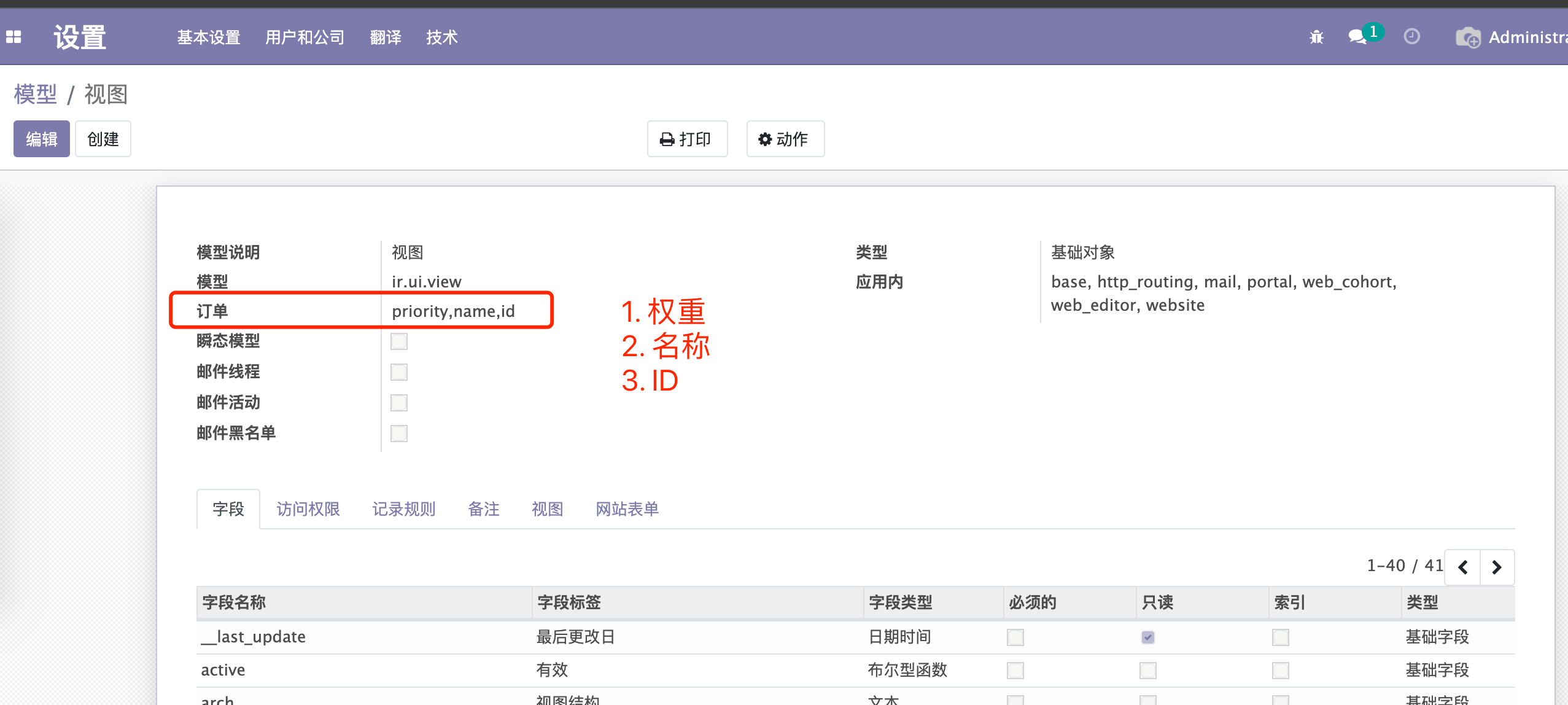
有点坑啊,大家在视图继承的时候。权重基本上是默认的,也就是说若不考虑name的影响,那么默认视图将永远是最先添加的基础视图。但是,这里name的排序居然还在ID的前面,这就有的玩了嘛,起名字也是门艺术了。
- 好了回归正题,在步骤3中,拿到了默认视图后,我们取到的视图有可能是继承视图,也有可能是基础视图。那么将通过
read_combined函数拼接出来以基础视图为框架,包含所有继承视图内容的etree对象。
    def read_combined(self, fields=None):

        """

        Utility function to get a view combined with its inherited views.

        * Gets the top of the view tree if a sub-view is requested

        * Applies all inherited archs on the root view

        * Returns the view with all requested fields

          .. note:: ``arch`` is always added to the fields list even if not

                    requested (similar to ``id``)

        """

        # introduce check_view_ids in context

        if 'check_view_ids' not in self._context:

            self = self.with_context(check_view_ids=[])

        check_view_ids = self._context['check_view_ids']

        # if view_id is not a root view, climb back to the top.

        root = self

        while root.mode != 'primary':

            # Add inherited views to the list of loading forced views

            # Otherwise, inherited views could not find elements created in their direct parents if that parent is defined in the same module

            check_view_ids.append(root.id)

            root = root.inherit_id

        # arch and model fields are always returned

        if fields:

            fields = list({'arch', 'model'}.union(fields))

        # read the view arch

        [view_data] = root.read(fields=fields)

        view_arch = etree.fromstring(view_data['arch'].encode('utf-8'))

        if not root.inherit_id:

            if self._context.get('inherit_branding'):

                view_arch.attrib.update({

                    'data-oe-model': 'ir.ui.view',

                    'data-oe-id': str(root.id),

                    'data-oe-field': 'arch',

                })

            arch_tree = view_arch

        else:

            if self._context.get('inherit_branding'):

                root.inherit_branding(view_arch)

            parent_view = root.inherit_id.read_combined(fields=fields)

            arch_tree = etree.fromstring(parent_view['arch'])

            arch_tree = self.browse(parent_view['id']).apply_inheritance_specs(arch_tree, view_arch)

        # and apply inheritance

        arch = root.apply_view_inheritance(arch_tree, self.model)

        return dict(view_data, arch=etree.tostring(arch, encoding='unicode'))
结束
【odoo】【知识点】视图的继承逻辑的更多相关文章
- 关于类视图选择继承APIView还是工具视图(ListAPIView、CreateAPIView等等)
APIView使用方法,直接继承APIView,get或者post请求.方法很简单1.先获取到要操作的数据,然后把数据放到serializer中序列化或者反序列化,最后return返回值(记得.dat ...
- ODOO里视图开发案例---定义一个像tree、form一样的视图
odoo里视图模型MVC模式: 例子:在原来的视图上修改他: var CustomRenderer = KanbanRenderer.extend({ ....});var CustomRendere ...
- Odoo中的模型继承、视图继承、Qweb模板继承详解
转载请注明原文地址:https://www.cnblogs.com/ygj0930/p/10826114.html 在实际开发过程中,经常会遇到需要修改Odoo原生逻辑的情况.然而,直接修改Odoo底 ...
- 第八章 Odoo 12开发之业务逻辑 - 业务流程的支持
在前面的文章中,我们学习了模型层.如何创建应用数据结构以及如何使用 ORM API 来存储查看数据.本文中我们将利用前面所学的模型和记录集知识实现应用中常用的业务逻辑模式. 本文的主要内容有: 以文件 ...
- 解读ASP.NET 5 & MVC6系列(16):自定义View视图文件查找逻辑
之前MVC5和之前的版本中,我们要想对View文件的路径进行控制的话,则必须要对IViewEngine接口的FindPartialView或FindView方法进行重写,所有的视图引擎都继承于该IVi ...
- Odoo form视图详解
转载请注明原文地址:https://www.cnblogs.com/ygj0930/p/10826350.html 一:Header头部 header区域一般用于展示文档流转的阶段和生命周期,以及动作 ...
- 自定义视图(继承View)
前言 Android提供了丰富的控件,但是有时候还是不能满足自己的需求,这时候就需要自定义视图了,自定义视图分为几种,一种为继承为View的,一种为继承于ViewGroup的.继承于View的需要我们 ...
- 自定义控件(视图)2期笔记09:自定义视图之继承自ViewGroup(仿ViewPager效果案例)
1. 这里我们继承已有ViewGroup实现自定义控件,模拟出来ViewPager的效果,如下: (1)实现的效果图如下: (2)实现步骤: • 自定义view继承viewGroup • 重写onLa ...
- 12.Yii2.0框架视图模版继承与模版相互调用
目录 模板渲染的两种方式 加载视图 index.php 和 about.php 页面 建立控制器HomeController php 新建模板 home\index.php 新建模板home\abou ...
随机推荐
- 基于MATLAB的手写公式识别(6)
基于MATLAB的手写公式识别 2021-03-29 10:24:51 走通了程序,可以识别"心脑血管这几个字",还有很多不懂的地方. 2021-03-29 12:20:01 tw ...
- 11- APP性能测试GT工具的使用
对性能测试来说有服务端的性能与客户端(APP)的性能. GT简介 1.GT(随身调)是APP的随身调测平台,它是直接运行在手机上的"集成调试环境"(IDTE) 2.利用GT,仅凭一 ...
- node运行的第一个helloWorld程序
hello world 参考链接: https://www.runoob.com/nodejs/nodejs-http-server.html https://npm.taobao.org/ http ...
- hdu3400 两重三分
题意: 题意给你两个公路 A-B C-D 和三个速度V(ab) V(cd) 和 V(两条公路之间) 问你从A到D的最短时间是多少. 思路: 一开始暴力了其中的一条边,每次加0.01,另 ...
- LA4851餐厅(求好的坐标的个数)
题意: 有一个m*m的格子,左下角(0,0)右上角(m-1,m-1),网格里面有两个y坐标相同的宾馆(A,B),每个宾馆里面有一个餐厅,一共用n个餐厅,第1,2个都在宾馆里,3,4...在 ...
- POJ3614奶牛晒阳光DINIC或者贪心
题意: n个区间,m种点,每种点有ci个,如果一个点的范围在一个区间上,那么就可以消耗掉一个区间,问最多可以消耗多少个区间,就是这n个区间中,有多少个可能被抵消掉. 思路: 方 ...
- poj1190深搜 生日蛋糕
题意: 让你制作一个蛋糕,这个蛋糕有m层,而且每层都是圆柱形,并且每一层都必须满足 ri>ri+1 && hi > hi+1,然后给出蛋糕的总体积是n*PI,还有 ...
- JSONP跨域资源共享的安全问题
目录 关于 JSONP 一.JSON 劫持 二.Callback 可定义导致的安全问题 三.其他文件格式( Content-Type )与 JSON 四.防御 摘自:http://blog.known ...
- Python中根据库包名学习使用该库包
目录 Python库包模块 import 语句 from-import 语句 搜索路径 PYTHONPATH 变量 命名空间和作用域 查看模块中所有变量和函数,以及查看具体函数的用法 globals( ...
- Windows PE 第十三章 PE补丁技术
PE补丁技术 这章很多东西之前都见过,也单独总结过,比如动态补丁里说的远程代码注入,还有hijack什么的.之前整理过的这里就不细说了,大体说下思路.这里总结一些之前没总结过的东西. 资料中把补丁分为 ...