
启动docker: Got permission denied while trying to connect to the Docker daemon socket at unix:///var/run/docker.sock
启动docker提示:
docker: Got permission denied while trying to connect to the Docker daemon socket at unix:///var/run/docker.sock: Post http://%2Fvar%2Frun%2Fdocker.sock/v1.40/containers/create?name=hjenkins: dial unix /var/run/docker.sock: connect: permission denied.

权限问题:
1.查看所有用户组与用户
vim /etc/group
/etc/group 的内容包括用户组(Group)、用户组口令、GID及该用户组所包含的用户(User),每个用户组一条记录;格式如下:
group_name:passwd:GID:user_list
在/etc/group 中的每条记录分四个字段:
第一字段:用户组名称;
第二字段:用户组密码;
第三字段:GID
第四字段:用户列表,每个用户之间用,号分割;本字段可以为空;如果字段为空表示用户组为GID的用户名;
2.把jenkins用户加入到dockerroot用户组
gpasswd -a jenkins dockerroot #将登陆用户加入到docker用户组中
newgrp dockerroot #更新用户组
3.重启jenkins
hello world!
普通用户使用docker的方法
添加用户组,将用户添加到组,重启docker即可
[root@localhost ~]# groupadd docker

[root@localhost ~]# groups

root

[root@localhost ~]# usermod -a -G docker wade

[root@localhost ~]# grep docker /etc/group

dockerroot:x:994:

docker:x:1001:wade

[root@localhost ~]# service docker restart

Redirecting to /bin/systemctl restart docker.service

[root@localhost ~]# sudo wade

[wade @localhost ~]$ docker image ls
————————————————
版权声明:本文为CSDN博主「wade3015」的原创文章,遵循CC 4.0 BY-SA版权协议,转载请附上原文出处链接及本声明。
原文链接:https://blog.csdn.net/wade3015/java/article/details/94588423
以下方法亲测可行:
1 问题描述
在终端执行"docker version"命令,出现如下报错:
”Got permission denied while trying to connect to the Docker daemon socket at unix:///var/run/docker.sock: Get http://%2Fvar%2Frun%2Fdocker.sock/v1.26/images/json: dial unix /var/run/docker.sock: connect: permission denied“
2 原因分析
来自docker mannual:
Manage Docker as a non-root user
The docker daemon binds to a Unix socket instead of a TCP port. By default that Unix socket is owned by the user root and other users can only access it using sudo. The docker daemon always runs as the root user.
If you don’t want to use sudo when you use the docker command, create a Unix group called docker and add users to it. When the docker daemon starts, it makes the ownership of the Unix socket read/writable by the docker group.
docker进程使用Unix Socket而不是TCP端口。而默认情况下,Unix socket属于root用户,因此需要root权限才能访问。
3 解决方法
sudo groupadd docker #添加docker用户组
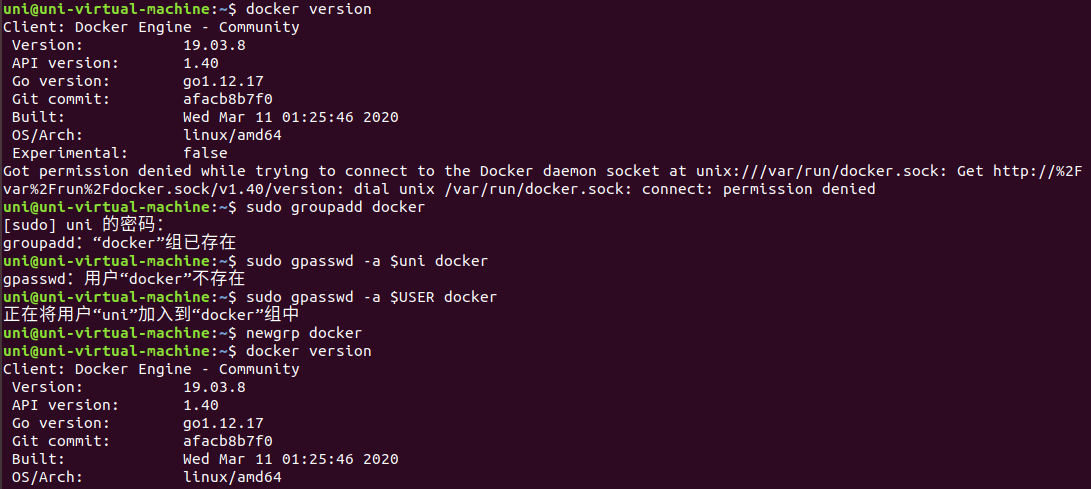
sudo gpasswd -a $XXX docker #检测当前用户是否已经在docker用户组中,其中XXX为用户名,例如我的,liangll。sudo gpasswd -a $uni docker
sudo gpasswd -a $USER docker #将当前用户添加至docker用户组
newgrp docker #更新docker用户组
4 检查是否更新成功
再次执行"docker version"命令,发现不再出现"Got permission denied"权限报错
————————————————
版权声明:本文为CSDN博主「LL_Leung」的原创文章,遵循CC 4.0 BY-SA版权协议,转载请附上原文出处链接及本声明。
原文链接:https://blog.csdn.net/liangllhahaha/java/article/details/92077065
启动docker: Got permission denied while trying to connect to the Docker daemon socket at unix:///var/run/docker.sock的更多相关文章
- docker Got permission denied while trying to connect to the Docker daemon socket at unix:///var/run/docker.sock: Post
利用docker构建时,报错 + docker pull maven:3-alpine Got permission denied while trying to connect to the Doc ...
- Got permission denied while trying to connect to the Docker daemon socket at unix:///var/run/docker.sock: Get http://%2Fvar%2Frun%2Fdocker.sock/v1.38/images/json: dial unix /var/run/docker.sock: conne
使用docker报如下错误信息: Got permission denied while trying to connect to the Docker daemon socket at unix:/ ...
- [问题解决]Got permission denied while trying to connect to the Docker daemon socket at unix:///var/run/docker.sock
写了一个脚本读取docker日志,发生报错:Got permission denied while trying to connect to the Docker daemon socket at u ...
- Got permission denied while trying to connect to the Docker daemon socket at unix:///var/run/docker.sock: Get http://%2Fvar%2Frun%2Fdocker.sock/v1.26/images/j..........
如果你在执行 docker images 出现这样的问题 注意:把你的用户切到root下
- docker dial unix /var/run/docker.sock: connect: permission denied
Got permission denied while trying to connect to the Docker daemon socket at unix:///var/run/docker. ...
- 【转载】Docker 安装后 报 Cannot connect to the Docker daemon at unix:///var/run/docker.sock. Is the docker daemon running? 解决办法
Docker Docker 安装后 报 Cannot connect to the Docker daemon at unix:///var/run/docker.sock. Is the docke ...
- 输入docker ps 报错信息处理Get http:///var/run/docker.sock/v1.19/containers/json: dial unix /var/run/docker.sock: permission denied.
完整错误信息 Get http:///var/run/docker.sock/v1.19/containers/json: dial unix /var/run/docker.sock: permis ...
- 【解决】Got permission denied while trying to connect to the Docker daemon socket at......dial unix /var/run/docker.sock: permission denied
>>> 问题:搭建Portainer时,选择本地连接报错? >>>分析: 根据报错信息可知是权限问题. 可能原因一:使用了非root用户启用或连接docker &g ...
- Docker未启动错误:Cannot connect to the Docker daemon at unix:///var/run/docker.sock. Is the docker daemon running?
此问题是因为Docker安装后未启动所致,执行以下命令启动docker: systemctl start docker.service 具体日志如下: Connecting to ... Connec ...
随机推荐
- 使用DOM方法来遍历一个文档
问题 你有一个HTML文档要从中提取数据,并了解这个HTML文档的结构. 方法 将HTML解析成一个Document之后,就可以使用类似于DOM的方法进行操作.示例代码: File input = n ...
- .net core signalR 服务端强制中断用户连接
.net core signalR 服务端断开连接 { } { } *:first-child { } *:last-child { } { } { } { } { } { } { } { } { } ...
- HTML基本语法(慕课网学习笔记)
标题 <!DOCTYPE html> <html lang="en"> <head> <meta charset="UTF-8& ...
- Google 开发console查找元素或方法
F12 后 在console中输入: $("#R")[0] 查找ID 为R的元素, 如需打印出元素属性值,则输入: console.dir($("#R")[0] ...
- Object 的wait()方法
The java.lang.Object.wait() causes current thread to wait until another thread invokes the notify() ...
- redis rpoplpush列表转移元素
文档出处:redisdoc.com/list/rpoplpush.html模式: 安全的队列 Redis的列表经常被用作队列(queue),用于在不同程序之间有序地交换消息(message).一个客户 ...
- [leetcode]1109. 航班预订统计(击败100%用户算法-差分数组的详解)
执行用时2ms,击败100%用户 内存消耗52.1MB,击败91%用户 这也是我第一次用差分数组,之前从来没有碰到过,利用差分数组就是利用了差分数组在某一区间内同时加减情况,只会改变最左边和最右边+1 ...
- Ubuntu 16.04 + Win10双系统 启动Ubuntu进入命令行 无界面
Ubuntu 16.04 + Win10双系统,启动Ubuntu时候报错,并入命令行(无界面). 原因:可能是双系统兼容性问题 解决办法: 重启系统,进入Win10 然后在Win10中重启电脑. 重启 ...
- iGuard和NFS文件同步的解决方案
一般来说,从文件系统中获得文件变化信息,调用操作系统提供的 API 即可.Windows 操作系统上有个名为 ReadDirectoryChangesW 的 API 接口,只要监视一个目录路径就可以获 ...
- MySQL的几种锁机制的使用介绍
锁 在日常的开发过程中,为了控制线程的并发肯定会用到锁机制.对于数据库而言,锁机制就是数据库为了保证数据的一致性,而使各种共享资源在被并发访问变得有序所设计的一种规则.当然MySQL也不例外,根据不同 ...