
SDN 期末作业验收
前言
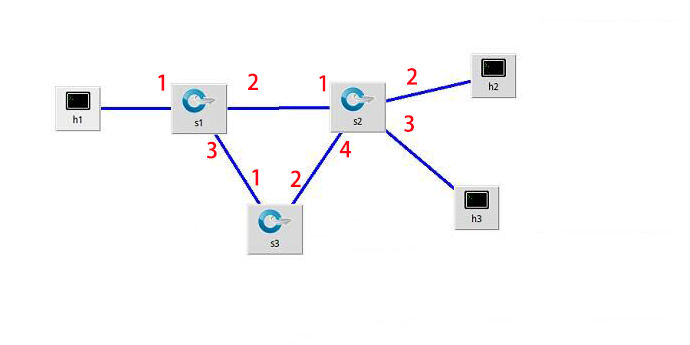
- SDN 期末作业验收我们是采用的参考场景一,我们在此场景的基础上来做负载均衡,下面是我们搭建的拓扑图
演示视频
https://pan.baidu.com/s/1htkKLPM
负载均衡程序
相关的关键代码
import java.io.BufferedReader;

import java.io.BufferedWriter;

import java.io.FileInputStream;

import java.io.FileNotFoundException;

import java.io.FileOutputStream;

import java.io.IOException;

import java.io.InputStream;

import java.io.InputStreamReader;

import java.io.OutputStream;

import java.io.OutputStreamWriter;

import java.io.UnsupportedEncodingException;

import java.net.HttpURLConnection;

import java.net.URL;

import java.util.Base64;

import net.sf.json.*;

public class Main {

	public static JSONObject jsonObject = null;

	public static JSONObject[] jsonArray = new  JSONObject[100];

	static String url24= "http://172.17.172.244:8181/restconf/config/opendaylight-inventory:nodes/node/openflow:2/flow-node-inventory:table/0/flow/0";

	static String url14= "http://172.17.172.244:8181/restconf/config/opendaylight-inventory:nodes/node/openflow:1/flow-node-inventory:table/0/flow/1";

	static String url21= "http://172.17.172.244:8181/restconf/config/opendaylight-inventory:nodes/node/openflow:2/flow-node-inventory:table/0/flow/0";

	static String url12= "http://172.17.172.244:8181/restconf/config/opendaylight-inventory:nodes/node/openflow:1/flow-node-inventory:table/0/flow/1";

	public static JSONObject httpRequest(String requestUrl, String requestMethod,int index) {

        StringBuffer buffer = new StringBuffer();

        try {

            URL url = new URL(requestUrl);

            // http协议传输

            HttpURLConnection httpUrlConn = (HttpURLConnection) url.openConnection();

            httpUrlConn.setDoOutput(true);

            httpUrlConn.setDoInput(true);

            httpUrlConn.setUseCaches(false);

            String userPassword = "admin" + ":" + "admin";

            String encoding =  Base64.getEncoder().encodeToString((userPassword).getBytes());

            httpUrlConn.setRequestProperty("Authorization", "Basic " + encoding);

            httpUrlConn.setRequestProperty("Connection", "Keep-Alive"); // 设置维持长连接

            httpUrlConn.setRequestProperty("Charset", "UTF-8");// 设置文件字符集:

            // 设置请求方式(GET/POST)

            httpUrlConn.setRequestMethod(requestMethod);

            if ("GET".equalsIgnoreCase(requestMethod))

            {

            	httpUrlConn.connect();

                // 将返回的输入流转换成字符串

                InputStream inputStream = httpUrlConn.getInputStream();

                InputStreamReader inputStreamReader = new InputStreamReader(inputStream, "utf-8");

                BufferedReader bufferedReader = new BufferedReader(inputStreamReader);

                String str = null;

                while ((str = bufferedReader.readLine()) != null) {

                    buffer.append(str);

                }

                bufferedReader.close();

                inputStreamReader.close();

                // 释放资源

                inputStream.close();

                inputStream = null;

                httpUrlConn.disconnect();

                jsonObject = JSONObject.fromObject(buffer.toString());

              //  System.out.println(buffer.toString());

            }else if("PUT".equalsIgnoreCase(requestMethod)){

            	byte[] data = (jsonArray[index].toString()).getBytes();//转换为字节数组

                httpUrlConn.setRequestProperty("Content-Length", String.valueOf(data.length));// 设置文件长度

                httpUrlConn.setRequestProperty("Content-Type", "application/json;charset=utf-8");

             // 开始连接请求

                httpUrlConn.connect();

                OutputStream  out = httpUrlConn.getOutputStream();

             // 写入请求的字符串

                out.write((jsonArray[index].toString()).getBytes());

                out.flush();

                out.close();

                if (httpUrlConn.getResponseCode() == 200) {

                	System.out.println("发送成功");

                }

            }else if("DELETE".equalsIgnoreCase(requestMethod)){

            }

        } catch (Exception e) {

            e.printStackTrace();

        }

        return jsonObject;

    }

	public static void init() throws IOException{

		String s = null;

		int i = 0;

		try {

			BufferedReader br = new BufferedReader(new InputStreamReader(new FileInputStream("DATA.txt"),"UTF-8"));

			while((s = br.readLine())!=null){

				jsonArray[i] = JSONObject.fromObject(s);

				i++;

			}

			String url31= "http://172.17.172.244:8181/restconf/config/opendaylight-inventory:nodes/node/openflow:3/flow-node-inventory:table/0/flow/0";

			String url32= "http://172.17.172.244:8181/restconf/config/opendaylight-inventory:nodes/node/openflow:3/flow-node-inventory:table/0/flow/1";

			String url11= "http://172.17.172.244:8181/restconf/config/opendaylight-inventory:nodes/node/openflow:1/flow-node-inventory:table/0/flow/0";

			String url22= "http://172.17.172.244:8181/restconf/config/opendaylight-inventory:nodes/node/openflow:2/flow-node-inventory:table/0/flow/1";

			String url13= "http://172.17.172.244:8181/restconf/config/opendaylight-inventory:nodes/node/openflow:1/flow-node-inventory:table/0/flow/2";

			String url23= "http://172.17.172.244:8181/restconf/config/opendaylight-inventory:nodes/node/openflow:2/flow-node-inventory:table/0/flow/2";

			String url33= "http://172.17.172.244:8181/restconf/config/opendaylight-inventory:nodes/node/openflow:3/flow-node-inventory:table/0/flow/2";

			httpRequest(url31,"PUT",0);

			httpRequest(url32,"PUT",1);

			httpRequest(url21,"PUT",2);

			httpRequest(url11,"PUT",3);

			httpRequest(url12,"PUT",4);

			httpRequest(url22,"PUT",5);

			httpRequest(url13,"PUT",6);

			httpRequest(url23,"PUT",7);

			httpRequest(url33,"PUT",10);

		} catch (UnsupportedEncodingException e) {

			// TODO Auto-generated catch block

			e.printStackTrace();

		} catch (FileNotFoundException e) {

			// TODO Auto-generated catch block

			e.printStackTrace();

		}

	}

	public static int getReceived(String url2){

		 jsonObject =  httpRequest(url2,"GET",0);

			JSONArray j1 = (JSONArray) jsonObject.get("node-connector");

			JSONObject j2 = (JSONObject) j1.get(0);

			JSONObject j3 =  (JSONObject) j2.get("opendaylight-port-statistics:flow-capable-node-connector-statistics");

			JSONObject j4 =  (JSONObject)j3.get("bytes");

			int received = (int) j4.get("received");

			return received;

	}

	public static void main(String[] args) {

		System.out.println("-------------------------------------------------");

		try {

			init();

		} catch (IOException e) {

			// TODO Auto-generated catch block

			e.printStackTrace();

		}

		String s = "";

		String url = "http://172.17.172.244:8181/restconf/config/opendaylight-inventory:nodes/node/openflow:3/flow-node-inventory:table/0/flow/1";

		String url1= "http://172.17.172.244:8181/restconf/config/opendaylight-inventory:nodes/node/openflow:2/flow-node-inventory:table/0/flow/0";

		String url2 = "http://172.17.172.244:8181/restconf/operational/opendaylight-inventory:nodes/node/openflow:2/node-connector/openflow:2:2";

//		 jsonObject =  httpRequest(url2,"GET",0);

//		System.out.println(jsonObject.toString());

		int received ;

		int temp = 0;

		while(true){

			received = getReceived(url2);

			try {

				Thread.sleep(5000);

			} catch (InterruptedException e) {

				// TODO Auto-generated catch block

				e.printStackTrace();

			}

			System.out.println(received-temp);

                                //这里我们去判断S2交换机通过包的增长数量来选择路径,实现负载均衡

			if(received-temp<10000){

				//下负载均衡流表

				httpRequest(url24,"PUT",8);

				httpRequest(url14,"PUT",9);

			}else if(received-temp>10000 ){

				httpRequest(url21,"PUT",2);

				httpRequest(url12,"PUT",4);

			}

			temp = received;

		}

//		jsonObject =  httpRequest(url1,"PUT");

	}

}
期末分工
- 我在本次期末作业中,主要是搭建场景,以及设计负载均衡,和最后的视频录制,关于代码实现这部分我参与的比较少。
课程总结
- 虽然在本次课程前我是有接触过一些SDN的相关知识,但在一些课程中也有我之前从未接触过的知识,比例ODL的使用以及开发。也同时在课程中重新复习了SDN的知识,也得到了新的知识。这次的负载均衡也是之前理论上知道,但实际并未去实现。通过这次的SDN课程可以说的是收获很多了。
SDN 期末作业验收的更多相关文章
- SDN期末作业验收
作业链接:https://edu.cnblogs.com/campus/fzu/SoftwareDefinedNetworking2017/homework/1585 负载均衡程序 1.github链 ...
- SDN期末作业——负载均衡
作业链接 期末作业 1.负载均衡程序 代码 2.演示视频 地址 3.小组分工 小组:incredible five 构建拓扑:俞鋆 编写程序:陈绍纬.周龙荣 程序调试和视频录制:陈辉.林德望 4.个人 ...
- SDN期末作业
期末项目 代码仓库:传送门 视频:组长已经发送给朱老师 选题:负载均衡场景3 选题内容: 该拓扑是数据中心拓扑的一部分,其中h1是数据中心外的一台客户机,h2-h5是数据中心内的服务器,请根据该拓扑实 ...
- SDN期末作业-通过SDN的应用实现负载均衡
负载均衡程序 1.程序链接:https://github.com/424baopu/software/tree/master/LoadBalance 2.场景 topo: 场景描述: 服务器host ...
- SDN期末作业博客
一.项目描述 A P4-based Network Load Balancing Application 基于P4的网络负载均衡项目 二.个人分工 The Controller : Acquire t ...
- SDN2017 期末作业验收
GIT仓库:GITHUB 负载均衡程序 拓扑如图 目的 实现一个负载均衡的北向程序: 服务器host 2 ,host 3,host 4上各自有不同的服务,host 1是客户端 当host 2,host ...
- 《SDN期末作业——实现负载均衡》
队名:取个队名真难 一.网络拓扑(场景二) 二.负载均衡程序 1.建立拓扑的代码 拓扑 2.下发组表流表的代码 下发组表流表 三.演示视频 1.目的 服务器h2,h3,h4上各自有不同的服务,h1是客 ...
- SDN课程作业总结
SDN 期末作业总结 设计场景 我们采用参考场景一,实现负载均衡,拓扑图及端口示意如下: 演示视频 视频地址 关键代码 package loadBalance; import java.io.Buff ...
- 分享:计算机图形学期末作业!!利用WebGL的第三方库three.js写一个简单的网页版“我的世界小游戏”
这几天一直在忙着期末考试,所以一直没有更新我的博客,今天刚把我的期末作业完成了,心情澎湃,所以晚上不管怎么样,我也要写一篇博客纪念一下我上课都没有听,还是通过强大的度娘完成了我的作业的经历.(当然作业 ...
随机推荐
- 【angular5项目积累总结】breadcrumb面包屑组件
view code <div class="fxs-breadcrumb-wrapper" aria-label="Navigation history" ...
- C# Azure-让http自动跳转到https链接
在项目的web.config下面加上下面的配置: <rewrite> <rules> <clear /> <rule name="Redirect ...
- 关于sublimeText3 设置格式化代码快捷键的问题
sublime中自建的有格式化按钮: Edit -> Line -> Reindent 只是sublime并没有给他赋予快捷键,所以只需加上快捷键即可 Preference -& ...
- IntelliJ IDEA 2016.2 注册破解激活教程
下载了IntelliJ IDEA 尽然需要激活,整了终于找到解决的办法了,记录下来. IntelliJ IDEA 2016.2下载地址:http://www.jetbrains.com/idea/do ...
- Android---TextView实现图文混排一
TextView使用ImageSpan显示图片 SpannableStringBuilder spannableStringBuilder = new SpannableStringBuilder() ...
- github小白上传本地代码及更新代码到GitHub及华为云教程
上传本地代码 第一步:去github上创建自己的Repository,创建页面如下图所示: 红框为新建的仓库的https地址 第二步: echo "# Test" >> ...
- 数据操作语句(DML)
增加(插入)数据 SQL>insert into 表名 values(值1,值2 /*根据表中的字段顺序和字段类型相应填写*/); SQL>commit; (提交,提交了别的人才看看到这个 ...
- java.lang.ExceptionInInitializerError异常
今天在开发的过程中,遇到java.lang.ExceptionInInitializerError异常,百度查了一下,顺便学习学习,做个笔记 静态初始化程序中发生意外异常的信号,抛出Exception ...
- php命令行按模板生成应用的入口文件
接着这篇文章php命令行生成项目结构 继续改造: ghostwu@dev:~/php/php1/12$ tree . ├── app │ └── index.php ├── core │ ├─ ...
- JS 作用域 p1
引用<你不知道的JavaScript>中的话,如下: 负责收集并维护由所有生命的标识符(变量)组成的一系列查询并实施一套非常严格的规则,确定当前执行的代码对这些标识符的访问权限. 那么作用 ...