
ubuntu中报错:无法分配内存 (errno=12)
今天碰到一个大坑,差点要了老命!
之前装了ubuntu双系统,后来崩溃,想在就想装VMware虚拟机,再装ubuntu,一切进展顺利,直到在虚拟机的ubuntu中安装IDEA时出现了问题。
安装过程并没有报错,但是启动后运行一个项目,项目还没加载呢就直接退出,生成个错误日志,如下:
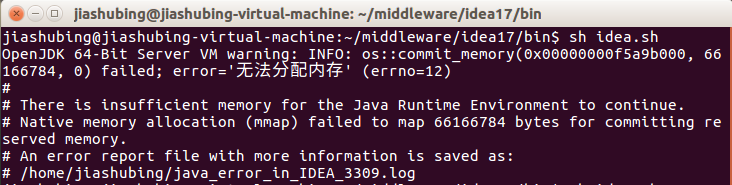
OpenJDK 64-Bit Server VM warning: INFO: os::commit_memory(0x00000000f5a9b000, 66166784, 0) failed; error='无法分配内存' (errno=12)
日志中的部分内容是:
# There is insufficient memory for the Java Runtime Environment to continue.
# Native memory allocation (mmap) failed to map 66166784 bytes for committing reserved memory.
# Possible reasons:
# The system is out of physical RAM or swap space
# In 32 bit mode, the process size limit was hit
# Possible solutions:
# Reduce memory load on the system
# Increase physical memory or swap space
# Check if swap backing store is full
# Use 64 bit Java on a 64 bit OS
# Decrease Java heap size (-Xmx/-Xms)
# Decrease number of Java threads
# Decrease Java thread stack sizes (-Xss)
# Set larger code cache with -XX:ReservedCodeCacheSize=
# This output file may be truncated or incomplete.
#
# Out of Memory Error (os_linux.cpp:2627), pid=3309, tid=0x00007f0174cfc700
#
# JRE version: OpenJDK Runtime Environment (8.0_112-b16) (build 1.8.0_112-release-736-b16)
# Java VM: OpenJDK 64-Bit Server VM (25.112-b16 mixed mode linux-amd64 compressed oops)
# Failed to write core dump. Core dumps have been disabled. To enable core dumping, try "ulimit -c unlimited" before starting Java again
真是走了很多弯路,尝试了无数次:重装idea,idea配置文件配置jvm的大小,把虚拟机的内存再调大一倍等等等等
最后来根据 (errno=12)这个搜索到一篇文章,说道:
后来看了美军一个文章(http://www.enchantedage.com/node/235),加一个配置即可:echo 1000000 > /proc/sys/vm/max_map_count
我看了自己虚拟机ubuntu里面,/proc/sys/vm/max_map_count的初始值很小,只有65530,果断使用这个重设了一下。
啊,终于好了,太艰难了。
后来又请装双系统的同事看下他们系统里的这个值,也是65530,但是他们的却不报错,真是醉醉的。看来造成“无法分配内存”的原因,并不是这里,但是可以通过修改这个来解决。
猜测这个原因:1、双系统和虚拟机不同 2、安装jdk方式的不同(之前的我,和现在的同事们,都是先下载好jdk再安装的;可是现在虚拟机我却使用命令安装,这样不需要配置环境变量)
只是猜测,暂时就不去验证它了,如果再有遇到的同学,解决不了的话,可以朝这个方向尝试下。
后来在IDEA中操作,实在是各种卡、慢,第二天还是决定重装jdk,不使用命令安装,而是使用解压缩包并且配置环境变量,并且将max_map_count的值改了回去
echo 65530> /proc/sys/vm/max_map_count
你猜怎么着,一点问题没有。Maven仓库下载jar包也很溜,果然还是jdk的问题啊。所以最终解决方案是:使用解压缩包并配置环境变量的方式,重新安装jdk!
标签:虚拟机的ubuntu中安装Idea出错 无法分配内存 (errno=12)
原创文章,欢迎转载,转载请注明处!
附 美军文章的内容如下:
Linux mmap() ENOMEM error causing Segmentation Fault
I have a system that creates files on disk, then uses mmap and madvise and mflush to asynchronously do I/O to the disk. This system may potentially create many, many files, each of which will have three mmap sections, that will be rotated through the file.
After trying to run this system for a while, I started getting segmentation violations that I couldn't quite understand. Initially, I thought it was a threading problem, because I'm using boost::asio and boost::thread quite heavily. I used strace() to figure out what the system was doing, and found that right before the crashes, one or more calls to mmap() would fail.
Long story short: There is a limit to the number of mmap() segments that can be active in a Linux process at any one time. This limit is configurable in /proc/sys/vm/max_map_count. I already knew there was a file descriptor limit, and I raised that pretty high, but apparently Linux doesn't think you'll be using lots of mmap() just because you're using lots of files. Adding the following to /etc/rc.local will fix the problem:
echo 1000000 > /proc/sys/vm/max_map_count
ubuntu中报错:无法分配内存 (errno=12)的更多相关文章
- 训练DQN,报错:OSError: [Errno 12] Cannot allocate memory
训练DQN,报错:OSError: [Errno 12] Cannot allocate memory 问题介绍: 这两天在做强化学习的作业,使用 DQN 打 Atari 游戏,但在训练过程中,出现了 ...
- mysql报错mmap(137428992 bytes) failed; errno 12,Cannot allocate memory for the buffer pool
mysql以`systemctl start mysqld.service`的方式启动一段时间后发现突然无法启动,尝试重新启动也不能解决问题,排查问题时,先后通过`systemctl status m ...
- kafka容器报内存不足异常(failed; error='Cannot allocate memory' (errno=12))
一.启动kafka broker时异常 nohup /mnt/sata1/kafka_2.11-0.10.0.1/bin/kafka-server-start.sh /mnt/sata1/kafka_ ...
- Java HotSpot(TM) 64-Bit Server VM warning: INFO: os::commit_memory(0x00000000fa980000, 59244544, 0) failed; error='Cannot allocate memory' (errno=12)
启动项目报错 Java HotSpot(TM) 64-Bit Server VM warning: INFO: os::commit_memory(0x00000000fa980000, 592445 ...
- @清晰掉 malloc是如何分配内存的?
任何一个用过或学过C的人对malloc都不会陌生.大家都知道malloc可以分配一段连续的内存空间,并且在不再使用时可以通过free释放掉.但是,许多程序员对malloc背后的事情并不熟悉,许多人甚至 ...
- c malloc分配内存
php中的内存分配有用类似emalloc这样的函数,emalloc实际上是C语言中的malloc的一层封装,php启动后,会向OS申请一块内存,可以理解为内存池,以后的php分配内存都是在这块内存池中 ...
- C++ 内存、new与malloc分配内存区别?
一关于内存 1.内存分配方式 内存分配方式有三种: (1)从静态存储区域分配.内存在程序编译的时候就已经分配好,这块内存在程序的整个运行期间都存在.例如全局变量,static变量. (2)在栈上创建. ...
- OpenJDK 64-Bit Server VM warning: INFO: os::commit_memory(0x00000000c0000000, 1073741824, 0) failed; error='Out of memory' (errno=12)
使用docker 安装kafka时启动失败 查看报错日志 # docker logs --since 30m 71846a96e514 Excluding KAFKA_HOME from broker ...
- linux设备驱动归纳总结(五):1.在内核空间分配内存【转】
本文转载自:http://blog.chinaunix.net/uid-25014876-id-79134.html linux设备驱动归纳总结(五):1.在内核空间分配内存 xxxxxxxxxxxx ...
随机推荐
- mysql数据库怎么存入emoji表情,更改utf8mb4后为什么出现全是问号
在项目中遇到有人存emoji表情,出现如下错误: java.sql.SQLException: Incorrect string value: '\xF0\x9F\x92\x94' for colum ...
- odoo之显示前端,数据,可选择
def create(self,cr,uid,vals,context=None): if context is None: context ={} if vals.get('name','/')== ...
- 20155222卢梓杰 实验一 逆向及Bof基础
实验一 逆向及Bof基础 1.实验对象为32位可执行文件pwn1,这个程序主要有main.foo.getshell这三个函数,其中foo函数功能为输出输入的字符串,getshell函数功能为打开一个s ...
- Exp7 网络欺诈技术防范
Exp7 网络欺诈技术防范 基础问题回答 1.通常在什么场景下容易受到DNS spoof攻击? 在同一局域网下比较容易受到DNS spoof攻击,攻击者可以冒充域名服务器,来发送伪造的数据包,从而修改 ...
- Codeforces 954C Matrix Walk (思维)
题目链接:Matrix Walk 题意:设有一个N×M的矩阵,矩阵每个格子都有从1-n×m的一个特定的数,具体数的排列如图所示.假设一个人每次只能在这个矩阵上的四个方向移动一格(上下左右),给出一条移 ...
- R实战 第六篇:数据变换(aggregate+dplyr)
数据分析的工作,80%的时间耗费在处理数据上,而数据处理的主要过程可以分为:分离-操作-结合(Split-Apply-Combine),也就是说,首先,把数据根据特定的字段分组,每个分组都是独立的:然 ...
- 【Android UI设计与开发】第02期:引导界面(二)使用ViewPager实现欢迎引导页面
本系列文章都会以一个程序的实例开发为主线来进行讲解,以求达到一个循序渐进的学习效果,这样更能加深大家对于程序为什么要这样写的用意,理论加上实际的应用才能达到事半功倍的效果,不是吗? 最下方有源码的下载 ...
- Svn 提示错误:previous operation has not finished 解决方案
svn提交遇到恶心的问题,可能是因为上次cleanup中断后,进入死循环了. 解决方案: 找到你项目的.svn文件,查看是否存在wc.db 网上下载SQLite Expert工具,手动打开wc.db, ...
- Vxlan抓包
实验目的:验证Openstack vxlan组网模式验证虚拟机数据是否通过物理网卡流出 一. 同网段不同主机间虚拟机通讯 (同网段通讯直接通过物理机隧道口链接对端物理机隧道口,不需要通过网络节点): ...
- Dictionary 对象
Dictionary 对象 对象的存储数据键/项对. 语法 Scripting.Dictionary 说明 Dictionary对象相当于 PERL 关联数组. 项目,可以是任何形式的数据,存储在数组 ...