
Android购物车的实现,仿淘宝天猫京东等APP。处理RecyclerView或listview中的选中事件;
很久之前的代码了,拉出来晾晾!
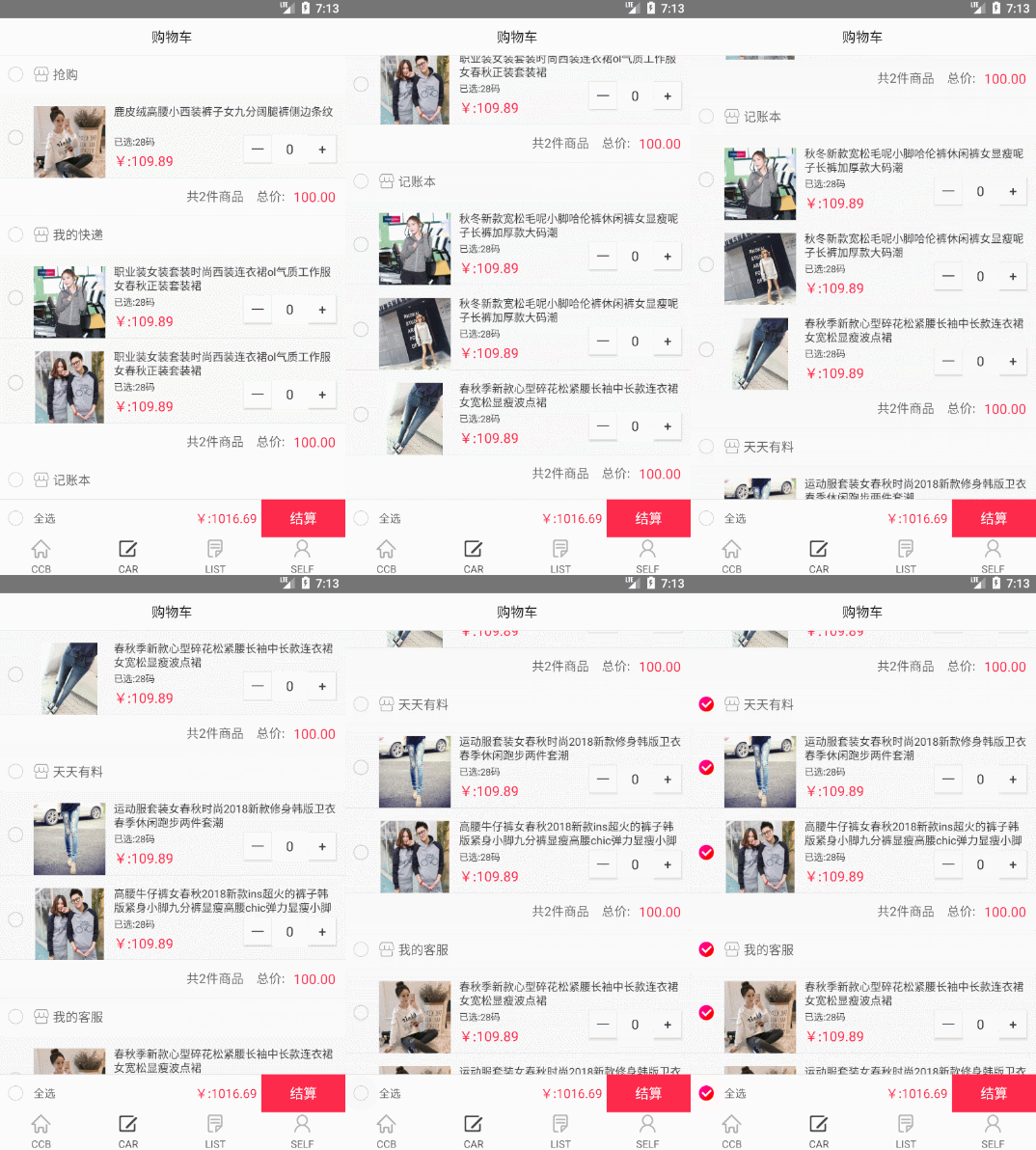
购物车大致思路:
分为:商品、店铺、全选;
商品全部选中后--店铺自动选中;商品未全部选中(若有一个商品未选中)--店铺不选中。
店铺全部选中后--全选自动选中;店铺未全部选中(若有一个店铺未选中)--全选不选中。
选中店铺 -- 店铺中的商品全部选中。
全选选中 -- 店铺全部选中。(全部选中);
我是使用RecyclerView来写的,适配器用的是BaseRecyclerViewAdapterHelper;当然ListView也能实现,思路代码什么的都一样。
好,直接上代码:
核心代码:
package com.example.admin.ccb.fragment;

import android.content.Intent;

import android.graphics.Color;

import android.os.Bundle;

import android.support.v4.app.Fragment;

import android.support.v7.widget.LinearLayoutManager;

import android.support.v7.widget.RecyclerView;

import android.view.LayoutInflater;

import android.view.View;

import android.view.ViewGroup;

import android.widget.CheckBox;

import android.widget.TextView;

import com.bigkoo.pickerview.OptionsPickerView;

import com.chad.library.adapter.base.BaseQuickAdapter;

import com.chad.library.adapter.base.BaseViewHolder;

import com.example.admin.ccb.R;

import com.example.admin.ccb.activity.GoodsDatailsActivity;

import com.example.admin.ccb.activity.ShopHomeActivity;

import com.example.admin.ccb.base.BaseFragment;

import com.example.admin.ccb.base.ShopPingCartBean;

import com.example.admin.ccb.utils.ResCcb;

import java.util.ArrayList;

import java.util.List;

import java.util.Random;

/**

 * Ccb simple {@link Fragment} subclass.

 */

public class SpcFragment extends BaseFragment {

    private SpcAdapter spcAp;

    private ShopPingCartBean spcs;

    private CheckBox cbAll;

    private TextView jiesuan;

    @Override

    protected View initContentView(LayoutInflater inflater, ViewGroup container, Bundle savedInstanceState) {

        return inflater.inflate(R.layout.fragment_spc, container, false);

    }

    private RecyclerView rvShop;

    @Override

    public void initView(View view) {

      rvShop = view.findViewById(R.id.rvShop);

      cbAll = view.findViewById(R.id.spc_cb_all);

        jiesuan = view.findViewById(R.id.jiesuan);

      rvShop.setLayoutManager(new LinearLayoutManager(mContext,LinearLayoutManager.VERTICAL, false));

        spcAp = new SpcAdapter(R.layout.item_spc_shop);

      rvShop.setAdapter(spcAp);

    }

    @Override

    public void loadData() {

        Random random = new Random();

        spcs = new ShopPingCartBean();

        spcs.shopList = new ArrayList<>();

        for (int i = 0; i < ResCcb.getMenus().size(); i++) {   //添加店铺

            ShopPingCartBean.ShopBean shop = new ShopPingCartBean.ShopBean();

            shop.shopName = ResCcb.getMenus().get(i);

            int jj = random.nextInt(5)+1;

            shop.carList = new ArrayList<>();

            for (int j = 0; j < jj; j++) {  //添加商品

                ShopPingCartBean.ShopBean.CarListBean goods = new ShopPingCartBean.ShopBean.CarListBean();

                goods.title = ResCcb.getspcGoodsImages().get(random.nextInt(ResCcb.getspcGoodsImages().size()-1));

                goods.icon = ResCcb.getSpcImages().get(random.nextInt(ResCcb.getSpcImages().size()-1));

                shop.carList.add(goods);

            }

            spcs.shopList.add(shop);

        }

        spcAp.setNewData(spcs.shopList);

    }

    @Override

    public void initListener() {

        cbAll.setOnClickListener(new View.OnClickListener() {

            @Override

            public void onClick(View view) {

                boolean is = cbAll.isChecked();

                for (int i = 0; i < spcs.shopList.size(); i++) {

                    spcs.shopList.get(i).isSelectShop = is;

                    for (int j = 0; j < spcs.shopList.get(i).carList.size(); j++) {

                        spcs.shopList.get(i).carList.get(j).isSelectGoods = is;

                    }

                }

                spcAp.notifyDataSetChanged();

            }

        });

    }

    /**

     * 适配器

     */

    public class SpcAdapter extends BaseQuickAdapter<ShopPingCartBean.ShopBean,BaseViewHolder> {

        public SpcAdapter(int layoutResId) {

            super(layoutResId);

        }

        @Override

        protected void convert(final BaseViewHolder helper, ShopPingCartBean.ShopBean item) {

            helper.setText(R.id.tvShop,item.shopName)

                    .setOnClickListener(R.id.tvShop, new View.OnClickListener() {

                        @Override

                        public void onClick(View view) {

                            mContext.startActivity(new Intent(mContext, ShopHomeActivity.class));

                        }

                    });

            final CheckBox cbShop = helper.getView(R.id.spc_cb_shops);

            cbShop.setChecked(item.isSelectShop);

            cbShop.setOnClickListener(new View.OnClickListener() {

                @Override

                public void onClick(View view) {

                    spcs.shopList.get(helper.getAdapterPosition()).isSelectShop = cbShop.isChecked();

                    for (int i = 0; i < spcs.shopList.get(helper.getAdapterPosition()).carList.size(); i++) {  //改变这个店铺中所有商品的数据

                        spcs.shopList.get(helper.getAdapterPosition()).carList.get(i).isSelectGoods = cbShop.isChecked();

                    }

                     //遍历有所的店铺集合,看是否全部选中,若选中则改变全选标记

                    List<Boolean> shoplist = new ArrayList<>();

                    for (int i = 0; i < spcs.shopList.size(); i++) {

                        shoplist.add(spcs.shopList.get(i).isSelectShop);

                    }

                    if (shoplist.contains(false)){

                        cbAll.setChecked(false);

                    }else{

                        cbAll.setChecked(true);

                    }

                    notifyDataSetChanged();

                }

            });

            RecyclerView rvGoods = helper.getView(R.id.rvGoods);

            rvGoods.setLayoutManager(new LinearLayoutManager(mContext,LinearLayoutManager.VERTICAL,false));

            GoodsAdapter goodsAp = new GoodsAdapter(R.layout.item_spc_goods, helper.getAdapterPosition());

            rvGoods.setAdapter(goodsAp);

            goodsAp.setNewData(item.carList);

        }

    }

    class GoodsAdapter extends BaseQuickAdapter<ShopPingCartBean.ShopBean.CarListBean,BaseViewHolder>{

        private int positionShop;

        public GoodsAdapter(int layoutResId,int positionShop) {

            super(layoutResId);

            this.positionShop = positionShop;

        }

        @Override

        protected void convert(final BaseViewHolder helper, ShopPingCartBean.ShopBean.CarListBean item) {

            helper.setText(R.id.spc_tv_shop_name_msg,item.title)

                   .setOnClickListener(R.id.rl, new View.OnClickListener() {

                       @Override

                       public void onClick(View view) {

                           mContext.startActivity(new Intent(mContext, GoodsDatailsActivity.class));

                       }

                   });

            helper.setImageResource(R.id.spc_iv_page,item.icon);

            final CheckBox cbGoods = helper.getView(R.id.spc_cb_goods);

            cbGoods.setChecked(item.isSelectGoods);

            cbGoods.setOnClickListener(new View.OnClickListener() {

                @Override

                public void onClick(View view) {

                    spcs.shopList.get(positionShop).carList.get(helper.getAdapterPosition()).isSelectGoods = cbGoods.isChecked();

                    //改变这个商品的选中状态后,遍历看是否全部选中,若全部选中则改变店铺的选中状态

                    List<Boolean> goodslist = new ArrayList<>();

                    for (int i = 0; i < spcs.shopList.get(positionShop).carList.size(); i++) {

                        goodslist.add(spcs.shopList.get(positionShop).carList.get(i).isSelectGoods);

                    }

                    if (goodslist.contains(false)){

                        spcs.shopList.get(positionShop).isSelectShop = false;

                    }else{

                        spcs.shopList.get(positionShop).isSelectShop = true;

                    }

                    //改变这个店铺的选中状态后,遍历看是否全部选中,若全部选中则改变全选的选中状态

                    List<Boolean> shoplist = new ArrayList<>();

                    for (int i = 0; i < spcs.shopList.size(); i++) {

                        shoplist.add(spcs.shopList.get(i).isSelectShop);

                    }

                    if (shoplist.contains(false)){

                        cbAll.setChecked(false);

                    }else{

                        cbAll.setChecked(true);

                    }

                    spcAp.notifyDataSetChanged();

                    notifyDataSetChanged();

                }

            });

        }

    }

}
主界面布局文件:
<RelativeLayout xmlns:android="http://schemas.android.com/apk/res/android"

    xmlns:tools="http://schemas.android.com/tools"

    android:layout_width="match_parent"

    android:layout_height="match_parent"

    tools:context="com.example.admin.ccb.fragment.SpcFragment">

    <RelativeLayout

        android:id="@+id/title"

        android:layout_width="match_parent"

        android:layout_height="@dimen/dp44">

        <TextView

            android:layout_width="match_parent"

            android:layout_height="match_parent"

            android:textSize="16dp"

            android:textColor="#212121"

            android:gravity="center"

            android:text="购物车" />

        <View

            android:layout_alignParentBottom="true"

            style="@style/Line_e0e0e0_Horizontal"/>

    </RelativeLayout>

    <View

        android:layout_below="@id/title"

        style="@style/Line_e0e0e0_Horizontal"/>

    <RelativeLayout

        android:id="@+id/layout_bottom"

        android:layout_alignParentBottom="true"

        android:layout_width="match_parent"

        android:background="@color/colorWhite"

        android:layout_height="45dp">

       <View

           android:layout_width="match_parent"

           android:layout_height="1dp"

           android:background="@color/defaultDividerLine"

           />

        <CheckBox

            android:id="@+id/spc_cb_all"

            android:layout_width="wrap_content"

            android:layout_height="match_parent"

            android:paddingLeft="@dimen/side_distance"

            android:paddingRight="@dimen/side_distance"

            style="@style/spc_checkbox_style"

            />

        <TextView

            android:layout_width="wrap_content"

            android:layout_height="wrap_content"

            android:text="全选"

            android:layout_toRightOf="@id/spc_cb_all"

            android:layout_centerVertical="true"

            android:textColor="@color/color_666666"

            android:textSize="13dp"

            />

        <TextView

            android:id="@+id/jiesuan"

            android:layout_width="100dp"

            android:layout_height="match_parent"

            android:text="结算"

            android:gravity="center"

            android:textSize="@dimen/dp16"

            android:background="@color/mainColor"

            android:textColor="@color/colorWhite"

            android:layout_centerVertical="true"

            android:layout_alignParentRight="true"

            />

        <TextView

            android:layout_width="wrap_content"

            android:layout_height="wrap_content"

            android:text="¥:1016.69"

            android:layout_toLeftOf="@id/jiesuan"

            android:layout_marginRight="@dimen/dp5"

            android:layout_centerVertical="true"

            android:layout_marginLeft="@dimen/dp4"

            android:textColor="@color/mainColor"

            android:textSize="15dp"

            />

    </RelativeLayout>

    <android.support.v7.widget.RecyclerView

        android:id="@+id/rvShop"

        android:layout_width="match_parent"

        android:layout_height="match_parent"

        android:layout_below="@id/title"

        android:layout_above="@id/layout_bottom"

        ></android.support.v7.widget.RecyclerView>

</RelativeLayout>
外层RecyclerView(店铺)的item:
<?xml version="1.0" encoding="utf-8"?>

<LinearLayout xmlns:android="http://schemas.android.com/apk/res/android"

    android:layout_width="match_parent"

    android:layout_height="wrap_content"

    android:orientation="vertical"

    android:background="#ffffff"

    android:descendantFocusability="blocksDescendants"

    >

    <LinearLayout

        android:layout_width="match_parent"

        android:layout_height="44dp"

        android:orientation="horizontal"

        android:gravity="center_vertical"

        >

        <CheckBox

            android:id="@+id/spc_cb_shops"

            android:layout_width="wrap_content"

            android:layout_height="match_parent"

            android:paddingLeft="@dimen/side_distance"

            android:paddingRight="@dimen/side_distance"

            style="@style/spc_checkbox_style"

            />

        <ImageView

            android:layout_width="wrap_content"

            android:layout_height="wrap_content"

            android:background="@mipmap/orderfrom_shangdian"

            />

        <TextView

            android:id="@+id/tvShop"

            android:layout_width="match_parent"

            android:layout_height="match_parent"

            android:layout_marginLeft="5dp"

            android:paddingRight="@dimen/side_distance"

            android:gravity="center_vertical"

            android:text="ShopName"

            android:textColor="#666666"

            android:textSize="15dp"

            />

    </LinearLayout>

<LinearLayout

    android:layout_width="match_parent"

    android:layout_height="wrap_content"

    android:background="@color/defaultBackground"

    >

    <android.support.v7.widget.RecyclerView

        android:id="@+id/rvGoods"

        android:layout_width="match_parent"

        android:layout_height="wrap_content"

        >

    </android.support.v7.widget.RecyclerView>

</LinearLayout>

<RelativeLayout

    android:layout_width="match_parent"

    android:layout_height="44dp"

    android:gravity="center_vertical"

    >

        <TextView

            android:id="@+id/spc_tv_zong_price"

            android:layout_width="wrap_content"

            android:layout_height="wrap_content"

            android:textSize="16dp"

            android:textColor="@color/mainColor"

            android:layout_alignParentRight="true"

            android:text="100.00"

            android:layout_marginRight="@dimen/side_distance"

            />

    <TextView

        android:id="@+id/spc_tv_price_money"

        android:layout_width="wrap_content"

        android:layout_height="wrap_content"

        android:text="总价:"

        android:textColor="#666666"

        android:textSize="15dp"

        android:layout_toLeftOf="@id/spc_tv_zong_price"

        android:layout_marginRight="10dp"

        />

    <LinearLayout

        android:layout_width="wrap_content"

        android:layout_height="wrap_content"

        android:orientation="horizontal"

        android:layout_toLeftOf="@id/spc_tv_price_money"

        android:layout_marginRight="15dp"

        >

        <TextView

            android:id="@+id/spc_tv_shop_count"

            android:layout_width="wrap_content"

            android:layout_height="wrap_content"

            android:textColor="#666666"

            android:textSize="15dp"

            android:text="共2件商品"

            />

    </LinearLayout>

</RelativeLayout>

    <View

       style="@style/Line_e0e0e0_Horizontal"/>

</LinearLayout>
内层商品Item;
<?xml version="1.0" encoding="utf-8"?>

<RelativeLayout xmlns:android="http://schemas.android.com/apk/res/android"

    android:layout_width="match_parent"

    android:layout_height="wrap_content"

    android:background="@color/defaultBackground"

    android:descendantFocusability="blocksDescendants"

    >

    <RelativeLayout

        android:id="@+id/rl"

        android:layout_width="match_parent"

        android:layout_height="100dp"

        android:paddingTop="5dp">

        <View

            android:layout_alignParentBottom="true"

            style="@style/Line_e0e0e0_Horizontal"/>

        <CheckBox

            android:id="@+id/spc_cb_goods"

            style="@style/spc_checkbox_style"

            android:layout_width="wrap_content"

            android:layout_height="match_parent"

            android:paddingLeft="@dimen/side_distance"

            android:paddingRight="@dimen/side_distance" />

        <ImageView

            android:id="@+id/spc_iv_page"

            android:layout_width="85dp"

            android:layout_height="85dp"

            android:layout_toRightOf="@id/spc_cb_goods"

            android:layout_alignParentBottom="true"

            android:src="@mipmap/default_icon" />

            <TextView

                android:id="@+id/spc_tv_shop_name_msg"

                android:layout_width="wrap_content"

                android:layout_height="wrap_content"

                android:layout_marginLeft="10dp"

                android:layout_marginRight="@dimen/side_distance"

                android:layout_marginTop="8dp"

                android:layout_toRightOf="@id/spc_iv_page"

                android:lines="2"

                android:text="title"

                android:lineSpacingExtra="1dp"

                android:textColor="@color/defaultTextview"

                android:textSize="13dp" />

            <TextView

                android:id="@+id/spc_tv_pinlei"

                android:layout_width="wrap_content"

                android:layout_height="wrap_content"

                android:text="已选:28码"

                android:layout_below="@id/spc_tv_shop_name_msg"

                android:layout_marginLeft="10dp"

                android:layout_marginTop="3dp"

                android:layout_toRightOf="@id/spc_iv_page"

                android:textColor="@color/defaultTextview"

                android:textSize="11dp"

                android:visibility="visible" />

                <TextView

                    android:id="@+id/spc_tv_zong_price"

                    android:layout_width="wrap_content"

                    android:layout_height="wrap_content"

                    android:text="¥:109.89"

                    android:layout_below="@id/spc_tv_pinlei"

                    android:layout_marginLeft="10dp"

                    android:layout_toRightOf="@id/spc_iv_page"

                    android:layout_marginTop="@dimen/dp4"

                    android:textColor="@color/mainColor"

                    android:textSize="16dp" />

        <Button

                android:id="@+id/spc_btn_comm_count_jian"

                android:layout_width="32dp"

                android:layout_height="32dp"

                android:layout_alignTop="@+id/spc_tv_pinlei"

                android:layout_toLeftOf="@+id/spc_et_comm_count"

                android:layout_toStartOf="@+id/spc_et_comm_count"

                android:background="#ffffff"

                android:text="一"

                android:textColor="@color/defaultTextview"

                android:textSize="16dp" />

        <TextView

                android:id="@+id/spc_et_comm_count"

                android:layout_width="44dp"

                android:layout_height="32dp"

                android:layout_alignTop="@+id/spc_tv_pinlei"

                android:layout_toLeftOf="@+id/spc_btn_comm_count_jia"

                android:layout_toStartOf="@+id/spc_btn_comm_count_jia"

                android:background="#ffffff"

                android:gravity="center"

                android:text="0"

                android:textColor="@color/defaultTextview"

                android:textSize="16dp" />

        <Button

                android:id="@+id/spc_btn_comm_count_jia"

                android:layout_width="32dp"

                android:layout_height="32dp"

                android:layout_alignParentRight="true"

                android:layout_alignTop="@+id/spc_tv_pinlei"

                android:layout_marginRight="@dimen/side_distance"

                android:background="#ffffff"

                android:text="+"

                android:textColor="@color/defaultTextview"

                android:textSize="16dp"

                android:layout_alignRight="@+id/spc_tv_shop_name_msg"

                android:layout_alignEnd="@+id/spc_tv_shop_name_msg" />

    </RelativeLayout>

</RelativeLayout>
好了,打完收工;其中ResCcb是我的制造的假数据源;代码我已上传Github;
完整代码:https://github.com/CuiChenbo/CcMall
Android购物车的实现,仿淘宝天猫京东等APP。处理RecyclerView或listview中的选中事件;的更多相关文章
- android文件选择器、仿淘宝编辑页面、新手引导层等源码
Android精选源码 单片机和安卓应用,传感器 文件选择器 android滑动选择的尺子view源码 android视频录制 视频压缩的源码 仿今日头条顶部导航指示器源码 Android框架+常用控 ...
- Android仿淘宝购物车demo
夏的热情渐渐退去,秋如期而至,丰收的季节,小编继续着实习之路,走着走着,就走到了购物车,逛过淘宝或者是京东的小伙伴都知道购物车里面的宝贝可不止一件,对于爱购物的姑娘来说,购物车里面的商品恐怕是爆满,添 ...
- android电子书App、自定义图表、仿腾讯漫画App、仿淘宝优惠券、3D选择容器等源码
Android精选源码 仿支付宝记账本功能,饼状图:数字键盘 android一款功能完善的电子书应用源码 Android自定义图标库,使用方便,扩展性强 android 3D立体无限旋转容器源码 an ...
- Android中仿淘宝首页顶部滚动自定义HorizontalScrollView定时水平自动切换图片
Android中仿淘宝首页顶部滚动自定义HorizontalScrollView定时水平自动切换图片 自定义ADPager 自定义水平滚动的ScrollView效仿ViewPager 当遇到要在Vie ...
- android版高仿淘宝客户端源码V2.3
android版高仿淘宝客户端源码V2.3,这个版本我已经更新到2.3了,源码也上传到源码天堂那里了,大家可以看一下吧,该应用实现了我们常用的购物功能了,也就是在手机上进行网购的流程的,如查看产品(浏 ...
- Android仿淘宝继续上拉进入商品详情页的效果,使用双Fragment动画切换;
仿淘宝继续上拉进入商品详情页的效果,双Fragment实现: 动画效果: slide_above_in.xml <?xml version="1.0" encoding=&q ...
- Android仿淘宝头条滚动广告条
之前我使用TextView+Handler+动画,实现了一个简单的仿淘宝广告条的滚动,https://download.csdn.net/download/qq_35605213/9660825: 无 ...
- 高仿淘宝和聚美优品商城详情页实现《IT蓝豹》
高仿淘宝和聚美优品商城详情页实现 android-vertical-slide-view高仿淘宝和聚美优品商城详情页实现,在商品详情页,向上拖动时,可以加载下一页. 使用ViewDragHelper, ...
- JavaScript仿淘宝实现放大镜效果的实例
我们都知道放大镜效果一般都是用于一些商城中的,列如每当我们打开淘宝,天猫等pc端时,看到心仪的物品时,点击图片时,便呈现出放大镜的效果.在没有去理解分析它的原理时,感觉非常的神奇,当真正地去接触,也是 ...
随机推荐
- 原生JavaScript实现跨域
为什么需要跨域呢?这是因为我们一般的请求都是使用xhr的,但是它只能调用同一个域里面的接口,有时候,我们想要在自己的站点中调用其他站点的接口,这时候就要用到跨域了.其实,跨域并不难,我们可以通过Jav ...
- video conference s/w
CamFrogWindows | Mac OS | Linux (Server only) | iOS | Android | Windows PhoneCamFrog lets you set up ...
- [转]logback常用配置简介
logback是一套日志框架,由log4j的优化版,由同一个作者开发,在速度和性能上都超过其他日志框架,再结合slf4j,已成为当前最流行的日志框架. Logback最常用就是在classpath定义 ...
- vue 和 react 组件间通信方法对比
vue 和 react 组件间通信方法对比: 通信路径 vue的方法 react的方法 父组件 => 子组件 props(推荐).slot(推荐).this.$refs.this.$childr ...
- 关于TF-IDF的解释
TF:term frequency ,词频 .指的是 term 出现的评率.词频和 2 个因数有关,在一个文档中出现这个词条次数越多,词频越高,文档总词条总数越多这个值被稀释. 所以 一般 TF = ...
- Linux下vim基本操作和清空文件内容的常用方法
以前都是用的很土的办法,大概有以下几种.1.直接删除,创建一个新的同名文件(这种方法的弊端是有可能这个文件带着权限或者是属性,那么你新建这个文件后有可能会导致权限不正确或者丢失属性).2.使用vim编 ...
- MATLAB:SMPD无法启动
可以键入 distcomp.feature( 'LocalUseMpiexec', false )命令运行后,然后再启动程序.
- java 迭代
迭代器的作用是提供一种方法对一个容器对象中的各个元素进行访问,而又不暴露该对象容器的内部细节. java中的很多容器都实现了Iterable接口,容器中的元素都是可以遍历的. 如下例,list容器中存 ...
- 【转】基于keras 的神经网络股价预测模型
from matplotlib.dates import DateFormatter, WeekdayLocator, DayLocator, MONDAY,YEARLY from matplotli ...
- vs2015重新安装后,项目属性中的目标框架中没有framework4.6.1
vs2015重新安装后,安装完后 项目属性中的目标框架中没有framework4.6.1, 控制面板的程序和功能中存在该安装包. 原因: NDP461-DevPack-KB3105179-CHS.e ...