
kbmmw 中虚拟文件操作入门
kbmmw 中一直有一个功能,但是基本上都没有提过,但是在实际应用中,却非常有用,这个功能就是
虚拟文件包功能,他可以把一大堆文件保存到一个文件里面,方便后台管理。
kbmmw 的虚拟文件在单元kbmMWStreamStore 中实现,这个是非控件形式的,因此需要手工添加这个
单元。另外虚拟文件操作的类为TkbmMWLookupStorage,所有的操作都由这个类实现,具体可以参加源码。
因为这个很简单,直接就上界面
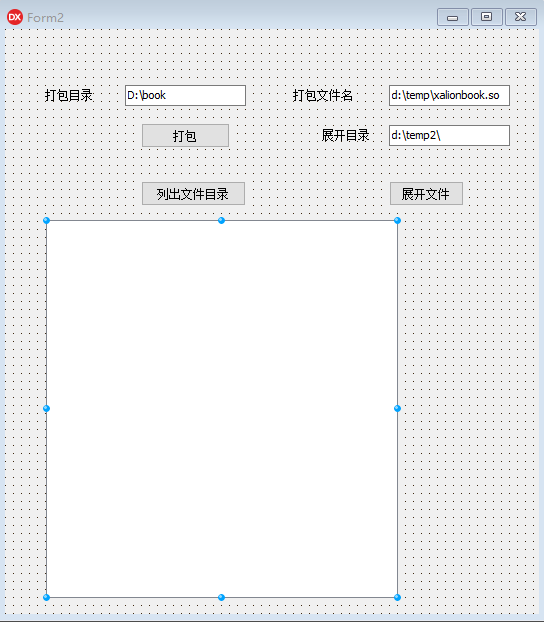
具体实现代码如下
procedure TForm2.Button1Click(Sender: TObject);// 打包

var

   sr:TSearchRec;

   i:integer;

   fs:TFileStream;

   fsfile:TFileStream;

   st:TkbmMWLookupStorage;

begin

     fs:=TFileStream.Create(edit2.Text,fmCreate or fmOpenReadWrite);

     try

        st:=TkbmMWLookupStorage.Create(fs);

        try

          chdir(edit1.Text);

           i:=FindFirst('*.*',faNormal,sr);

           while i= do

           begin

                try

                   fsfile:=TFileStream.Create(sr.Name,fmOpenRead or fmShareCompat);

                   try

                      st.Add(sr.Name,fsfile);

                   finally

                      fsfile.Free;

                   end;

                except

                end;

                i:=FindNext(sr);

           end;

        finally

           st.Free;

        end;

     finally

        fs.Free;

     end;

     showmessage('打包成功');

end;

procedure TForm2.Button2Click(Sender: TObject); //列目录

var

   fs:TFileStream;

   st:TkbmMWLookupStorage;

begin

     fs:=TFileStream.Create(edit2.text,fmOpenReadWrite);

     try

        st:=TkbmMWLookupStorage.Create(fs);

        try

           Label1.Caption:=inttostr(st.Count);

           st.GetIdentifiers(ListBox1.Items);

        finally

           st.Free;

        end;

     finally

        fs.Free;

     end;

end;

procedure TForm2.Button3Click(Sender: TObject);//解压文件

var

   i:integer;

   fs:TFileStream;

   fsfile:TFileStream;

   st:TkbmMWLookupStorage;

   sl:TStringList;

   s:string;

begin

     fs:=TFileStream.Create(edit2.Text,fmOpenReadWrite);

     try

        st:=TkbmMWLookupStorage.Create(fs);

        try

           sl:=TStringList.Create;

           try

              st.GetIdentifiers(sl);

              for i:= to sl.Count- do

              begin

                   s:=sl.Strings[i];

                   fsfile:=TFileStream.Create(edit3.Text+s,fmCreate or fmOpenWrite);

                   try

                      st.Get(s,fsfile);

                   finally

                      fsfile.Free;

                   end;

              end;

           finally

              sl.Free;

           end;

        finally

           st.Free;

        end;

     finally

        fs.Free;

     end;

    showmessage('解包成功!');

end;
运行效果

可以看见一共319 个文件
同时在d:\temp 生成了一个so 文件

打包成功
列表可以显示包里面的文件
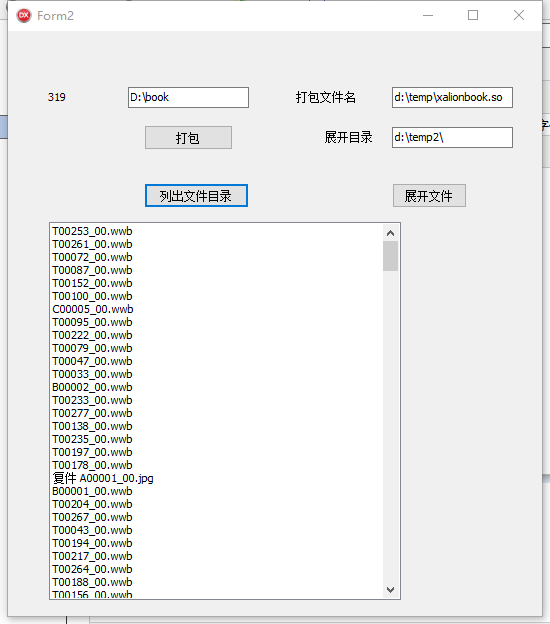
解压结果
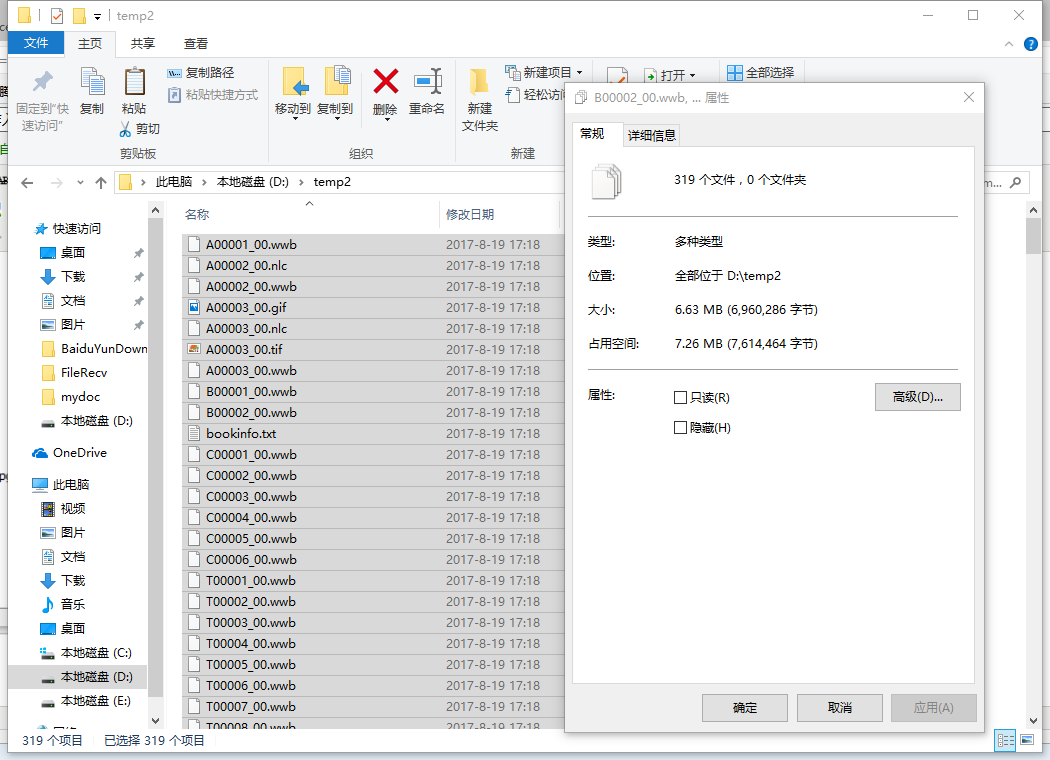
解压正确。
有的时候我们为了保密和减小文件大小,可以采用加密和压缩。
下面再演示一下加密的方式。
加入一个kbmmwcrypt和两个按钮。
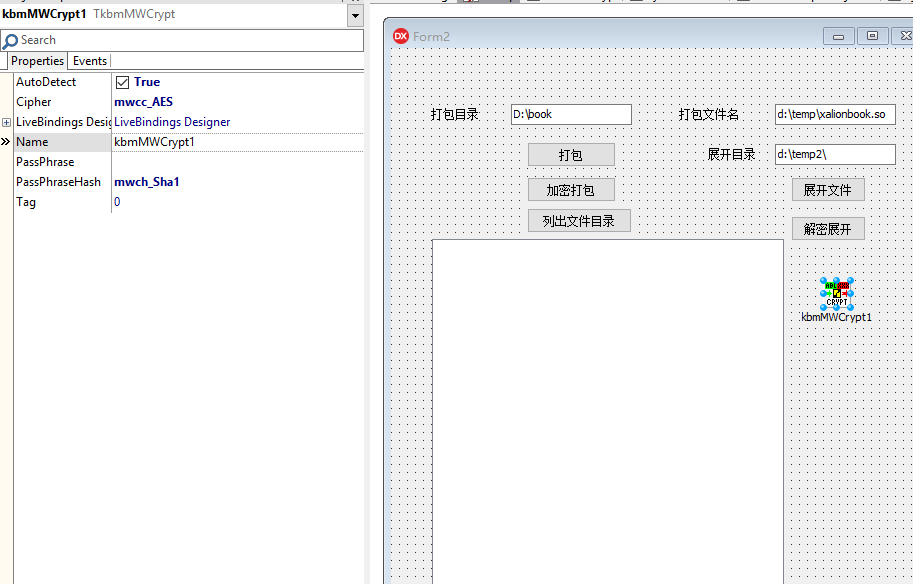
对应的代码如下:
procedure TForm2.Button4Click(Sender: TObject);    //加密打包

var

   sr:TSearchRec;

   i:integer;

   ms:Tbytesstream;

   fs:TFileStream;

   fsfile:TFileStream;

   st:TkbmMWLookupStorage;

begin

     fs:=TFileStream.Create(edit2.Text,fmCreate or fmOpenReadWrite);

     ms:=TbytesStream.Create;

     try

        st:=TkbmMWLookupStorage.Create(ms);

        try

          chdir(edit1.Text);

           i:=FindFirst('*.*',faNormal,sr);

           while i= do

           begin

                try

                   fsfile:=TFileStream.Create(sr.Name,fmOpenRead or fmShareCompat);

                   try

                      st.Add(sr.Name,fsfile);

                   finally

                      fsfile.Free;

                   end;

                except

                end;

                i:=FindNext(sr);

           end;

        kbmMWCrypt1.PassPhrase:='xalion123456';

        ms.Position:=;

        kbmMWCrypt1.Encrypt(nil,ms,fs);

        finally

           st.Free;

        end;

     finally

        fs.Free;

        ms.Free;

     end;

     showmessage('打包成功');

end;

procedure TForm2.Button5Click(Sender: TObject);   // 解密展开

var

   i:integer;

   fs:TFileStream;

   fsfile:TFileStream;

    ms:Tbytesstream;

   st:TkbmMWLookupStorage;

   sl:TStringList;

   s:string;

begin

     fs:=TFileStream.Create(edit2.Text,fmOpenReadWrite);

     ms:=TbytesStream.Create;

     kbmMWCrypt1.PassPhrase:='xalion123456';

     kbmMWCrypt1.decrypt(nil,fs,ms);

     try

        st:=TkbmMWLookupStorage.Create(ms);

        try

           sl:=TStringList.Create;

           try

              st.GetIdentifiers(sl);

              for i:= to sl.Count- do

              begin

                   s:=sl.Strings[i];

                   fsfile:=TFileStream.Create(edit3.Text+s,fmCreate or fmOpenWrite);

                   try

                      st.Get(s,fsfile);

                   finally

                      fsfile.Free;

                   end;

              end;

           finally

              sl.Free;

           end;

        finally

           st.Free;

        end;

     finally

        fs.Free;

     end;

    showmessage('解包成功!');

end;
运行程序,与没有加密的运行效果一致,但是生成的文件已经被加密。
别人即使偷走文件,也不用担心信息泄露了。
kbmmw 中虚拟文件操作入门的更多相关文章
- 第32课 Qt中的文件操作
1. Qt的中IO操作 (1)Qt中IO操作的处理方式 ①Qt通过统一的接口简化了文件和外部设备的操作方式 ②Qt中的文件被看作一种特殊的外部设备 ③Qt中的文件操作与外部设备的操作相同 (2)IO操 ...
- 003-Tuple、Array、Map与文件操作入门实战
003-Tuple.Array.Map与文件操作入门实战 Tuple 各个元素可以类型不同 注意索引的方式 下标从1开始 灵活 Array 注意for循环的until用法 数组的索引方式 上面的for ...
- 重新想象 Windows 8 Store Apps (24) - 文件系统: Application Data 中的文件操作, Package 中的文件操作, 可移动存储中的文件操作
原文:重新想象 Windows 8 Store Apps (24) - 文件系统: Application Data 中的文件操作, Package 中的文件操作, 可移动存储中的文件操作 [源码下载 ...
- 背水一战 Windows 10 (91) - 文件系统: Application Data 中的文件操作, Application Data 中的“设置”操作, 通过 uri 引用 Application Data 中的媒体
[源码下载] 背水一战 Windows 10 (91) - 文件系统: Application Data 中的文件操作, Application Data 中的“设置”操作, 通过 uri 引用 Ap ...
- 背水一战 Windows 10 (90) - 文件系统: 获取 Package 中的文件, 可移动存储中的文件操作, “库”管理
[源码下载] 背水一战 Windows 10 (90) - 文件系统: 获取 Package 中的文件, 可移动存储中的文件操作, “库”管理 作者:webabcd 介绍背水一战 Windows 10 ...
- Java中的文件操作(一)RandomAccessFile
今天,学到的是java中的文件操作. Java.IO.File Java中操作文件用到RandomAccessFile类,既可以读取文件内容,也可以向文件输出数据,但不同与普通输入/输出流的是Rand ...
- Win 32平台SDK中的文件操作
读取文件: HANDLE hFile ; // 声明文件操作内核对象句柄 hFile = CreateFile(, NULL, OPEN_EXISTING, FILE_ATTRIBUTE_NORMAL ...
- 关于文件的INode与Java中的文件操作接口
本文由作者周梁伟授权网易云社区发布. 近日做的项目中涉及到多进程共同读写多个文件的问题,文件名和最后修改时间都是可能会被频繁修改的,因而识别文件的唯一性会产生相当的麻烦,于是专门再学习了一下文件系统对 ...
- ASP.NET中的文件操作(文件信息,新建,移动,复制,重命名,上传,遍历)(亲测详细)
做了几天的文件操作,现在来总结一下,错误之处,还望指点!以文件为例,如果对文件夹操作,基本上将File换为Directory即可(例:FileInfo file = new FileInfo(Path ...
随机推荐
- 树的子结构(python)
题目描述 输入两棵二叉树A,B,判断B是不是A的子结构.(ps:我们约定空树不是任意一个树的子结构) # -*- coding:utf-8 -*- # class TreeNode: # def __ ...
- leecode 978. Longest Turbulent Subarray(最长连续波动序列,DP or 滚动数组)
传送门:点我 978. Longest Turbulent Subarray A subarray A[i], A[i+1], ..., A[j] of A is said to be turbule ...
- spring mybatis springmvc整合
使用SSM(Spring.SpringMVC和Mybatis)已经有三个多月了,项目在技术上已经没有什么难点了,基于现有的技术就可以实现想要的功能,当然肯定有很多可以改进的地方.之前没有记录SSM整合 ...
- 从零开始写bootloader(1)
下面是具体的代码实现: #define S3C2440_MPLL_200MHZ ((0x5C<<12)|(0x01<<4)|(0x02)) #define MEM ...
- [剑指Offer]39-数组中出现次数超过一半的数字(快排延申,找第k大数同理)
题目链接 https://www.nowcoder.com/practice/e8a1b01a2df14cb2b228b30ee6a92163?tpId=13&tqId=11181&t ...
- java 基础之--反射详解
java 反射绝大部分都位于 java.lang.reflect package 中:常用的类就是: 1.class类:代表一个类 2.field类:代表类的成员变量 3.method:代表类的方法 ...
- shell脚本实例总结
1.判断文件夹是否存在 #!/bin/sh workspace="/home/web/mall" #如果文件夹不存在 if [ ! -d ${workspace} ]; then ...
- JSON与GSON比较
JSON: 是Android SDK官方的库,所以在开发移动端的工程时就必须使用JSON.进行数据的转换和处理 GSON: GSON适用于服务端,gson比json功能更加强大.比如在集合类的处理.自 ...
- C语言 内存
内存属性: 1.大小 2.位置 int a; 默认方式 (段) 内核空间 应用程序不许访问 ------------------------------------------3g ...
- linq 动态判断
以前要不是使用扩展方法 要么使用如(t==2&&判断条件)||(s==1&&判断条件) 其实可以简单的实现扩展一个whereIf即可(abp实现),如下所示 ··· / ...