
CSP攻略
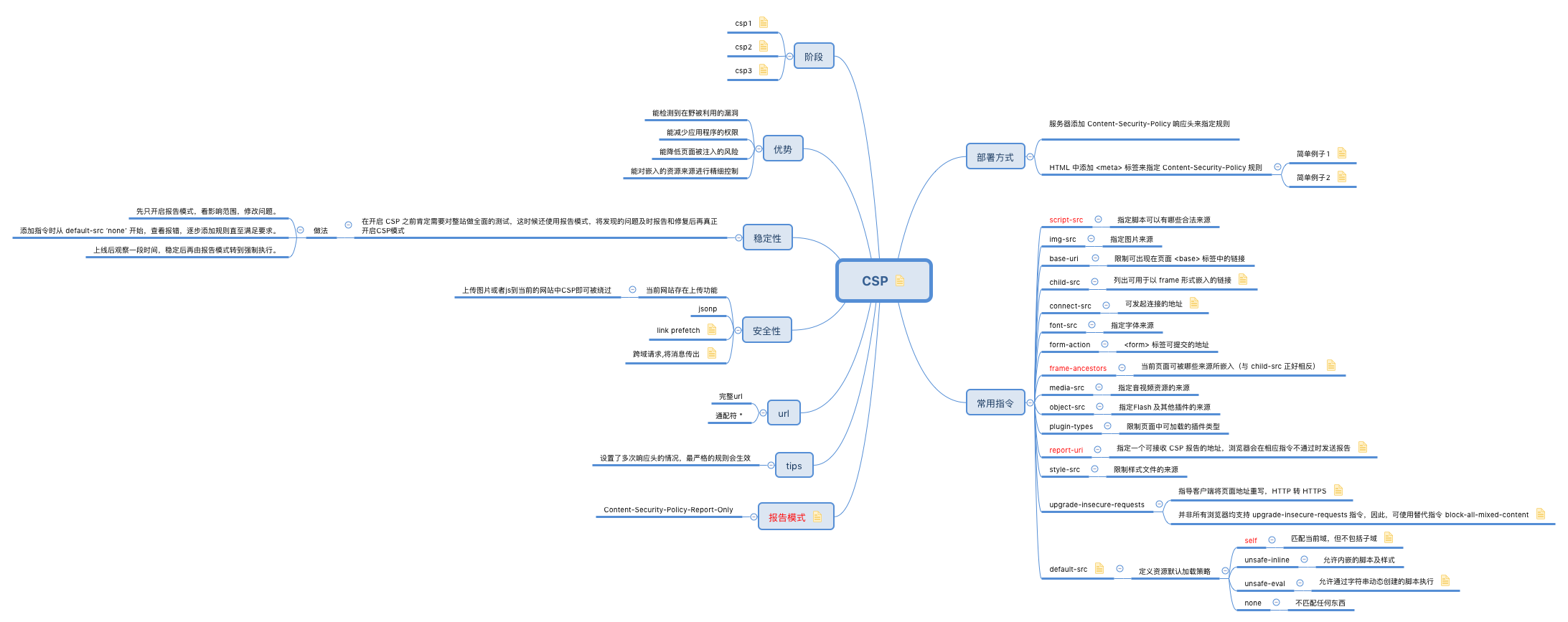
看完三篇文章应该就懂了csp是干嘛的。
https://www.cnblogs.com/Wayou/p/intro_to_content_security_policy.html
https://www.w3.org/TR/CSP3/
http://drops.xmd5.com/static/drops/papers-15120.html
如果内部要使用CSP
(1)搭建内部CSP平台做接收数据和快速生成CSP代码。参考(https://www.cspisawesome.com/)
(2)抓取大厂部署的CSP代码分析(google、twitter、facebook、zhihu、qq)等。
(3)寻找内部站点搭建Content-Security-Policy-Report-Only做初步调研和收集。
测试csp的安全性(https://csp-evaluator.withgoogle.com/)
附上之前收集的策略:
ogs.google.com

script-src 'report-sample' 'nonce-fdsPt7XhhnNYkef7uPxMVg' 'unsafe-inline';object-src 'none';base-uri 'self';report-uri /_/NotificationsOgbUi/cspreport;worker-src 'self'

www.google.com

script-src 'none'; object-src 'none'; base-uri 'none'

notifications.google.com

script-src 'report-sample' 'nonce-Ckmy8Tb6kRjzc8FQ3tmwmg' 'unsafe-inline';object-src 'none';base-uri 'self';report-uri /_/NotificationsOgbUi/cspreport;worker-src 'self'

myaccount.google.com

script-src 'report-sample' 'nonce-Ah4fduA/EfgXUxxEJ0dUHw' 'unsafe-inline' 'unsafe-eval';object-src 'none';base-uri 'self';report-uri /_/AccountsDomainCookiesHttp/cspreport;worker-src 'self'

accounts.google.com

script-src 'report-sample' 'nonce-fepB1+KIRMWzPkbP+NBrXA' 'unsafe-inline' 'unsafe-eval';object-src 'none';base-uri 'self';report-uri /cspreport

www.zhihu.com

img-src * data: blob:; connect-src * wss: blob:; frame-src 'self' *.zhihu.com weixin: *.vzuu.com getpocket.com note.youdao.com safari-extension://com.evernote.safari.clipper-Q79WDW8YH9 zhihujs: captcha.guard.qcloud.com; script-src 'self' blob: *.zhihu.com res.wx.qq.com 'unsafe-eval' unpkg.zhimg.com unicom.zhimg.com captcha.gtimg.com captcha.guard.qcloud.com pagead2.googlesyndication.com i.hao61.net 'nonce-648e162d-4d06-4918-8a42-ec2a8f6f2e0e'; style-src 'self' 'unsafe-inline' *.zhihu.com unicom.zhimg.com captcha.gtimg.com

default-src * blob:; img-src * data: blob:; connect-src * wss: blob:; frame-src 'self' *.zhihu.com weixin: *.vzuu.com getpocket.com note.youdao.com safari-extension://com.evernote.safari.clipper-Q79WDW8YH9 zhihujs: captcha.guard.qcloud.com; script-src 'self' blob: *.zhihu.com res.wx.qq.com 'unsafe-eval' unpkg.zhimg.com unicom.zhimg.com captcha.gtimg.com captcha.guard.qcloud.com pagead2.googlesyndication.com i.hao61.net 'nonce-66bfedfe-b9e8-4ee0-861f-7048a27297e8'; style-src 'self' 'unsafe-inline' *.zhihu.com unicom.zhimg.com captcha.gtimg.com

https://hackerone.com/starbucks

default-src 'none'; base-uri 'self'; block-all-mixed-content; child-src www.youtube-nocookie.com b5s.hackerone-ext-content.com a5s.hackerone-ext-content.com; connect-src 'self' www.google-analytics.com errors.hackerone.net; font-src 'self'; form-action 'self'; frame-ancestors 'none'; img-src 'self' data: cover-photos.hackerone-user-content.com hackathon-photos.hackerone-user-content.com profile-photos.hackerone-user-content.com hackerone-us-west-2-production-attachments.s3-us-west-2.amazonaws.com; media-src 'self' hackerone-us-west-2-production-attachments.s3-us-west-2.amazonaws.com; script-src 'self' www.google-analytics.com; style-src 'self' 'unsafe-inline'; report-uri https://errors.hackerone.net/api/30/csp-report/?sentry_key=61c1e2f50d21487c97a071737701f598

https://mobile.twitter.com/home

connect-src 'self' blob: https://*.giphy.com https://*.pscp.tv https://*.video.pscp.tv https://*.twimg.com https://api.twitter.com https://caps.twitter.com https://media.riffsy.com https://pay.twitter.com https://sentry.io https://ton.twitter.com https://twitter.com https://upload.twitter.com https://www.google-analytics.com https://vmap.snappytv.com https://vmapstage.snappytv.com https://vmaprel.snappytv.com https://vmap.grabyo.com https://mdhdsnappytv-vh.akamaihd.net https://mpdhdsnappytv-vh.akamaihd.net https://mmdhdsnappytv-vh.akamaihd.net https://smdhdsnappytv-vh.akamaihd.net https://smpdhdsnappytv-vh.akamaihd.net https://smmdhdsnappytv-vh.akamaihd.net https://rmdhdsnappytv-vh.akamaihd.net https://rmpdhdsnappytv-vh.akamaihd.net https://rmmdhdsnappytv-vh.akamaihd.net https://dwo3ckksxlb0v.cloudfront.net ; default-src 'self'; form-action 'self' https://twitter.com https://*.twitter.com; font-src 'self' https://*.twimg.com; frame-src 'self' https://twitter.com https://mobile.twitter.com https://pay.twitter.com https://cards-frame.twitter.com ; img-src 'self' blob: data: https://*.cdn.twitter.com https://ton.twitter.com https://*.twimg.com https://www.google-analytics.com https://www.periscope.tv https://www.pscp.tv https://media.riffsy.com https://*.giphy.com https://*.pscp.tv; manifest-src 'self'; media-src 'self' blob: https://twitter.com https://*.twimg.com https://*.vine.co https://*.pscp.tv https://*.video.pscp.tv https://*.giphy.com https://media.riffsy.com https://mdhdsnappytv-vh.akamaihd.net https://mpdhdsnappytv-vh.akamaihd.net https://mmdhdsnappytv-vh.akamaihd.net https://smdhdsnappytv-vh.akamaihd.net https://smpdhdsnappytv-vh.akamaihd.net https://smmdhdsnappytv-vh.akamaihd.net https://rmdhdsnappytv-vh.akamaihd.net https://rmpdhdsnappytv-vh.akamaihd.net https://rmmdhdsnappytv-vh.akamaihd.net https://dwo3ckksxlb0v.cloudfront.net; object-src 'none'; script-src 'self' 'unsafe-inline' https://*.twimg.com   https://www.google-analytics.com https://twitter.com  'nonce-Yzk4NDhjYzctYjA0MS00Mjc4LTk5Y2UtMWZlZjMzOGI2Yjg2'; style-src 'self' 'unsafe-inline' https://*.twimg.com; report-uri https://twitter.com/i/csp_report?a=O5RXE%3D%3D%3D&ro=false

<script nonce="Yzk4NDhjYzctYjA0MS00Mjc4LTk5Y2UtMWZlZjMzOGI2Yjg2">

weibo.com

Content-Security-Policy: block-all-mixed-content;

github.com

default-src 'none'; base-uri 'self'; block-all-mixed-content; connect-src 'self' uploads.github.com www.githubstatus.com collector.githubapp.com api.github.com www.google-analytics.com github-cloud.s3.amazonaws.com github-production-repository-file-5c1aeb.s3.amazonaws.com github-production-upload-manifest-file-7fdce7.s3.amazonaws.com github-production-user-asset-6210df.s3.amazonaws.com wss://live.github.com; font-src github.githubassets.com; form-action 'self' github.com gist.github.com; frame-ancestors 'none'; frame-src render.githubusercontent.com; img-src 'self' data: github.githubassets.com assets-cdn.github.com identicons.github.com collector.githubapp.com github-cloud.s3.amazonaws.com *.githubusercontent.com; manifest-src 'self'; media-src 'none'; script-src github.githubassets.com; style-src 'unsafe-inline' github.githubassets.com

mbd.baidu.com

Content-Security-Policy-Report-Only: default-src https: 'unsafe-inline' 'unsafe-eval' data: blob: ; report-uri https://reports.baidu.com/csp-report/searchbox

mp.weixin.qq.com

script-src 'self' 'unsafe-inline' 'unsafe-eval' http://*.qq.com https://*.qq.com http://*.weishi.com https://*.weishi.com 'nonce-1839597284';style-src 'self' 'unsafe-inline' http://*.qq.com https://*.qq.com;object-src 'self' http://*.qq.com https://*.qq.com;font-src 'self' data: http://*.qq.com https://*.qq.com http://fonts.gstatic.com https://fonts.gstatic.com;frame-ancestors 'self' http://wx.qq.com https://wx.qq.com http://wx2.qq.com https://wx2.qq.com  http://wx8.qq.com https://wx8.qq.com http://web.wechat.com https://web.wechat.com http://web1.wechat.com https://web1.wechat.com http://web2.wechat.com https://web2.wechat.com http://sticker.weixin.qq.com https://sticker.weixin.qq.com http://bang.qq.com https://bang.qq.com http://app.work.weixin.qq.com https://app.work.weixin.qq.com http://work.weixin.qq.com https://work.weixin.qq.com http://finance.qq.com https://finance.qq.com http://gu.qq.com https://gu.qq.com;report-uri https://mp.weixin.qq.com/mp/fereport?action=csp_report
CSP攻略的更多相关文章
- 【C#代码实战】群蚁算法理论与实践全攻略——旅行商等路径优化问题的新方法
若干年前读研的时候,学院有一个教授,专门做群蚁算法的,很厉害,偶尔了解了一点点.感觉也是生物智能的一个体现,和遗传算法.神经网络有异曲同工之妙.只不过当时没有实际需求学习,所以没去研究.最近有一个这样 ...
- 微软MVP攻略 (如何成为MVP?一个SQL Server MVP的经验之谈)
一.本文所涉及的内容(Contents) 本文所涉及的内容(Contents) 初衷 什么是微软MVP? 成为微软MVP的条件? 如何成为微软MVP? (一) 申请时间划分 (二) 前期准备 (三) ...
- Windows下LATEX排版论文攻略—CTeX、JabRef使用介绍
Windows下LATEX排版论文攻略—CTeX.JabRef使用介绍 一.工具介绍 TeX是一个很好排版工具,在学术界十分流行,特别是数学.物理学和计算机科学界. CTeX是TeX中的一个版本,指的 ...
- linux下安装apache与php;Apache+PHP+MySQL配置攻略
1.apache 在如下页面下载apache的for Linux 的源码包 http://www.apache.org/dist/httpd/; 存至/home/xx目录,xx是自建文件 ...
- 生成 PDF 全攻略【2】在已有PDF上添加内容
项目在变,需求在变,不变的永远是敲击键盘的程序员..... PDF 生成后,有时候需要在PDF上面添加一些其他的内容,比如文字,图片.... 经历几次失败的尝试,终于获取到了正确的代码书写方式. 在此 ...
- Java数组技巧攻略
Java数组技巧攻略 0. 声明一个数组(Declare an array) String[] aArray = new String[5]; String[] bArray = {" ...
- BZOJ3252: 攻略
Description 题目简述:树版[k取方格数] 众所周知,桂木桂马是攻略之神,开启攻略之神模式后,他可以同时攻略k部游戏. 今天他得到了一款新游戏<XX半岛>,这款游戏有n个场景 ...
- [经验] Win7减肥攻略(删文件不删功能、简化优化系统不简优化性能)
[经验] Win7减肥攻略(删文件不删功能.简化优化系统不简优化性能) ☆心梦无痕☆ 发表于 2014-1-24 11:15:04 https://www.itsk.com/thread-316471 ...
- 从小工到专家 ——读《Java程序员职场全攻略》有感
从小工到专家 ——读<Java程序员职场全攻略>有感 <Java程序员职场全攻略>是以故事的形式,向读者介绍Java程序员的职场经验.作者牛开复在北京从事软件开发,已经是一 ...
随机推荐
- poj-3928(树状数组)
题目链接:传送门 题意:n个乒乓球运动员要互相练习,都去一个运动员那里比赛,举办训练的运动员不能水平最高或最低. 现在给出n个运动员的水平,求出最终有多少种组合. 思路:先对运动员进行离散化,然后进行 ...
- 用react脚手架新建项目
1.全局安装 create-react-app脚手架 [可能需要管理员权限]npm install -g create-react-app 2.创建项目 create-react-app projec ...
- tp5,thinkphp5,隐藏index.php,隐藏入口文件
一.找到/public/.htaccess文件 Apache: <IfModule mod_rewrite.c> Options +FollowSymlinks -Multiviews R ...
- 诡异的 ERROR 1045 (28000): Access denied for user 错误
问题描述: 用户已建,权限已赋予.long long ago这个用户是可以正常访问的,但是今天它就不能访问了.报错如下: ERROR 1045 (28000): Access denied for u ...
- 后台开发 - DPDK引发的图谱
关系图谱(点击看完整大图): 部分名词: 名词 全写 解释 备注 DPDK Data Plane Development Kit 数据平面开发套件或叫数据平面开发工具集 Intel开源的快速数据包处理 ...
- Video Processing and Communications:(视频处理和通信)
https://max.book118.com/html/2017/1010/136711526.shtm Application of (GAN) of AI faceswap in Music V ...
- Forward团队-爬虫豆瓣top250项目-需求分析
一. 需求:1.爬取豆瓣电影top250. 2.获取电影名称,排名,分数,简介,导演,演员. 3.将爬取到的数据保存,以便随时查看. 3.可以将获取到的数据展示给用户. 二. 参考: 豆瓣api参考资 ...
- Hdu1796 How many integers can you find 2017-06-27 15:54 25人阅读 评论(0) 收藏
How many integers can you find Time Limit : 12000/5000ms (Java/Other) Memory Limit : 65536/32768K ...
- Circles and Pi
Circles and Pi Introduction id: intro-1 For as long as human beings exist, we have looked to the sky ...
- 第二天:Javascript事件
事件:是可以被Javascript侦测到的行为,例如鼠标的点击,鼠标的移动,常见的事件如下 代码实现“点击事件”: <body> <button onclick="de ...