
Flask系列10-- Flask请求上下文源码分析
总览

一.基础准备.
1. local类
对于一个类,实例化得到它的对象后,如果开启多个线程对它的属性进行操作,会发现数据时不安全的
import time

from threading import Thread

import threading

class Foo(object):

    pass

foo = Foo()

def add(i):

    foo.num = i

    time.sleep(1)

    print(foo.num,i,threading.current_thread().ident,foo)

for i in range(10):

    task = Thread(target=add,args=(i,))

    task.start()

##结果##

9 9 5616 <__main__.Foo object at 0x0000018992A05400>

9 8 9780 <__main__.Foo object at 0x0000018992A05400>

9 6 4692 <__main__.Foo object at 0x0000018992A05400>

9 3 2168 <__main__.Foo object at 0x0000018992A05400>

9 1 4424 <__main__.Foo object at 0x0000018992A05400>

9 0 10264 <__main__.Foo object at 0x0000018992A05400>

9 7 11728 <__main__.Foo object at 0x0000018992A05400>

9 5 6688 <__main__.Foo object at 0x0000018992A05400>

9 2 808 <__main__.Foo object at 0x0000018992A05400>

9 4 1160 <__main__.Foo object at 0x0000018992A05400>

# 以上结论得知:
# 线程操作公共对象 产生不安全现象
为了保证对属性操作的安全,而且又不使用锁(使用锁会使异步线程变成同步操作), 可以使用继承local类的方式实现
from threading import local

class Foo(local):

    pass

foo = Foo()

def add(i):

    foo.num = i

    time.sleep(1)

    print(foo.num,i,threading.current_thread().ident,foo)

for i in range(10):

    task = Thread(target=add,args=(i,))

    task.start()

##结果##

8 8 10372 <__main__.Foo object at 0x000002157C037648>

9 9 8604 <__main__.Foo object at 0x000002157C037648>

6 6 9512 <__main__.Foo object at 0x000002157C037648>

5 5 1240 <__main__.Foo object at 0x000002157C037648>

3 3 5404 <__main__.Foo object at 0x000002157C037648>

2 2 13548 <__main__.Foo object at 0x000002157C037648>

0 0 10516 <__main__.Foo object at 0x000002157C037648>

7 7 8644 <__main__.Foo object at 0x000002157C037648>

4 4 8420 <__main__.Foo object at 0x000002157C037648>

1 1 4372 <__main__.Foo object at 0x000002157C037648>
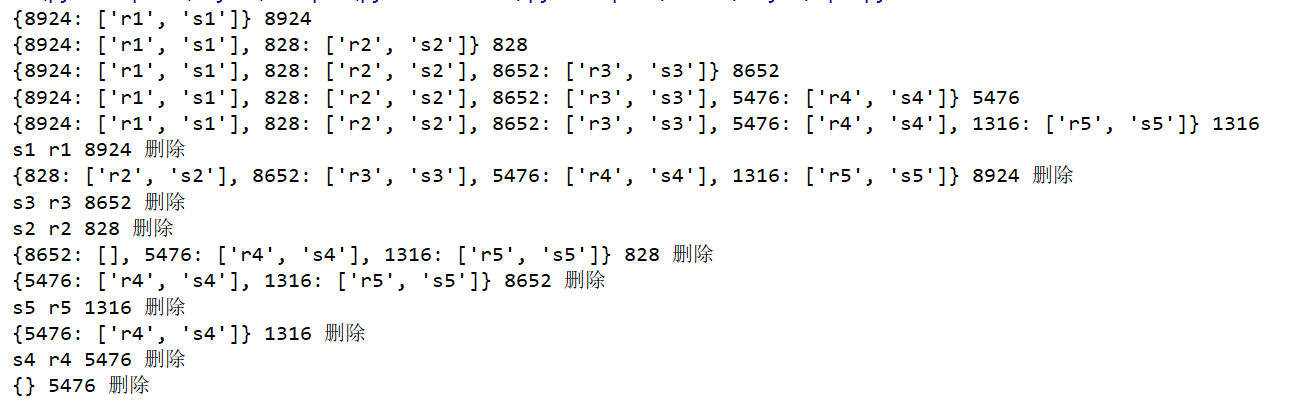
多线程实现的栈(简易), 注意使用了local类. 使用local能保证每一个线程都能对类的属性进行操作,而且互不干扰
from threading import local,Thread

import threading

class MyLocalStack(local):

    stack = {}

    pass

mls = MyLocalStack()

def ts(i):

    a = threading.current_thread().ident

    mls.stack[a] = [f"r{i+1}",f"s{i+1}"]

    print(mls.stack,a)

    time.sleep(1)

    print(mls.stack[a].pop(),mls.stack[a].pop(),a,'删除')

    # time.sleep(0.0089)

    mls.stack.pop(a)

    print(mls.stack , a, '删除')

for i in range(5):

    task = Thread(target=ts,args=(i,))

    task.start()

#堆栈

    # 程序员

# 先进后出 后进先出

# 先进先出 后进后出
结果
2. app()
from flask import Flask

app = Flask(__name__)

app.run()
这个app就是,flask启动时的那个对象, 一般函数加()的意思是执行这个函数,而这里对象加() 的意思就是执行app对象的__call__方法, 原因文档里面解释的非常清楚.看下图

二. run_simple()源码分析
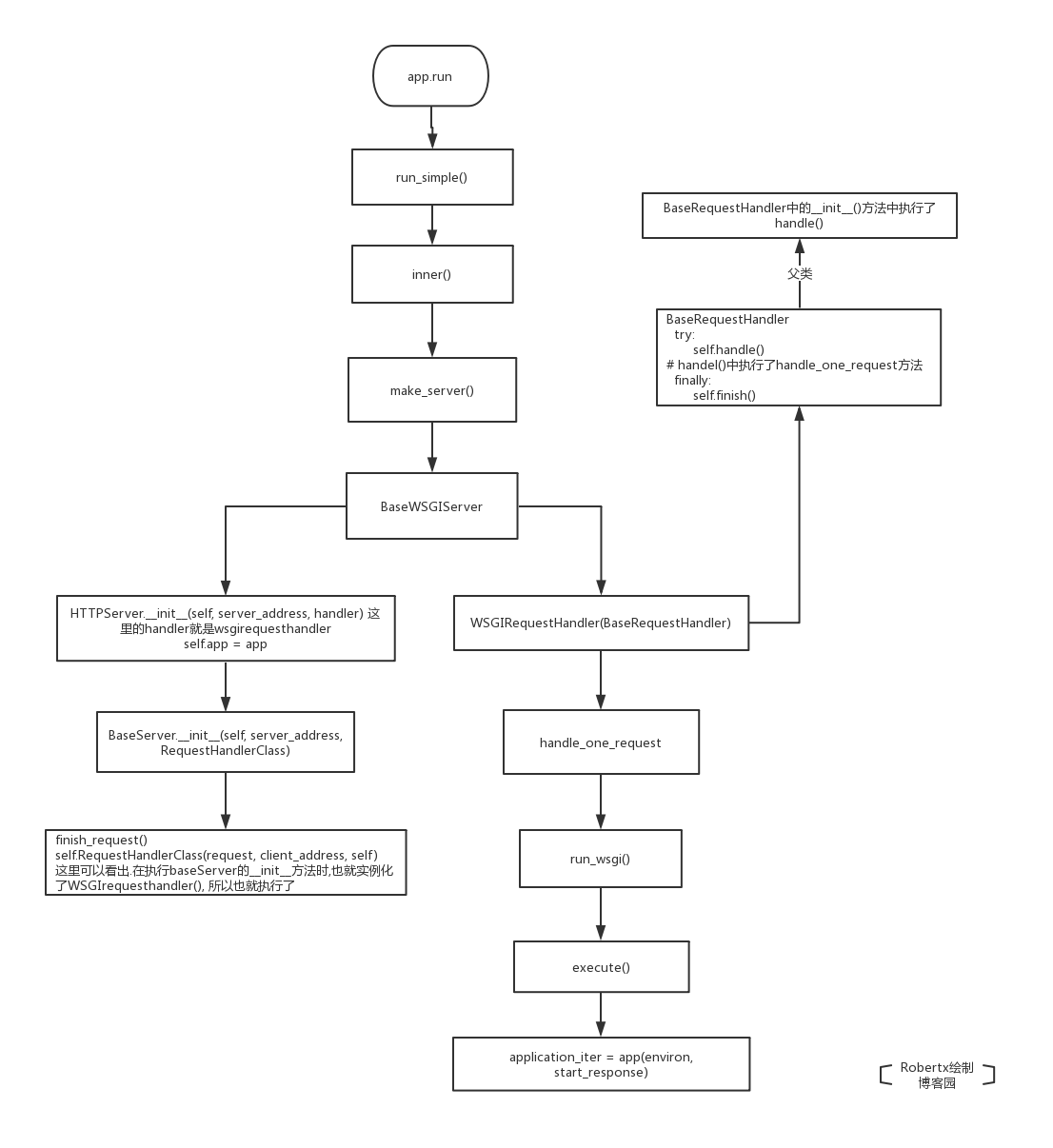
函数执行层解
app.run() -> run_simple() -> inner() -> make_server() -> BaseWSGIServer()>WSGIRequestHandler ->
handle() -> run_wsgi() -> execute() ->application_iter = app(environ, start_response)
1. run_simple() 源码详解, 如何调用了app.__call__()
首先运行时调用了app.run()方法, 相当于调用了app.__call__(),而为什么调用了app.__call__()从哪看出来的呢, 百度的那些粘贴人总是说werkzeug的rum_simple方法,但从没有具体的解释,我就研究了一下
from flask import Flask

app = Flask(__name__)

app.run()
def run(self, host=None, port=None, debug=None,

    load_dotenv=True, **options): # self = app = Flask()

        from werkzeug.serving import run_simple  # 引入werkzeug相关 run_simple开始运行

        try:  # host 127.0.0.1 port=5000 self=app=Flask()

            run_simple(host, port, self, **options)  # self = app = Flask()
run_simple()中将执行inner()函数
def run_simple(

    hostname,

    port,

    application,  # self = app = Flask() application: the WSGI application to execute

    use_reloader=False,

    use_debugger=False,

    use_evalex=True,

    extra_files=None,

    reloader_interval=1,

    reloader_type="auto",

    threaded=False,

    processes=1,

    request_handler=None,

    static_files=None,

    passthrough_errors=False,

    ssl_context=None,

):

        from ._reloader import run_with_reloader

        run_with_reloader(inner, extra_files, reloader_interval, reloader_type) # 这里开始 使用inner函数

    else:

        inner()  # 这里开始 使用inner函数
来看inner()函数,这个inner()函数是被包含在run_simple()函数中的
    def inner():

        try:

            fd = int(os.environ["WERKZEUG_SERVER_FD"])

        except (LookupError, ValueError):

            fd = None

        srv = make_server(

            hostname,

            port,

            application,   # self = app = Flask()  第三个位置参数

            threaded,

            processes,

            request_handler,

            passthrough_errors,

            ssl_context,

            fd=fd,

        )  # srv就是返回了一个 # BaseWSGIServer实例BaseWSGIServer(app) srv.app = app

        if fd is None:

            log_startup(srv.socket)

        srv.serve_forever() # srv(self = app = Flask() )
inner()中注意make_server()
def make_server(

    host=None,

    port=None,

    app=None,    # self = app = Flask()

    threaded=False,

    processes=1,

    request_handler=None,

    passthrough_errors=False,

    ssl_context=None,

    fd=None,

):

    """Create a new server instance that is either threaded, or forks

    or just processes one request after another.

    创建一个新的server实例

    """

    if threaded and processes > 1:

        raise ValueError("cannot have a multithreaded and multi process server.")

    elif threaded:

        return ThreadedWSGIServer(  # 多线程wsgiserver启动

            host, port, app, request_handler, passthrough_errors, ssl_context, fd=fd

        )   # self = app = Flask()

    elif processes > 1:  # 多个进程时

        return ForkingWSGIServer(

            host,

            port,

            app,   # self = app = Flask()

            processes,

            request_handler,

            passthrough_errors,

            ssl_context,

            fd=fd,

        )

    else:

        return BaseWSGIServer(

            host, port, app, request_handler, passthrough_errors, ssl_context, fd=fd

        ) # self = app = Flask()
来看BaseWSGIServer
class BaseWSGIServer(HTTPServer, object):

    """Simple single-threaded, single-process WSGI server."""

    multithread = False

    multiprocess = False

    request_queue_size = LISTEN_QUEUE

    def __init__(

        self,

        host,

        port,

        app,  # self = app = Flask()

        handler=None,

        passthrough_errors=False,

        ssl_context=None,

        fd=None,

    ):

        if handler is None:

            handler = WSGIRequestHandler

        self.address_family = select_address_family(host, port)

        if fd is not None:

            real_sock = socket.fromfd(fd, self.address_family, socket.SOCK_STREAM)

            port = 0

        server_address = get_sockaddr(host, int(port), self.address_family)

        # remove socket file if it already exists

        if self.address_family == af_unix and os.path.exists(server_address):

            os.unlink(server_address)

        HTTPServer.__init__(self, server_address, handler) #handler = WSGIRequestHandler

        self.app = app  # self = app = Flask()

        self.passthrough_errors = passthrough_errors

        self.shutdown_signal = False

        self.host = host

        self.port = self.socket.getsockname()[1]
来看WSGIrequesthandler ,部分代码省略
    def run_wsgi(self):

        if self.headers.get("Expect", "").lower().strip() == "100-continue":

            self.wfile.write(b"HTTP/1.1 100 Continue\r\n\r\n")

        self.environ = environ = self.make_environ()

        headers_set = []

        headers_sent = []

        def execute(app):

            application_iter = app(environ, start_response) # app()= self.wsgi_app(environ, start_response)

            try:

                for data in application_iter:

                    write(data)

                if not headers_sent:

                    write(b"")

            finally:

                if hasattr(application_iter, "close"):

                    application_iter.close()

                application_iter = None

        try:

            execute(self.server.app)  #

        except (_ConnectionError, socket.timeout) as e:

            self.connection_dropped(e, environ)

        except Exception:

            if self.server.passthrough_errors:

                raise

            from .debug.tbtools import get_current_traceback

            traceback = get_current_traceback(ignore_system_exceptions=True)

            try:

                # if we haven't yet sent the headers but they are set

                # we roll back to be able to set them again.

                if not headers_sent:

                    del headers_set[:]

                execute(InternalServerError())

            except Exception:

                pass

            self.server.log("error", "Error on request:\n%s", traceback.plaintext)
至此可以看出用到了app()进而就可以知道app.run()时实际就是执行了app.__call__()
三.请求上下文源码分析
1.请求上文
函数执行层解

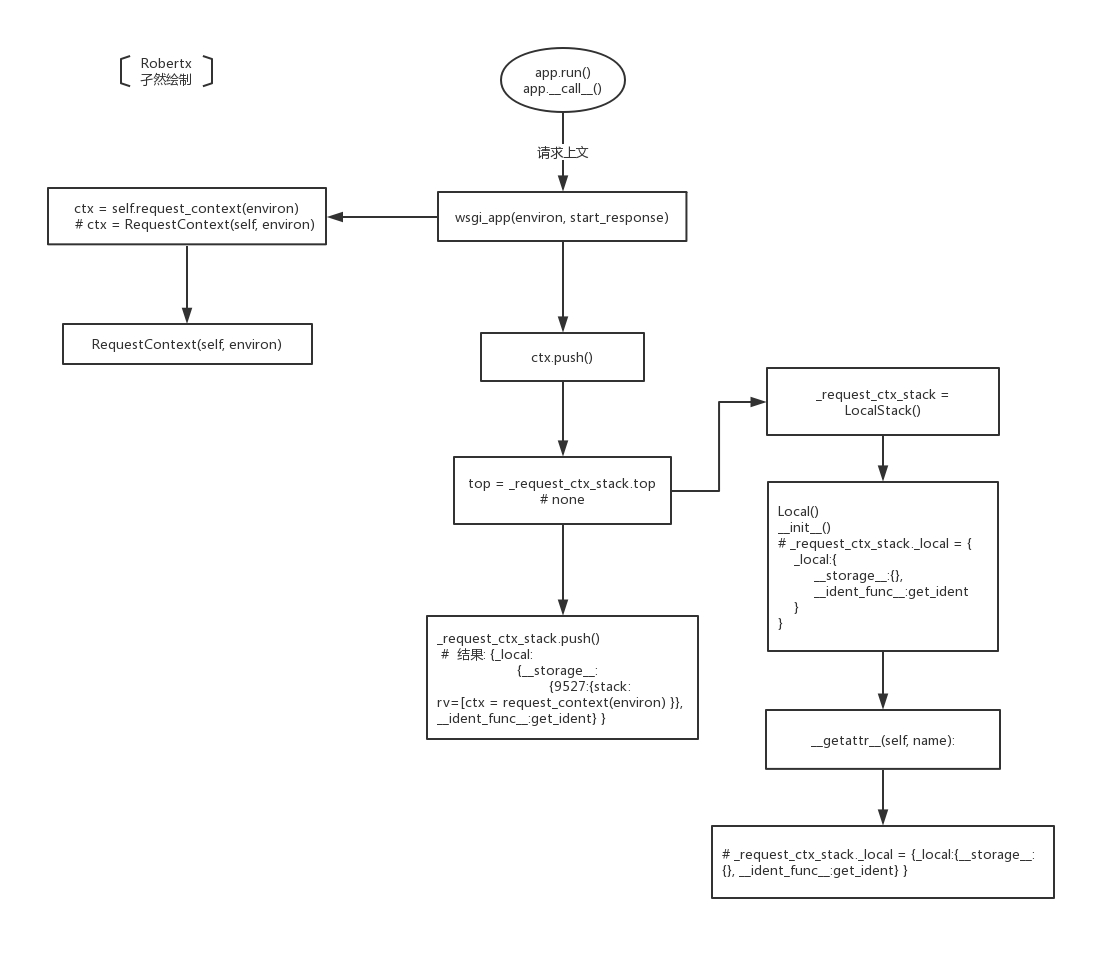
由app.__all__()入口进入查看请求上文流程
def __call__(self, environ, start_response):

    """The WSGI server calls the Flask application object as the

    WSGI application. This calls :meth:`wsgi_app` which can be

    wrapped to applying middleware."""

    return self.wsgi_app(environ, start_response)
之后进入wsgi_app
 def wsgi_app(self, environ, start_response): # environ = 请求的原始信息 self=app=Flask()

        # self = app = Flask()

        """The actual WSGI application. This is not implemented in

        :meth:`__call__` so that middlewares can be applied without

        losing a reference to the app object. Instead of doing this::

            app = MyMiddleware(app)

        It's a better idea to do this instead::

            app.wsgi_app = MyMiddleware(app.wsgi_app)

        Then you still have the original application object around and

        can continue to call methods on it.

        .. versionchanged:: 0.7

            Teardown events for the request and app contexts are called

            even if an unhandled error occurs. Other events may not be

            called depending on when an error occurs during dispatch.

            See :ref:`callbacks-and-errors`.

        :param environ: A WSGI environment.

        :param start_response: A callable accepting a status code,

            a list of headers, and an optional exception context to

            start the response.

        """

        # self = app = Flask()

        # environ = 请求的原始信息 请求头 请求体 path method

        # environ = 请求的原始信息

        # self = app = Flask()

        ctx = self.request_context(environ)  # 请求上下文

        # ctx = request_context对象 -> RequestContext(app,environ)-> app,request,session

        # ctx = RequestContext(app,environ)

        error = None

        try:

            try:

                ctx.push() # request_context对象 ctx = RequestContext(app,environ)

                # 请求上文

                response = self.full_dispatch_request()

            except Exception as e:

                error = e

                response = self.handle_exception(e)

            except:

                error = sys.exc_info()[1]

                raise

            return response(environ, start_response)

        finally:

            if self.should_ignore_error(error):

                error = None

            ctx.auto_pop(error)
一步一步来,先看ctx = self.request_context(environ)
  def request_context(self, environ):

        # self = app = Flask()

        # environ = 请求的原始信息

        """Create a :class:`~flask.ctx.RequestContext` representing a  #  表示一个wsgi环境变量使用一个锁

        WSGI environment. Use a ``with`` block to push the context,

        which will make :data:`request` point at this request.

        See :doc:`/reqcontext`.

        Typically you should not call this from your own code. A request

        context is automatically pushed by the :meth:`wsgi_app` when

        handling a request. Use :meth:`test_request_context` to create

        an environment and context instead of this method.

        :param environ: a WSGI environment

        """

        # self = app = Flask()

        # environ = 请求的原始信息

        return RequestContext(self, environ)
实际上就是返回了一个RequestContext()对象,这个对象将request定义了出来
class RequestContext(object):

    def __init__(self, app, environ, request=None):

        # app = Flask()

        # environ = 请求的原始信息

        # requestcontext.app = app = Flask()

        # requestcontext.request = request

        # requestcontext.session = None

        self.app = app

        if request is None:

            request = app.request_class(environ) # request 前身

        self.request = request

        self.url_adapter = app.create_url_adapter(self.request)  # 创建一个url适配器
再回到wsgi_app()函数中,看到 ctx.push()
    def push(self): # self= ctx = RequestContext(self, environ)

        top = _request_ctx_stack.top  # none

        # _request_ctx_stack._local = {_local:{__storage__:{}, __ident_func__:get_ident} }

        if top is not None and top.preserved:

            top.pop(top._preserved_exc)

        # Before we push the request context we have to ensure that there

        # is an application context.

        app_ctx = _app_ctx_stack.top # none

        #  _app_ctx_stack._local = {_local:{__storage__:{}, __ident_func__:get_ident} }

        if app_ctx is None or app_ctx.app != self.app:

            app_ctx = self.app.app_context()  # self= ctx = RequestContext(self, environ)

            app_ctx.push()

            self._implicit_app_ctx_stack.append(app_ctx)

        else:

            self._implicit_app_ctx_stack.append(None)

        if hasattr(sys, 'exc_clear'):

            sys.exc_clear()

        # self = ctx = RequestContext(self, environ)

        # _request_ctx_stack._local = {_local:{__storage__:{}, __ident_func__:get_ident} }

        _request_ctx_stack.push(self)

        #  结果: {_local:{__storage__:{9527:{stack: rv=[ctx = request_context(environ) }}, __ident_func__:get_ident} }

        if self.session is None:

            session_interface = self.app.session_interface

            self.session = session_interface.open_session(

                self.app, self.request

            )

            if self.session is None:

                self.session = session_interface.make_null_session(self.app)
看到其中 top = _request_ctx_stack.top 一个对象.top 要先看这个对象是什么__init__中执行了什么, .top的话要看__getattr__方法
_request_ctx_stack = LocalStack() # _request_ctx_stack._local = {_local:{__storage__:{}, __ident_func__:get_ident} }
LocalStack()
class LocalStack(object):

    """This class works similar to a :class:`Local` but keeps a stack

    of objects instead.  This is best explained with an example::

        >>> ls = LocalStack()

        >>> ls.push(42)

        >>> ls.top

        42

        >>> ls.push(23)

        >>> ls.top

        23

        >>> ls.pop()

        23

        >>> ls.top

        42

    They can be force released by using a :class:`LocalManager` or with

    the :func:`release_local` function but the correct way is to pop the

    item from the stack after using.  When the stack is empty it will

    no longer be bound to the current context (and as such released).

    By calling the stack without arguments it returns a proxy that resolves to

    the topmost item on the stack.

    .. versionadded:: 0.6.1

    """

    def __init__(self):  # self = _request_ctx_stack

        self._local = Local()

    def __release_local__(self):

        self._local.__release_local__()

    def _get__ident_func__(self):

        return self._local.__ident_func__

    def _set__ident_func__(self, value):

        object.__setattr__(self._local, "__ident_func__", value)

    __ident_func__ = property(_get__ident_func__, _set__ident_func__)

    del _get__ident_func__, _set__ident_func__

    def __call__(self):

        def _lookup():

            rv = self.top

            if rv is None:

                raise RuntimeError("object unbound")

            return rv

        return LocalProxy(_lookup)

    def push(self, obj):

        # obj = ctx = RequestContext(self, environ)

        # self = _request_ctx_stack._local = {_local:{__storage__:{}, __ident_func__:get_ident} }

        """Pushes a new item to the stack"""

        rv = getattr(self._local, "stack", None)  # rv=none

        if rv is None:

            self._local.stack = rv = [] # {_local:{__storage__:{9527:{stack: rv=[ctx = request_context(environ) }}, __ident_func__:get_ident} }

        rv.append(obj)

        return rv

    def pop(self):

        """Removes the topmost item from the stack, will return the

        old value or `None` if the stack was already empty.

        """

        # _request_ctx_stack._local = {_local: {__storage__: {}, __ident_func__: get_ident}}

        stack = getattr(self._local, "stack", None)  # none

        if stack is None:

            return None

        elif len(stack) == 1:

            release_local(self._local)

            return stack[-1]

        else:

            return stack.pop()

    @property

    def top(self):

        """The topmost item on the stack.  If the stack is empty,

        `None` is returned.

        """

        try:

            return self._local.stack[-1]   #  rv=[ctx = request_context(environ)][-1]

        except (AttributeError, IndexError):

            return None
然后发现了 top = _request_ctx_stack.top 的结果为none,接着看ctx.py中的push() app_ctx = _app_ctx_stack.top # none 结果也一样

执行到这里时,
    def push(self, obj):

        # obj = ctx = RequestContext(self, environ)

        # self = _request_ctx_stack._local = {_local:{__storage__:{}, __ident_func__:get_ident} }

        """Pushes a new item to the stack"""

        rv = getattr(self._local, "stack", None)  # rv=none

        if rv is None:

            self._local.stack = rv = [] # {_local:{__storage__:{9527:{stack: rv=[ctx = request_context(environ) }}, __ident_func__:get_ident} }

        rv.append(obj)

        return rv
可以看到执行结束后返回的值,至此,请求上文分析完毕,下图是图解

2.请求下文
函数层级分析
request.method -> LocalProxy(partial(_lookup_req_object, 'request')) ->_lookup_req_object()

-> LocalStack() -> Local() -> __init__() -> top() -> __getattr__()

->getattr(top, name)
再来看请求下文,在视图函数中使用request.method当作入口查看请求下文

request = LocalProxy(partial(_lookup_req_object, 'request'))
_lookup_req_object:
def _lookup_req_object(name):  # name = request

# LocalStack = {_local: {"__storage__": {9527: {stack: [ctx(app, req, sess)]}}, "__ident_func__": get_ident}}

    top = _request_ctx_stack.top # ctx(app, req, sess)

    if top is None:

        raise RuntimeError(_request_ctx_err_msg)

    return getattr(top, name) # ctx(app, req, sess) name = request # request
要看 _request_ctx_stack
_request_ctx_stack = LocalStack() # _request_ctx_stack._local = {_local:{__storage__:{}, __ident_func__:get_ident} }
class LocalStack(object):

    """This class works similar to a :class:`Local` but keeps a stack

    of objects instead.  This is best explained with an example::

        >>> ls = LocalStack()

        >>> ls.push(42)

        >>> ls.top

        42

        >>> ls.push(23)

        >>> ls.top

        23

        >>> ls.pop()

        23

        >>> ls.top

        42

    They can be force released by using a :class:`LocalManager` or with

    the :func:`release_local` function but the correct way is to pop the

    item from the stack after using.  When the stack is empty it will

    no longer be bound to the current context (and as such released).

    By calling the stack without arguments it returns a proxy that resolves to

    the topmost item on the stack.

    .. versionadded:: 0.6.1

    """

    def __init__(self):  # self = _request_ctx_stack

        self._local = Local()

    def __release_local__(self):

        self._local.__release_local__()

    def _get__ident_func__(self):

        return self._local.__ident_func__

    def _set__ident_func__(self, value):

        object.__setattr__(self._local, "__ident_func__", value)

    __ident_func__ = property(_get__ident_func__, _set__ident_func__)

    del _get__ident_func__, _set__ident_func__

    def __call__(self):

        def _lookup():

            rv = self.top

            if rv is None:

                raise RuntimeError("object unbound")

            return rv

        return LocalProxy(_lookup)

    def push(self, obj):

        # obj = ctx = RequestContext(self, environ)

        # self = _request_ctx_stack._local = {_local:{__storage__:{}, __ident_func__:get_ident} }

        """Pushes a new item to the stack"""

        rv = getattr(self._local, "stack", None)  # rv=none

        if rv is None:

            self._local.stack = rv = [] # {_local:{__storage__:{9527:{stack: rv=[ctx = request_context(environ) }}, __ident_func__:get_ident} }

        rv.append(obj)

        return rv

    def pop(self):

        """Removes the topmost item from the stack, will return the

        old value or `None` if the stack was already empty.

        """

        # _request_ctx_stack._local = {_local: {__storage__: {}, __ident_func__: get_ident}}

        stack = getattr(self._local, "stack", None)  # none

        if stack is None:

            return None

        elif len(stack) == 1:

            release_local(self._local)

            return stack[-1]

        else:

            return stack.pop()

    @property

    def top(self):

        """The topmost item on the stack.  If the stack is empty,

        `None` is returned.

        """

        try:
            return self._local.stack[-1]   #  rv=[ctx = request_context(environ)][-1] 这里要看__getattr__方法 实际上就是反悔了

        except (AttributeError, IndexError):

            return None
再看Local类
class Local(object):

    __slots__ = ("__storage__", "__ident_func__")

    def __init__(self):

        object.__setattr__(self, "__storage__", {})

        object.__setattr__(self, "__ident_func__", get_ident)

        # self = _request_ctx_stack._local = {_local:{__storage__:{}, __ident_func__:get_ident} }

    def __iter__(self):

        return iter(self.__storage__.items())

    def __call__(self, proxy):

        """Create a proxy for a name."""

        return LocalProxy(self, proxy)

    def __release_local__(self):

        self.__storage__.pop(self.__ident_func__(), None)

    def __getattr__(self, name):

        try:#{_local:{__storage__:{9527:{stack: }}, __ident_func__:get_ident} }

            return self.__storage__[self.__ident_func__()][name]  # [ctx(app,req,sess)]

        except KeyError:

            raise AttributeError(name)

    def __setattr__(self, name, value):

        ident = self.__ident_func__()  # {_local:{__storage__:{9527:{stack:}}, __ident_func__:get_ident} }

        storage = self.__storage__

        try:

            storage[ident][name] = value

        except KeyError:

            storage[ident] = {name: value}

    def __delattr__(self, name):

        try:

            del self.__storage__[self.__ident_func__()][name]

        except KeyError:

            raise AttributeError(name)
到这里请求下文查看完毕
Flask系列10-- Flask请求上下文源码分析的更多相关文章
- Flask框架 (四)—— 请求上下文源码分析、g对象、第三方插件(flask_session、flask_script、wtforms)、信号
Flask框架 (四)—— 请求上下文源码分析.g对象.第三方插件(flask_session.flask_script.wtforms).信号 目录 请求上下文源码分析.g对象.第三方插件(flas ...
- flask请求上下文源码分析
一.什么是上下文 每一段程序都有很多外部变量,只有像add这种简单的函数才是没有外部变量的,一旦你的一段程序有了外部变量,这段程序就不完整了,不能独立运行,你为了使他们能运行,就要给所有的外部变量一个 ...
- Flask请求和应用上下文源码分析
flask的request和session设置方式比较新颖,如果没有这种方式,那么就只能通过参数的传递. flask是如何做的呢? 1:本地线程,保证即使是多个线程,自己的值也是互相隔离 1 im ...
- Flask(4)- flask请求上下文源码解读、http聊天室单聊/群聊(基于gevent-websocket)
一.flask请求上下文源码解读 通过上篇源码分析,我们知道了有请求发来的时候就执行了app(Flask的实例化对象)的__call__方法,而__call__方法返回了app的wsgi_app(en ...
- flask的请求上下文源码解读
一.flask请求上下文源码解读 通过上篇源码分析( ---Flask中的CBV和上下文管理--- ),我们知道了有请求发来的时候就执行了app(Flask的实例化对象)的__call__方法,而__ ...
- flask 请求上下文源码(转)
本篇阅读目录 一.flask请求上下文源码解读 二.http聊天室(单聊/群聊)- 基于gevent-websocket 回到顶部 转:https://www.cnblogs.com/li-li/p/ ...
- Flask框架(五) —— session源码分析
Flask框架(五) —— session源码分析 目录 session源码分析 1.请求来了,执行__call__方法 2.__call__方法 3.调用__call__方法 3.1.ctx = s ...
- Java 集合系列 10 Hashtable详细介绍(源码解析)和使用示例
java 集合系列目录: Java 集合系列 01 总体框架 Java 集合系列 02 Collection架构 Java 集合系列 03 ArrayList详细介绍(源码解析)和使用示例 Java ...
- Eureka 系列(04)客户端源码分析
Eureka 系列(04)客户端源码分析 [TOC] 0. Spring Cloud 系列目录 - Eureka 篇 在上一篇 Eureka 系列(01)最简使用姿态 中对 Eureka 的简单用法做 ...
随机推荐
- 移动开发学习touchmove
<!DOCTYPE html> <html> <head> <meta http-equiv="Content-Type" content ...
- webapp利用iscroll实现同时横滚|竖滚
<!DOCTYPE html> <html> <head> <meta http-equiv="Content-Type" content ...
- mysql之零碎知识
一 视图 什么是视图:视图就是一张虚拟表.方便查看. 创建视图:create view 起名 as sql语句 #两张有关系的表 mysql> select * from course; +-- ...
- 2019.01.17 bzoj1853: [Scoi2010]幸运数字(容斥+dfs)
传送门 搜索菜题,然而第一次没有注意然后爆longlonglong longlonglong了. 题意:称所有数位由6,86,86,8组成的数为幸运数字,问一个一个区间[l,r][l,r][l,r]中 ...
- Linux 目录说解
目录 1.树状目录结构图 2./目录 3./etc/目录 4./usr/目录 5./var/目录 6./proc/目录 7./dev/目录 该文章主要来自于网络进行整理. 目录结构参考地址: http ...
- The XOR Largest Pair(Tire字典树应用)
题目链接:传送门 思路:建立一个32位的字典树,对每一个要插入的数字查找它异或的最大值(就是尽量全部二进制的值都相反), 然后获得两个数异或的最大值. #include<iostream> ...
- ac自动机板子
hdu2222 #include<bits/stdc++.h> #define ll long long #define M 500005 using namespace std; int ...
- Codeforces Round #541 (Div. 2) E 字符串 + 思维 + 猜性质
https://codeforces.com/contest/1131/problem/D 题意 给你n个字符串,字符串长度总和加起来不会超过1e5,定义字符串相乘为\(s*s1=s1+s[0]+s1 ...
- C的指针和数组
int i; //定义整型变量i int *p; //定义一个指向int的指针变量p int a[5]; //定义一个int数组a int *p[5]; //定义一个指针数组,其中每个数组元素指向一个 ...
- dj 模板层template
1 模板语法之变量 在 Django 模板中遍历复杂数据结构的关键是句点字符, 语法: {{var_name}} def index(request): import datetime s=" ...