
解决Apache启动错误:httpd: Could not reliably determine the server's fully qualified domain name, using 127.0.0.1 for ServerName
启动apache遇到提示:
[root@bqh-119 conf]# ../bin/apachectl -t
httpd: apr_sockaddr_info_get() failed for bqh-119
httpd: Could not reliably determine the server's fully qualified domain name, using 127.0.0.1 for ServerName
Syntax OK
[root@bqh-119 conf]# ../bin/apachectl graceful
httpd: apr_sockaddr_info_get() failed for bqh-119
httpd: Could not reliably determine the server's fully qualified domain name, using 127.0.0.1 for ServerName
上面httpd:行内容的提示意思是不能确定服务器的FQDN,使用127.0.0.1代替
去掉上面提示的方法为:
输入命令vim ./conf/httpd.conf +99 回车,进入99行左右增加如下配置,然后从启apache即可
ServerName 127.0.0.1:

快速解决方法:
[root@bqh- apache]# sed -i 's#\#ServerName www.example.com:80#ServerName 127.0.0.1:80#g' ./conf/httpd.conf

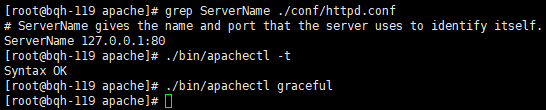
[root@bqh- apache]# grep ServerName ./conf/httpd.conf

# ServerName gives the name and port that the server uses to identify itself.

ServerName 127.0.0.1:
再次重启就不报提示信息了:
解决Apache启动错误:httpd: Could not reliably determine the server's fully qualified domain name, using 127.0.0.1 for ServerName的更多相关文章
- 解决apache启动错误:Could not reliably determine the server's fully qualified domain name
启动apache遇到错误:httpd: Could not reliably determine the server's fully qualified domain name [root@serv ...
- apache启动错误:Could not reliably determine the server's fully qualified domain name
启动apache遇到错误:httpd: Could not reliably determine the server's fully qualified domain name [root@serv ...
- apache环境配置 | httpd Could not reliably determine the server's fully qualified domain name
apache环境配置 | httpd Could not reliably determine the server's fully qualified domain name 转 https: ...
- 重启Apache报错apache2: Could not reliably determine the server's fully qualified domain name, using 127.0.1.1 for ServerName ... waiting的解决方法
启动apache提示 : apache2: Could not reliably determine the server's fully qualified domain name, using 1 ...
- apache启动问题: Could not reliably determine the server's fully qualified domain name
[root@rusky]# service httpd startStarting httpd: httpd: apr_sockaddr_info_get() failed for ruskyhttp ...
- 测试Apache服务器及httpd: Could not reliably determine the server's fully qualified domain name解决办法
测试Apache服务器: 重启apache: sudo /usr/local/apache/bin/apachectl restart 若出现错误: httpd: Could not reliably ...
- 启动apache时,出现httpd: Could not reliably determine the server\'s fully qualified domain name, using 127.0.0.1 for ServerName
1.通过vi打开apache的配置文件httpd.conf > vi /data/apache/conf/httpd.conf 2.找到#ServerName www.example.com:8 ...
- 解决apache启动错误"httpd:Could not reliably determine..."
启动apache遇到错误:httpd: Could not reliably determine the server's fully qualified domain name [root@serv ...
- 部署OpenStack问题汇总(七)--解决apache启动错误"httpd:Could not reliably determine..."
今天在调试openstack的时候,重启apache,出现以下报错: [root@hctrl log]# service httpd restart 停止 httpd:[确定] 正在启动 httpd: ...
随机推荐
- 深入学习c++--多线程编程(一)
1. 简介 2. 线程使用 2.1 demo #include <iostream> #include <thread> #include <future> usi ...
- 转 linux下ClamAV使用
linux下ClamAV使用 第一步:Clamav下载http://www.clamav.net/downloads#yuminstall wget –y第二步:创建clamav用户和组groupad ...
- SQL Server 2014 清除用户名和密码
网上找来找去都是SQL Server 2008版本或者以前版本的... 后来:http://stackoverflow.com/questions/349668/removing-the-rememb ...
- Flink FileSink 自定义输出路径——BucketingSink
今天看到有小伙伴在问,就想着自己实现一下. 问题: Flink FileSink根据输入数据指定输出位置,比如讲对应日期的数据输出到对应目录 输入数据: 20190716 输出到路径 20190716 ...
- python基础教程项目五之虚拟茶话会
python基础教程项目五之虚拟茶话会 几乎在学习.使用任何一种编程语言的时候,关于socket的练习从来都不会少,尤其是会写一些局域网的通信的东西.所以书上的这个项目刚好可以练习一下socket编程 ...
- 【 Linux 】Systemd 配置文件说明及编写(2)
1. 开机启动 对于支持 systemd 的软件,如果想要设置开机启动,就执行如下命令(以 http 为例): systemctl enable httpd 上面的命令相当于在 /etc/system ...
- redis添加到linux系统服务
http://blog.csdn.net/justfor3l/article/details/53187795
- Ubuntu18安装虚拟机virtualbox
环境查看 安装虚拟机 apt install virtualbox 图形化界面启动 virtualbox 其余创建虚拟机和安装和在Windows安装配置一样,不详述.
- Selenium IDE命令
Selenium IDE中提供了丰富的操作命令,在Selenium IDE的Command的下拉列表框中可以选择使用这些命令. 下面介绍一些常用命令的使用. 1.open open(url) 在浏览器 ...
- Kubernetes环境部署
简介 Kubernetes 是一个开源系统,用于容器化应用的自动部署.扩缩和管理.它将构成应用的容器按逻辑单位进行分组以便于管理和发现. 配置镜像源 Debian / Ubuntu apt-get ...