
springboot使用RestTemplate以post方式发送json字符串参数(以向钉钉机器人发送消息为例)
使用springboot之前,我们发送http消息是这么实现的
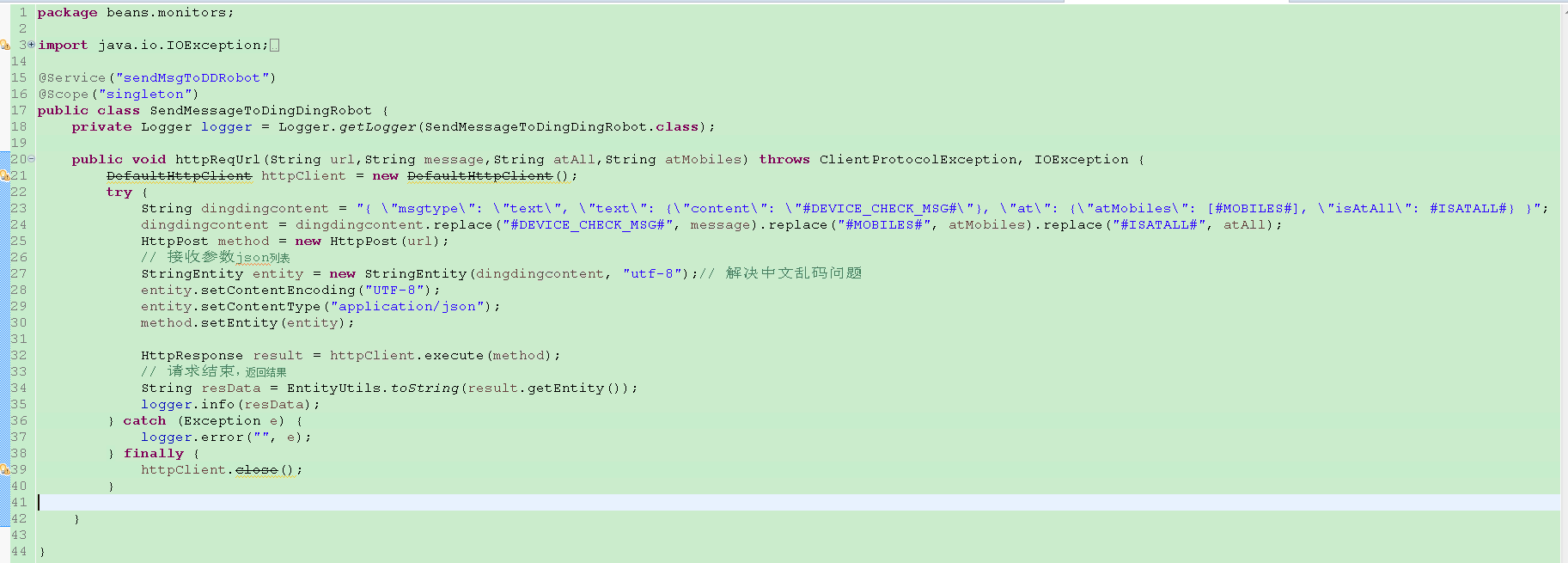
我们用了一个过时的类,虽然感觉有些不爽,但是出于一些原因,一直也没有做处理,最近公司项目框架改为了springboot,springboot中有一种很方便的发送http请求的实现,就是RestTemplate,而且实现起来非常简单,代码也很清晰。
从上面代码可以看到,向钉钉发送的参数为一个json字符串,所以需要的HttpEntity的泛型应该是String,如果是键值对,就需要声明MultiValueMap<String, String> map = new LinkedMultiValueMap<>();,将其作为第一个参数传递到HttpEntity构造方法中。
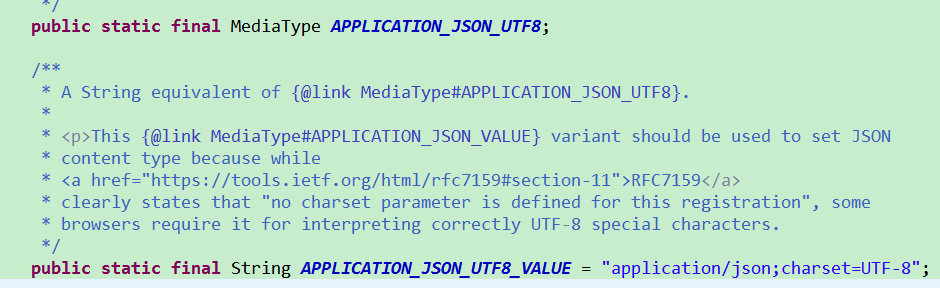
MediaType中定义了很多类型,我们这里使用的为APPLICATION_JSON_UTF8,进入源码,可以看到,该字段对应的值为属性APPLICATION_JSON_UTF8_VALUE的值,而属性APPLICATION_JSON_UTF8_VALUE的值为application/json;charset=UTF-8,这也正是我们需要的。
本例发送的json字符串,查找钉钉机器人的地址比较简单,具体步骤为"群设置 -- 群机器人 -- 设置 -- 复制"即可,
需要的maven依赖
<dependency>

     <groupId>org.springframework.boot</groupId>

     <artifactId>spring-boot-starter-web</artifactId>

</dependency>
如果只是这样引入依赖,则程序启动后,会启动一个内嵌的tomcat,程序将一直运行下去,如果程序是一次性的,执行完就想让其自动结束,并且不需要启动一个web项目,那么可以在上述依赖中去除对内嵌tocmat的依赖。在本例中,发送了钉钉消息之后就会结束程序,故去除了内嵌tomcat
<dependency>

     <groupId>org.springframework.boot</groupId>

     <artifactId>spring-boot-starter-web</artifactId>

     <exclusions>

           <exclusion>

                <groupId>org.springframework.boot</groupId>

                <artifactId>spring-boot-starter-tomcat</artifactId>

           </exclusion>

     </exclusions>

</dependency>
具体代码实现也很简单,如下
package com.demo.webboot;

import javax.annotation.Resource;

import org.springframework.boot.CommandLineRunner;

import org.springframework.http.HttpEntity;

import org.springframework.http.HttpHeaders;

import org.springframework.http.MediaType;

import org.springframework.http.ResponseEntity;

import org.springframework.stereotype.Component;

import org.springframework.web.client.RestTemplate;

@Component

public class RestCommandLine implements CommandLineRunner {

    @Resource

    private RestTemplate restTemplate;

    @Override

    public void run(String... args) throws Exception {

        HttpHeaders headers = new HttpHeaders();

        headers.setContentType(MediaType.APPLICATION_JSON_UTF8);

        String content = "{ \"msgtype\": \"text\", \"text\": {\"content\": \"This is a test case.\"}, \"at\": {\"atMobiles\": [phone num], \"isAtAll\": false}}";

        HttpEntity<String> request = new HttpEntity<>(content, headers);

        String url = "https://oapi.dingtalk.com/robot/send?access_token=65eff73abfd26a3e5e11dc87c2c8bcbf359f15b65cd1d3bcb60443307fba675a1";

        ResponseEntity<String> postForEntity = restTemplate.postForEntity(url, request, String.class);

        String body = postForEntity.getBody();

        System.out.println(body);

    }

}
在启动类中配置RestTemplate,没有对RestTemplate做较多的处理,直接调用build方法创建。
package com.demo.webboot;

import javax.annotation.Resource;

import org.springframework.boot.SpringApplication;

import org.springframework.boot.autoconfigure.SpringBootApplication;

import org.springframework.boot.web.client.RestTemplateBuilder;

import org.springframework.context.annotation.Bean;

import org.springframework.web.client.RestTemplate;

@SpringBootApplication

public class WebbootApplication {

    @Resource

    private RestTemplateBuilder builder;

    public static void main(String[] args) {

        SpringApplication.run(WebbootApplication.class, args);

    }

    @Bean

    public RestTemplate restTemplate() {

        return builder.build();

    }

}
运行结果如下
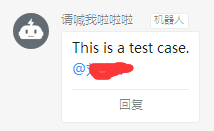
通过以上简单代码,就可以想钉钉机器人发送消息了,当然,这里只是一个demo。
springboot使用RestTemplate以post方式发送json字符串参数(以向钉钉机器人发送消息为例)的更多相关文章
- httpclient工具类,post请求发送json字符串参数,中文乱码处理
在使用httpclient发送post请求的时候,接收端中文乱码问题解决. 正文: 我们都知道,一般情况下使用post请求是不会出现中文乱码的.可是在使用httpclient发送post请求报文含中文 ...
- 钉钉自定义机器人 发送文本 换行 \n无效果
今天用php做钉钉自定义机器人 发送文本 换行 \n无效果,原来是我一直用单引号作为定义字符串,换成双引号就ok了.
- spring mvc各种常见类型参数绑定方式以及json字符串绑定对象
在使用spring mvc作为框架的时候,为了规范,我们通常希望客户端的请求参数符合规范直接通过DTO的方式从客户端提交到服务端,以便保持规范的一致性,除了很简单的情况使用RequestParam映射 ...
- ajax post 请求发送 json 字符串
$.ajax({ // 请求方式 type:"post", // contentType contentType:"application/json", // ...
- Springboot 通过FastJson实现bean对象和Json字符串互转
Json格式在后台服务中的重要性就不多说了,直入正题.首先引入pom文件,这里使用的是1.2.83版本 1 <dependency> 2 <groupId>com.alibab ...
- springMVC 接收json字符串参数
/** 前台js拼接了一个数组 myparam = [a,b,c]; 在ajax中直接 {"myparam":JSON.stringify(myparam)} 传入springMV ...
- json字符串参数
jsp部分 json字符串的属性应该都是实体类的属性 function saveCashier(){ layer.closeAll(); var Reapply = document.g ...
- 【spring mvc】spring mvc POST方式接收单个字符串参数,不加注解,接收到的值为null,加上@RequestBody,接收到{"uid":"品牌分类大”},加上@RequestParam报错 ---- GET方式接收单个参数的方法
spring mvc POST方式 接收单个参数,不加任何注解,参数名对应,接收到的值为null spring mvc POST方式 接收单个参数,加上@RequestBody,接收到参数格式:{&q ...
- httpclient的调用 发送json字符串
public static String postHttp(JSONObject jsonObject, String jsonUrl){ String responseMsg="" ...
随机推荐
- TypeScript入门三:TypeScript函数类型
TypeScript函数类型 TypeScript函数的参数 TypeScript函数的this与箭头函数 TypeScript函数重载 一.TypeScript函数类型 在上一篇博客中已经对声明Ty ...
- 5.Servlet 对象(request-response)
/*ServletResponse*/ /*responese常见应用*/ 1.向客户端输出中文数据 (分别以OutputStream 和 PrintWriter输出) 2.文件下载和中文文件的下载 ...
- Django—model系统:ORM之其他骚操作
Django ORM执行原生SQL # extra # 在QuerySet的基础上继续执行子语句 # extra(self, select=None, where=None, params=None, ...
- python面向对象:组合、封装、property装饰器、多态
一.组合二.封装三.property装饰器四.多态 一.组合 ''' 1. 什么是组合 一个对象的属性是来自于另外一个类的对象,称之为组合 2. 为何用组合 组合也是用来解决类与类代码冗余的问题 3. ...
- golang map多层嵌套使用及遍历方法汇总
原文:https://blog.csdn.net/boyhandsome7/article/details/79734847 ------------------------------------- ...
- tensorflow.python.framework.errors_impl.PermissionDeniedError: /data; Permission denied
在linux系统中,tensorflow跑mnist数据集出现错误,本应该自动下载的数据集 将mnist自动下载的路径,由/data/mnist之前的/删掉即可.改为data/mnist.
- filebeat configure
docker run -d --rm -v ./filebeat.yml:/usr/share/filebeat/filebeat.yml -v /var/log:/var/log docker.e ...
- 【bzoj2141】排队 [国家集训队2011]排队(树套树)
题目描述 排排坐,吃果果,生果甜嗦嗦,大家笑呵呵.你一个,我一个,大的分给你,小的留给我,吃完果果唱支歌,大家乐和和. 红星幼儿园的小朋友们排起了长长地队伍,准备吃果果.不过因为小朋友们的身高有所区别 ...
- Codeforces Round #453 (Div. 1) 901C C. Bipartite Segments
题 http://codeforces.com/contest/901/problem/C codeforces 901C 解 首先因为图中没有偶数长度的环,所以: 1.图中的环长度全是奇数,也就是说 ...
- Luogu P1903 [国家集训队]数颜色 or 维护队列
标准的带修莫队...咕到了现在$qwq$ 莫队是对询问排序来优化复杂度的(不带修就是对询问区间$[l,r]$排序).. 那么现在带修了,我们再可以维护一个时间维度$tm$:对于每个询问,每次回答前先检 ...