
Spring Boot系列教程十二:Spring boot集成Redis
一.创建项目
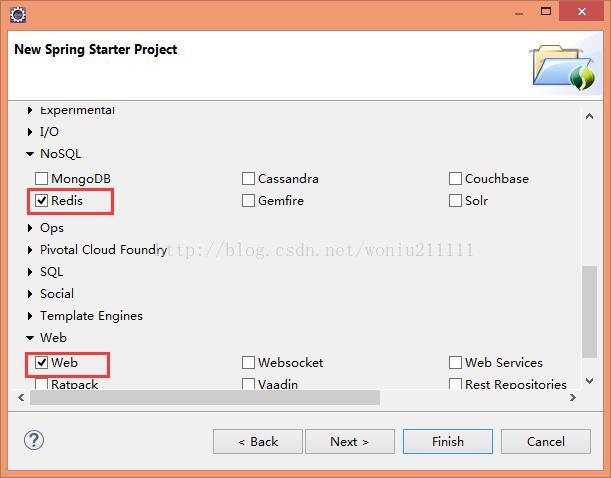
项目名称为 “springboot_redis”,创建过程中勾选 “Web”,“Redis”,第一次创建Maven需要下载依赖包(耐心等待)
二.实现
properties配置文件中添加配置信息
##########redis############

#redis的IP地址

spring.redis.host=localhost

#redis的端口

spring.redis.port=6379

#redis的密码

spring.redis.password=123456

#redis默认有16个数据库,使用DB0

spring.redis.database=0
创建RedisComponent类
package com.woniu.RedisComponent;

import org.apache.hadoop.mapred.gethistory_jsp;

import org.springframework.beans.factory.annotation.Autowired;

import org.springframework.data.redis.core.StringRedisTemplate;

import org.springframework.data.redis.core.ValueOperations;

import org.springframework.stereotype.Component;

@Component

public class RedisComponent {

	@Autowired

	private StringRedisTemplate stringRedisTemplate;

	public void set(String key, String value){

		ValueOperations<String, String> ops = this.stringRedisTemplate.opsForValue();

		boolean bExistent = this.stringRedisTemplate.hasKey(key);

		if (bExistent) {

			System.out.println("this key is bExistent!");

		}else{

			ops.set(key, value);

		}

	}

	public String get(String key){

		return this.stringRedisTemplate.opsForValue().get(key);

	}

	public void del(String key){

		this.stringRedisTemplate.delete(key);

	}

}
创建WebController类
package com.woniu.controller;

import org.springframework.beans.factory.annotation.Autowired;

import org.springframework.web.bind.annotation.PathVariable;

import org.springframework.web.bind.annotation.RequestMapping;

import org.springframework.web.bind.annotation.RestController;

import com.woniu.RedisComponent.RedisComponent;

@RestController

@RequestMapping(value="/web")

public class WebController {

	@Autowired

	private RedisComponent redisComponet;

	@RequestMapping(value="/set/{key}/{value}")

	public String set(@PathVariable String key, @PathVariable String value){

		redisComponet.set(key, value);

		return "set key succ!";

	}

	@RequestMapping(value="/get/{key}")

	public String get(@PathVariable String key){

		return redisComponet.get(key);

	}

	@RequestMapping(value="/del/{key}")

	public void del(@PathVariable String key){

		redisComponet.del(key);

	}

}
本机安装redis,设置密码为123456,启动redis。
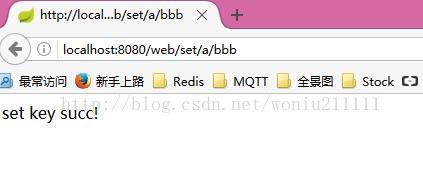
测试:
工程springboot_redis源码下载地址:点击打开链接
spring boot讨论群:611262656,一键加群:点击加群
更多技术文章请关注微信公众号“Java架构师之路”:

Spring Boot系列教程十二:Spring boot集成Redis的更多相关文章
- Spring Boot2 系列教程(十八)Spring Boot 中自定义 SpringMVC 配置
用过 Spring Boot 的小伙伴都知道,我们只需要在项目中引入 spring-boot-starter-web 依赖,SpringMVC 的一整套东西就会自动给我们配置好,但是,真实的项目环境比 ...
- Spring Boot系列教程十:Spring boot集成MyBatis
一.创建项目 项目名称为 "springboot_mybatis_demo",创建过程中勾选 "Web","MyBatis" ...
- Spring Boot系列教程十:Spring boot集成Sentinel Redis
前言 上一篇文章介绍了spring boot集成单点的redis,然而实际生产环境使用单点的redis风险很高,一旦宕机整个服务将无法使用,这篇文章介绍如何使用基于sentinel的redis高可用方 ...
- Spring Boot2 系列教程(十九)Spring Boot 整合 JdbcTemplate
在 Java 领域,数据持久化有几个常见的方案,有 Spring 自带的 JdbcTemplate .有 MyBatis,还有 JPA,在这些方案中,最简单的就是 Spring 自带的 JdbcTem ...
- Spring Boot2 系列教程 (十二) | 整合 thymeleaf
前言 如题,今天介绍 Thymeleaf ,并整合 Thymeleaf 开发一个简陋版的学生信息管理系统. SpringBoot 提供了大量模板引擎,包含 Freemarker.Groovy.Thym ...
- Spring Boot2 系列教程(十二)@ControllerAdvice 的三种使用场景
严格来说,本文并不算是 Spring Boot 中的知识点,但是很多学过 SpringMVC 的小伙伴,对于 @ControllerAdvice 却并不熟悉,Spring Boot 和 SpringM ...
- CRL快速开发框架系列教程十二(MongoDB支持)
本系列目录 CRL快速开发框架系列教程一(Code First数据表不需再关心) CRL快速开发框架系列教程二(基于Lambda表达式查询) CRL快速开发框架系列教程三(更新数据) CRL快速开发框 ...
- webpack4 系列教程(十二):处理第三方JavaScript库
教程所示图片使用的是 github 仓库图片,网速过慢的朋友请移步<webpack4 系列教程(十二):处理第三方 JavaScript 库>原文地址.或者来我的小站看更多内容:godbm ...
- Spring Boot2 系列教程(三十一)Spring Boot 构建 RESTful 风格应用
RESTful ,到现在相信已经没人不知道这个东西了吧!关于 RESTful 的概念,我这里就不做过多介绍了,传统的 Struts 对 RESTful 支持不够友好 ,但是 SpringMVC 对于 ...
随机推荐
- 如何用Python删除一个文件?
删除文件 path,删除时候如果path是一个目录, 抛出 OSError错误. remove() 同 unlink() 的功能是一样的 os.remove('a.txt') 如果remove文件夹就 ...
- Tkinter 之主窗口参数
一.常用参数 语法 作用 window= tk.TK() 创建窗口 window['height'] = 300 设置高 window['width'] = 500 设置宽 window.title( ...
- web目录
Proj app controllers jobs models view user xxx.html init.go conf message public img js css html
- GC的判定的2种方式
对象是否死亡的2中判定方法:引用计数和可达性分析(又称引用链) 1.引用计数 对象再被创建时,对象头里会存储引用计数器,对象被引用,计数器+1:引用失效,计数器 -1:GC时会回收计数器为0的对象.但 ...
- 20175234 2018-2019-2 《Java程序设计》第十周学习总结
目录 20175234 2018-2019-2 <Java程序设计>第十周学习总结 教材学习内容总结 12.1进程与线程 12.2 Java中的线程 12.3 Thread类与线程的创建 ...
- Vue源码分析(一) : new Vue() 做了什么
Vue源码分析(一) : new Vue() 做了什么 author: @TiffanysBear 在了解new Vue做了什么之前,我们先对Vue源码做一些基础的了解,如果你已经对基础的源码目录设计 ...
- Cesium Workshop
参考资料: https://cesiumjs.org/tutorials/Cesium-Workshop/ https://github.com/geoadmin/workshop-cesium3d ...
- 用了pm2之后,如何让console.log('..')出现在控制台
使用 pm2 log 0 可以查看.当然这个 0 应该是应用的 id
- 简易的CRM系统案例之Struts2+Hibernate3+JSP+MySQL版本
改造上一版本的DAO层 简易的CRM系统案例之Struts2+JSP+MySQL版本 src文件下hibernate.cfg.xml <!DOCTYPE hibernate-configurat ...
- 编译安装MySQL5.6
安装必需的工具 比如cmake.gcc.g++.git CentOS使用下面的命令: yum install cmake gcc g++ git Ubuntu使用下面的命令: apt-get ins ...