
jsp利用webuploader实现超大文件分片上传、断点续传
1,项目调研
因为需要研究下断点上传的问题。找了很久终于找到一个比较好的项目。
在GoogleCode上面,代码弄下来超级不方便,还是配置hosts才好,把代码重新上传到了github上面。
https://github.com/freewebsys/java-large-file-uploader-demo
效果:
上传中,显示进度,时间,百分比。
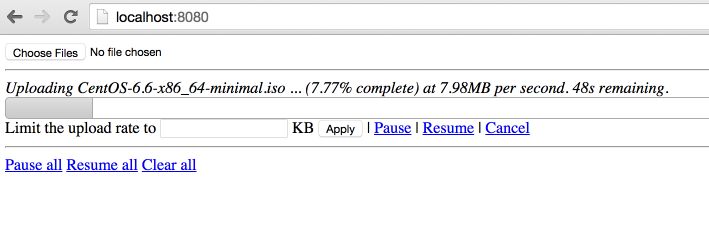
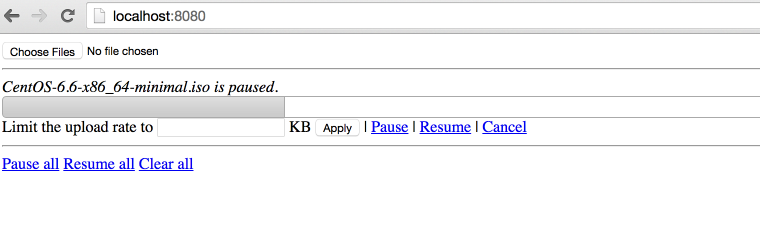
点击【Pause】暂停,点击【Resume】继续。
2,代码分析
原始项目:
https://code.google.com/p/java-large-file-uploader/
这个项目最后更新的时间是 2012 年,项目进行了封装使用最简单的方法实现了http的断点上传。
因为html5 里面有读取文件分割文件的类库,所以才可以支持断点上传,所以这个只能在html5 支持的浏览器上面展示。
同时,在js 和 java 同时使用 cr32 进行文件块的校验,保证数据上传正确。
代码在使用了最新的servlet 3.0 的api,使用了异步执行,监听等方法。
上传类UploadServlet
@Component("javaLargeFileUploaderServlet")
@WebServlet(name = "javaLargeFileUploaderServlet", urlPatterns = { "/javaLargeFileUploaderServlet" })
public class UploadServlet extends HttpRequestHandlerServlet
implements HttpRequestHandler {
private static final Logger log = LoggerFactory.getLogger(UploadServlet.class);
@Autowired
UploadProcessor uploadProcessor;
@Autowired
FileUploaderHelper fileUploaderHelper;
@Autowired
ExceptionCodeMappingHelper exceptionCodeMappingHelper;
@Autowired
Authorizer authorizer;
@Autowired
StaticStateIdentifierManager staticStateIdentifierManager;
@Override
public void handleRequest(HttpServletRequest request, HttpServletResponse response)
throws IOException {
log.trace("Handling request");
Serializable jsonObject = null;
try {
// extract the action from the request
UploadServletAction actionByParameterName =
UploadServletAction.valueOf(fileUploaderHelper.getParameterValue(request, UploadServletParameter.action));
// check authorization
checkAuthorization(request, actionByParameterName);
// then process the asked action
jsonObject = processAction(actionByParameterName, request);
// if something has to be written to the response
if (jsonObject != null) {
fileUploaderHelper.writeToResponse(jsonObject, response);
}
}
// If exception, write it
catch (Exception e) {
exceptionCodeMappingHelper.processException(e, response);
}
}
private void checkAuthorization(HttpServletRequest request, UploadServletAction actionByParameterName)
throws MissingParameterException, AuthorizationException {
// check authorization
// if its not get progress (because we do not really care about authorization for get
// progress and it uses an array of file ids)
if (!actionByParameterName.equals(UploadServletAction.getProgress)) {
// extract uuid
final String fileIdFieldValue = fileUploaderHelper.getParameterValue(request, UploadServletParameter.fileId, false);
// if this is init, the identifier is the one in parameter
UUID clientOrJobId;
String parameter = fileUploaderHelper.getParameterValue(request, UploadServletParameter.clientId, false);
if (actionByParameterName.equals(UploadServletAction.getConfig) && parameter != null) {
clientOrJobId = UUID.fromString(parameter);
}
// if not, get it from manager
else {
clientOrJobId = staticStateIdentifierManager.getIdentifier();
}
// call authorizer
authorizer.getAuthorization(
request,
actionByParameterName,
clientOrJobId,
fileIdFieldValue != null ? getFileIdsFromString(fileIdFieldValue).toArray(new UUID[] {}) : null);
}
}
private Serializable processAction(UploadServletAction actionByParameterName, HttpServletRequest request)
throws Exception {
log.debug("Processing action " + actionByParameterName.name());
Serializable returnObject = null;
switch (actionByParameterName) {
case getConfig:
String parameterValue = fileUploaderHelper.getParameterValue(request, UploadServletParameter.clientId, false);
returnObject =
uploadProcessor.getConfig(
parameterValue != null ? UUID.fromString(parameterValue) : null);
break;
case verifyCrcOfUncheckedPart:
returnObject = verifyCrcOfUncheckedPart(request);
break;
case prepareUpload:
returnObject = prepareUpload(request);
break;
case clearFile:
uploadProcessor.clearFile(UUID.fromString(fileUploaderHelper.getParameterValue(request, UploadServletParameter.fileId)));
break;
case clearAll:
uploadProcessor.clearAll();
break;
case pauseFile:
List<UUID> uuids = getFileIdsFromString(fileUploaderHelper.getParameterValue(request, UploadServletParameter.fileId));
uploadProcessor.pauseFile(uuids);
break;
case resumeFile:
returnObject =
uploadProcessor.resumeFile(UUID.fromString(fileUploaderHelper.getParameterValue(request, UploadServletParameter.fileId)));
break;
case setRate:
uploadProcessor.setUploadRate(UUID.fromString(fileUploaderHelper.getParameterValue(request, UploadServletParameter.fileId)),
Long.valueOf(fileUploaderHelper.getParameterValue(request, UploadServletParameter.rate)));
break;
case getProgress:
returnObject = getProgress(request);
break;
}
return returnObject;
}
List<UUID> getFileIdsFromString(String fileIds) {
String[] splittedFileIds = fileIds.split(",");
List<UUID> uuids = Lists.newArrayList();
for (int i = 0; i < splittedFileIds.length; i++) {
uuids.add(UUID.fromString(splittedFileIds[i]));
}
return uuids;
}
private Serializable getProgress(HttpServletRequest request)
throws MissingParameterException {
Serializable returnObject;
String[] ids =
new Gson()
.fromJson(fileUploaderHelper.getParameterValue(request, UploadServletParameter.fileId), String[].class);
Collection<UUID> uuids = Collections2.transform(Arrays.asList(ids), new Function<String, UUID>() {
@Override
public UUID apply(String input) {
return UUID.fromString(input);
}
});
returnObject = Maps.newHashMap();
for (UUID fileId : uuids) {
try {
ProgressJson progress = uploadProcessor.getProgress(fileId);
((HashMap<String, ProgressJson>) returnObject).put(fileId.toString(), progress);
}
catch (FileNotFoundException e) {
log.debug("No progress will be retrieved for " + fileId + " because " + e.getMessage());
}
}
return returnObject;
}
private Serializable prepareUpload(HttpServletRequest request)
throws MissingParameterException, IOException {
// extract file information
PrepareUploadJson[] fromJson =
new Gson()
.fromJson(fileUploaderHelper.getParameterValue(request, UploadServletParameter.newFiles), PrepareUploadJson[].class);
// prepare them
final HashMap<String, UUID> prepareUpload = uploadProcessor.prepareUpload(fromJson);
// return them
return Maps.newHashMap(Maps.transformValues(prepareUpload, new Function<UUID, String>() {
public String apply(UUID input) {
return input.toString();
};
}));
}
private Boolean verifyCrcOfUncheckedPart(HttpServletRequest request)
throws IOException, MissingParameterException, FileCorruptedException, FileStillProcessingException {
UUID fileId = UUID.fromString(fileUploaderHelper.getParameterValue(request, UploadServletParameter.fileId));
try {
uploadProcessor.verifyCrcOfUncheckedPart(fileId,
fileUploaderHelper.getParameterValue(request, UploadServletParameter.crc));
}
catch (InvalidCrcException e) {
// no need to log this exception, a fallback behaviour is defined in the
// throwing method.
// but we need to return something!
return Boolean.FALSE;
}
return Boolean.TRUE;
}
}
异步上传UploadServletAsync
@Component("javaLargeFileUploaderAsyncServlet")
@WebServlet(name = "javaLargeFileUploaderAsyncServlet", urlPatterns = { "/javaLargeFileUploaderAsyncServlet" }, asyncSupported = true)
public class UploadServletAsync extends HttpRequestHandlerServlet
implements HttpRequestHandler {
private static final Logger log = LoggerFactory.getLogger(UploadServletAsync.class);
@Autowired
ExceptionCodeMappingHelper exceptionCodeMappingHelper;
@Autowired
UploadServletAsyncProcessor uploadServletAsyncProcessor;
@Autowired
StaticStateIdentifierManager staticStateIdentifierManager;
@Autowired
StaticStateManager<StaticStatePersistedOnFileSystemEntity> staticStateManager;
@Autowired
FileUploaderHelper fileUploaderHelper;
@Autowired
Authorizer authorizer;
/**
* Maximum time that a streaming request can take.<br>
*/
private long taskTimeOut = DateUtils.MILLIS_PER_HOUR;
@Override
public void handleRequest(final HttpServletRequest request, final HttpServletResponse response)
throws ServletException, IOException {
// process the request
try {
//check if uploads are allowed
if (!uploadServletAsyncProcessor.isEnabled()) {
throw new UploadIsCurrentlyDisabled();
}
// extract stuff from request
final FileUploadConfiguration process = fileUploaderHelper.extractFileUploadConfiguration(request);
log.debug("received upload request with config: "+process);
// verify authorization
final UUID clientId = staticStateIdentifierManager.getIdentifier();
authorizer.getAuthorization(request, UploadServletAction.upload, clientId, process.getFileId());
//check if that file is not paused
if (uploadServletAsyncProcessor.isFilePaused(process.getFileId())) {
log.debug("file "+process.getFileId()+" is paused, ignoring async request.");
return;
}
// get the model
StaticFileState fileState = staticStateManager.getEntityIfPresent().getFileStates().get(process.getFileId());
if (fileState == null) {
throw new FileNotFoundException("File with id " + process.getFileId() + " not found");
}
// process the request asynchronously
final AsyncContext asyncContext = request.startAsync();
asyncContext.setTimeout(taskTimeOut);
// add a listener to clear bucket and close inputstream when process is complete or
// with
// error
asyncContext.addListener(new UploadServletAsyncListenerAdapter(process.getFileId()) {
@Override
void clean() {
log.debug("request " + request + " completed.");
// we do not need to clear the inputstream here.
// and tell processor to clean its shit!
uploadServletAsyncProcessor.clean(clientId, process.getFileId());
}
});
// then process
uploadServletAsyncProcessor.process(fileState, process.getFileId(), process.getCrc(), process.getInputStream(),
new WriteChunkCompletionListener() {
@Override
public void success() {
asyncContext.complete();
}
@Override
public void error(Exception exception) {
// handles a stream ended unexpectedly , it just means the user has
// stopped the
// stream
if (exception.getMessage() != null) {
if (exception.getMessage().equals("Stream ended unexpectedly")) {
log.warn("User has stopped streaming for file " + process.getFileId());
}
else if (exception.getMessage().equals("User cancellation")) {
log.warn("User has cancelled streaming for file id " + process.getFileId());
// do nothing
}
else {
exceptionCodeMappingHelper.processException(exception, response);
}
}
else {
exceptionCodeMappingHelper.processException(exception, response);
}
asyncContext.complete();
}
});
}
catch (Exception e) {
exceptionCodeMappingHelper.processException(e, response);
}
}
}
3,请求流程图:
主要思路就是将文件切分,然后分块上传。
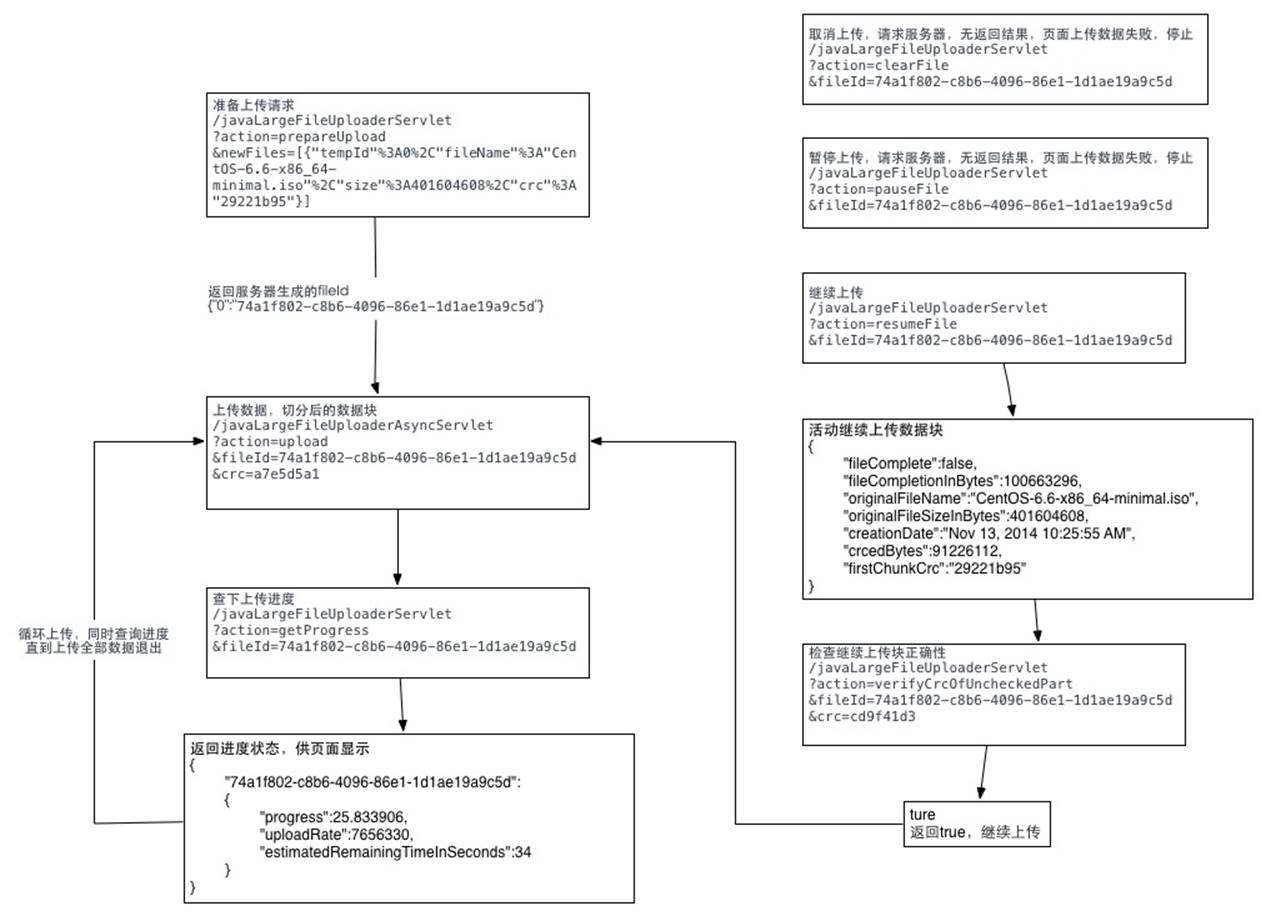
详细代码可以参照我写的这篇文章:http://t.cn/AiHwnJaB
jsp利用webuploader实现超大文件分片上传、断点续传的更多相关文章
- b/s利用webuploader实现超大文件分片上传、断点续传
本人在2010年时使用swfupload为核心进行文件的批量上传的解决方案.见文章:WEB版一次选择多个文件进行批量上传(swfupload)的解决方案. 本人在2013年时使用plupload为核心 ...
- 前端利用webuploader实现超大文件分片上传、断点续传
本人在2010年时使用swfupload为核心进行文件的批量上传的解决方案.见文章:WEB版一次选择多个文件进行批量上传(swfupload)的解决方案. 本人在2013年时使用plupload为核心 ...
- 利用webuploader实现超大文件分片上传、断点续传
之前仿造uploadify写了一个HTML5版的文件上传插件,没看过的朋友可以点此先看一下~得到了不少朋友的好评,我自己也用在了项目中,不论是用户头像上传,还是各种媒体文件的上传,以及各种个性的业务需 ...
- java利用webuploader实现超大文件分片上传、断点续传
我们平时经常做的是上传文件,上传文件夹与上传文件类似,但也有一些不同之处,这次做了上传文件夹就记录下以备后用. 首先我们需要了解的是上传文件三要素: 1.表单提交方式:post (get方式提交有大小 ...
- php利用webuploader实现超大文件分片上传、断点续传
PHP用超级全局变量数组$_FILES来记录文件上传相关信息的. 1.file_uploads=on/off 是否允许通过http方式上传文件 2.max_execution_time=30 允许脚本 ...
- asp.net利用webuploader实现超大文件分片上传、断点续传
ASP.NET上传文件用FileUpLoad就可以,但是对文件夹的操作却不能用FileUpLoad来实现. 下面这个示例便是使用ASP.NET来实现上传文件夹并对文件夹进行压缩以及解压. ASP.NE ...
- thinkphp+webuploader实现大文件分片上传
大文件分片上传,简单来说就是把大文件切分为小文件,然后再一个一个的上传,到最后由这些小文件再合并成原来的文件 webuploader下载地址及其文档:http://fex.baidu.com/webu ...
- 在React中使用WebUploader实现大文件分片上传的踩坑日记!
前段时间公司项目有个大文件分片上传的需求,项目是用React写的,大文件分片上传这个功能使用了WebUploader这个组件. 具体交互是: 1. 点击上传文件button后出现弹窗,弹窗内有选择文件 ...
- 以寡治众各个击破,超大文件分片上传之构建基于Vue.js3.0+Ant-desgin+Tornado6纯异步IO高效写入服务
原文转载自「刘悦的技术博客」https://v3u.cn/a_id_218 分治算法是一种很古老但很务实的方法.本意即使将一个较大的整体打碎分成小的局部,这样每个小的局部都不足以对抗大的整体.战国时期 ...
随机推荐
- 【HC89S003F4开发板】 1环境搭建
HC89S003F4开发板环境搭建 一.概述 芯圣电子做活动,一个开发板只用一块钱,买过来玩玩.︿( ̄︶ ̄)︿ 全套资料可以在论坛或qq群里下载.总之先安装个环境先. 二.安装Keil C51 作为增 ...
- CH01-ZYNQ修炼秘籍-LINUX篇-虚拟机环境搭建
CH01基于Ubuntu系统的ZYNQ-7000开发环境的搭建 1.1概述 实验环境: Windows 10 专业版 Vmware workstation 14.1.1 Ubuntu 16.04.3 ...
- vue的生命周期 created mounted等
生命周期: beforeCreate 在实例初始化之后,数据观测和event/watcher时间配置之前被调用 created 页面加载之前执行,在实例创建完成后被立即调用.执行顺序:父组件-子组件 ...
- maven配置阿里镜像
在conf\settings.xml 在<mirrors>里面添加 <mirror> <id>nexus-aliyun</id> < ...
- java.lang.AbstractMethodError: null
在使用springcloud的时候运行报这个错,原因是版本冲突导致的,在idea中创建springcloud项目的时候,这里默认是${spring-cloud.version},但是如果你使用的是高版 ...
- 如何将SolidWorks文件另存为.obj文件及如何打开.obj格式文件
原网站:http://fans.solidworks.com.cn/forum.php?mod=viewthread&tid=40238) OBJ文件是Alias Wavefront公司为它的 ...
- intel ipp6.0安装过程
由于最近看到一个代码中使用了intel ipp6.0库,了解到,ipp6.0是一个很强大的图像处理库,将其与opencv联合使用,还能够加速opencv的处理,在图像处理的过程中,是一个很重要的工具. ...
- jQuery的显示和隐藏
在 jQuery 中可以使用 hide() 和 show() 方法来隐藏和显示 HTML 元素,以及使用 toggle() 方法能够切换 hide() 和 show() 方法. 隐藏例子: <! ...
- 在pivotal cloud foundry上申请账号和部署应用
Created by Wang, Jerry, last modified on Jul 04, 2016 URL: http://run.pivotal.io/ maintain your mobi ...
- Json:Restful
JArray & JObject JArray与JObject在json的应用:无需定义相应的类对象,直接解析 JArray jarr = JArray.Parse(jsonStr); //数 ...