
Java动态修改运行环境
1、pom.xml直接添加一下配置
    <profiles>

        <profile>

            <id>dev</id>

            <properties>

                <activatedProperties>dev</activatedProperties>

            </properties>

            <!-- 这里代表默认使用dev环境配置文件 -->

            <activation>

                <activeByDefault>true</activeByDefault>

            </activation>

        </profile>

        <profile>

            <id>test</id>

            <properties>

                <activatedProperties>test</activatedProperties>

            </properties>

        </profile>

        <profile>

            <id>prod</id>

            <properties>

                <activatedProperties>prod</activatedProperties>

            </properties>

        </profile>

    </profiles>
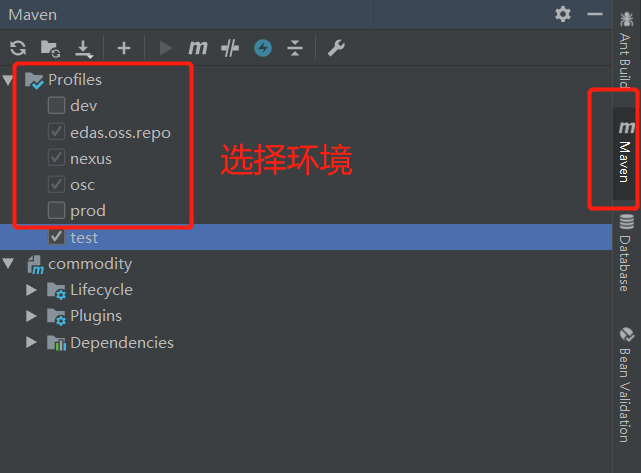
2、选择环境
3、在application.yml添加配置
#默认使用配置,@activatedProperties@为激活的配置

spring:

  profiles:

    active: @activatedProperties@

#公共配置与profiles选择无关

mybatis-plus:

  typeAliasesPackage: com.cn.commodity.entity

  mapperLocations: classpath:mapper/*.xml

logging:

  level:

    com.cn.commodity.dao : debug

---

#开发配置

spring:

  profiles: dev

  datasource:

    url: jdbc:mysql://localhost:3306/test?useUnicode=true&characterEncoding=utf-8&useSSL=true&serverTimezone=GMT%2B8

    #url: jdbc:mysql://localhost:3306/test

    username: root

    password: yang156122

    driver-class-name: com.mysql.jdbc.Driver

    # 使用druid数据源

    type: com.alibaba.druid.pool.DruidDataSource

#jasypt:

#  encryptor:

#    password: yangwj

---

#开发配置

spring:

  profiles: test

  datasource:

    url: jdbc:mysql://localhost:3306/test1?useUnicode=true&characterEncoding=utf-8&useSSL=true&serverTimezone=GMT%2B8

    #url: jdbc:mysql://localhost:3306/test

    username: root

    password: yang156122

    driver-class-name: com.mysql.jdbc.Driver

    # 使用druid数据源

    type: com.alibaba.druid.pool.DruidDataSource
4、在service或controller层,通过@Profile(value="{pro,test}"),控制不同环境访问不同的api
package com.cn.commodity.controller;

import com.cn.commodity.entity.User;

import org.springframework.boot.autoconfigure.EnableAutoConfiguration;

import org.springframework.context.annotation.Profile;

import org.springframework.web.bind.annotation.RequestMapping;

import org.springframework.web.bind.annotation.RestController;

@RestController

@EnableAutoConfiguration

@Profile("dev")

@RequestMapping("/testboot")

public class TestBootController {

    @RequestMapping("getuser")

    public User getUser() {

        User user = new User();

        user.setUserName("test");

        return user;

    }

}
Java动态修改运行环境的更多相关文章
- Java开发和运行环境的搭建
Java开发需要准备的东西? JDK+Eclipse 其中JDK的意思是Java开发工具包,Eclipse是进行用于做Java程序开发的工具(当然你也可以用记事本什么的去做). 其他开发工具:JCre ...
- Mac OS 您需要安装旧 Java SE 6 运行环境才能打开“XXX” 问题
问题描述: 今天在Mac OS上安装一个app的时候提示 “您需要安装旧 Java SE 6 运行环境才能打开 XXX” ,在网上搜索了一下,有说要改app的info.plist文件的,将其中的JVM ...
- JAVA运行环境 和 Java Applet的运行环境 的区别
Java小程序,也就是Java Applet,可以在Web浏览器中运行.Java Applet必须以<applet>脚本的形式嵌入到HTML页面中,才能在web浏览器中运行. 之前总以为本 ...
- Docker学习笔记之搭建 Java Web 项目运行环境
0x00 概述 Java Web 泛指以 Java 程序为基础向外提供 Web 服务的技术及相关工具,狭义上来说,我们也可以说 Java Web 是由 Servlet 程序提供的 Web 服务. 对我 ...
- linux(center OS7)安装JDK、tomcat、mysql 搭建java web项目运行环境
一.安装JDK 1.卸载旧版本或者系统自带的JDK (1)列出所有已安装的JDK rpm -qa | grep jdk (2)卸载不需要的JDK yum -y remove 安装包名称 2.下载并解压 ...
- 03 sublime text3下配置Java的编译运行环境
参考如下文章,加入了自己的干货: https://blog.csdn.net/qq_38295511/article/details/81140069 https://blog.csdn.net/qq ...
- Linux上安装java+tomcat+mysql运行环境
centos6.5jdk"1.7.0_79"mysql5.6apache-tomcat-7.0.53 安装jdk:1.先到oracle下载rpm包:jdk-7u80-linux-x ...
- linux环境下配置java WEB项目运行环境,jdk8+tomcat8+mysql5.7.11 新手向
一:安装jdk 1.下载jdk 在oracle下载东西的时候因为oracle的一些验证机制,所以需要在链接前面添加一些参数 wget --no-check-certificate --no-cook ...
- 运行monitor提示需要安装旧JAVA SE 6运行环境
MAC系统下运行monitor命令 ➜ tools git:(master) ✗ monitor 提示如下: 若要打开Eclipse.app,您需要Java SE 6 runtime,您想现在安装一个 ...
随机推荐
- 用js刷剑指offer(替换空格)
题目描述 请实现一个函数,将一个字符串中的每个空格替换成“%20”.例如,当字符串为We Are Happy.则经过替换之后的字符串为We%20Are%20Happy. 牛客网链接 js代码 func ...
- 【NOIP/CSP2019】D2T1 Emiya 家今天的饭
这个D2T1有点难度啊 原题: 花了我一下午的时间,作为D2T1的确反常 条件很奇怪,感觉不太直观,于是看数据范围先写了个暴力 写暴力的时候我就注意到了之前没有仔细想过的点,烹饪方式必须不同 虽然a很 ...
- PHP mysqli_error_list() 函数
返回最近调用函数的最后一个错误代码: <?php // 假定数据库用户名:root,密码:123456,数据库:RUNOOB $con=mysqli_connect("localhos ...
- sql server 游标的知识
一:认识游标 游标是SQL Server的一种数据访问机制,它允许用户访问单独的数据行.用户可以对每一行进行单独的处理,从而降低系统开销和潜在的阻隔情况,用户也可以使用这些数据生成的SQL代码并立 ...
- webservice三要素
1. 2. 3.
- locale与C字符编码
ref: https://www.cnblogs.com/gatsby123/p/11150472.html Unicode 字符集 代码点 与编码表中的某个字符对应的代码值.在Unicode标准中, ...
- CSP-S 模拟测试94题解
T1 yuuustu: 可以对两边取对数,然后就转化为两个double的比较,时间复杂度$O(n)$ 然后我就用神奇0.4骗分水过 #include<bits/stdc++.h> usin ...
- 威尔逊定理x
威尔逊定理 在初等数论中,威尔逊定理给出了判定一个自然数是否为素数的充分必要条件.即:当且仅当p为素数时:( p -1 )! ≡ -1 ( mod p ),但是由于阶乘是呈爆炸增长的,其结论对于实际操 ...
- redis系列(三):python操作redis
1.安装包 pip install redis 2.使用 # -*- coding: utf-8 -*- # @Time : 18-12-7 下午4:33 # @Author : Felix Wang ...
- char 类型的数组转换到CSting
首先,字符串“abc”在CString的保存格式是‘a’,'\0','b','\0','c','\0','\0','\0'; 从中可以看出它是以‘\0’,'\0',结束的. 当char ch[6]: ...