
c# redis密码验证笔记
参考博客https://www.cnblogs.com/qukaicheng/p/7514168.html写的
安装教程https://www.redis.net.cn/tutorial/3503.html
实现后的东西
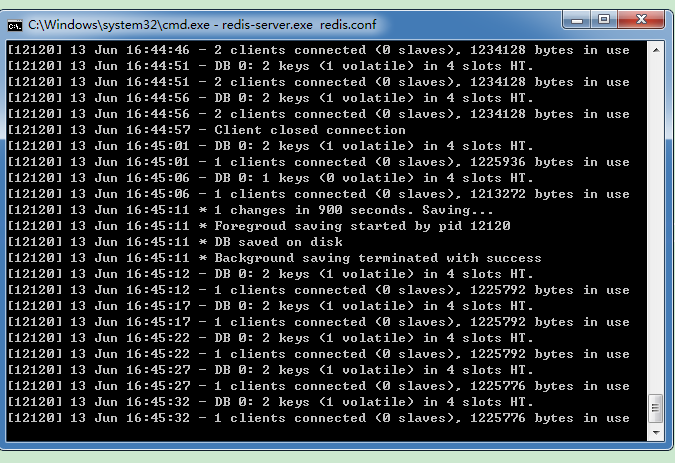
跳到H盘;cd打开指定文件夹

执行命令:redis-server.exe redis.conf
这时候另启一个cmd窗口,原来的不要关闭,不然就无法访问服务端了。
切换到redis目录下运行 redis-cli.exe -h 127.0.0.1 -p 6379 。
设置键值对 set myKey abc
取出键值对 get myKey
然后设置密码
获取密码 :127.0.0.1:6379> CONFIG get requirepas
设置密码:127.0.0.1:6379> CONFIG set requirepass "123"
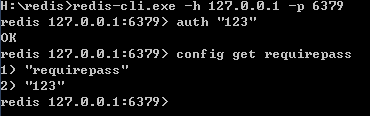
然后连接后,验证密码:127.0.0.1:6379> AUTH "123";然后才能进行操作
结果如下:设置密码要重新验证:不然config get requirepass 找不到
c# 中应用:添加引用 ServiceStack.Redis 3.9.x Complete Library;代码是复制的
 public class RedisCacheHelper

    {

        private static readonly PooledRedisClientManager pool = null;

        private static readonly string[] writeHosts = null;

        private static readonly string[] readHosts = null;

        public static int RedisMaxReadPool = int.Parse(ConfigurationManager.AppSettings["redis_max_read_pool"]);

        public static int RedisMaxWritePool = int.Parse(ConfigurationManager.AppSettings["redis_max_write_pool"]);

        static RedisCacheHelper()

        {

            var redisWriteHost = ConfigurationManager.AppSettings["redis_server_write"];

            var redisReadHost = ConfigurationManager.AppSettings["redis_server_read"];

            if (!string.IsNullOrEmpty(redisWriteHost))

            {

                writeHosts = redisWriteHost.Split(',');

                readHosts = redisReadHost.Split(',');

                if (readHosts.Length > )

                {

                    pool = new PooledRedisClientManager(writeHosts, readHosts,

                        new RedisClientManagerConfig()

                        {

                            MaxWritePoolSize = RedisMaxWritePool,

                            MaxReadPoolSize = RedisMaxReadPool,

                            AutoStart = true

                        });

                }

            }

        }

        public static void Add<T>(string key, T value, DateTime expiry)

        {

            if (value == null)

            {

                return;

            }

            if (expiry <= DateTime.Now)

            {

                Remove(key);

                return;

            }

            try

            {

                if (pool != null)

                {

                    using (var r = pool.GetClient())

                    {

                        if (r != null)

                        {

                            r.SendTimeout = ;

                            r.Set(key, value, expiry - DateTime.Now);

                        }

                    }

                }

            }

            catch (Exception ex)

            {

                string msg = string.Format("{0}:{1}发生异常!{2}", "cache", "存储", key);

            }

        }

        public static void Add<T>(string key, T value)

        {

            RedisCacheHelper.Add<T>(key, value, DateTime.Now.AddMinutes());

        }

        public static void Add<T>(string key, T value, TimeSpan slidingExpiration)

        {

            if (value == null)

            {

                return;

            }

            if (slidingExpiration.TotalSeconds <= )

            {

                Remove(key);

                return;

            }

            try

            {

                if (pool != null)

                {

                    using (var r = pool.GetClient())

                    {

                        if (r != null)

                        {

                            r.SendTimeout = ;

                            r.Set(key, value, slidingExpiration);

                        }

                    }

                }

            }

            catch (Exception ex)

            {

                string msg = string.Format("{0}:{1}发生异常!{2}", "cache", "存储", key);

            }

        }

        public static T Get<T>(string key)

        {

            if (string.IsNullOrEmpty(key))

            {

                return default(T);

            }

            T obj = default(T);

            try

            {

                if (pool != null)

                {

                    using (var r = pool.GetClient())

                    {

                        if (r != null)

                        {

                            r.SendTimeout = ;

                            obj = r.Get<T>(key);

                        }

                    }

                }

            }

            catch (Exception ex)

            {

                string msg = string.Format("{0}:{1}发生异常!{2}", "cache", "获取", key);

            }

            return obj;

        }

        public static void Remove(string key)

        {

            try

            {

                if (pool != null)

                {

                    using (var r = pool.GetClient())

                    {

                        if (r != null)

                        {

                            r.SendTimeout = ;

                            r.Remove(key);

                        }

                    }

                }

            }

            catch (Exception ex)

            {

                string msg = string.Format("{0}:{1}发生异常!{2}", "cache", "删除", key);

            }

        }

        public static bool Exists(string key)

        {

            try

            {

                if (pool != null)

                {

                    using (var r = pool.GetClient())

                    {

                        if (r != null)

                        {

                            r.SendTimeout = ;

                            return r.ContainsKey(key);

                        }

                    }

                }

            }

            catch (Exception ex)

            {

                string msg = string.Format("{0}:{1}发生异常!{2}", "cache", "是否存在", key);

            }

            return false;

        }

        public static IDictionary<string, T> GetAll<T>(IEnumerable<string> keys) where T : class

        {

            if (keys == null)

            {

                return null;

            }

            keys = keys.Where(k => !string.IsNullOrWhiteSpace(k));

            if (keys.Count() == )

            {

                T obj = Get<T>(keys.Single());

                if (obj != null)

                {

                    return new Dictionary<string, T>() { { keys.Single(), obj } };

                }

                return null;

            }

            if (!keys.Any())

            {

                return null;

            }

            try

            {

                using (var r = pool.GetClient())

                {

                    if (r != null)

                    {

                        r.SendTimeout = ;

                        return r.GetAll<T>(keys);

                    }

                }

            }

            catch (Exception ex)

            {

                string msg = string.Format("{0}:{1}发生异常!{2}", "cache", "获取", keys.Aggregate((a, b) => a + "," + b));

            }

            return null;

        }

    }
配置文件加了密码的设置

源码是柘木写的:
         /// <summary>

         /// IP地址中可以加入auth验证   password@ip:port

         /// </summary>

         /// <param name="hosts"></param>

         /// <returns></returns>

        public static List<RedisEndpoint> ToRedisEndPoints(this IEnumerable<string> hosts)

         {

             if (hosts == null) return new List<RedisEndpoint>();

             //redis终结点的列表

            var redisEndpoints = new List<RedisEndpoint>();

             foreach (var host in hosts)

           {

                RedisEndpoint endpoint;

                 string[] hostParts;

                if (host.Contains("@"))

                 {

                    hostParts = host.SplitOnLast('@');

                    var password = hostParts[];

                   hostParts = hostParts[].Split(':');

                    endpoint = GetRedisEndPoint(hostParts);

                     endpoint.Password = password;

                }

                 else

                 {

                    hostParts = host.Split(':');

                     endpoint = GetRedisEndPoint(hostParts);

               }

                redisEndpoints.Add(endpoint);

             }

             return redisEndpoints;

        }
c# redis密码验证笔记的更多相关文章
- PHP操作Redis(一) PHP连接Redis,含Redis密码验证、指定某一Redis数据库
台服务器上都快开启200个redis实例了,看着就崩溃了.这么做无非就是想让不同类型的数据属于不同的应用程序而彼此分开. 那么,redis有没有什么方法使不同的应用程序数据彼此分开同时又存储在相同的实 ...
- IdentityServer4 学习笔记[2]-用户名密码验证
回顾 上一篇介绍了IdentityServer4客户端授权的方式,今天来看看IdentityServer4的基于密码验证的方式,与客户端验证相比,主要是配置文件调整一下,让我们来看一下 配置修改 pu ...
- Redis:学习笔记-04
Redis:学习笔记-04 该部分内容,参考了 bilibili 上讲解 Redis 中,观看数最多的课程 Redis最新超详细版教程通俗易懂,来自 UP主 遇见狂神说 10. Redis主从复制 1 ...
- Redis入门学习笔记一
Redis 简要描述: 1. Redis 是啥 ? Redis 英文名称全称为: Remote Dictionary Server ,中译为远程字典服务器. 是一款区分于磁盘数据库如(Mysql)的 ...
- Nginx密码验证 ngx_http_auth_basic_module模块
有时候我们需要限制某些目录只允许指定的用户才可以访问,我们可以给指定的目录添加一个用户限制. nginx给我们提供了ngx_http_auth_basic_module模块来实现这个功能. 模块ngx ...
- redis密码设置、访问权限控制等安全设置
redis作为一个高速数据库,在互联网上,必须有对应的安全机制来进行保护,方法有2,如下. 1.比较安全的办法是采用绑定IP的方式来进行控制. 请在redis.conf文件找到如下配置 # If y ...
- Spring+SpringMVC+MyBatis+easyUI整合进阶篇(十一)redis密码设置、安全设置
警惕 前一篇文章<Spring+SpringMVC+MyBatis+easyUI整合进阶篇(九)Linux下安装redis及redis的常用命令和操作>主要是一个简单的介绍,针对redis ...
- Redis 密码设置和查看密码
Redis 密码设置和查看密码 redis没有实现访问控制这个功能,但是它提供了一个轻量级的认证方式,可以编辑redis.conf配置来启用认证. 1.初始化Redis密码: 在配置文件中有个参数: ...
- Redis 密码设置和查看密码(二)
Redis 密码设置和查看密码 redis没有实现访问控制这个功能,但是它提供了一个轻量级的认证方式,可以编辑redis.conf配置来启用认证. 1.初始化Redis密码: 在配置文件中有个参数: ...
随机推荐
- CodeWar打怪升级-Python篇
1. The goal of this exercise is to convert a string to a new string where each character in the new ...
- web前端——实例中学习css,javascript
最近闲暇时候在研究前端的样式和js,以前都是从w3school上看看那些选择器和DOM操作方法很少去实际做demo来研究,做的过程当中才真切感觉到纸上得来终觉浅,看得懂跟能做出东西完全两码事,尤其在定 ...
- 【Java】利用java.io.PrintWriter写出文本文件
代码: package com.hy.expired; import java.io.FileNotFoundException; import java.io.PrintWriter; public ...
- powershell命令教程
启动 powershell #字符串操作 对象操作 "hello".Length #进程操作 PS C:\> notepad PS C:\> $process=get- ...
- 阶段5 3.微服务项目【学成在线】_day05 消息中间件RabbitMQ_16.RabbitMQ研究-与springboot整合-生产者代码
springBoot给我们提供了 RarbbitTemplate发送消息 创建测试类,因为我们是基于SpringBoot的来写的测试类.所以要加上@SpringBootTest和@RunWith的注解 ...
- 增加github访问速度
转自:https://blog.csdn.net/qq_38977097/article/details/80770987 原因 为什么慢?github的CDN被某墙屏了. 解决方法 绕过dns解析, ...
- 动手生成 Delphi xe DBTreeview
tProductType表结构如下 object FDConnection1: TFDConnection Params.Strings = ( 'Database=ClothingT ...
- java处理jqueryGantt甘特图数据的task.depends依赖规则方法
前端采用jqueryGantt,github地址为:https://github.com/robicch/jQueryGantt 原以为后端只需要简单地保存甘特图任务列表和返回任务列表就行了. 但功能 ...
- 使用mybatis的resultMap进行复杂查询
记录下mybatis的集合查询中碰到的问题 https://jaychang.iteye.com/blog/2357143 MyBatis ofType和javaType区别 https: ...
- 【极简版】OpenGL 超级宝典(第五版)环境配置 VS2010
事先声明:该教程仅适用于VS2010环境下超级宝典第五版的配置 第一步:下载示例代码和环境包: 链接:https://pan.baidu.com/s/1llRRQ8ymBgMGuXp5M50pJw 提 ...