
openseadragon.js与deep zoom java实现艺术品图片展示
openseadragon.js 是一款用来做图像缩放的插件,它可以用来做图片展示,做展示的插件很多,也很优秀,但大多数都解决不了图片尺寸过大的问题。
艺术品图像展示就是最简单的例子,展示此类图片一般要求比较精细,所以图片尺寸很大,如果按照普通的方式直接将整个图片加载,要耗费巨大的带宽。
openseadragon.js 即为此而生,它展示的图像,必须经过切割处理,当放大图像时,才去加载更大的尺寸,真正做到了按需加载。
值得一提的是,openseadragon.js是微软公司的一款开源产品,非常难得。
openseadragon.js用法很简单。
定义html容器
<div id="container" style="width: 100%; height: 600px;"></div>
初始化openseadragon.js
 (function(win){

     var viewer = OpenSeadragon({

         // debugMode: true,

         id: "container",  //容器id

         prefixUrl: "./lib/openseadragon/images/", //openseadragon插件资源路径

         tileSources: "./image/earth.xml",  //openseadragon 图片资源xml

         showNavigator:true  //是否显示控制按钮

     });

     console.log(viewer);

 })(window);
效果图
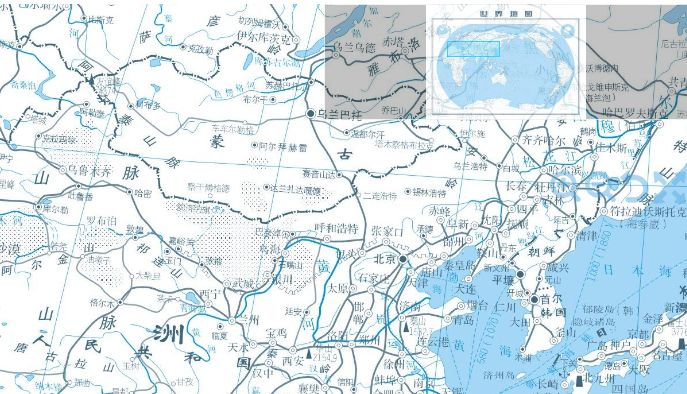
对,你没有看错,使用openseadragon.js,只需要copy一段初始化代码,初始化代码格式基本固定,只有tileSources是需要变化的,想显示哪个图,就写哪个图的xml链接。
那么这个xml是个什么东西呢?这是微软定义的一套Deep Zoom技术,或者叫规范,通过图像分割,然后配上一个xml文件,即可按照用户缩放的尺寸,按需加载图像,直到最清晰为止。这本来是微软Silverlight里的技术,它的JavaScript实现就是openseadragon.js。
笔者从google code上找到了一份java程序,专门用来生成Deep Zoom。笔者在原作基础上做了一些小小的改进,原作有些错误。。。
Deep Zoom For Java
 import java.awt.Graphics2D;

 import java.awt.RenderingHints;

 import java.awt.image.BufferedImage;

 import java.io.File;

 import java.io.FileOutputStream;

 import java.io.IOException;

 import java.nio.ByteBuffer;

 import java.nio.channels.FileChannel;

 import javax.imageio.ImageIO;

 /**

  * Deep Zoom Converter

  *

  * @author 杨元

  *

  */

 public class DeepZoomUtil {

     static final String xmlHeader = "<?xml version=\"1.0\" encoding=\"utf-8\"?>";

     static final String schemaName = "http://schemas.microsoft.com/deepzoom/2009";

     static Boolean deleteExisting = true;

     static String tileFormat = "jpg";

     // settings

     static int tileSize = 256;

     static int tileOverlap = 1;

     static Boolean verboseMode = false;

     static Boolean debugMode = false;

     /**

      * @param args the command line arguments

      */

     public static void main(String[] args) {

         try {

             processImageFile(new File("d:/earth.jpg"), new File("d:/earth"));

         } catch (Exception e) {

             e.printStackTrace();

         }

     }

     /**

      * Process the given image file, producing its Deep Zoom output files

      * in a subdirectory of the given output directory.

      * @param inFile the file containing the image

      * @param outputDir the output directory

      */

     private static void processImageFile(File inFile, File outputDir) throws IOException {

         if (verboseMode)

              System.out.printf("Processing image file: %s\n", inFile);

         String fileName = inFile.getName();

         String nameWithoutExtension = fileName.substring(0, fileName.lastIndexOf('.'));

         String pathWithoutExtension = outputDir + File.separator + nameWithoutExtension;

         BufferedImage image = loadImage(inFile);

         int originalWidth = image.getWidth();

         int originalHeight = image.getHeight();

         double maxDim = Math.max(originalWidth, originalHeight);

         int nLevels = (int)Math.ceil(Math.log(maxDim) / Math.log(2));

         if (debugMode)

             System.out.printf("nLevels=%d\n", nLevels);

         // Delete any existing output files and folders for this image

         File descriptor = new File(pathWithoutExtension + ".xml");

         if (descriptor.exists()) {

             if (deleteExisting)

                 deleteFile(descriptor);

             else

                 throw new IOException("File already exists in output dir: " + descriptor);

         }

         File imgDir = new File(pathWithoutExtension);

         if (imgDir.exists()) {

             if (deleteExisting) {

                 if (debugMode)

                     System.out.printf("Deleting directory: %s\n", imgDir);

                 deleteDir(imgDir);

             } else

                 throw new IOException("Image directory already exists in output dir: " + imgDir);

         }

         imgDir = createDir(outputDir, nameWithoutExtension.concat("_files"));

         double width = originalWidth;

         double height = originalHeight;

         for (int level = nLevels; level >= 0; level--) {

             int nCols = (int)Math.ceil(width / tileSize);

             int nRows = (int)Math.ceil(height / tileSize);

             if (debugMode)

                 System.out.printf("level=%d w/h=%f/%f cols/rows=%d/%d\n",

                                    level, width, height, nCols, nRows);

             File dir = createDir(imgDir, Integer.toString(level));

             for (int col = 0; col < nCols; col++) {

                 for (int row = 0; row < nRows; row++) {

                     BufferedImage tile = getTile(image, row, col);

                     saveImage(tile, dir + File.separator + col + '_' + row);

                 }

             }

             // Scale down image for next level

             width = Math.ceil(width / 2);

             height = Math.ceil(height / 2);

             if (width > 10 && height > 10) {

                 // resize in stages to improve quality

                 image = resizeImage(image, width * 1.66, height * 1.66);

                 image = resizeImage(image, width * 1.33, height * 1.33);

             }

             image = resizeImage(image, width, height);

         }

         saveImageDescriptor(originalWidth, originalHeight, descriptor);

     }

     /**

      * Delete a file

      * @param path the path of the directory to be deleted

      */

     private static void deleteFile(File file) throws IOException {

          if (!file.delete())

              throw new IOException("Failed to delete file: " + file);

     }

     /**

      * Recursively deletes a directory

      * @param path the path of the directory to be deleted

      */

     private static void deleteDir(File dir) throws IOException {

         if (!dir.isDirectory())

             deleteFile(dir);

         else {

             for (File file : dir.listFiles()) {

                if (file.isDirectory())

                    deleteDir(file);

                else

                    deleteFile(file);

             }

             if (!dir.delete())

                 throw new IOException("Failed to delete directory: " + dir);

         }

     }

     /**

      * Creates a directory

      * @param parent the parent directory for the new directory

      * @param name the new directory name

      */

     private static File createDir(File parent, String name) throws IOException {

         assert(parent.isDirectory());

         File result = new File(parent + File.separator + name);

         if (!result.mkdir())

            throw new IOException("Unable to create directory: " + result);

         return result;

     }

     /**

      * Loads image from file

      * @param file the file containing the image

      */

     private static BufferedImage loadImage(File file) throws IOException {

         BufferedImage result = null;

         try {

             result = ImageIO.read(file);

         } catch (Exception e) {

             throw new IOException("Cannot read image file: " + file);

         }

         return result;

     }

     /**

      * Gets an image containing the tile at the given row and column

      * for the given image.

      * @param img - the input image from whihc the tile is taken

      * @param row - the tile's row (i.e. y) index

      * @param col - the tile's column (i.e. x) index

      */

     private static BufferedImage getTile(BufferedImage img, int row, int col) {

         int x = col * tileSize - (col == 0 ? 0 : tileOverlap);

         int y = row * tileSize - (row == 0 ? 0 : tileOverlap);

         int w = tileSize + (col == 0 ? 1 : 2) * tileOverlap;

         int h = tileSize + (row == 0 ? 1 : 2) * tileOverlap;

         if (x + w > img.getWidth())

             w = img.getWidth() - x;

         if (y + h > img.getHeight())

             h = img.getHeight() - y;

         if (debugMode)

             System.out.printf("getTile: row=%d, col=%d, x=%d, y=%d, w=%d, h=%d\n",

                               row, col, x, y, w, h);

         assert(w > 0);

         assert(h > 0);

         BufferedImage result = new BufferedImage(w, h, img.getType());

         Graphics2D g = result.createGraphics();

         g.drawImage(img, 0, 0, w, h, x, y, x+w, y+h, null);

         return result;

     }

     /**

      * Returns resized image

      * NB - useful reference on high quality image resizing can be found here:

      *   http://today.java.net/pub/a/today/2007/04/03/perils-of-image-getscaledinstance.html

      * @param width the required width

      * @param height the frequired height

      * @param img the image to be resized

      */

     private static BufferedImage resizeImage(BufferedImage img, double width, double height) {

         int w = (int)width;

         int h = (int)height;

         BufferedImage result = new BufferedImage(w, h, img.getType());

         Graphics2D g = result.createGraphics();

         g.setRenderingHint(RenderingHints.KEY_INTERPOLATION,

                            RenderingHints.VALUE_INTERPOLATION_BICUBIC);

         g.drawImage(img, 0, 0, w, h, 0, 0, img.getWidth(), img.getHeight(), null);

         return result;

     }

     /**

      * Saves image to the given file

      * @param img the image to be saved

      * @param path the path of the file to which it is saved (less the extension)

      */

     private static void saveImage(BufferedImage img, String path) throws IOException {

         File outputFile = new File(path + "." + tileFormat);

         try {

             ImageIO.write(img, tileFormat, outputFile);

         } catch (IOException e) {

             throw new IOException("Unable to save image file: " + outputFile);

         }

     }

     /**

      * Write image descriptor XML file

      * @param width image width

      * @param height image height

      * @param file the file to which it is saved

      */

     private static void saveImageDescriptor(int width, int height, File file) throws IOException {

         StringBuilder sb = new StringBuilder(256);

         sb.append(xmlHeader);

         sb.append("<Image TileSize=\"");

         sb.append(tileSize);

         sb.append("\" Overlap=\"");

         sb.append(tileOverlap);

         sb.append("\" Format=\"");

         sb.append(tileFormat);

         sb.append("\" ServerFormat=\"Default\" xmlns=\"");

         sb.append(schemaName);

         sb.append("\">");

         sb.append("<Size Width=\"");

         sb.append(width);

         sb.append("\" Height=\"");

         sb.append(height);

         sb.append("\" />");

         sb.append("</Image>");

         saveText(sb.toString().getBytes("UTF-8"), file);

     }

     /**

      * Saves strings as text to the given file

      * @param bytes the image to be saved

      * @param file the file to which it is saved

      */

     private static void saveText(byte[] bytes, File file) throws IOException {

         try {

             //输出流

             FileOutputStream fos = new FileOutputStream(file);

             //从输出流中创建写通道

             FileChannel writeChannel = fos.getChannel();

             //将既有数组作为buffer内存空间

             ByteBuffer byteBuffer = ByteBuffer.wrap(bytes);

             //将buffer写到磁盘

             writeChannel.write(byteBuffer);

             writeChannel.close();

         } catch (IOException e) {

             throw new IOException("Unable to write to text file: " + file);

         }

     }

 }
调用非常简单,只有一句话:processImageFile(new File("d:/earth.jpg"), new File("d:/earth"));,第一个参数是图片路径,第二个参数是生成的Deep Zoom保存路径。本例将会在d:/earth目录下生成一个earth.xml文件和一个earth_files文件夹,xml的文件名默认和图片的文件名一致,然后直接把earth.xml的url返回给前端的openseadragon.js,就可以实现图像缩放。
需要注意的是,*_files文件夹必须和xml文件在同一目录,并且*要和xml文件名保持一致。
想要预览openseadragon.js效果,必须在真实的http容器中,不可以直接在文件中打开。
打包的openseadragon.js笔者做了一些UI上的美化,个人觉得漂亮些,如果读者不喜欢,可以用包里的原版。
openseadragon.js与deep zoom java实现艺术品图片展示的更多相关文章
- [WPF系列]-Deep Zoom
参考 Deep Zoom in Silverlight
- java+js实现完整的图片展示本地目录demo
java+js实现完整的图片展示本地目录demo 最近的项目满足需要,实现通过一个前端button点击事件,流行音乐浏览下的全部图片: 思路: - 获取到所需展示图片的本地目录内全部图片的文件绝对路径 ...
- [翻译] 比较 Node.js,Python,Java,C# 和 Go 的 AWS Lambda 性能
[翻译] 比较 Node.js,Python,Java,C# 和 Go 的 AWS Lambda 性能 原文: Comparing AWS Lambda performance of Node.js, ...
- 关于Visual Studio调试C/C++,JS,PHP,JAVA,Python等语言的方法
我在开始接触vs code后,确实对它的高颜值和小巧灵活而着迷,但是有一个非常现实的问题,相对于vs来说,vscode是一个代码编辑器,而不是一个IDE,在代码编译运行上存在着极大的问题,尤其是开始编 ...
- js调用android本地java代码
js调用android本地java代码 当在Android上使用WebView控件开发一个Web应用时,可以创建一个通过Javascript调用Android端java代码的接口.也就是可以通过Jav ...
- A SIMPLE LIBRARY TO BUILD A DEEP ZOOM IMAGE
My current project requires a lot of work with Deep Zoom images. We recently received some very high ...
- jsp中把js变量赋给java变量,或者将java变量赋给js变量怎么做?
在jsp中经常会遇到把js变量赋给java变量,或者将java变量赋给js变量的情况,在此将通用的处理方法小结如下: java变量传给js好办,var a=”<%=javaParam%>“ ...
- jsp页面:js方法里嵌套java代码(是操作数据库的),如果这个js 方法没被调用,当jsp页面被解析的时候,不管这个js方法有没有被调用这段java代码都会被执行?
jsp页面:js方法里嵌套java代码(是操作数据库的),如果这个js 方法没被调用,当jsp页面被解析的时候,不管这个js方法有没有被调用这段java代码都会被执行? 因为在解析时最新解析的就是JA ...
- Atitit。Js调用后台语言 java c# php swing android swt的方法大总结
Atitit.Js调用后台语言 java c# php swing android swt的方法大总结 1. Js调用后台语言有三种方法1 2. Swt BrowserFunction 绑定方法 ...
随机推荐
- Spark如何使用Akka实现进程、节点通信的简明介绍
<深入理解Spark:核心思想与源码分析>一书前言的内容请看链接<深入理解SPARK:核心思想与源码分析>一书正式出版上市 <深入理解Spark:核心思想与源码分析> ...
- (Python)继承
面向对象的另一个特性是继承,继承可以更好的代码重用. 例如一个学校里面的成员有老师.学生.老师和学生都有共同的属性名字和年纪.但老师还有它自己的属性,如工资.学生也有它的属性,如成绩. 因此我们可以设 ...
- java中数组的相关知识
1. 2.数组的命名方法 1)int[]ages=new int[5]; 2) int[]ages; ages=new int[5]; 3)int[]ags={1,2,3,4,5}; 4)int[ ...
- hdu 1015(DFS)
Safecracker Time Limit: 2000/1000 MS (Java/Others) Memory Limit: 65536/32768 K (Java/Others)Total ...
- DOM 事件
1.注册事件 // 事件处理函数 function handleMouseOver(event) { // process ...... } p.addEventListener("mous ...
- Lisp 函数
(quote x) [返回x] >>>>>>>>>>>>>>>>>>>>> ...
- React Native填坑之旅--class(番外篇)
无论React还是RN都已经迈入了ES6的时代,甚至凭借Babel的支持都进入了ES7.ES6内容很多,本文主要讲解类相关的内容. 构造函数 定义侦探类作为例子. ES5的"类"是 ...
- Form表单提交数据的几种方式
一.submit提交 在form标签中添加Action(提交的地址)和method(post),且有一个submit按钮(<input type='submit'>)就可以进行数据的提交, ...
- 用ADMM求解大型机器学习问题
[本文链接:http://www.cnblogs.com/breezedeus/p/3496819.html,转载请注明出处] 从等式约束的最小化问题说起: ...
- E9相关技术链接
1.飞思卡尔i.MX6q安装ubuntu14.04操作系统:http://demo.netfoucs.com/bzw073/article/details/42551399 2. DS-5社区版安装: ...