
商品条形码(JBarcode)
之前没有使用过这个,现在使用JBarcode生成商品条形码,工作之前的准备工作:

Eclipse:
Eclipse Java EE IDE for Web Developers.
Version: Helios Service Release 1
Build id: 20100917-0705
jar包:
JBarcode-Recognition_Source-0.2.jar
jbarcode-0.2.8.jar
commons-lang-2.6.jar
首先了解EAN-13码的规则:
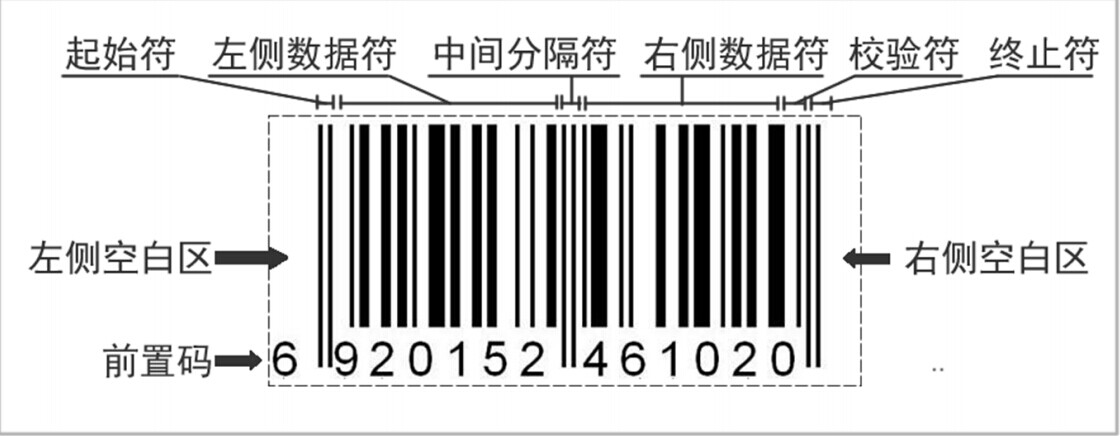
然后大家去了解一下这些数字的排列:

13位条形码分位处理就看出来,这些都需要自己加工处理并做截取处理,可以了解条形码每个段位表达的意思。
知道这些就已经足够我们去做一个条形码的校验工作以及生成自己的条形码。

了解校验码是怎么回事,我们根据我们自己的需求去做,然后根据需求处理一下,就是我们想要的条形码。
校验码生成规则如下:
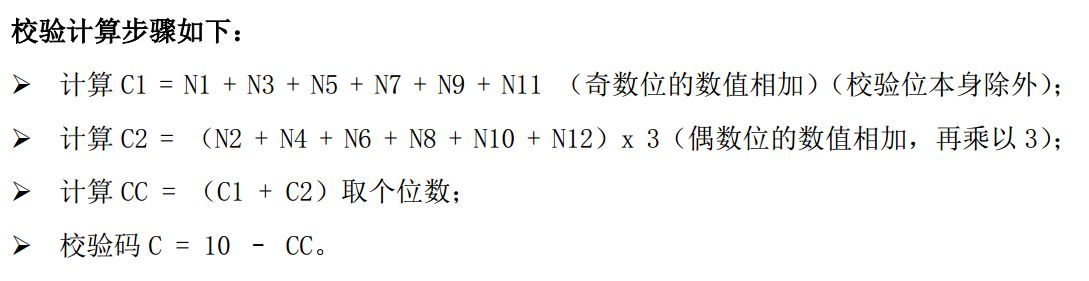
注意:这里的校验码,如果减掉后的C的结果为0或者10,那么最后一位的校验码就是0
现在是不是对JBarcode越来越感兴趣了呢,流程是很简单的。
明天小媳妇的巧克力就到了,加油写代码为了小媳妇的巧克力。,,,

package com.liuyc.test.demo;

import java.awt.image.BufferedImage;

import java.io.File;

import java.io.FileOutputStream;

import java.io.UnsupportedEncodingException;

import java.net.URLDecoder;

import java.util.regex.Pattern;

import org.apache.commons.lang.StringUtils;

import org.jbarcode.JBarcode;

import org.jbarcode.encode.EAN13Encoder;

import org.jbarcode.paint.EAN13TextPainter;

import org.jbarcode.paint.WideRatioCodedPainter;

import org.jbarcode.paint.WidthCodedPainter;

import org.jbarcode.util.ImageUtil;

/**

 *

 * @=============================================

 *

 * @author : Liuyc

 * @create : 2015年1月26日 14:47:57

 * @update :

 * @bolg : http://www.cnblogs.com/yuchuan/

 * @csdn : http://blog.csdn.net/l_lycos

 * @E-mail : 763999883@qq.com

 * @desc :

 *

 * @=============================================

 */

public class BarCodeImage {

	/**

	 * 图片类型

	 */

	public enum ImgType {

		/**

		 * 图片格式:.gif

		 */

		GIF(".gif"),

		/**

		 * 图片格式:.png

		 */

		PNG(".png"),

		/**

		 * 图片格式:.jpg

		 */

		JPG(".jpg"),

		/**

		 * 图片格式:.jpeg

		 */

		JPEG(".jpeg"), ;

		ImgType(String value) {

			this.value = value;

		}

		private final String value;

		public String getValue() {

			return value;

		}

	}

	/**

	 * 生成商品条形码

	 *

	 * @param filePath

	 *            商品条形码图片存放路径:../xxx/yyy/

	 * @param jbarCode

	 *            商品条形码:8位、13位

	 * @param format

	 *            商品条形码图片格式:.gif/.png/.jpg/.jpeg

	 * @return 图片存放路径+图片名称+图片文件类型

	 */

	public String createBarCode(String filePath, String jbarCode, String format) {

		String barCodeName = jbarCode + format;

		try {

			BufferedImage bi = null;

			int len = jbarCode.length();

			String barCode = jbarCode;

			if (len == 12) {

			} else if (len == 13) {

				int backCode = checkCode(jbarCode);

				int oldCode = Integer

						.parseInt(jbarCode.substring(len - 1, len));

				if (oldCode != backCode) {

					return null;

				}

				barCode = jbarCode.substring(0, jbarCode.length() - 1);

			}

			JBarcode localJBarcode13 = new JBarcode(EAN13Encoder.getInstance(),

					WidthCodedPainter.getInstance(),

					EAN13TextPainter.getInstance());

			bi = localJBarcode13.createBarcode(barCode);

			if (ImgType.GIF.value.equals(format)) {

				saveToGIF(bi, filePath, barCodeName);

			} else if (ImgType.PNG.value.equals(format)) {

				saveToPNG(bi, filePath, barCodeName);

			} else if (ImgType.JPG.value.equals(format) || ImgType.JPEG.value.equals(format)) {

				saveToJPEG(bi, filePath, barCodeName);

			}

			localJBarcode13.setEncoder(EAN13Encoder.getInstance());

			localJBarcode13.setPainter(WideRatioCodedPainter.getInstance());

			localJBarcode13.setTextPainter(EAN13TextPainter.getInstance());

			localJBarcode13.setShowCheckDigit(false);

			return filePath + barCodeName;

		} catch (Exception localException) {

			localException.printStackTrace();

			return null;

		}

	}

	/**

	 * 生成JPEG图片

	 *

	 * @param paramBufferedImage

	 * @param paramString

	 */

	@SuppressWarnings("unused")

	private void saveToJPEG(BufferedImage paramBufferedImage, String filePath,

			String fileName) {

		saveToFile(paramBufferedImage, filePath, fileName, "jpeg");

	}

	/**

	 * 生成PNG图片

	 *

	 * @param paramBufferedImage

	 * @param paramString

	 */

	@SuppressWarnings("unused")

	private void saveToPNG(BufferedImage paramBufferedImage, String filePath,

			String fileName) {

		saveToFile(paramBufferedImage, filePath, fileName, "png");

	}

	/**

	 * 生成GIF图片

	 *

	 * @param paramBufferedImage

	 * @param paramString

	 */

	private void saveToGIF(BufferedImage paramBufferedImage, String filePath,

			String fileName) {

		saveToFile(paramBufferedImage, filePath, fileName, "gif");

	}

	/**

	 * 保存图片文件

	 *

	 * @param paramBufferedImage

	 *            图片流

	 * @param filePath

	 *            文件路径

	 * @param imgName

	 *            图片参数

	 * @param imgFormat

	 *            图片格式

	 */

	private void saveToFile(BufferedImage paramBufferedImage, String filePath,

			String imgName, String imgFormat) {

		try {

			FileOutputStream fileOutputStream = null;

			try {
                                // 如果是本地测试,请自行修改为一个图片存放地址

				String rootPath = this.getClass().getClassLoader()

						.getResource("/").getPath();

				String imgDir = StringUtils

						.substringBefore(rootPath, "WEB-INF").concat(filePath);

				String dirPath = "";

				try {

					dirPath = URLDecoder.decode(imgDir, "UTF-8");

				} catch (UnsupportedEncodingException uee) {

					uee.printStackTrace();

				}

				File dirFile = new File(dirPath);

				if (!dirFile.exists()) {

					dirFile.mkdirs();

				}

				String imgPath = dirPath + "/" + imgName;

				fileOutputStream = new FileOutputStream(imgPath);

			} catch (Exception e) {

				System.out.println("Create Img File Error:" + e.toString());

			}

			ImageUtil.encodeAndWrite(paramBufferedImage, imgFormat,

					fileOutputStream, 96, 96);

			fileOutputStream.close();

		} catch (Exception localException) {

			System.out.println("Save Img File Error:" + localException);

			localException.printStackTrace();

		}

	}

	/**

	 * 返回校验码

	 *

	 * @param code

	 *            商品条形码

	 * @return 校验码: -1:格式不正确,条形码为全部数字 -2:参数不能为空

	 *

	 */

	private int checkCode(String code) {

		int checkCode = -1;

		if (code == null || "".equals(code)) {

			return -2;

		} else if (!Pattern.compile("^[0-9]*$").matcher(code).matches()) {

			checkCode = -1;

		} else {

			try {

				int evensum = 0; // 偶数位的和

				int oddsum = 0; // 奇数位的和

				evensum += Integer.parseInt(code.substring(11, 12));

				evensum += Integer.parseInt(code.substring(9, 10));

				evensum += Integer.parseInt(code.substring(7, 8));

				evensum += Integer.parseInt(code.substring(5, 6));

				evensum += Integer.parseInt(code.substring(3, 4));

				evensum += Integer.parseInt(code.substring(1, 2));

				evensum *= 3;

				oddsum += Integer.parseInt(code.substring(10, 11));

				oddsum += Integer.parseInt(code.substring(8, 9));

				oddsum += Integer.parseInt(code.substring(6, 7));

				oddsum += Integer.parseInt(code.substring(4, 5));

				oddsum += Integer.parseInt(code.substring(2, 3));

				oddsum += Integer.parseInt(code.substring(0, 1));

				int sum = evensum + oddsum;

				int ck = 0;

				if (sum % 10 == 0) {

					ck = sum;

				} else {

					ck = (sum / 10 + 1) * 10;

				}

				checkCode = ck - sum;

			} catch (NumberFormatException e) {

				System.out.println("BarCode Format Error:" + e.toString());

			} catch (Exception e) {

				System.out.println("Get Check Code Error:" + e.toString());

			}

		}

		return checkCode;

	}

	/**

	 * @param args

	 */

	public static void main(String[] args) {

	}

}


商品条形码(JBarcode)的更多相关文章
- 商品条形码(JBarcode)Java版(二)
下午开了一个下午的会议,其实开会我听不进去,因为今天妖都特别冷,下班在公司等待小媳妇一个钟头,然后带着她去吃饭,吃完饭回到家.她做运动,我就开始慢慢整理我自己的小博客. ——题记 先说一下,写这篇文章 ...
- 条形码(JBarcode)
一世尘梦 少小离家老大回,妖娆尘世,程序唧唧:问君能有几多愁,恰是满屏BUG无处修. 商品条形码(JBarcode) 之前没有使用过这个,现在使用JBarcode生成商品条形码,工作之前的准备工作: ...
- EAN 通用商品条形码
商品条形码是指由一组规则排列的条.空及其对应字符组成的标识,用以表示一定的商品信息的符号.其中条为深色.空为纳色,用于条形码识读设备的扫描识读.其对应字符由一组阿拉伯数字组成,供人们直接识读或通过键盘 ...
- Jbarcode 条形码生成工具
一.准备jar包 https://sourceforge.net/projects/jbcode/?source=typ_redirect 二.编写工具类 package com.example.de ...
- 使用JBarcode生成一维码
需要的jar包,只有jbarcode.jar 链接: https://pan.baidu.com/s/1o9oDPB8 密码: x367 public class Main { //设置条形码高度 p ...
- vue实现带logo的二维码/商品条形码/打印商品吊牌
一.带logo的二维码 1.安装 npm install vue-qr --save 2.在页面或组件中使用 <template> <div id="qrcode" ...
- jar 包 的用处 ,dozer、poi、itext 、jxl 、jbarcode 、itextrenderer jquery 效果
1.dozer 做类型转换的, 新建 xml 文件 描述两个实体的对应关系 ,DozerBeanMapper mapper =new DozerBeanMapper().addMappingFiles ...
- hdu3724 字典树(商品条形码)
题意: 给你一堆商品的名字,然后给你一些条形码,问你这些条形码转换成的字符串的 前缀在商品中出现的个数,条形码的每个字母是八个二进制数字,有两种数,大的是小的2倍,小的是0,大的是1,这里面 ...
- java生产条形码
一.通过JBarcode(此种方式可以隐藏掉条形码下面的字符串) 1.下载jar包 jbarcode-0.2.8.jar 目前maven中央仓库并没有jbarcode的坐标 如果是mav ...
随机推荐
- 【异常】ORA-01536: space quota exceeded for tablespace
### The error may exist in /src/main/resources/com/star/css/dao/sql/workflow.xml ### The error may i ...
- MongoDB基本使用
成功启动MongoDB后,再打开一个命令行窗口输入mongo,就可以进行数据库的一些操作. 输入help可以看到基本操作命令: show dbs:显示数据库列表 show collections:显示 ...
- PHP静态化
一.判断大型网站的标准 1.pv值(page views)网站浏览量: 概念:一个网站,所有的页面,在一天24小时内,被访问的总量,达到千万级别,或者几百万以上. 2.uv值(unique visit ...
- 四种常见的 POST-------- content-type数据提交方式
HTTP/1.1 协议规定的 HTTP 请求方法有 OPTIONS.GET.HEAD.POST.PUT.DELETE.TRACE.CONNECT 这几种.其中 POST 一般用来向服务端提交数据,本文 ...
- UIPickerView理解
- Remoting and web services using Spring[摘自官网]
spring document url: http://docs.spring.io/spring/docs/ Using Hessian First we’ll have to create a n ...
- tjkd-html
<div class="result-item"> <div class="kd-item"> <div class=" ...
- JMeter 响应文本乱码处理
首次安装Jmeter后,会出现响应文本乱码现象,处理办法如下: (1)修改默认编码方式 Jmeter安装目录/bin/jmeter.properties中sampleresult.default.en ...
- InnoDB杂记
一.InnoDB写数据流程(猜想) myisam是将索引放入内存缓存(Key Cache,大小有key_buffer_size设置) innodb时间索引和数据文件都放入内存缓存池(Buffer Po ...
- 事务处理-回滚(转账操作)(转自http://www.cnblogs.com/void-m/p/6143540.html)
JDBC事务处理-四大原则 原子性一致性隔离性持久性 第一步:实现转账操作 假设在账户中,盖伦有余额5000元,赵信有余额2000元, 盖伦要向赵信转账1000元. 1 2 3 4 5 6 7 8 9 ...