
window 下如何安装ghost博客
1、安装nodejs # Node v0.12.x and v4.2+ LTS - supported 我本地安装的是4.2 安装其他版本可能提示系统不兼容
2、安装mysql
3、安装bower
4、安装git
5、git clone git://github.com/tryghost/ghost.git
6、cd ghost
7、npm install -g grunt-cli
8、复制ghost根目录下的config.example.js文件,更改文件名为 config.js,我已经根据我的mysql配置了一个config.js,如下
var path = require('path'),

    config;

config = {

    development: {

        url: 'http://127.0.0.1:2369',

        // Example mail config

        // Visit http://support.ghost.org/mail for instructions

        // ```

         mail: {

             transport: 'SMTP',

             options: {

                 service: 'Mailgun',

                 auth: {

                     user: 'postmaster@sandbox52f8195f72d346d9bfbc1314176abcdd.mailgun.org', // mailgun username

                     pass: '25ip4bzyjwo1'  // mailgun password

                 }

             }

         },

        database: {

            client: 'mysql',

            connection: {

                host     : '127.0.0.1',

                user     : 'root',

                password : '',

                database : 'ghost',

                charset  : 'utf8'

            }

        },

        server: {

            host: '127.0.0.1',

            port: '2369'

        },

        logging: true

    },

    // ### Production

    // When running Ghost in the wild, use the production environment.

    // Configure your URL and mail settings here

    production: {

        url: 'http://127.0.0.1:2369',

        database: {

            client: 'mysql',

            connection: {

                host     : '127.0.0.1',

                user     : 'root',

                password : '',

                database : 'ghost',

                charset  : 'utf8'

            }

        },

        server: {

            host: '127.0.0.1',

            port: '2369'

        },

        logging: true

    },

    // ### Testing pg

    // Used by Travis - Automated testing run through GitHub

    'testing-pg': {

        url: 'http://127.0.0.1:2369',

        database: {

            client: 'pg',

            connection: {

                host     : '127.0.0.1',

                user     : 'postgres',

                password : '',

                database : 'ghost_testing',

                charset  : 'utf8'

            }

        },

        server: {

            host: '127.0.0.1',

            port: '2369'

        },

        logging: false

    }

};

module.exports = config;
9、npm install
10、grunt init
11、grunt prod
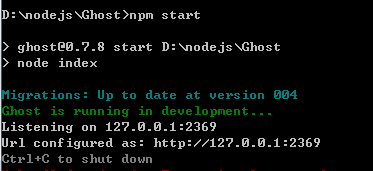
12、npm start
正常情况下node的提示如下图
打开https://mailgun.com 注册并登陆 我这里用的是谷歌账号注册登陆的
配置完成后出现下图
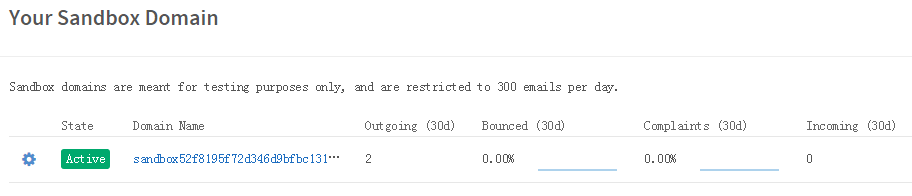
打开链接出现下图

将login及pass 输入到ghost目录中的config文件里
打开127.0.0.1:2369/ghost 进入博客目录,你已经可以添加修改博客,邀请朋友加入博客了,这是一篇ghost.js windows环境下的安装入门教程,转载请注明出处
参考文档 1.http://www.ghostchina.com/useing-mysql-database-with-ghost/
2.http://support.ghost.org/mail
3.https://segmentfault.com/a/1190000002947497
window 下如何安装ghost博客的更多相关文章
- 从零开始,CentOS6安装ghost博客
买了个Bandwagon的VPS来科学上网的,寻思着空间还大顺便做个博客呗. 然后就安装了AMH面板,再搞了个wordpress博客玩玩. 接触到Ghost博客的时候,心血来潮想装一个. 然后就试着搞 ...
- 安装 Ghost 博客和 Nginx
Ghost 认 node 的版本,所以使用 nvm 更好. 1.安装 nvm: 可以去 github 查看 nvm 的说明,通过:wget -qO- https://raw.githubusercon ...
- docker安装Ghost博客
1.安装docker-compose curl -L https://github.com/docker/compose/releases/download/1.22.0/docker-compose ...
- Ghost博客安装
Ghost博客是一个基于Node.js 的开源博客平台,由前WordPress UI 部门主管John O'Nolan 和WordPress 高级工程师Hannah Wolfe 创立,目的是为了给用户 ...
- CentOS 7.2 搭建 Ghost 博客
因为平时记录一些文档或想法基本使用 markdown 的语法,Mac 下推荐一款 markdown 的编辑器 Haroopad:上周无意发现 Ghost 有支持 Mac 的桌面版本了,并且同样开源 h ...
- Ubuntu上部署Ghost博客
所有文章搬运自我的个人主页:sheilasun.me 刚刚成功把自己的ghost博客部署到Linode VPS上了,在这里回顾并顺便整理一下从购买域名到部署代码到服务器的整个过程. 购买域名 万网或者 ...
- 为Ghost博客扩展代码高亮、数学公式、页面统计、评论
前几天捣鼓了一下博客首页,接下来再丰富一下博客页面的功能与内容.由于我所使用的Ghost博客专注于轻量简洁,因此标题中提到的功能在Ghost中默认均不支持.下面将逐个介绍一下如何为Ghost扩展这些功 ...
- 读Ghost博客源码与自定义Ghost博客主题
我使用的Ghost博客一直使用者默认的Casper主题.我向来没怎么打理过自己博客,一方面认为自己不够专业,很难写出质量比较高的文字:另一方面认为博客太耗时间,很容易影响正常的工作内容.最近公司即将搬 ...
- 【ghost初级教程】 怎么搭建一个免费的ghost博客
ghost博客系统无疑是这个月最火热的话题之一,这个号称”只为博客“的系统,早在项目开始之初就受到了众人的关注.它使用了当前最火热node.js技术,10月14日发布了V0.3.3版本.江湖传言它将是 ...
随机推荐
- SQLPlus 在连接时通常有四种方式
1. sqlplus / as sysdba 操作系统认证,不需要数据库服务器启动listener,也不需要数据库服务器处于可用状态.比如我们想要启动数据库就可以用这种方式进入 sqlpl ...
- Discuz! X论坛上传附件到100%自动取消上传的原因及解决方案
最近接到一些站长的反馈,说论坛上传附件,到100%的时候自己取消上传了.经查是附件索引表pre_forum_attachment表的aid字段自增值出现了问题,导致程序逻辑返回的aid值实际为一个My ...
- 用于阻止div上的事件和div上的按钮的事件同时触发
event.stopPropagation() 阻止事件冒泡 用于ie11以上
- JS/jquery获取iframe内部元素和ifame中获取外部元素精华
1.从外部获取iframe内部元素方法: js : window.frames['frame'].document.getElementById("imglist"); //f ...
- iOS中文网址路径转换URLEncode
如果返回的URL中有中文可以用此方法转换 今天发现一个蛋疼的问题,服务端返回的urlString里面有时含有中文,使用 [NSURL URLWithString:urlString]生成URL对象时, ...
- bzoj 3530: [Sdoi2014]数数
#include<cstdio> #include<iostream> #include<cstring> #define M 1509 #define MO 10 ...
- 关于Xcode6创建的工程在Xcode5打开
Xcode6创建的工程在Xcode5打开- 4.0只显示3.5大小的问题 只需要在工程里添加Default-568h@2x.png,即可以解决
- mysql 找回密码方法
1.首先确认服务器出于安全的状态,也就是没有人能够任意地连接MySQL数据库. 因为在重新设置MySQL的root密码的期间,MySQL数据库完全出于没有密码保护的 状态下,其他的用户也可以任意地登录 ...
- WebBrowser Control
https://msdn.microsoft.com/en-us/library/aa752040(v=vs.85).aspx WebBrowser Control
- MFC-01-Chapter01:Hello,MFC---1.3 第一个MFC程序(02)
1.3.1 应用程序对象 MFC应用程序的核心就是基于CWinApp类的应用程序对象,CWinApp提供了消息循环来检索消息并将消息调度给应用程序的窗口.当包含头文件<afxwin.h>, ...