
扩展GridView实现的一个自定义无刷新分页,排序,支持多种数据源的控件TwfGridView
最近项目View层越来越趋向于无刷新化,特别是数据展示方面,还要对Linq有很好的支持.
在WebFrom模式的开发中,GridView是一个功能很强大,很常用的控件,但是他也不是完美的,没有自带的无刷新和排序(有人说UpdatePanel或第三方插件就可以实现无刷新,呵呵... 相信不少朋友和我一样讨厌UpdatePanel,
引入一大堆很长的js库且不说,用起来感觉不到一点无刷新带来的快速),也不支持部分数据绑定分页(有人说部分数据绑定也可以用aspNetPager等第三方插件很好的实现,但是那个插件能在一个事件里搞定分页和排序吗,还是无刷新的),
我也网上找了很多,但都不是很好用,很多还不提供源代码,所以自己实现了一个
具体功能如下:
1.由于是扩展实现.net中自带的GridView 所以GridView的功能她都有
2.支持部分数据绑定,节约服务器资源(即DataSource只需指定当前要显示页的数据,而不需要像自带的GridView一样DataSource为整个数据源)
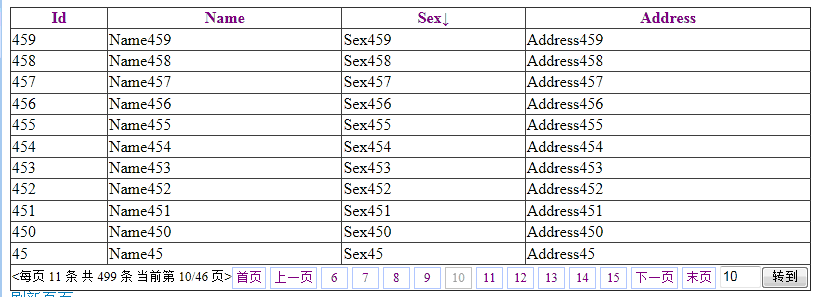
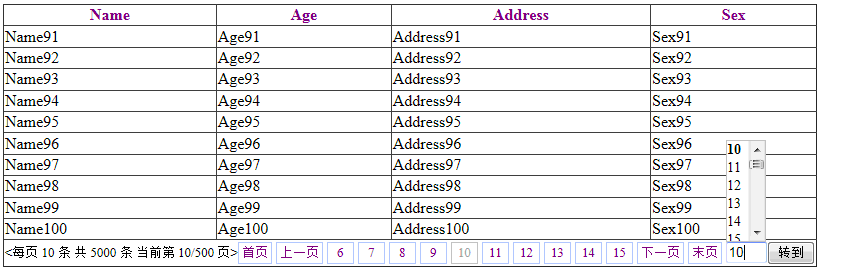
3.无刷新分页,可自定义分页栏,分页按钮样式
4.无刷新排序,可自定义排序栏,排序按钮的样式
5.自定义无刷新操作后的视图状态[ViewState](1.禁用视图状态 2.只维护数据的视图状态 3.维护全部数据和子控件的视图状态)
6.简化事件处理,排序和分页只需一个事件
下载地址:http://files.cnblogs.com/dint/TComponentsTest_V_1_0_3.rar
不同数据源的绑定:
DataTable:
        private void BindSource()

        {

            DataTable dtPersons = new DataTable();

            dtPersons.Columns.Add("Name");

            dtPersons.Columns.Add("Age");

            dtPersons.Columns.Add("Address");

            dtPersons.Columns.Add("Sex");

            for (int i = 1, il = 5000; i <= il; i++)

            {

                DataRow nrow = dtPersons.NewRow();

                nrow[0] = "Name" + i.ToString();

                nrow[1] = "Age" + i.ToString();

                nrow[2] = "Address" + i.ToString();

                nrow[3] = "Sex" + i.ToString();

                dtPersons.Rows.Add(nrow);

            }

            TwfGridView1.DataSource = dtPersons;

            TwfGridView1.DataBind();

        }
List,Linq:
        private void BindSource()

        {

            List<Person> lstPersons = new List<Person>();

            for (int i = 1, il = 2000; i <= il; i++)

            {

                Person p = new Person()

                {

                    Id=i,

                    Name = "Name" + i.ToString(),

                    Age = "Age" + i.ToString(),

                    Address = "Address" + i.ToString(),

                    Sex = "Sex" + i.ToString()

                };

                lstPersons.Add(p);

            }

            TwfGridView1.DataSource = lstPersons;

            TwfGridView1.DataBind();

        }
分页排序事件,部分数据源(EntityFramework数据操作,其他的类似):
//部分数据源绑定需调用,重载的DataBind(int pageIndex,int allRecordCount)方法
private void DataBinder(int pageindex, string sortexp, SortDirection? direct)

        {

            using (var db = new EFDbContext(@"Data Source=.;Initial Catalog=dbtest;Integrated Security=true;"))

            {

                var results = db.Persons.Where(x => x.Id < 500);

                int rc = results.Count();

                int ps = (rc % TwfGridView1.PageSize == 0) ? rc / TwfGridView1.PageSize : rc / TwfGridView1.PageSize + 1;

                if (pageindex > ps - 1) pageindex = ps - 1;

                var v= results;

                if (sortexp == "Id")

                {

                    if (direct == SortDirection.Descending)

                    {

                        v = v.OrderByDescending(x => x.Id);

                    }

                    else

                    {

                        v = v.OrderBy(x => x.Id);

                    }

                }

                else if (sortexp == "Name")

                {

                    if (direct == SortDirection.Descending)

                    {

                        v = v.OrderByDescending(x => x.Name);

                    }

                    else

                    {

                        v = v.OrderBy(x => x.Name);

                    }

                }

                else if (sortexp == "Age")

                {

                    if (direct == SortDirection.Descending)

                    {

                        v = v.OrderByDescending(x => x.Age);

                    }

                    else

                    {

                        v = v.OrderBy(x => x.Age);

                    }

                }

                else if (sortexp == "Sex")

                {

                    if (direct == SortDirection.Descending)

                    {

                        v = v.OrderByDescending(x => x.Sex);

                    }

                    else

                    {

                        v = v.OrderBy(x => x.Id);

                    }

                }

                else if (sortexp == "Address")

                {

                    if (direct == SortDirection.Descending)

                    {

                        v = v.OrderByDescending(x => x.Address);

                    }

                    else

                    {

                        v = v.OrderBy(x => x.Address);

                    }

                }

                else { v = v.OrderBy(x => x.Id); }

                v = v.Skip(pageindex * TwfGridView1.PageSize).Take(TwfGridView1.PageSize);

                TwfGridView1.DataSource =v.ToList();

                TwfGridView1.DataBind(pageindex, rc);//注意重载了DataBind方法

            }

        }

        protected void TwfGridView1_PageSorting(object sender, GridViewPageEventArgs ePage, Dint.TwfWebox.EGridViewSortArgs eSort)

        {

            DataBinder(ePage.NewPageIndex, eSort.SortExpression, eSort.SortDirection);

        }
<cc1:TwfGridView ID="TwfGridView1" runat="server"
onpagesorting="TwfGridView1_PageSorting" AjaxViewState="False"
AllowPaging="True" AllowSorting="True" FocusBgColor="" jQuerySupport="True"
LoadMsg="正在加载数据...">
<EPagerSetting NavButton="PrevNumNext" ClassName="TwfGv_All" NavMessageBarCss="TwfGv_NavMessage"
NumBtnBarCss="TwfGv_NumBtnBar" CurrentNumBtnCss="TwfGv_CurrNumBtn" PrevNextBtnCss="TwfGv_PrevNextBtn"
DisabledPrevNextBtnCss="TwfGv_PrevNextDisable" PagerInfoFormatter="<每页 {RecordCount} 条 共 {TotalCount} 条 当前第 {PageIndex}/{PageCount} 页>"
GoToBarEnable="True" GotoBtnText="转到" GoToDropdown="DropdownSubmit"
GotoClassName="TwfGv_Goto" GotoTxtCss="TwfGv_Goto_Txt"></EPagerSetting>
<ESortSetting SortAscCss="TwfGv_SortAsc" SortDescCss="TwfGv_SortDesc" SortDefaultCss="TwfGv_SortDef"
AscFormatter="{0}↑" DescFormatter="{0}↓"></ESortSetting>
<PagerSettings FirstPageText="首页" LastPageText="末页" NextPageText="下一页" PreviousPageText="上一页"></PagerSettings>
</cc1:TwfGridView>
快捷设计时:
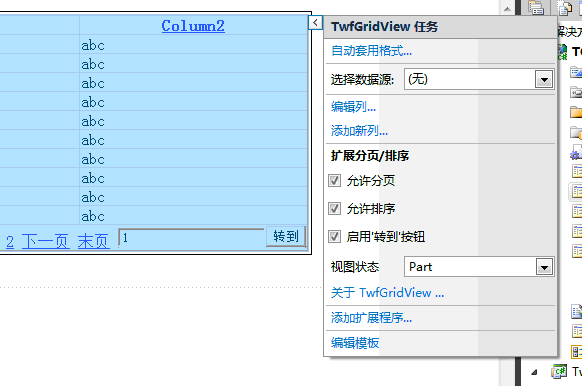
分页排序效果:
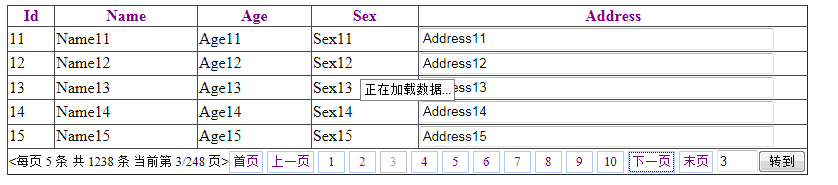
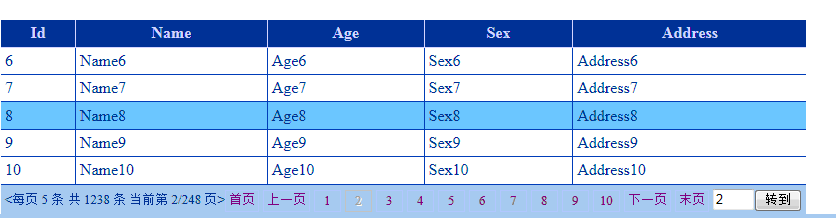
当前焦点行颜色效果:
下拉页选择效果:
具体实现原理:
1.重写DataSource属性 适应不同数据源
         /// <summary>

         /// 获取或设置数据源 支持 DataTable,DataView,ICollection,ITwfRecordCount,IQueryable 等类型的数据源

         /// </summary>

         public override object DataSource

         {

             get

             {

                 return base.DataSource;

             }

             set

             {

                 IListSource dtSource = value as IListSource;

                 if (dtSource != null){

                     _RecordCount = dtSource.GetList().Count;

                 }

                 else{

                     ITwfRecordCount trcSource = value as ITwfRecordCount;

                     if (trcSource != null){

                         _RecordCount = trcSource.RecordCount();

                     }

                     else{

                         ICollection cletSource = value as ICollection;

                         if (cletSource != null){

                             _RecordCount = cletSource.Count;

                         }

                         else{

                             IEnumerable aEnum = value as IEnumerable;

                             if (aEnum != null) {

                                 IEnumerator aEnumtor = aEnum.GetEnumerator();

                                 if (aEnumtor != null)

                                 {

                                     int iCount = ;

                                     aEnumtor.Reset();

                                     while (aEnumtor.MoveNext())iCount++;

                                     _RecordCount = iCount;

                                 }

                             }

                         }

                     }

                 }

                 VsRecordCount = _RecordCount;

                 base.DataSource = value;

             }

         }
2.重写控件呈现函数 呈现的时候传递分页参数
 private void RenderHtml(HtmlTextWriter defWriter)

         {

             if (Page != null)

             {

                 Page.VerifyRenderingInServerForm(this);

                 StringBuilder strBuilder = new StringBuilder();

                 StringWriter strWriter = new StringWriter(strBuilder);

                 HtmlTextWriter htmlWriter = new HtmlTextWriter(strWriter);

                 base.RenderChildren(htmlWriter);

                 string strVs="",strEvl="";

                 TransferFormState(ref strVs, ref strEvl);

                 RspCallBackResult(string.Format("SUCCE{0},{1},{2},{3}~{4},{5},{6}~{8}~{9}~{7}", PageIndex.ToString().PadLeft(, ''),

                     PageCount.ToString().PadLeft(, ''), "", "",aSort.ColumnIndex.ToString(),

                     aSort.SortExpression,aSort.DirectString,strBuilder.ToString(),strVs,strEvl));

             }

             else{

                 base.RenderChildren(defWriter);

             }

         }
3.处理ViewState让无刷新之后也能保存视图状态(此处用 IL 实现效率会更高)
  private void TransferFormState(ref string rVstate,ref string rEvl)

         {

             if (_AjaxViewState && isVsSupport)

             {

                 MethodInfo ptrM = Page.GetType().GetMethod("DecomposeViewStateIntoChunks",

                     BindingFlags.Instance | BindingFlags.NonPublic);

                 ICollection ivs = ptrM.Invoke(Page, null) as ICollection;

                 if ((ivs != null) && (ivs.Count > ))

                 {

                     StringBuilder strBuilder = new StringBuilder();

                     int num = , ivc = ivs.Count - ;

                     foreach (string s in ivs)

                     {

                         strBuilder.Append(s);

                         if (num < ivc) strBuilder.Append("#");

                         num++;

                     }

                     rVstate = strBuilder.ToString();

                 }

                 if (Page.EnableEventValidation)

                 {

                     ptrM = Page.ClientScript.GetType().GetMethod("GetEventValidationFieldValue",

                         BindingFlags.Instance | BindingFlags.NonPublic);

                     rEvl = ((ptrM.Invoke(Page.ClientScript, null) as string) ?? "");

                 }

             }

         }
4.更友好的设计时支持 让控件更易用
     public class TwfGridDesignerActionList : DesignerActionList

     {

         private TwfGridView twfGridView;

         public TwfGridDesignerActionList(IComponent component) : base(component) {

             twfGridView = component as TwfGridView;

         }

         private void SetProperty(string propertyName, object value)

         {

             TypeDescriptor.GetProperties(twfGridView)[propertyName].SetValue(twfGridView, value);

         }

         public override DesignerActionItemCollection GetSortedActionItems()

         {

             DesignerActionItemCollection nitem = new DesignerActionItemCollection();

             nitem.Add(new DesignerActionHeaderItem("扩展分页/排序", "kzfypx"));

             nitem.Add(new DesignerActionPropertyItem("AllowPaging", "允许分页", "kzfypx"));

             nitem.Add(new DesignerActionPropertyItem("AllowSorting", "允许排序", "kzfypx"));

             nitem.Add(new DesignerActionPropertyItem("GotoEnable", "启用'转到'按钮", "kzfypx"));

             nitem.Add(new DesignerActionPropertyItem("StateMode", "视图状态", "kzfypx", "Part:部分状态\r\nNone:无状态\r\nAll:完全状态"));

             nitem.Add(new DesignerActionMethodItem(this, "About", "关于 TwfGridView ...", "kzfypx",true));

             return nitem;

         }

         [EditorBrowsable(EditorBrowsableState.Never)]

         public bool GotoEnable

         {

             get{

                 return this.twfGridView.EPagerSetting.GoToBarEnable;

             }

             set

             {

                 TypeDescriptor.GetProperties(twfGridView.EPagerSetting)["GoToBarEnable"].SetValue(twfGridView.EPagerSetting,value);

                 AllowPaging = AllowPaging;

             }

         }

         [EditorBrowsable(EditorBrowsableState.Never)]

         public void About()

         {

             (new FrmAbout()).ShowDialog();

         }

         [EditorBrowsable(EditorBrowsableState.Never)]

         public bool AllowSorting {

             get { return this.twfGridView.AllowSorting; }

             set { SetProperty("AllowSorting", value); }

         }

         [EditorBrowsable(EditorBrowsableState.Never)]

         public bool AllowPaging

         {

             get { return this.twfGridView.AllowPaging; }

             set { SetProperty("AllowPaging", value); }

         }

         [EditorBrowsable(EditorBrowsableState.Never)]

         public TwfGridViewStateMode StateMode

         {

             get {

                 if (!this.twfGridView.EnableViewState) return TwfGridViewStateMode.None;

                 if (!this.twfGridView.AjaxViewState) return TwfGridViewStateMode.Part;

                 return TwfGridViewStateMode.All;

             }

             set {

                 switch (value)

                 {

                     case TwfGridViewStateMode.None:

                         SetProperty("EnableViewState", false);

                         SetProperty("AjaxViewState", false);

                         break;

                     case TwfGridViewStateMode.Part:

                         SetProperty("EnableViewState", true);

                         SetProperty("AjaxViewState", false);

                         break;

                     case TwfGridViewStateMode.All:

                         SetProperty("EnableViewState", true);

                         SetProperty("AjaxViewState", true);

                         break;

                     default:

                         throw new Exception("error param");

                 }

             }

         }

     }
扩展GridView实现的一个自定义无刷新分页,排序,支持多种数据源的控件TwfGridView的更多相关文章
- MVC无刷新分页(即局部刷新,带搜索,页数选择,排序功能)
我查看了很多网站,大部分评论分页都是局部刷新的,可大部分电商商品展示分页都是有刷新页面的,于是我便做了一个商品展示无刷新分页的例子.接下来我就将做一个模仿淘宝已买到的宝贝功能,不过我的是无刷新分页的. ...
- MVC无刷新分页
MVC无刷新分页(即局部刷新,带搜索,页数选择,排序功能) 我查看了很多网站,大部分评论分页都是局部刷新的,可大部分电商商品展示分页都是有刷新页面的,于是我便做了一个商品展示无刷新分页的例子.接下 ...
- 自己动手用Javascript写一个无刷新分页控件
.NET技术交流群:337901356 ,欢迎您的加入! 对 于一个用户体验好的网站来说,无刷新技术是很重要的,无刷新,顾名思义,就是局部刷新数据,有用过Asp.net Web Form技术开发网页的 ...
- ASP.NET中无刷新分页
上次介绍了我们代码写的刷新分页,这次就来说说无刷新分页. 这次我们是在上次的基础上改动了一些,我们都知道想要无刷新,就需要Ajax,在我们的ASP.NET中AJax是和一般处理程序配合着用的. 无刷新 ...
- ASP.NET Ajax简单的无刷新分页
最近练习了一些AJAX无刷新分页,写得比较简单,性能不知道怎么样,求大神指点,如有更好的分页提供,欢迎交流! 发话不多说了,直接上代码! 首先从网上下了一个JS分页,感觉挺好用的 (function( ...
- phpcms无刷新分页
控制器添加一个函数: 添加一个静态页面ajax_message.html,在页面中添加如下代码: 在要分页的页面(我的是"show"页面)中添加如上图代码: phpcms无刷新分页 ...
- thinkphp ajax 无刷新分页效果的实现
思路:先做出传统分页效果,然后重新复制一份Page.class.php类,对它进行修改,把js中的函数传到page类中,把上一页.下一页.首页.尾页.链接页中的url地址改成js控制的函数,模板页面中 ...
- jquery ajax php+mysql 无刷新分页 详细实例
最近在接触jquery和ajax,当前项目也会用到分页,为了用户体验更好一些,就准备用无刷新分页,这个demo很适合新手学习查看,写的比较清晰,话不多说,直接上代码吧. 首先是html页面,index ...
- MVC简单分页(未实现无刷新分页)
分页Html辅助方法 using System.Text; using System.Web: using System.Web.Mvc; namespace System.Web.Mvc { pub ...
随机推荐
- 再谈java两种变量(基本类型和引用类型)(综合各路大神)
基本类型: 基本类型自然不用说了,它的值就是一个数字,一个字符或一个布尔值. int a: a=250: //声明变量a的同时,系统给a分配了数据空间. 引用类型: 是一个对象类型,值是什么呢? ...
- 百度地图api
引入js <script type="text/javascript" src="http://api.map.baidu.com/api?v=2.0&ak ...
- Yii源码阅读笔记(三十二)
web/Application类的注释,继承base/Application类,针对web应用的一些处理: namespace yii\web; use Yii; use yii\base\Inval ...
- java swing文件内容检索工具
Java相关技术 - 文件内容检索工具 拿到一个几百M甚至上G的project让你去学习 有时候你会想知道某个关键词是在哪个文件里 比如:spring MVC配置的@RequestMapping,你从 ...
- Tomcat 随机挂掉
最近遇到一些诡异的事情,1Apache + 4Tomcat的系统中,每天偶尔会发现其中的一台或几台Tomcat宕机了. 今天特别频繁,宕了有6次之多. 环境: Windows Server 20 ...
- tomcatPluginV321.zip
下载地址:http://www.eclipsetotale.com/tomcatPlugin/tomcatPluginV321.zip 或者 http://files.cnblogs.com/fil ...
- Source Insight设置
Source Insight设置 1.背景色选择 要改变背景色Options->preference->windows background->color设置背景色,设置自定 ...
- spring 另开线程时的注入问题
spring web项目在启动的时候,就会完成各种组件的注入.在工作的过程中,遇到了这样一个问题: 一个serviceA中要新开一个线程来执行一项任务(假定这个任务是ClassA).ClassA中要用 ...
- 开启JMX功能,使JVisvualVM能够连接JVM
-Dcom.sun.management.jmxremote.port=1099 -Dcom.sun.management.jmxremote.ssl=false -Dcom.sun.manageme ...
- DOS基础命令
对服务(service)的操作 命令 功能 Net start 查看Windows开启的服务 Net stop [service name] 停止服务 net start [service name] ...