
Chapter 5: Design and implement security
Configure authentication
Authenticating users
IIS authentication
- Anonymous
- ASP.net impersonation
- Basic
transmit username/password between client/server in Base64 encoded but not encrypted. - Digest
username/password are encrypted - Forms
1: without using built-in windows security system
2: use FormsAuthentication.SetAuthCookie to make authentication token available for the rest of the session. - Windows
supported only in microsoft browser
use NTLM/Kerberos
straightforward and easy to implement, especially on intranet. - ASP.net impersonation authentication
independent of authentication mode configured in Web.config file
System.Security.Principal.IPrincipal / System.Security.Principal.IIdentity
- WindowsIdentity/WindowsPrincipal
- FormsIdentity/GenericPrincipal
- GenericIdentity/GenericPrinciapl
use AuthorizeAttribute to enforce authentication
- Form authentication + SimpleMembership + WebSecurity
Windows authentication- use Active directory to manage users
- all users are members of your domain
- require users to use IE or Microsoft browser
Form authentication - use standard ASP.net membership provider db schema or your own
Custom authentication - create a custom provider by implementing IIdentity or IPrincipal to interact with underlying authentication mechanism
Manage user session by cookies
FormsAuthenticationTicket authTicket = new FormsAuthenticationTicket(

1,

userName,

DateTime.Now,

DateTime.Now.AddDays(90),

createPersistentCookie, // a Boolean indicating whether a cookie

// should be created on the user's machine

String.Join(";",rolesArr) //user's roles

);

// add cookie to response stream

string encTicket = FormsAuthentication.Encrypt(authTicket);

System.Web.HttpCookie authCookie = new System.Web.HttpCookie(FormsAuthentication.

FormsCookieName, encTicket);

System.Web.HttpContext.Current.Response.Cookies.Add(authCookie);
Configuring membership providers
- use SimpleMembershipProvider/WebSecurity helper classes
Creating custom membership providers
- ActiveDirectoryProvider for app use windows authentication
- SqlMembershipProvider for form authentication
Configure and apply authorization
- create roles
- configure roles
configure a SQL membership role provider in Web.config file
use InitializeDatabaseConnection(...) for SimpleMembershipProvider with SimpleRole. - Authorizing roles programmatically
- applying Authorize attribute
- check in code via followings
*RoleProvider.GetRolesForUser, RoleProvider.IsUserInRole, HttpContext.User.IsInRole
*WebSecurity.RequireRoles(...)
- creating custom role providers
- Implementing WCF service authorization
Design and implement claims-based authentication across federated identity stores
- Implementing federated authentication by using Windows Azure Access Control Service (ACS)
ACS features includes:- integrates with Windows Identity Foundation (WIF)
- support well-known identity providers such as Facebook, Microsoft account, Yahoo and Google
- support Active Directory Federation Services (ADFS) 2.0
- support OAuth 2.0, WS-Trust and WS-Federation protocols
- support various token formats, include JSON Web Token (JWT), Security Assertion Markup Language (SAML) and Simple Web Token (SWT)
- provides a web-based management portal
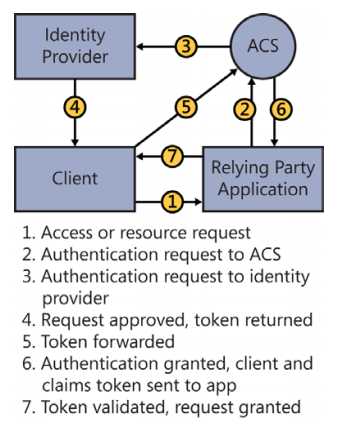
- Creating a custom security token by using WIF
- Handling token formats for SAML and SWT tokens
Manage data integrity
encryption terminology
- Encryption: DES, AES
- Hashing: MD5, SHA
- Salting
Applying encryption to application data
- Symmetric: AES, DES, RC2, Rijindael, TripleDES
- Asymmetric: DSA, ECDiffieHellman, ECDsa, RSA
using (RijndaelManaged rijndaelManaged = new RijndaelManaged())

{

// assumes that the key and initialization vectors are already configured

CryptoStream crypoStream = new CryptoStream(myManagedStream, rijndaelManaged.

CreateEncryptor(),CryptoStreamMode.Write);

};

using (RijndaelManaged rijndaelManaged = new RijndaelManaged())

{

// assumes that the key and initialization vectors are already configured

CryptoStream crypoStream = new CryptoStream(myManagedStream, rijndaelManaged.

CreateDecryptor(),CryptoStreamMode.Read);

};
Applying encryption to the configuraion sections of an application
- DPAPIProtectedConfigurationProvider
- RsaProtectedConfigurationProvider: allow export/import of the keys used for encryption/decryption
- use aspnet_regiis to encrypt/decrypt sections of the Web.confg file.
Signing application data to prevent tampering
// create the hash code of the text to sign

SHA1 sha = SHA1.Create();

byte[] hashcode = sha.ComputeHash(TextToConvert);

// use the CreateSignature method to sign the data

DSA dsa = DSA.Create();

byte[] signature = dsa.CreateSignature(hashcode);

// create the hash code of the text to verify

SHA1 sha = SHA1.Create();

byte[] hashcode = sha.ComputeHash(TextToVerify);

// use the VerifySignature method to verify the DSA signature

DSA dsa = DSA.Create();

bool isSignatureValid = dsa.VerifySignature(hashcode, signature);
Implement a secure site with ASP.NET
Securing communication by applying SSL/TLS certificates
setup site with certificate and httpsSalt and hash passwords for storage
Using HTML encoding to prevent cross-site scripting attacks (AntiXSS Library)
- use @Html.Encode()
- encode the data before saving to db
- use AntiXSS library from NuGet
Implementing deferred validation and handle unvalidated requests
Preventing SQL injection attacks by parameterizing queries
Preventing cross-site request forgeries (XSRFs)
[RequireSession]

[AcceptVerbs(HttpVerbs.Post)]

[HttpPost]

[ValidateAntiForgeryToken]

public ActionResult Login(string username, string password, string remember, string deviceToken, string apid)

{

}
@using (Html.BeginForm("Login", "Authorize"))

{

@Html.AntiForgeryToken();

}
internally cookie is used for XSRF validation.
Chapter 5: Design and implement security的更多相关文章
- Chapter 2: Design the user experience
Apply the user interface design for a web application 介绍了Css的常用属性和html5的新element,以及Htmlhelper的简单方法,如 ...
- Chapter 1: Design the application architecture
1.1 Plan the application layers 提到了repository pattern,SoC(Separation of Concern), 进而提及MVC,Action/Act ...
- Chapter 7. Design and Performance
本章将对MPEG4及H.264的实现细节进行讲解和比对. Motion Estimation 衡量运动估计的好坏有三种函数(第228页):MSE,MAE和SAE,其中由于SAE运算速度最快所以采用的最 ...
- MapReduce Design Patterns(chapter 1)(一)
Chapter 1.Design Patterns and MapReduce MapReduce 是一种运行于成百上千台机器上的处理数据的框架,目前被google,Hadoop等多家公司或社区广泛使 ...
- (转)MapReduce Design Patterns(chapter 1)(一)
翻译的是这本书: Chapter 1.Design Patterns and MapReduce MapReduce 是一种运行于成百上千台机器上的处理数据的框架,目前被google,Hadoop等多 ...
- Page Security
参见开发文档 Overview This document describes how to build applications that grant selected access to indi ...
- Chapter 6 — Improving ASP.NET Performance
https://msdn.microsoft.com/en-us/library/ff647787.aspx Retired Content This content is outdated and ...
- Quality in the Test Automation Review Process and Design Review Template
About this document Prerequisite knowledge/experience: Software Testing, Test Automation Applicable ...
- Security Software Engineer
Security Software Engineer Are you excited to be part of the VR revolution and work on cutting edge ...
随机推荐
- .Net生成HTML的三种方法
一.在服务器上指定aspx网页,生成html静态页 public partial class Default2 : System.Web.UI.Page { protected void Page_L ...
- Android --差缺补漏之 Intent&putExtra()
伴随着Android Developers 的开发,再也不用FQ了,这意味着Android 对中国学习者有着越来越多的官方学习资料,学习起来有更明确的方向和目标. Android Developer ...
- AFNetworking之缓存篇
苦苦看了我两天,最近后台为了减轻压力,要我做缓存,我说好吧...... 借鉴了别人的说法找到一张图可以看明白好多: 这个是我比较战成一种方案. 好了直接上代码了 首先我们要有自己缓存的类 ...
- 不管你以后写不写JS,都应该学会这种思考方式
昨天在网上看到了一篇文章说程序员写不过35这种说法,但事实上,确实并不能每个人都像我一样,在写JS中找到乐趣,就乐意写这东西直到50岁眼瞎为止. 那肯定有人要问,也许我不仅写JS写不到35,可能我连3 ...
- MySQL数据库5 - 插入数据,修改数据,删除数据
一.插入数据 1. 所有列都插入值 INSERT [INTO] TABLE_NAME VALUES(V1,V2....Vn); 特点:列值同数,列值同序 eg: insert into users v ...
- Cordova学习(一) 环境搭建
一.什么是cordova Cordova提供了一组设备相关的API,通过这组API,移动应用能够以JavaScript访问原生的设备功能,如摄像头.麦克风等. Cordova还提供了一组统一的Java ...
- SQL Server 简介
什么是数据库? 数据库(Database)是按照数据结构来组织.存储和管理数据的仓库.是以一定方式储存在一起.能为多个用户共享.具有尽可能小的冗余度的特点.是与应用程序彼此独立的数据集合. SQL S ...
- MainWindow、QWidget和QDialog的区别和选择(转载)
QApplication类用于管理应用程序范围内的资源,其构造函数需要main函数的argc和argv作为参数. Widget被创建时都是不可见的,widget中可容纳其他的widget. Qt中的w ...
- 关于break和continue的区别
//break是结束整个循环体,continue是结束单次循环 比方说: while(x++ < 10){ if(x == 3) { break; } printf("%d\r\n&q ...
- check_pkg函数解析
函数位置,conf/core,具体代码如下: check_pkg() { # Usage: check_pkg <command> <package> # It means: ...