
[Linux]Redhat7配置CentOS7 YUM源
一、简介
安装Redhat7并配置了网卡之后,虽然可以直接ping www.baidu.com,但是执行yum install的命令时提示如下信息:
[root@ansible ~]# yum install -y vim

Loaded plugins: langpacks, product-id, search-disabled-repos, subscription-manager

This system is not registered with an entitlement server. You can use subscription-manager to register.

There are no enabled repos.

 Run "yum repolist all" to see the repos you have.

 To enable Red Hat Subscription Management repositories:

     subscription-manager repos --enable <repo>

 To enable custom repositories:

     yum-config-manager --enable <repo>
原因在于redhat 的更新包只对注册的用户生效,所以需要自己手动更改成CentOS 的更新包,CentOS几乎和redhat是一样的,所以无需担心软件包是否可安装,安装之后是否有问题,另外CentOS公司去年已经被Redhat 收购了,下面是安装步骤
二、配置Redhat7的YUM源
配置Redhat7的YUM源一般有2种方法:1-本地CD源 2-CentOS7源。第一种方式是挂载Redhat7的DVD镜像作为源,所有的安装都是在镜像文件中安装,这种方式比较简单,但是不方便。第二种是使用CentOS7的YUM源。下面讲的就是第二种方式:
1、首先查看redhat 7.0系统本身所安装的那些yum 软件包:
[root@linuxprobe ~]# rpm -qa | grep yum
yum-utils-1.1.31-24.el7.noarch
yum-langpacks-0.4.2-3.el7.noarch
yum-metadata-parser-1.1.4-10.el7.x86_64
yum-rhn-plugin-2.0.1-4.el7.noarch
PackageKit-yum-0.8.9-11.el7.x86_64
yum-3.4.3-118.el7.noarch
2、 删除redhat自带的yum包
卸载上面显示的所有yum包:
[root@localhost ~]# rpm -qa|grep yum|xargs rpm -e --nodeps
[root@localhost ~]# rpm -qa |grep yum
[root@localhost ~]#
3、保证本机电脑能上网
[root@linuxprobe ~]# ping www.baidu.com
PING www.a.shifen.com (61.135.169.121) 56(84) bytes of data.
64 bytes from 61.135.169.121: icmp_seq=1 ttl=53 time=31.8 ms
64 bytes from 61.135.169.121: icmp_seq=2 ttl=53 time=31.9 ms
64 bytes from 61.135.169.121: icmp_seq=3 ttl=53 time=32.0 ms
4、选择网络源
网易163网络源地址:http://mirrors.163.com/
CentOS网络源地址:http://centos.ustc.edu.cn/centos/
5、选择163源(最重要一步)
下载安装包rpm的地址:http://mirrors.163.com/centos/7/os/x86_64/Packages/
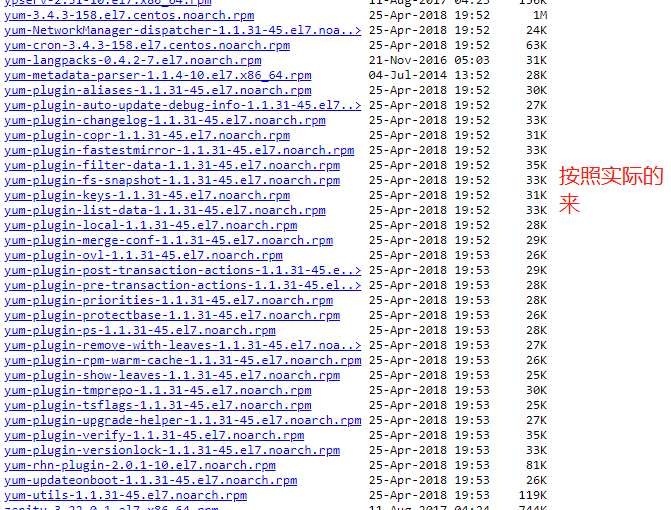
注意下面的链接可能会失效,打开上面WEB按照实际的版本下载这5个包即可。
[root@ansible ~]# wget http://mirrors.163.com/centos/7/os/x86_64/Packages/yum-3.4.3-158.el7.centos.noarch.rpm
[root@ansible ~]# wget http://mirrors.163.com/centos/7/os/x86_64/Packages/yum-metadata-parser-1.1.4-10.el7.x86_64.rpm
[root@ansible ~]# wget http://mirrors.163.com/centos/7/os/x86_64/Packages/yum-utils-1.1.31-45.el7.noarch.rpm
[root@ansible ~]# wget http://mirrors.163.com/centos/7/os/x86_64/Packages/yum-updateonboot-1.1.31-45.el7.noarch.rpm
[root@ansible ~]# wget http://mirrors.163.com/centos/7/os/x86_64/Packages/yum-plugin-fastestmirror-1.1.31-45.el7.noarch.rpm
6、查看下载完成结果
[root@ansible ~]# ls
anaconda-ks.cfg initial-setup-ks.cfg Templates yum-metadata-parser-1.1.4-10.el7.x86_64.rpm.1
Desktop Music Videos yum-plugin-fastestmirror-1.1.31-45.el7.noarch.rpm
Documents Pictures yum-3.4.3-158.el7.centos.noarch.rpm yum-updateonboot-1.1.31-45.el7.noarch.rpm
Downloads Public yum-metadata-parser-1.1.4-10.el7.x86_64.rpm yum-utils-1.1.31-45.el7.noarch.rpm
7、安装软件包:
[root@ansible ~]# rpm -ivh yum-*
warning: yum-3.4.3-158.el7.centos.noarch.rpm: Header V3 RSA/SHA256 Signature, key ID f4a80eb5: NOKEY
warning: package yum-metadata-parser-1.1.4-10.el7.x86_64 was already added, skipping yum-metadata-parser-1.1.4-10.el7.x86_64
Preparing... ################################# [100%]
Updating / installing...
1:yum-metadata-parser-1.1.4-10.el7 ################################# [ 20%]
2:yum-plugin-fastestmirror-1.1.31-4################################# [ 40%]
3:yum-3.4.3-158.el7.centos ################################# [ 60%]
4:yum-updateonboot-1.1.31-45.el7 ################################# [ 80%]
5:yum-utils-1.1.31-45.el7 ################################# [100%]
8、新建repo 配置文件,直接复制即可
[root@linuxprobe ~]# vim /etc/yum.repos.d/CentOS-Base.repo
#CentOS-Base.repo
#
# The mirror system uses the connecting IP address of the client and the
# update status of each mirror to pick mirrors that are updated to and
# geographically close to the client. You should use this for CentOS updates
# unless you are manually picking other mirrors.
#
# If the mirrorlist= does not work for you, as a fall back you can try the
# remarked out baseurl= line instead.
#
#
[base]
name=CentOS-$7 - Base - 163.com
#mirrorlist=http://mirrorlist.centos.org/?release=$7&arch=$basearch&repo=os
baseurl=http://mirrors.163.com/centos/7/os/$basearch/
gpgcheck=1
gpgkey=http://mirrors.163.com/centos/RPM-GPG-KEY-CentOS-7
#released updates
[updates]
name=CentOS-$7 - Updates - 163.com
#mirrorlist=http://mirrorlist.centos.org/?release=$7&arch=$basearch&repo=updates
baseurl=http://mirrors.163.com/centos/7/updates/$basearch/
gpgcheck=1
gpgkey=http://mirrors.163.com/centos/RPM-GPG-KEY-CentOS-7
#additional packages that may be useful
[extras]
name=CentOS-$7 - Extras - 163.com
#mirrorlist=http://mirrorlist.centos.org/?release=$7&arch=$basearch&repo=extras
baseurl=http://mirrors.163.com/centos/7/extras/$basearch/
gpgcheck=1
gpgkey=http://mirrors.163.com/centos/RPM-GPG-KEY-CentOS-7
#additional packages that extend functionality of existing packages
[centosplus]
name=CentOS-$7 - Plus - 163.com
baseurl=http://mirrors.163.com/centos/7/centosplus/$basearch/
gpgcheck=1
enabled=0
gpgkey=http://mirrors.163.com/centos/RPM-GPG-KEY-CentOS-7
9、至此YUM 网络源已经安装完成
[root@linuxprobe ~]# yum clean all
10、测试安装是否正常
[root@ansible ~]# yum -y install vim
Loaded plugins: fastestmirror, product-id, search-disabled-repos, subscription-manager
This system is not registered with an entitlement server. You can use subscription-manager to register.
Loading mirror speeds from cached hostfile
Resolving Dependencies
--> Running transaction check
[Linux]Redhat7配置CentOS7 YUM源的更多相关文章
- [Linux]Redhat7配置本地镜像源
一.Redhat7源 上一个文章介绍了如何配置的Redhat7的YUM网络源:[Linux]Redhat7配置CentOS7 YUM源 .如果在无法联网的情况下,可以使用镜像文件作为源安装需要的包. ...
- RedHat Linux RHEL6配置本地YUM源
YUM是Yellow dog Updater Modified的简称,起初是由yellow dog这一发行版的开发者Terra Soft研发,用python写成,那时还叫做yup(yellow dog ...
- Linux虚拟机配置本地yum源
刚开始使用Linux,自己构建了一个Linux虚拟机之后,在使用yum install的时候,经常是出错,提示连接不上. 一直以为是自己构建的虚拟机的问题,后来在网上查找了一些资料,才发现:需要配置本 ...
- 红帽系列linux自行配置本地yum源
yum是红帽系列的一种包管理工具,能方便的自动解决安装包的依赖关系.以前用rpm包管理安装gcc时,rpm -ivh gcc.rpm ,一般会提示要安装gcc需要安装某某lib库,等你找到那个库的rp ...
- redhat7配置本地yum源
1.首先是要有一个iso文件,并将这个文件挂载到某个目录 挂载: 配置: 检验: yum list 现在你就可以在没有网的情况下,安装软件了~~~
- Linux_配置本地YUM源(RHEL8)
[RHEL8] Linux-RHEL8配置本地YUM 源,按照之前传统的配置本地YUM的方法肯定不行,在RHEL8版本的软件源发生了变化,在RHEL8版本的软件仓库分成了两部分:[AppStream] ...
- linux 配置本地yum源,配置国内yum源,配置epel源
目录 一.配置本地yum源 二.配置国内yum源和epel源 一.配置本地yum源 1.挂载ISO镜像 mount -o loop /mnt/yum-iso/CentOS-7-x86_64-DVD-1 ...
- Linux挂载iso镜像、配置本地yum源
Linux挂载iso镜像.配置本地yum源 1.备份原yum源配置文件 [root@localhost ~]# ll /etc/yum.repos.d/ [root@localhost ~]# mkd ...
- Linux配置网络YUM源
配置网络yum源 RHEL6.5 [root@xuegod163 ~]# wget -O /etc/yum.repos.d/CentOS-Base.repo http://mirrors.aliyun ...
随机推荐
- windows程序设计 新建一个提示框程序
1.鼠标右键项目名称,添加->新建项目. 2.选择.cpp,将文件名改成.c文件.点击添加. 3.在.c文件里面输入代码. #include <windows.h> //hInsta ...
- MB SD Connect Compact 5 Error 95.53392.0 Solved
MB SD Connect Compact 5 is new released from MB Star company ,and its original version here the copy ...
- npm -i 与npm install -s与-d的区别
npm i module_name -S = > npm install module_name --save 写入到 dependencies 对象 npm i module_name -D ...
- 复习-css控制文本字体属性
css控制文本字体属性 font-family:字体系列,如”serif“”sans-serif“ font-size:尺寸 font-style:字体样式,如“normal,italic(斜体).o ...
- Flutter之MaterialApp使用详解
来自: https://cloud.tencent.com/developer/article/1337184 字段 类型 navigatorKey(导航键) GlobalKey<Navigat ...
- MySQL5.7 编译安装
准备 yum install cmake yum install -y bison yum install -y libaio-devel yum install -y boost 下载 percon ...
- window 系统虚拟机安装mac系统
前言: 我们用的是虚拟机,物理机安装一是复杂,二是兼容性实在太差,所以不推荐使用,除非你的电脑配置不够.这篇文章很长,如果想安装的话建议收藏,否则你有可能记不住步骤,我尽量缩减步骤,所以如果你想安装黑 ...
- 6、Spring-Kafka4
4.1. Using Spring for Apache Kafka This section offers detailed explanations of the various concerns ...
- VMware安装步骤既常见问题
一.vmware出问题? 可以使用vmvare的修复功能. 二.创建虚拟机 1)第一步:选择自定义下一步,典型里是都设定好了的. 2)第二步:选择12默认下一步 3)第三步:可以从光驱中安装,可以从文 ...
- Intellij IDEA 设置启动JVM参数
目录 采用CMS垃圾回收配置: 采用G1垃圾回收配置: 参数说明: 通用参数: CMS机制才有的参数: G1机制才有的参数: 参考: 打开 IDEA 安装目录,看到有一个 bin 目录,其中有两个 v ...