
asp.net core输出中文乱码的问题
摘要
在学习asp.net core的时候,尝试在控制台,或者页面上输出中文,会出现乱码的问题。
问题重现
新建控制台和站点
    public class Program

    {

        public static void Main(string[] args)

        {

            Console.WriteLine("您好,北京欢迎你");

            Console.Read();

        }

    }
站点
    public class Startup

    {

        // This method gets called by the runtime. Use this method to add services to the container.

        // For more information on how to configure your application, visit http://go.microsoft.com/fwlink/?LinkID=398940

        public void ConfigureServices(IServiceCollection services)

        {

        }

        // This method gets called by the runtime. Use this method to configure the HTTP request pipeline.

        public void Configure(IApplicationBuilder app, IHostingEnvironment env, ILoggerFactory loggerFactory)

        {

            loggerFactory.AddConsole();

            if (env.IsDevelopment())

            {

                app.UseDeveloperExceptionPage();

            }

            app.Run(async (context) =>

            {

                await context.Response.WriteAsync("您好,北京欢迎你");

            });

        }

    }
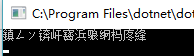
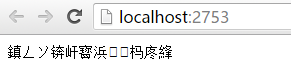
那么我们获取“GB2312”编码,然后对其编码呢?
        public static void Main(string[] args)

        {

            Console.WriteLine("您好,北京欢迎你");

            try

            {

                Console.WriteLine(Encoding.GetEncoding("GB2312"));

            }

            catch (Exception ex)

            {

                Console.WriteLine(ex.Message);

            }

            Console.Read();

        }

    }

'GB2312' is not a supported encoding name. For information on defining a custom encoding, see the documentation for the Encoding.RegisterProvider method.
Parameter name: name
上面的大概意思是Encoding 不支持GB2312编码,需要使用Encoding.RegisterProvider方法进行注册Provider。
            try

            {

                Encoding.RegisterProvider(CodePagesEncodingProvider.Instance);

                Console.WriteLine(Encoding.GetEncoding("GB2312"));

            }

            catch (Exception ex)

            {

                Console.WriteLine(ex.Message);

            }

            Console.Read();
CodePagesEncodingProvider在包System.Text.Encoding.CodePages中
      "System.Text.Encoding.CodePages/4.0.1": {

        "type": "package",

        "dependencies": {

          "Microsoft.NETCore.Platforms": "1.0.1",

          "System.Collections": "4.0.11",

          "System.Globalization": "4.0.11",

          "System.IO": "4.1.0",

          "System.Reflection": "4.1.0",

          "System.Resources.ResourceManager": "4.0.1",

          "System.Runtime": "4.1.0",

          "System.Runtime.Extensions": "4.1.0",

          "System.Runtime.Handles": "4.0.1",

          "System.Runtime.InteropServices": "4.1.0",

          "System.Text.Encoding": "4.0.11",

          "System.Threading": "4.0.11"

        },

        "compile": {

          "ref/netstandard1.3/System.Text.Encoding.CodePages.dll": {}

        },

        "runtimeTargets": {

          "runtimes/unix/lib/netstandard1.3/System.Text.Encoding.CodePages.dll": {

            "assetType": "runtime",

            "rid": "unix"

          },

          "runtimes/win/lib/netstandard1.3/System.Text.Encoding.CodePages.dll": {

            "assetType": "runtime",

            "rid": "win"

          }

        }

      },
好了,我们修改下代码,先注册,然后输出中文
    try

            {

                Encoding.RegisterProvider(CodePagesEncodingProvider.Instance);

                Console.WriteLine(Encoding.GetEncoding("GB2312"));

                Console.WriteLine("您好,北京欢迎你");

            }

            catch (Exception ex)

            {

                Console.WriteLine(ex.Message);

            }

结语
所以在页面上输出,或者在控制台输出中文的时候,要注意进行注册Provider。
参考
https://msdn.microsoft.com/zh-cn/library/system.text.encoding.registerprovider(v=vs.110).aspx
asp.net core输出中文乱码的问题的更多相关文章
- .NET CORE 2.0小白笔记(四):asp.net core输出中文乱码的问题
问题描述:在学习asp.net core的时候,尝试在控制台,或者页面上输出中文,会出现乱码的问题. 分析解决:控制台乱码的原因是因为中文windows命令行默认编码页是gb2312,想输出中文只要把 ...
- .Net Core 控制台输出中文乱码
Net Core 控制台输出中文乱码的解决方法: public static void Main(string[] args) { Console.Output ...
- 在Servlet中出现一个输出中文乱码的问题(已经解)。
在Servlet中出现一个输出中文乱码的问题,已经解. @Override public void doPost(HttpServletRequest reqeust, HttpServletResp ...
- 【转】asp.net Cookie值中文乱码问题解决方法
来源:脚本之家.百度空间.网易博客 http://www.jb51.net/article/34055.htm http://hi.baidu.com/honfei http://tianminqia ...
- idea 控制台输出 中文乱码 解决方法
使用intellij idea 14.1时,console 会输出中文乱码.下面分两种情况解决这种问题:一种是maven构建项目.一种是tomcat(不以maven构建)构建项目. 1.tomcat输 ...
- 编码(ACSII unicod UTF-8)、QT输出中文乱码深入分析
总结: 1. qt输出中文乱码原因分析 qt的编程环境默认是utf-8编码格式(关于编码见下文知识要点一): cout << "中文" << endl; 程 ...
- 使用WebLogic时控制台输出中文乱码解决方法
使用WebLogic时控制台输出中文乱码解决方法 1.找到weblogic安装目录,当前项目配置的domain 2.找到bin下的setDomainEnv.cmd文件 3.打开文件,从文件最后搜索第一 ...
- 二十一、IntelliJ IDEA 控制台输出中文乱码问题的解决方法
首先,找到 IntelliJ IDEA 的安装目录,进入bin目录下,定位到idea.vmoptions文件,如下图所示: 双击打开idea.vmoptions文件,如下图所示: 然后,在其中追加-D ...
- 解决phantomjs输出中文乱码
解决phantomjs输出中文乱码,可以在js文件里添加如下语句: phantom.outputEncoding="gb2312"; // 解决输出乱码
随机推荐
- java、easyui-combotree树形下拉选择框
最近一直在研究这个树形的下拉选择框,感觉非常的有用,现在整理下来供大家使用: 首先数据库的表架构设计和三级菜单联动的表结构是一样,(父子关系) 1.下面我们用hibernate建一下对应的额实体类: ...
- mybatis-generator-gui--一个mybatis代码自动生成界面工具
mybatis-generator-gui是什么 介绍mybatis-generator-gui之前,有必要介绍一下什么是mybatis generator(熟悉的同学可以跳过这一节).我们都知道,通 ...
- linux输入子系统(input subsystem)之evdev.c事件处理过程
1.代码 input_subsys.drv.c 在linux输入子系统(input subsystem)之按键输入和LED控制的基础上有小改动,input_subsys_test.c不变. input ...
- vim 在linux下中如何设置显示行数
在.vimrc(或/etc/vimrc)文件中输入如下文本: set tabstop=4 set softtabstop=4 set shiftwidth=4 set noexpandtab ...
- C#基础---Queue(队列)的应用
Queue队列,特性先进先出. 在一些项目中我们会遇到对一些数据的Check,如果数据不符合条件将会把不通过的信息返回到界面.但是对于有的数据可能会Check很多条件,如果一个数据一旦很多条件不 ...
- 细说 Form (表单)
细说 Form (表单) Form(表单)对于每个WEB开发人员来说,应该是再熟悉不过的东西了,可它却是页面与WEB服务器交互过程中最重要的信息来源. 虽然Asp.net WebForms框架为了帮助 ...
- [LeetCode] Russian Doll Envelopes 俄罗斯娃娃信封
You have a number of envelopes with widths and heights given as a pair of integers (w, h). One envel ...
- 华为5G空口新技术(2015年)
2015-03-24 长江后浪推前浪,4G建设方兴未艾,业界关于5G的讨论已如火如荼.对于每一代移动通信,空口技术都相当于王冠上的明珠. 在月初的世界移动通信大会上,华为发布了面向5G的新空口,并展出 ...
- 冰冻三尺非一日之寒--web框架Django(翻页、cookie)
第二十一章 cookie 1.获取Cookie: request.COOKIES['key'] request.get_signed_cookie(key, default=RAISE_ERROR, ...
- MySQL基础
数据库操作 ---终端使用数据库 mysql -u root -p 之后回车键 输入密码 ---显示所有数据库: show databases; ---默认数据库: mysql - 用户权限相关数据 ...