
asp.net core输出中文乱码的问题
摘要
在学习asp.net core的时候,尝试在控制台,或者页面上输出中文,会出现乱码的问题。
问题重现
新建控制台和站点
    public class Program

    {

        public static void Main(string[] args)

        {

            Console.WriteLine("您好,北京欢迎你");

            Console.Read();

        }

    }
站点
    public class Startup

    {

        // This method gets called by the runtime. Use this method to add services to the container.

        // For more information on how to configure your application, visit http://go.microsoft.com/fwlink/?LinkID=398940

        public void ConfigureServices(IServiceCollection services)

        {

        }

        // This method gets called by the runtime. Use this method to configure the HTTP request pipeline.

        public void Configure(IApplicationBuilder app, IHostingEnvironment env, ILoggerFactory loggerFactory)

        {

            loggerFactory.AddConsole();

            if (env.IsDevelopment())

            {

                app.UseDeveloperExceptionPage();

            }

            app.Run(async (context) =>

            {

                await context.Response.WriteAsync("您好,北京欢迎你");

            });

        }

    }
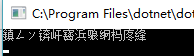
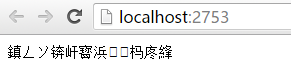
那么我们获取“GB2312”编码,然后对其编码呢?
        public static void Main(string[] args)

        {

            Console.WriteLine("您好,北京欢迎你");

            try

            {

                Console.WriteLine(Encoding.GetEncoding("GB2312"));

            }

            catch (Exception ex)

            {

                Console.WriteLine(ex.Message);

            }

            Console.Read();

        }

    }

'GB2312' is not a supported encoding name. For information on defining a custom encoding, see the documentation for the Encoding.RegisterProvider method.
Parameter name: name
上面的大概意思是Encoding 不支持GB2312编码,需要使用Encoding.RegisterProvider方法进行注册Provider。
            try

            {

                Encoding.RegisterProvider(CodePagesEncodingProvider.Instance);

                Console.WriteLine(Encoding.GetEncoding("GB2312"));

            }

            catch (Exception ex)

            {

                Console.WriteLine(ex.Message);

            }

            Console.Read();
CodePagesEncodingProvider在包System.Text.Encoding.CodePages中
      "System.Text.Encoding.CodePages/4.0.1": {

        "type": "package",

        "dependencies": {

          "Microsoft.NETCore.Platforms": "1.0.1",

          "System.Collections": "4.0.11",

          "System.Globalization": "4.0.11",

          "System.IO": "4.1.0",

          "System.Reflection": "4.1.0",

          "System.Resources.ResourceManager": "4.0.1",

          "System.Runtime": "4.1.0",

          "System.Runtime.Extensions": "4.1.0",

          "System.Runtime.Handles": "4.0.1",

          "System.Runtime.InteropServices": "4.1.0",

          "System.Text.Encoding": "4.0.11",

          "System.Threading": "4.0.11"

        },

        "compile": {

          "ref/netstandard1.3/System.Text.Encoding.CodePages.dll": {}

        },

        "runtimeTargets": {

          "runtimes/unix/lib/netstandard1.3/System.Text.Encoding.CodePages.dll": {

            "assetType": "runtime",

            "rid": "unix"

          },

          "runtimes/win/lib/netstandard1.3/System.Text.Encoding.CodePages.dll": {

            "assetType": "runtime",

            "rid": "win"

          }

        }

      },
好了,我们修改下代码,先注册,然后输出中文
    try

            {

                Encoding.RegisterProvider(CodePagesEncodingProvider.Instance);

                Console.WriteLine(Encoding.GetEncoding("GB2312"));

                Console.WriteLine("您好,北京欢迎你");

            }

            catch (Exception ex)

            {

                Console.WriteLine(ex.Message);

            }

结语
所以在页面上输出,或者在控制台输出中文的时候,要注意进行注册Provider。
参考
https://msdn.microsoft.com/zh-cn/library/system.text.encoding.registerprovider(v=vs.110).aspx
asp.net core输出中文乱码的问题的更多相关文章
- .NET CORE 2.0小白笔记(四):asp.net core输出中文乱码的问题
问题描述:在学习asp.net core的时候,尝试在控制台,或者页面上输出中文,会出现乱码的问题. 分析解决:控制台乱码的原因是因为中文windows命令行默认编码页是gb2312,想输出中文只要把 ...
- .Net Core 控制台输出中文乱码
Net Core 控制台输出中文乱码的解决方法: public static void Main(string[] args) { Console.Output ...
- 在Servlet中出现一个输出中文乱码的问题(已经解)。
在Servlet中出现一个输出中文乱码的问题,已经解. @Override public void doPost(HttpServletRequest reqeust, HttpServletResp ...
- 【转】asp.net Cookie值中文乱码问题解决方法
来源:脚本之家.百度空间.网易博客 http://www.jb51.net/article/34055.htm http://hi.baidu.com/honfei http://tianminqia ...
- idea 控制台输出 中文乱码 解决方法
使用intellij idea 14.1时,console 会输出中文乱码.下面分两种情况解决这种问题:一种是maven构建项目.一种是tomcat(不以maven构建)构建项目. 1.tomcat输 ...
- 编码(ACSII unicod UTF-8)、QT输出中文乱码深入分析
总结: 1. qt输出中文乱码原因分析 qt的编程环境默认是utf-8编码格式(关于编码见下文知识要点一): cout << "中文" << endl; 程 ...
- 使用WebLogic时控制台输出中文乱码解决方法
使用WebLogic时控制台输出中文乱码解决方法 1.找到weblogic安装目录,当前项目配置的domain 2.找到bin下的setDomainEnv.cmd文件 3.打开文件,从文件最后搜索第一 ...
- 二十一、IntelliJ IDEA 控制台输出中文乱码问题的解决方法
首先,找到 IntelliJ IDEA 的安装目录,进入bin目录下,定位到idea.vmoptions文件,如下图所示: 双击打开idea.vmoptions文件,如下图所示: 然后,在其中追加-D ...
- 解决phantomjs输出中文乱码
解决phantomjs输出中文乱码,可以在js文件里添加如下语句: phantom.outputEncoding="gb2312"; // 解决输出乱码
随机推荐
- 优化SQLServer--表和索引的分区(二)
简介 之前一篇简单的介绍了语法和一些基本的概念,隔了一段时间,觉得有必要细致的通过实例来总结一下这部分内容.如之前所说,分区就是讲大型的对象(表)分成更小的块来管理,基本单位是行.这也就产生了很大优势 ...
- 在Ubuntu上搭建Hadoop群集
前面我搭建的Hadoop都是单机伪分布式的,并不能真正感受到Hadoop的最大特点,分布式存储和分布式计算.所以我打算在虚拟机中同时开启3台机器,实现分布式的Hadoop群集. 1.准备3台Ubunt ...
- The user specified as a definer ('root'@'%') does not exist 异常解决
参考:http://www.cnblogs.com/Magicam/archive/2013/07/22/3207382.html 权限问题,授权 给 root 所有sql 权限 mysql> ...
- sql server 常用的扩展存储过程
sql server 里面提供了丰富的系统存储过程来辅助我们管理数据库以及开发.今天分享介绍一些常用的数据库扩展存储过程 xp_cmdshell 这个大家都比较熟悉了,使用xp_cmdshell 可以 ...
- [收集]MVC3 HTML辅助方法集录
1.跳转链接 @Html.ActionLink("linkText","actionName",routeValues,htmlAttributes) e.g& ...
- MVC+EF6+Oracle,提示ORA-01918: user '***' does not exist
1.在上下文里重载OnModelCreating: //没用到这个方法 protected override void OnModelCreating(DbModelBu ...
- docker学习(3) 容器的启动过程
这一节我们来稍微了解下docker原理性的东西 docker run -i -t ubuntu /bin/bash 输入上面这行命令,启动一个ubuntu容器时,到底发生了什么? 大致过程可以用下图描 ...
- [LeetCode] Zigzag Iterator 之字形迭代器
Given two 1d vectors, implement an iterator to return their elements alternately. For example, given ...
- IT培训行业揭秘(四)
IT培训班的老师前面已经说过,很多都是从一线程序员岗位转过来的,因为培训行业的收入整体上来看还是比作普通程序员要高一些,这是市场的普遍行情.还有一部分老师从培训班学习过并且留到培训班任教的.一般这种老 ...
- ASP.NET提取多层嵌套json数据的方法
本文实例讲述了ASP.NET利用第三方类库Newtonsoft.Json提取多层嵌套json数据的方法,具体例子如下. 假设需要提取的json字符串如下: {"name":&quo ...