
[Java] JSP笔记 - 自定义标签
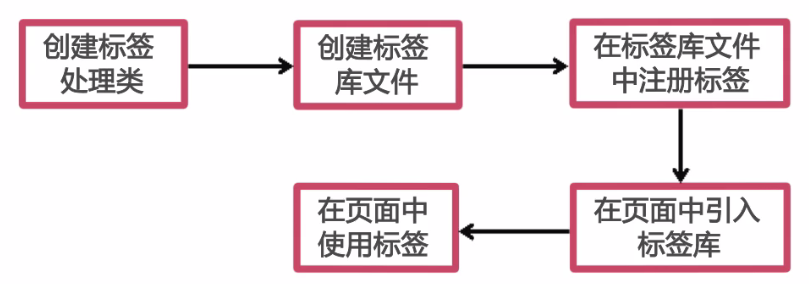
自定义标签的创建步骤:
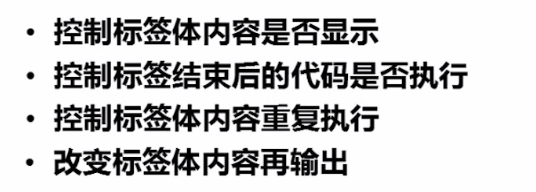
自定义标签的四大功能:
自定义标签的类结构:

在 1.0 中呢, 可以将 <body-content> 的值设置为 JSP, 2.0中则不允许在自定义标签体中出现jsp代码。
接下来呢,我直接贴一些Demo代码:
tagdatetag.tld (标签声明 XML,将之方于 WEB-INF 目录中)
<?xml version="1.0" encoding="UTF-8"?>

<taglib xmlns="http://java.sun.com/xml/ns/j2ee"

    xmlns:xsi="http://www.w3.org/2001/XMLSchema-instance"

    xsi:schemaLocation="http://java.sun.com/xml/ns/j2ee http://java.sun.com/xml/ns/j2ee/web-jsptaglibrary_2_0.xsd"

    version="2.0">

    <description>A tag library exercising SimpleTag handlers.</description>

    <tlib-version>1.0</tlib-version>

    <short-name>SimpleTagLibrary</short-name>

    <!-- 标签URI,用于在jsp中指定uri -->

    <uri>/date-tag</uri>

    <tag>

        <description>Outputs Date String</description>

        <name>simple</name>

        <tag-class>com.demo.TagDate</tag-class>

        <body-content>empty</body-content>

        <attribute>

            <name>format</name>

            <required>false</required> <!-- 属性是否是必须的 -->

            <rtexprvalue>true</rtexprvalue> <!-- 让属性在运行时可以写入 -->

        </attribute>

    </tag>

    <tag>

        <description>Outputs Date String</description>

        <name>simple2</name>

        <tag-class>com.demo.TagDate2</tag-class>

        <body-content>empty</body-content>

        <attribute>

            <name>format</name>

            <required>false</required> <!-- 属性是否是必须的 -->

            <rtexprvalue>true</rtexprvalue> <!-- 让属性在运行时可以写入 -->

        </attribute>

    </tag>

    <tag>

        <name>displayOrSkipBody</name>

        <tag-class>com.demo.DisplayOrSkipBody</tag-class>

        <body-content>scriptless</body-content>

    </tag>

    <tag>

        <name>skipPageOrEvalPage</name>

        <tag-class>com.demo.SkipPageOrEvalPage</tag-class>

        <body-content>empty</body-content>

    </tag>

    <tag>

        <name>interationTagDemo</name>

        <tag-class>com.demo.InterationTagDemo</tag-class>

        <body-content>scriptless</body-content>

        <attribute>

            <name>name</name>

            <required>true</required>

            <rtexprvalue>true</rtexprvalue>

        </attribute>

        <attribute>

            <name>items</name>

            <required>true</required>

            <rtexprvalue>true</rtexprvalue>

        </attribute>

    </tag>

    <tag>

        <name>modifyBodyContent</name>

        <tag-class>com.demo.ModifyBodyContent</tag-class>

        <body-content>scriptless</body-content>

    </tag>

    <tag>

        <name>if</name>

        <tag-class>com.demo.IfTag</tag-class>

        <body-content>scriptless</body-content>

        <attribute>

            <name>test</name>

            <required>true</required>

            <rtexprvalue>true</rtexprvalue>

        </attribute>

    </tag>

    <!-- 标签组 -->

    <tag>

        <name>choose</name>

        <tag-class>com.demo.ChooseTag</tag-class>

        <body-content>scriptless</body-content>

    </tag>

    <tag>

        <name>when</name>

        <tag-class>com.demo.WhenTag</tag-class>

        <body-content>scriptless</body-content>

        <attribute>

            <name>test</name>

            <required>true</required>

            <rtexprvalue>true</rtexprvalue>

        </attribute>

    </tag>

    <tag>

        <name>other</name>

        <tag-class>com.demo.OtherWiseTag</tag-class>

        <body-content>scriptless</body-content>

    </tag>

</taglib>
index.jsp (使用方法)
<%@ page language="java" contentType="text/html; charset=UTF-8" %>

<%@ taglib prefix="date" uri="/date-tag" %>

<!DOCTYPE html PUBLIC "-//W3C//DTD HTML 4.01 Transitional//EN" "http://www.w3.org/TR/html4/loose.dtd">

<html>

<head>

<meta http-equiv="Content-Type" content="text/html; charset=UTF-8">

<title>Insert title here</title>

</head>

<body>

<%pageContext.setAttribute("name", request.getParameter("name")); %>

<%pageContext.setAttribute("score", request.getParameter("score")); %>

Hello. 今天是

<date:simple format="yyyy年MM月dd日 HH:mm:ss" /><br>

<date:simple/><br>

<date:simple2/><br>

<date:simple2 format="yyyy/MM/dd HH:mm:ss" /><br>

<date:displayOrSkipBody>

    <h2>中国最大的免费在线培训平台</h2>

</date:displayOrSkipBody>

<!-- 条件判断标签 -->

<date:if test="${name=='imooc'}">

慕课网是中国最大的IT技能免费学习平台<br>

</date:if>

<date:if test="${name!='imooc'}">

小伙伴们快点加入慕课网一起学习吧。www.imooc.com<br>

</date:if>

<%

    pageContext.setAttribute("nbastar", new String[]{"jordan", "kobe", "t-mac"});

%>

<!-- 循环遍列数组 -->

<date:interationTagDemo items="${nbastar}" name="name">${name}<br></date:interationTagDemo>

<!-- 修改标签体中的内容 -->

<date:modifyBodyContent>虽然我出现在这里,但是我不会显示</date:modifyBodyContent>

<!-- 标签组 -->

<date:choose>

    <date:when test="${score>90}">非常优秀<br></date:when>

    <date:other>加油吧少年<br></date:other>

</date:choose>

<br>

<a href="index2.jsp">链接到index2.jsp</a><br>

<a href="index.jsp?score=98">非常优秀</a><br>

<a href="index.jsp?name=imooc">Name为imooc</a><br>

</body>

</html>
部分实现代码:
package com.demo;

import java.io.IOException;

import javax.servlet.jsp.JspException;

import javax.servlet.jsp.tagext.SimpleTagSupport;

public class ChooseTag extends SimpleTagSupport {

    private boolean flag;

    public boolean isFlag() {

        return flag;

    }

    public void setFlag(boolean flag) {

        this.flag = flag;

    }

    @Override

    public void doTag() throws JspException, IOException {

        getJspBody().invoke(null); // 输出标签体的内容

    }

}
package com.demo;

import java.io.IOException;

import javax.servlet.jsp.JspException;

import javax.servlet.jsp.tagext.SimpleTagSupport;

public class WhenTag extends SimpleTagSupport {

    private boolean test;

    public void setTest(boolean test) {

        this.test = test;

    }

    @Override

    public void doTag() throws JspException, IOException {

        if (test) {

            getJspBody().invoke(null);

            ChooseTag choose = (ChooseTag) getParent();

            choose.setFlag(true); // 设置父标签的标识为true

        }

    }

}
package com.demo;

import java.io.IOException;

import javax.servlet.jsp.JspException;

import javax.servlet.jsp.tagext.SimpleTagSupport;

public class OtherWiseTag extends SimpleTagSupport {

    @Override

    public void doTag() throws JspException, IOException {

        ChooseTag choose = (ChooseTag) getParent();

        if (!choose.isFlag()) // 如果父标签的标识为true,表示WhenTag已被执行。那么这里就再执行了

            getJspBody().invoke(null);

    }

}
package com.demo;

import java.io.IOException;

import java.text.SimpleDateFormat;

import javax.servlet.jsp.JspException;

import javax.servlet.jsp.tagext.TagSupport;

/** 自定义 Jsp 标签  */

public class TagDate extends TagSupport {

    private static final long serialVersionUID = 1L;

    private String format;

    public TagDate() {}

    public String getFormat() {

        return format;

    }

    public void setFormat(String format) {

        this.format = format;

    }

    @Override

    public int doStartTag() throws JspException {

        if (format == null || format.length() == 0)

            format = "yyyy-MM-dd HH:mm:ss";

        SimpleDateFormat sdf = new SimpleDateFormat(format);

        try {

            pageContext.getOut().print(sdf.format(System.currentTimeMillis()));

        } catch (IOException e) {

            e.printStackTrace();

        }

        return super.doStartTag();

    }

}
package com.demo;

import java.io.IOException;

import java.text.SimpleDateFormat;

import javax.servlet.jsp.JspException;

import javax.servlet.jsp.tagext.SimpleTagSupport;

/** 自定义 Jsp 标签  */

public class TagDate2 extends SimpleTagSupport {

    private String format;

    public String getFormat() {

        return format;

    }

    public void setFormat(String format) {

        this.format = format;

    }

    @Override

    public void doTag() throws JspException, IOException {

        if (format == null || format.length() == 0)

            format = "yyyy-MM-dd HH:mm:ss";

        SimpleDateFormat sdf = new SimpleDateFormat(format);

        try {

            getJspContext().getOut().print(sdf.format(System.currentTimeMillis()));

        } catch (IOException e) {

            e.printStackTrace();

        }

    }

}
package com.demo;

import java.io.IOException;

import javax.servlet.http.HttpServletRequest;

import javax.servlet.jsp.JspException;

import javax.servlet.jsp.PageContext;

import javax.servlet.jsp.SkipPageException;

import javax.servlet.jsp.tagext.SimpleTagSupport;

/**

 * @author Administrator

 *

 */

public class SkipPageOrEvalPage extends SimpleTagSupport {

    @Override

    public void doTag() throws JspException, IOException {

        PageContext context = (PageContext) getJspContext();

        HttpServletRequest req = (HttpServletRequest) context.getRequest();

        String referer = req.getHeader("Referer");

        // 如果来源(referer)为空,则代表是在浏览器中直接输入地址访问的。不继续执行

        if (referer == null || referer.length() == 0)

            throw new SkipPageException();

    }

}
完整源码下载:
链接: http://pan.baidu.com/s/1nu851u5 密码: 456e
【感谢】
慕课网, Eleven_Lee JAVA开发工程师
http://www.imooc.com/learn/480
[Java] JSP笔记 - 自定义标签的更多相关文章
- [Java] JSP笔记 - EL、JSTL 常用标签
一. 什么是 EL 语言 表达式语言(EL)是 JSP 2.0 引入的一种计算和输出 Java 对象的简单语言. 二.EL 语言的作用 为了使JSP写起来更加简单.表达式语言的灵感来自于 ECMASc ...
- 【JSP】自定义标签开发入门
JSP 自定义标签 自定义标签是用户定义的JSP语言元素.当JSP页面包含一个自定义标签时将被转化为servlet,标签转化为对被 称为tag handler的对象的操作,即当servlet执行时We ...
- 12、Jsp加强/自定义标签/JavaBean
1 Jsp加强回顾 Jsp加强 1)Jsp的9大内置对象 request HttpServletRequet response HttpServletResponse config ...
- Jsp开发自定义标签,自定义标签将字符串转成指定的时间格式显示
本例以将 字符串格式的时间转成指定的时间格式显示. 第一步.定义一个标签处理程序类,需要集成javax.servlet.jsp.tagext.TagSupport,代码如下: import java. ...
- JavaWeb之 JSP:自定义标签
当jsp的内置标签和jstl标签库内的标签都满足不了需求,这时候就需要开发者自定义标签. 自定义标签 下面我们先来开发一个自定义标签,然后再说它的原理吧! 自定义标签的开发步骤 步骤一 编写一个普通的 ...
- JavaWeb之 JSP:自定义标签的创建和使用
当jsp的内置标签和jstl标签库内的标签都满足不了需求,这时候就需要开发者自定义标签. 下面我们先来开发一个自定义标签,然后再说它的原理吧! 自定义标签的开发步骤 步骤一 编写一个普通的java类, ...
- jsp的自定义标签
1.相对于JSTL或Spring等第三方标签库而言的,用来实现项目中特定的功能需求. 2.自定义标签基本的组成部分 ①页面上看得见的部分 [1]通过taglib引入标签库 [2]标签本身 ②xxx.t ...
- Servlet和JSP之自定义标签学习
此文章会讲述简单标签处理器,因为经典自定义标签处理器没有简单标签处理器方便使用,故在此不进行描述. 参考:慕课网的<JSP自定义标签>视频; <Servlet.JSP和Sprin ...
- Java之 jstl 自定义标签的方法
1.写一个Java类 我的路径是写再tag包中的一个 HelloTag类 package tag; import java.io.IOException; import javax.servlet.j ...
随机推荐
- 关于WCF测试时出现无法从***获取元数据问题
在我们已经创建成功一个WCF服务后,通过本机localhost访问和测试均没有任何问题.但是寄宿在IIS/其他平台下时便会出现以下的错误信息 1.使用WCF Test Client错误 2.通过C#引 ...
- 关于Spring的构造函数,init-method,和依赖注入的先后顺序
接触学习Spring一段时间了,今天突然脑子短路,竟然一时间忘记了构造函数,init-method,和依赖注入的先后顺序,然后打开IDE去验证后.构造函数-->依赖注入-->init-me ...
- SPI基础知识
Serial Peripheral Interface 是摩托罗拉公司提出的一种总线协议,主要应用在EEPROM,FLASH,实时时钟,A/D转换,以及数字信号处理和数字信号解码器中 是一种高速,全双 ...
- CentOS安装Apache-2.4.10+安全配置
注:以下所有操作均在CentOS 6.5 x86_64位系统下完成. #准备工作# 在安装Nginx之前,请确保已经使用yum安装了各基础组件,并且配置了www用户和用户组,具体见<CentOS ...
- Windows7 忘记密码的解决办法
由于无法使用管理员帐号进入Windows 7,辅助工具比较大,已经回不到xp时代的pe一键删除密码了,不过用Windows 7的system账户运行cmd命令可以强制修改账户密码!就拿xp+Windo ...
- 大数据慎行,数据管理要落实到KPI
近年来,"大数据"一词被IT和互联网行业广泛提及,但真正落到实处的案例没有多少,大数据量支撑.数据挖掘技术.非结构化数据是阻碍的主要原因.大多数企业的信息化并没有达到到成熟水平,关 ...
- Vim Using
1 2 set nu 3 set backup 4 set bg=light 5 " transform tab to space 6 set expandtab 7 " auto ...
- angularJS(4)
angularJS(4) 一:angulaJs的作用域scope Scope(作用域) 是应用在 HTML (视图) 和 JavaScript (控制器)之间的纽带.scope 是一个 JavaScr ...
- UNITY自带的PACKAGE的UTILITY 里面有一个自带的FPS COUNTER
UNITY自带的PACKAGE的UTILITY 里面有一个自带的FPS COUNTER 可用,但是脚本是保密的?
- 扩大ubuntu虚拟机硬盘空间
一.背景: 出于测试的需要,在ubuntu 14.04系统中通过virtualbox虚拟机安装了额ubuntu 14.04系统(guest os).安装过程采用ubuntu 14.04的默认分区方法. ...