
android -------- MVP+DataBinding 的使用
今天来说说MVP+DataBinding 的使用
以一个登录案例来讲解
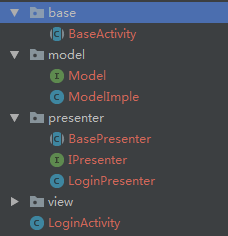
布局:(ConstraintLayout 作为根布局)
<layout>

    <data>

        <variable

            name="onClick"

            type="com.zhangqie.mvplogin.LoginActivity.OnViewClick" />

    </data>

    <android.support.constraint.ConstraintLayout xmlns:android="http://schemas.android.com/apk/res/android"

        xmlns:app="http://schemas.android.com/apk/res-auto"

        xmlns:tools="http://schemas.android.com/tools"

        android:layout_width="match_parent"

        android:layout_height="match_parent"

        tools:context=".LoginActivity">

        <TextView

            android:id="@+id/tv1"

            android:layout_width="wrap_content"

            android:layout_height="45dp"

            android:gravity="center"

            android:text="账号:"

            android:textColor="@android:color/black"

            android:textSize="16dp"

            app:layout_constraintBottom_toBottomOf="parent"

            app:layout_constraintHorizontal_bias="0.2"

            app:layout_constraintLeft_toLeftOf="parent"

            app:layout_constraintRight_toRightOf="parent"

            app:layout_constraintTop_toTopOf="parent"

            app:layout_constraintVertical_bias="0.4" />

        <EditText

            android:id="@+id/et_name"

            android:layout_width="222dp"

            android:layout_height="45dp"

            app:layout_constraintBottom_toBottomOf="parent"

            app:layout_constraintLeft_toRightOf="@+id/tv1"

            app:layout_constraintTop_toTopOf="parent"

            app:layout_constraintVertical_bias="0.4" />

        <TextView

            android:id="@+id/tv2"

            android:layout_width="wrap_content"

            android:layout_height="45dp"

            android:gravity="center"

            android:text="密码:"

            android:textColor="@android:color/black"

            android:textSize="16dp"

            app:layout_constraintHorizontal_bias="0.2"

            app:layout_constraintLeft_toLeftOf="parent"

            app:layout_constraintRight_toRightOf="parent"

            app:layout_constraintTop_toBottomOf="@+id/tv1" />

        <EditText

            android:id="@+id/et_pwd"

            android:layout_width="222dp"

            android:layout_height="45dp"

            app:layout_constraintLeft_toRightOf="@+id/tv2"

            app:layout_constraintTop_toBottomOf="@+id/et_name" />

        <Button

            android:id="@+id/btn_login"

            android:layout_width="match_parent"

            android:layout_height="wrap_content"

            android:layout_margin="25dp"

            android:onClick="@{onClick.OnClickCommand}"

            android:text="登录"

            app:layout_constraintTop_toBottomOf="@+id/et_pwd" />

    </android.support.constraint.ConstraintLayout>

</layout>
BaseActivity.Java
public abstract class BaseActivity<D extends ViewDataBinding,V,T extends BasePresenter<V>> extends AppCompatActivity{

    protected D viewDataBinding;

    protected T p;

    @Override

    protected void onCreate(@Nullable Bundle savedInstanceState) {

        super.onCreate(savedInstanceState);

        viewDataBinding = DataBindingUtil.setContentView(this, setMainLayout());

        p = createPresenter();

        p.attachView((V)this);

        initView();

        initBeforeData();

    }

    protected abstract T createPresenter();

    /***

     * 初始化布局

     */

    protected abstract int setMainLayout();

    /**

     * 初始化View

     */

    protected abstract void initView();

    /**

     * 初始化先前数据

     */

    protected abstract void initBeforeData();

    /***

     * 跳转Activity

     * @param mClass

     */

    protected void openActivity(Class<?> mClass) {

        openIntent(new Intent(this, mClass));

    }

    /**

     * 弹出toast 显示时长short

     *

     * @param msg

     */

    protected void showToastShort(String msg) {

        if (!TextUtils.isEmpty(msg)) {

            Toast.makeText(this, msg, Toast.LENGTH_SHORT).show();

        }

    }

    protected void showToastShort(int msg) {

        Toast.makeText(this, msg, Toast.LENGTH_SHORT).show();

    }

    protected void openIntent(Intent intent) {

        startActivity(intent);

    }

    protected void openForResultActivity(Intent intent, int requestCode){

        startActivityForResult(intent,requestCode);

    }

    @Override

    protected void onDestroy() {

        super.onDestroy();

        if (p != null){

            p.detachView();

        }

    }

}
Activity.java
public class LoginActivity extends BaseActivity<LoginMainBinding,IView,LoginPresenter> implements IView {

    @Override

    protected LoginPresenter createPresenter() {

        return new LoginPresenter();

    }

    @Override

    protected int setMainLayout() {

        return R.layout.login_main;

    }

    @Override

    protected void initView() {

        viewDataBinding.setOnClick(new OnViewClick());

    }

    @Override

    protected void initBeforeData() {

    }

    @Override

    public void showLoading(String msg) {

        showToastShort(msg);

    }

    public class OnViewClick {

        public void OnClickCommand(View view) {

            switch (view.getId()) {

                case R.id.btn_login:

                    p.showLogin(viewDataBinding.etName.getText().toString(),viewDataBinding.etPwd.getText().toString());

                    break;

            }

        }

    }

}
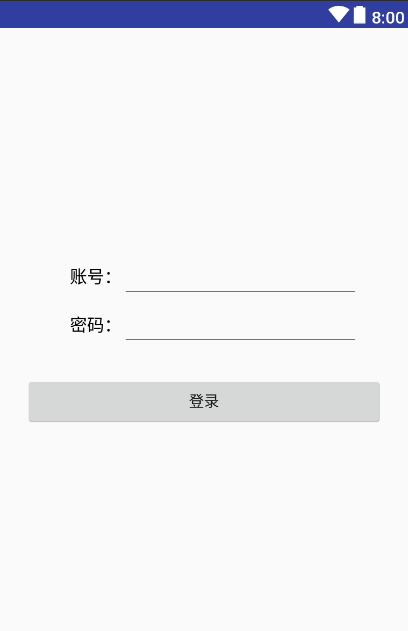
效果图:
源码下载: https://github.com/DickyQie/android-databinding
总结:
减少各层之间耦合,易于后续的需求变化,降低维护成本。
Presenter层独立于Android代码之外,可以进行Junit测试。
接口和类较多,互相做回调,代码臃肿。
Presenter层与View层是通过接口进行交互的,接口粒度不好控制。
有不足之处,望指正
android -------- MVP+DataBinding 的使用的更多相关文章
- Android MVP+Retrofit+RxJava实践小结
关于MVP.Retrofit.RxJava,之前已经分别做了分享,如果您还没有阅读过,可以猛戳: 1.Android MVP 实例 2.Android Retrofit 2.0使用 3.RxJava ...
- [Android]Android MVP&依赖注入&单元测试
以下内容为原创,欢迎转载,转载请注明 来自天天博客:http://www.cnblogs.com/tiantianbyconan/p/5422443.html Android MVP&依赖注入 ...
- Android MVP + 泛型,实现了友好VP交互及Activity潜在的内存泄露的优化
Android MVP粗来已经有段时间了,在项目中我也多多少少用了一些,不得不说代码使用这种模式后,条例确实清晰了好多,整个流程看起来有点各司其职的感觉(另一种的java面向对象的方式). 不过这里是 ...
- android MVP模式介绍与实战
android MVP模式介绍与实战 描述 MVP模式是什么?MVP 是从经典的模式MVC演变而来,它们的基本思想有相通的地方:Controller/Presenter负责逻辑的处理,Model提供数 ...
- Android MVP模式
转自http://segmentfault.com/blogs,转载请注明出处Android MVP Pattern Android MVP模式\[1\]也不是什么新鲜的东西了,我在自己的项目里也普遍 ...
- Android MVP模式 简单易懂的介绍方式
主要学习这位大神的博客:简而易懂 Android MVP模式 简单易懂的介绍方式 https://segmentfault.com/a/1190000003927200
- 结合实例分析Android MVP的实现
最近阅读项目的源码,发现项目中有MVP的痕迹,但是自己却不能很好地理解相关的代码实现逻辑.主要原因是自己对于MVP的理解过于概念话,还没有真正操作过.本文打算分析一个MVP的简单实例,帮助自己更好的理 ...
- 浅谈Android MVP
什么是MVP MVP,全称 Model-View-Presenter.要说MVP那就不得不说一说它的前辈--MVC(Model-View-Controller,模型-视图-控制器). View:对应于 ...
- Android MVP模式简单易懂的介绍方式 (三)
Android MVP模式简单易懂的介绍方式 (一) Android MVP模式简单易懂的介绍方式 (二) Android MVP模式简单易懂的介绍方式 (三) 讲完M和P,接下来就要讲V了.View ...
随机推荐
- 实验二:MAL——简单后门 by:赵文昊
实验二:MAL--简单后门 一.后门是什么? 哪里有后门呢? 编译器留后门 操作系统留后门 最常见的当然还是应用程序中留后门 还有就是潜伏于操作系统中或伪装为特定应用的专用后门程序. 二.认识netc ...
- typescript interface 泛型
interface interface Obj { [index: string]: any; } class Person { name: string; } let obj: obj = { na ...
- caffe编译报错 cudnn.hpp:127:41: error: too few arguments to function ‘cudnnStatus_t cudnnSetPooling2dDescriptor
转载自: https://blog.csdn.net/u011070171/article/details/52292680 这是因为当前版本的caffe的cudnn实现与系统所安装的cudnn的版本 ...
- varnish缓存系统基础知识
缓存系统类型 1.页面缓存/pageCache 缓存静态资源(html js css image) 例如:varnish squid 2.数据缓存/dataCache 缓存应 ...
- openshift 容器云从入门到崩溃之六《Source-to-Image》
上次说到了怎么在oc上面部署应用而且说道了怎么定义模板部署应用,也许你会奇怪那个我代码打包编译在哪一步,那就要说道oc的s2i流程了 下面是基本s2i流程 1.制作base-image镜像 要使用s2 ...
- React时间组件(时分秒补0)页面全局引用
1.common.js export function formatTime(data){ var d = new Date(data); function doTime(d){ if(d<10 ...
- 异常分类VS垃圾分类
异常分类VS垃圾分类 容易快速判断出是什么业务异常,容易对不同的异常进行不同的处理,容易很快找到对应的解决方法
- Docker 基础 (二)
网络管理 容器网络模式 Docker支持5种网络模式 bridge 默认网络,Docker启动后默认创建一个docker0网桥,默认创建的容器也是添加到这个网桥中 host 容器不会获得一个独立的n ...
- 彻底理解Netty,这一篇文章就够了
Netty到底是什么 从HTTP说起 有了Netty,你可以实现自己的HTTP服务器,FTP服务器,UDP服务器,RPC服务器,WebSocket服务器,Redis的Proxy服务器,MySQL的Pr ...
- iOS项目之WKWebView替换UIWebView相关
在网上已经有了许多关于UIWebView替换为WKWebView的文章,所以在这里就不在多说替换的细节了,不会的可以在网上搜搜. 下面是我在项目中遇到的问题: 问题一:在UIWebView中,网页显示 ...