
java框架之SpringBoot(6)-Restful风格的CRUD示例
准备
环境
- IDE:Idea
- SpringBoot版本:1.5.19
- UI:BootStrap 4
- 模板引擎:thymeleaf 3
- 效果:Restful 风格 CRUD 功能的 Demo
依赖
<?xml version="1.0" encoding="UTF-8"?>
<project xmlns="http://maven.apache.org/POM/4.0.0" xmlns:xsi="http://www.w3.org/2001/XMLSchema-instance"
         xsi:schemaLocation="http://maven.apache.org/POM/4.0.0 http://maven.apache.org/xsd/maven-4.0.0.xsd">
    <modelVersion>4.0.0</modelVersion>
    <parent>
        <groupId>org.springframework.boot</groupId>
        <artifactId>spring-boot-starter-parent</artifactId>
        <version>1.5.19.RELEASE</version>
        <relativePath/> <!-- lookup parent from repository -->
    </parent>
    <groupId>com.springboot</groupId>
    <artifactId>webdev2</artifactId>
    <version>0.0.1-SNAPSHOT</version>
    <name>webdev2</name>
    <description>Demo project for Spring Boot</description>

    <properties>
        <java.version>1.8</java.version>
        <thymeleaf.version>3.0.2.RELEASE</thymeleaf.version>
        <!--布局功能支持程序,thymeleaf 使用 3.0 版本以上时支持程序要使用 2.0 以上-->
        <thymeleaf-layout-dialect.version>2.1.1</thymeleaf-layout-dialect.version>
    </properties>

    <dependencies>
        <dependency>
            <groupId>org.springframework.boot</groupId>
            <artifactId>spring-boot-starter-web</artifactId>
        </dependency>

        <dependency>
            <groupId>org.springframework.boot</groupId>
            <artifactId>spring-boot-starter-test</artifactId>
            <scope>test</scope>
        </dependency>

        <dependency>
            <groupId>org.springframework.boot</groupId>
            <artifactId>spring-boot-starter-thymeleaf</artifactId>
        </dependency>

        <dependency>
            <groupId>org.webjars</groupId>
            <artifactId>bootstrap</artifactId>
            <version>4.3.1</version>
        </dependency>
        <dependency>
            <groupId>org.springframework.boot</groupId>
            <artifactId>spring-boot-devtools</artifactId>
        </dependency>
    </dependencies>

    <build>
        <plugins>
            <plugin>
                <groupId>org.springframework.boot</groupId>
                <artifactId>spring-boot-maven-plugin</artifactId>
            </plugin>
        </plugins>
    </build>

</project>
pom.xml
静态文件
html,
body {
  height: 100%;
}

body {
  display: -ms-flexbox;
  display: -webkit-box;
  display: flex;
  -ms-flex-align: center;
  -ms-flex-pack: center;
  -webkit-box-align: center;
  align-items: center;
  -webkit-box-pack: center;
  justify-content: center;
  padding-top: 40px;
  padding-bottom: 40px;
  background-color: #f5f5f5;
}

.form-signin {
  width: 100%;
  max-width: 330px;
  padding: 15px;
  margin: 0 auto;
}
.form-signin .checkbox {
  font-weight:;
}
.form-signin .form-control {
  position: relative;
  box-sizing: border-box;
  height: auto;
  padding: 10px;
  font-size: 16px;
}
.form-signin .form-control:focus {
  z-index:;
}
.form-signin input[type="email"] {
  margin-bottom: -1px;
  border-bottom-right-radius:;
  border-bottom-left-radius:;
}
.form-signin input[type="password"] {
  margin-bottom: 10px;
  border-top-left-radius:;
  border-top-right-radius:;
}
static/css/signin.css
JavaBean
package com.springboot.webdev2.bean;

import java.util.Date;

public class User {
    public User() {
    }

    public User(Integer id,String name, String email, Integer gender, Date birthday) {
        this.id = id;
        this.name = name;
        this.email = email;
        this.gender = gender;
        this.birthday = birthday;
    }

    private  Integer id;
    private  String name;
    private  String email;
    private Integer gender;
    private Date birthday;

    public Integer getId() {
        return id;
    }

    public void setId(Integer id) {
        this.id = id;
    }

    public String getName() {
        return name;
    }

    public void setName(String name) {
        this.name = name;
    }

    public String getEmail() {
        return email;
    }

    public void setEmail(String email) {
        this.email = email;
    }

    public Integer getGender() {
        return gender;
    }

    public void setGender(Integer gender) {
        this.gender = gender;
    }

    public Date getBirthday() {
        return birthday;
    }

    public void setBirthday(Date birthday) {
        this.birthday = birthday;
    }
}
com.springboot.webdev2.bean.User
模拟数据层
package com.springboot.webdev2.dao;

import com.springboot.webdev2.bean.User;
import org.springframework.stereotype.Repository;

import java.text.ParseException;
import java.text.SimpleDateFormat;
import java.util.ArrayList;
import java.util.List;

@Repository
public class UserDao {
    private static List<User> userList;
    private static int id = 3;
    static {
        /**
         * 模拟 db 数据
         */
        userList = new ArrayList<>();
        SimpleDateFormat simpleDateFormat = new SimpleDateFormat("yyyy-MM-dd");
        try {
            userList.add(new User(1,"张三", "asda@qq.com", 1, simpleDateFormat.parse("2019-1-1")));
            userList.add(new User(2,"李四", "32432@qq.com", 0, simpleDateFormat.parse("2014-3-11")));
            userList.add(new User(3,"王五", "dae@qq.com", 1, simpleDateFormat.parse("2012-1-1")));
        } catch (ParseException e) {
            e.printStackTrace();
        }
    }

    public List<User> listAll(){
        return userList;
    }

    public void save(User user){
        user.setId(++id);
        userList.add(user);
    }

    public void delete(Integer id){
        userList.removeIf(p -> p.getId() == id);
    }

    public User getById(Integer id){
        for (User user : userList) {
            if (user.getId() == id) {
                return user;
            }
        }
        return null;
    }

    public void update(User user){
        User dbUser = getById(user.getId());
        dbUser.setName(user.getName());
        dbUser.setBirthday(user.getBirthday());
        dbUser.setEmail(user.getEmail());
        dbUser.setGender(user.getGender());
    }

}
com.springboot.webdev2.dao.UserDao
编码
引入BootStrap-WebJars使用
之前我们通过 Maven 引入的依赖 jar 中大多都是类文件,其实通过 Maven 还可以引入静态文件,比如我们下面要用的 BootStrap,我们只需要添加如下依赖:
<dependency>
    <groupId>org.webjars</groupId>
    <artifactId>bootstrap</artifactId>
    <version>4.3.1</version>
</dependency>
如果要引入其它静态资源依赖可参考 webjars.org。
原理:通过之前的学习我们已经了解了静态资源映射,只要将静态资源放在 classpath:/META-INF/resources/webjars/ 下,我们就可以通过 /webjars/** 请求访问到对应静态资源。
登录页-国际化
下面以登录页面做国际化为示例。
1、首先要创建国际化使用的资源文件:
login.password=密码
login.please=请登录
login.rememberMe=记住我
login.signin=登录
login.username=用户名
login.properties
login.password=password
login.please=please login
login.rememberMe=Remember Me
login.signin=Sing In
login.username=UserName
login_en_US.properties
2、配置国际化资源目录:
# 如果有多个目录可以 , 分隔,起始目录为 classpath
spring.messages.basename=i18n.login
application.properties
3、编写登录模板页面,引用 BootStrap,使用 #{属性名} 引入国际化资源属性:
<!doctype html>
<html lang="en" xmlns:th="http://www.thymeleaf.org">
<head>
<meta charset="utf-8">
<meta name="viewport" content="width=device-width, initial-scale=1, shrink-to-fit=no">
<meta name="description" content="">
<meta name="author" content="">
<title>[[#{login.please}]]</title>
<link th:href="@{/webjars/bootstrap/4.3.1/css/bootstrap.css}" rel="stylesheet">
<link th:href="@{/css/signin.css}" rel="stylesheet">
</head>
<body class="text-center">
<form class="form-signin" th:action="@{/login}" method="post">
<h1 class="h3 mb-3 font-weight-normal">[[#{login.please}]]</h1>
<label for="inputEmail" th:text="#{login.username}" class="sr-only"></label>
<input type="text" id="inputEmail" th:name="username" class="form-control" th:placeholder="#{login.username}" required autofocus>
<label for="inputPassword" th:text="#{login.password}" class="sr-only"></label>
<input type="password" id="inputPassword" th:name="password" class="form-control" th:placeholder="#{login.password}" required>
<div class="checkbox mb-3">
<label>
<input type="checkbox" value="remember-me">[[#{login.rememberMe}]]
</label>
</div>
<button class="btn btn-lg btn-primary btn-block" th:text="#{login.signin}" type="submit"></button>
<span th:if="${msg!=null}" style="color:red;">[[${msg}]]</span>
<p class="mt-5 mb-3 text-muted">© 2019-2020</p>
</form>
</body>
</html>
templates/login.html
4、做完上述步骤其实已经完成了登录页面国际化,但 SpringBoot 默认配置的国际化解析器是根据客户端请求头来返回对应语言资源的。如果我们想要定制自己的国际化规则,可以自定义国际化解析器如下:
package com.springboot.webdev2.component;

import org.springframework.util.StringUtils;
import org.springframework.web.servlet.LocaleResolver;

import javax.servlet.http.HttpServletRequest;
import javax.servlet.http.HttpServletResponse;
import java.util.Locale;

/**
 * 自定义国际化解析器
 *      作用:
 *          如果客户端请求携带了语言参数,则根据语言参数返回相应资源
 *          如果客户端未携带语言参数,则根据语言请求头返回相应资源
 */
public class MyLocaleResolver implements LocaleResolver {
    @Override
    public Locale resolveLocale(HttpServletRequest httpServletRequest) {
        // 获取请求语言参数
        String langCode = httpServletRequest.getParameter("langCode");
        Locale locale = Locale.getDefault();
        // 如果没有传递请求参数
        if (StringUtils.isEmpty(langCode)) {
            // 获取语言请求头
            String languageHeader = httpServletRequest.getHeader("Accept-Language");
            String[] langInfo = languageHeader.split(";");
            if (langInfo != null && langInfo.length != 0) {
                String langsStr = langInfo[0];
                String[] langArr = langsStr.split(",");
                langCode = langArr[0];
            }
        }
        String[] strs = langCode.split("-");
        locale = new Locale(strs[0], strs[1]);
        return locale;
    }

    @Override
    public void setLocale(HttpServletRequest httpServletRequest, HttpServletResponse httpServletResponse, Locale locale) {

    }
}
com.springboot.webdev2.component.MyLocaleResolver
5、接下来我们就可以配置页面映射,还需要注意的是,编写完国际化解析器后还需要将其注册到容器中才会生效:
package com.springboot.webdev2.config;

import com.springboot.webdev2.component.MyLocaleResolver;
import org.springframework.context.annotation.Bean;
import org.springframework.context.annotation.Configuration;
import org.springframework.web.servlet.LocaleResolver;
import org.springframework.web.servlet.config.annotation.ViewControllerRegistry;
import org.springframework.web.servlet.config.annotation.WebMvcConfigurerAdapter;

/**
 * SpringMVC 扩展配置类
 */
@Configuration
public class MyMvcConfig extends WebMvcConfigurerAdapter {

    @Bean
    public WebMvcConfigurerAdapter webMvcConfigurerAdapter(){
        WebMvcConfigurerAdapter webMvcConfigurerAdapter = new WebMvcConfigurerAdapter(){
            @Override
            public void addViewControllers(ViewControllerRegistry registry) {
                // 配置首页映射为登录页
                registry.addViewController("/").setViewName("login");
                registry.addViewController("/index.html").setViewName("login");
            }
        };
        return webMvcConfigurerAdapter;
    }

    /**
     * 注册国际化解析器到容器
     */
    @Bean
    public LocaleResolver localeResolver(){
        return new MyLocaleResolver();
    }
}
com.springboot.webdev2.config.MyMvcConfig
6、测试:
不指定语言参数,请求 localhost:8080:

指定语言参数,请求 localhost:8080?langCode=en-US

test
Spring Boot 自动配置好了国际化资源文件的组件,对应类为:
 @Configuration
 @ConditionalOnMissingBean(value = MessageSource.class, search = SearchStrategy.CURRENT)
 @AutoConfigureOrder(Ordered.HIGHEST_PRECEDENCE)
 @Conditional(ResourceBundleCondition.class)
 @EnableConfigurationProperties
 // 与 spring.messages 下属性绑定
 @ConfigurationProperties(prefix = " spring.messages")
 public class MessageSourceAutoConfiguration {

     private static final Resource[] NO_RESOURCES = {};

     /*
     国际化资源文件的默认基础名为 messages
     所以我们国际化属性可以直接定义在 classpath 下 messages.properties 文件中
     */
     private String basename = "messages";

     private Charset encoding = Charset.forName("UTF-8");

     private int cacheSeconds = -1;

     private boolean fallbackToSystemLocale = true;

     private boolean alwaysUseMessageFormat = false;

     @Bean
     public MessageSource messageSource() {
         ResourceBundleMessageSource messageSource = new ResourceBundleMessageSource();
         if (StringUtils.hasText(this.basename)) {
             // 设置国际化资源文件的基础名(如:login_zh_CN、login_en_US 的基础名就为 login)
             messageSource.setBasenames(StringUtils.commaDelimitedListToStringArray(
                     StringUtils.trimAllWhitespace(this.basename)));
         }
         if (this.encoding != null) {
             messageSource.setDefaultEncoding(this.encoding.name());
         }
         messageSource.setFallbackToSystemLocale(this.fallbackToSystemLocale);
         messageSource.setCacheSeconds(this.cacheSeconds);
         messageSource.setAlwaysUseMessageFormat(this.alwaysUseMessageFormat);
         return messageSource;
     }

     public String getBasename() {
         return this.basename;
     }

     public void setBasename(String basename) {
         this.basename = basename;
     }

     public Charset getEncoding() {
         return this.encoding;
     }

     public void setEncoding(Charset encoding) {
         this.encoding = encoding;
     }

     public int getCacheSeconds() {
         return this.cacheSeconds;
     }

     public void setCacheSeconds(int cacheSeconds) {
         this.cacheSeconds = cacheSeconds;
     }

     public boolean isFallbackToSystemLocale() {
         return this.fallbackToSystemLocale;
     }

     public void setFallbackToSystemLocale(boolean fallbackToSystemLocale) {
         this.fallbackToSystemLocale = fallbackToSystemLocale;
     }

     public boolean isAlwaysUseMessageFormat() {
         return this.alwaysUseMessageFormat;
     }

     public void setAlwaysUseMessageFormat(boolean alwaysUseMessageFormat) {
         this.alwaysUseMessageFormat = alwaysUseMessageFormat;
     }

 }
org.springframework.boot.autoconfigure.context.MessageSourceAutoConfiguration
而在 SpringMVC 的自动配置类中配置了默认的国际化解析器:
 @Bean
 @ConditionalOnMissingBean  // 当容器中没有国际化解析器时才使用注册如下解析器,即如果我们自己在容器中注册了国际化解析器 SpringMVC 就会使用我们自己的国际化解析器
 @ConditionalOnProperty(prefix = "spring.mvc", name = "locale")
 public LocaleResolver localeResolver() {
     if (this.mvcProperties
             .getLocaleResolver() == WebMvcProperties.LocaleResolver.FIXED) {
         return new FixedLocaleResolver(this.mvcProperties.getLocale());
     }
     AcceptHeaderLocaleResolver localeResolver = new AcceptHeaderLocaleResolver();
     localeResolver.setDefaultLocale(this.mvcProperties.getLocale());
     return localeResolver;
 }
org.springframework.boot.autoconfigure.web.WebMvcAutoConfiguration.WebMvcAutoConfigurationAdapter#localeResolver
抽取公共页-thymeleaf布局
1、顶部栏:
<nav class="navbar navbar-dark sticky-top bg-dark flex-md-nowrap p-0">
    <a class="navbar-brand col-sm-3 col-md-2 mr-0" href="#">[[${#session.getAttribute('loginUser')}]]</a>
    <input class="form-control form-control-dark w-100" type="text" placeholder="Search" aria-label="Search">
    <ul class="navbar-nav px-3">
        <li class="nav-item text-nowrap">
            <a class="nav-link" href="#">Sign out</a>
        </li>
    </ul>
</nav>
templates/fragment/topbar.html
2、抽取左边菜单栏,动态高亮:
<nav class="col-md-2 d-none d-md-block bg-light sidebar" xmlns:th="http://www.thymeleaf.org">
    <div class="sidebar-sticky">
        <ul class="nav flex-column" th:with="activeURI=${#request.getRequestURI()}">
            <li class="nav-item">
                <a th:class="${activeURI}==@{/} or ${acitveURI}==@{/index.html} ?'nav-link active':'nav-link'"
                   th:href="@{/}">
                    <span data-feather="home"></span>
                    首页
                </a>
            </li>
            <li class="nav-item">
                <a th:class="${activeURI}==@{/users}?'nav-link active':'nav-link'" th:href="@{/users}">
                    <span data-feather="file"></span>
                    用户列表
                </a>
            </li>
        </ul>
    </div>
</nav>
<!-- Bootstrap core JavaScript
================================================== -->
<!-- Placed at the end of the document so the pages load faster -->
<script src="https://code.jquery.com/jquery-3.2.1.slim.min.js" integrity="sha384-KJ3o2DKtIkvYIK3UENzmM7KCkRr/rE9/Qpg6aAZGJwFDMVNA/GpGFF93hXpG5KkN" crossorigin="anonymous"></script>
<script>window.jQuery || document.write('<script src="../../../../assets/js/vendor/jquery-slim.min.js"><\/script>')</script>

<!-- Icons -->
<script src="https://unpkg.com/feather-icons/dist/feather.min.js"></script>
<script>
    feather.replace()
</script>
templates/fragment/leftmenu.html
3、首页引用公共页:
<!doctype html>
<html lang="en" xmlns:th="http://www.thymeleaf.org">
<head>
    <meta charset="utf-8">
    <meta name="viewport" content="width=device-width, initial-scale=1, shrink-to-fit=no">
    <meta name="description" content="">
    <meta name="author" content="">

    <title>首页</title>

    <link th:href="@{/webjars/bootstrap/4.3.1/css/bootstrap.css}" rel="stylesheet">
    <link th:href="@{/css/index.css}" rel="stylesheet">
</head>

<body>
<nav th:replace="fragment/topbar :: nav"/>
<div class="container-fluid">
    <div class="row">
        <nav th:replace="fragment/leftmenu"/>

        <main role="main" class="col-md-9 ml-sm-auto col-lg-10 pt-3 px-4">

            <h2>首页</h2>
        </main>
    </div>
</div>
</body>
</html>
templates/index.html
登录功能-拦截器
1、编写登录控制器:
package com.springboot.webdev2.controller;

import org.springframework.stereotype.Controller;
import org.springframework.ui.Model;
import org.springframework.util.StringUtils;
import org.springframework.web.bind.annotation.GetMapping;
import org.springframework.web.bind.annotation.PostMapping;

import javax.servlet.http.HttpSession;

@Controller
public class LoginController {

    @GetMapping("/login")
    public String loginView(){
        return "login";
    }

    @PostMapping("/login")
    public String login(String username, String password, HttpSession session, Model model){
        if(!StringUtils.isEmpty(username)&&"123456".equals(password)){
            session.setAttribute("loginUser",username);
            return "redirect:/index.html";
        }
        model.addAttribute("msg", "用户名或密码错误");
        return "/login";
    }
}
com.springboot.webdev2.controller.LoginController
2、编写登录拦截器:
package com.springboot.webdev2.component;

import org.springframework.web.servlet.HandlerInterceptor;
import org.springframework.web.servlet.ModelAndView;

import javax.servlet.http.HttpServletRequest;
import javax.servlet.http.HttpServletResponse;

public class LoginInterceptor implements HandlerInterceptor {
    @Override
    public boolean preHandle(HttpServletRequest httpServletRequest, HttpServletResponse httpServletResponse, Object o) throws Exception {
        Object loginUser = httpServletRequest.getSession().getAttribute("loginUser");
        if (loginUser==null){
            httpServletResponse.sendRedirect("/login");
            return false;
        }
        return true;
    }

    @Override
    public void postHandle(HttpServletRequest httpServletRequest, HttpServletResponse httpServletResponse, Object o, ModelAndView modelAndView) throws Exception {

    }

    @Override
    public void afterCompletion(HttpServletRequest httpServletRequest, HttpServletResponse httpServletResponse, Object o, Exception e) throws Exception {

    }
}
com.springboot.webdev2.component.LoginInterceptor
3、注册拦截器:
package com.springboot.webdev2.config;

import com.springboot.webdev2.component.LoginInterceptor;
import com.springboot.webdev2.component.MyLocaleResolver;
import org.springframework.context.annotation.Bean;
import org.springframework.context.annotation.Configuration;
import org.springframework.web.servlet.LocaleResolver;
import org.springframework.web.servlet.config.annotation.InterceptorRegistry;
import org.springframework.web.servlet.config.annotation.ViewControllerRegistry;
import org.springframework.web.servlet.config.annotation.WebMvcConfigurerAdapter;

/**
 * SpringMVC 扩展配置类
 */
@Configuration
public class MyMvcConfig extends WebMvcConfigurerAdapter {

    @Bean
    public WebMvcConfigurerAdapter webMvcConfigurerAdapter(){
        WebMvcConfigurerAdapter webMvcConfigurerAdapter = new WebMvcConfigurerAdapter(){
            @Override
            public void addInterceptors(InterceptorRegistry registry) {
                // 注册拦截器,不拦截 /login 请求
                registry.addInterceptor(new LoginInterceptor()).excludePathPatterns("/login");
            }

            @Override
            public void addViewControllers(ViewControllerRegistry registry) {
                registry.addViewController("/").setViewName("index");
                registry.addViewController("/index.html").setViewName("index");
            }
        };

        return webMvcConfigurerAdapter;
    }

    /**
     * 注册国际化解析器到容器
     */
    @Bean
    public LocaleResolver localeResolver(){
        return new MyLocaleResolver();
    }
}
com.springboot.webdev2.config.MyMvcConfig
CRUD功能实现
1、编写 User 控制器:
package com.springboot.webdev2.controller;

import com.springboot.webdev2.bean.User;
import com.springboot.webdev2.dao.UserDao;
import org.springframework.beans.factory.annotation.Autowired;
import org.springframework.stereotype.Controller;
import org.springframework.ui.Model;
import org.springframework.web.bind.annotation.*;

import java.util.List;

@Controller
public class UserController {

    @Autowired
    private UserDao userDao;

    @GetMapping("/users")
    public String listAll(Model model) {
        List<User> users = userDao.listAll();
        model.addAttribute("userList", users);
        return "users";
    }

    @GetMapping("/user/{id}")
    public String updateView(@PathVariable Integer id, Model model) {
        User user = userDao.getById(id);
        model.addAttribute("user", user);
        return "user";
    }

    @GetMapping("/user")
    public String addView(Model model) {
        // 因为页面使用了 th:object ,如果 user 为 null 会异常
        model.addAttribute("user", new User());
        return "user";
    }

    @PostMapping("/user")
    public String save(User user) {
        userDao.save(user);
        return "redirect:/users";
    }

    @PutMapping("/user")
    public String update(User user) {
        userDao.update(user);
        return "redirect:/users";
    }

    @DeleteMapping("/user/{id}")
    public String delete(@PathVariable Integer id) {
        userDao.delete(id);
        return "redirect:/users";
    }
}
com.springboot.webdev2.controller.UserController
2、编写列表页:
<!doctype html>
<html lang="en" xmlns:th="http://www.thymeleaf.org">
  <head>
    <meta charset="utf-8">
    <meta name="viewport" content="width=device-width, initial-scale=1, shrink-to-fit=no">
    <meta name="description" content="">
    <meta name="author" content="">

    <title>用户列表</title>

    <link th:href="@{/webjars/bootstrap/4.3.1/css/bootstrap.css}" rel="stylesheet">
    <link th:href="@{/css/index.css}" rel="stylesheet">
  </head>

  <body>
  <nav th:replace="fragment/topbar :: nav"/>
  <div class="container-fluid">
    <div class="row">
      <nav th:replace="fragment/leftmenu"/>

      <main role="main" class="col-md-9 ml-sm-auto col-lg-10 pt-3 px-4">

        <h2>用户列表</h2>
        <button th:onclick="|window.location.href='@{/user}'|" class="btn btn-sm btn-success">添加</button>
        <div class="table-responsive">
          <table class="table table-striped table-sm">
            <thead>
            <tr>
              <th>编号</th>
              <th>姓名</th>
              <th>邮箱</th>
              <th>性别</th>
              <th>生日</th>
              <th>操作</th>
            </tr>
            </thead>
            <tbody>
            <tr th:each="user : ${userList}">
              <td th:text="${user.id}"/>
              <td th:text="${user.name}"/>
              <td th:text="${user.email}"/>
              <td th:text="${user.gender}==0?'女':'男'"/>
              <td th:text="${#dates.format(user.birthday,'yyyy-MM-dd')}"/>
              <td>
                <form th:action="@{/user/}+${user.id}" method="post">
                  <input type="button" th:onclick="|window.location.href='@{/}user/${user.id}'|" class="btn btn-sm btn-info" value="编辑"/>
                  <input type="hidden" name="_method" value="delete">
                  <input type="submit" value="删除" class="btn btn-sm btn-danger"/>
                </form>
              </td>
            </tr>
            </tbody>
          </table>
        </div>
      </main>
    </div>
  </div>
  </body>
</html>
templates/users.html
3、编写编辑页:
<!doctype html>
<html lang="en" xmlns:th="http://www.thymeleaf.org">
<head>
<meta charset="utf-8">
<meta name="viewport" content="width=device-width, initial-scale=1, shrink-to-fit=no">
<meta name="description" content="">
<meta name="author" content="">
<title>[[${user.id==null?'添加':'编辑'}]]</title>
<link th:href="@{/webjars/bootstrap/4.3.1/css/bootstrap.css}" rel="stylesheet">
<link th:href="@{/css/index.css}" rel="stylesheet">
</head>
<body>
<nav th:replace="fragment/topbar :: nav"/>
<div class="container-fluid">
<div class="row">
<nav th:replace="fragment/leftmenu"/>
<main role="main" class="col-md-9 ml-sm-auto col-lg-10 pt-3 px-4">
<h2>用户[[${user.id==null?'添加':'编辑'}]]</h2>
<form th:action="@{/user}" method="post" th:object="${user}">
<input type="hidden" name="id" th:value="*{id}">
<input type="hidden" name="_method" value="put" th:unless="${user.id==null}">
<div class="form-group">
<lable>姓名:</lable>
<input type="text" name="name" th:value="*{name}" class="form-control" placeholder="姓名"/>
</div>
<div class="form-group">
<lable>邮箱:</lable>
<input type="email" name="email" th:value="*{email}" class="form-control" placeholder="邮箱"/>
</div>
<div class="form-group">
<lable>性别:</lable>
<br>
<div class="form-check form-check-inline">
<input class="form-check-input" type="radio" th:checked="*{gender}==1" name="gender" value="1"/>
<label class="form-check-label">男</label>
</div>
<div class="form-check form-check-inline">
<input class="form-check-input" type="radio" th:checked="*{gender}==0" name="gender" value="0"/>
<label class="form-check-label">女</label>
</div>
</div>
<div class="form-group">
<label>生日:</label>
<input type="text" name="birthday" th:value="*{#dates.format(birthday,'yyyy-MM-dd')}" class="form-control" placeholder="生日"/>
</div>
<button class="btn btn-lg btn-primary btn-block" th:text="提交" type="submit"></button>
<span th:if="${msg!=null}" style="color:red;">[[${msg}]]</span>
<p class="mt-5 mb-3 text-muted">© 2019-2020</p>
</form>
</main>
</div>
</div>
</body>
</html>
templates/user.html
4、效果:
实现了 Restful 风格的 CRUD
列表页:

新增:
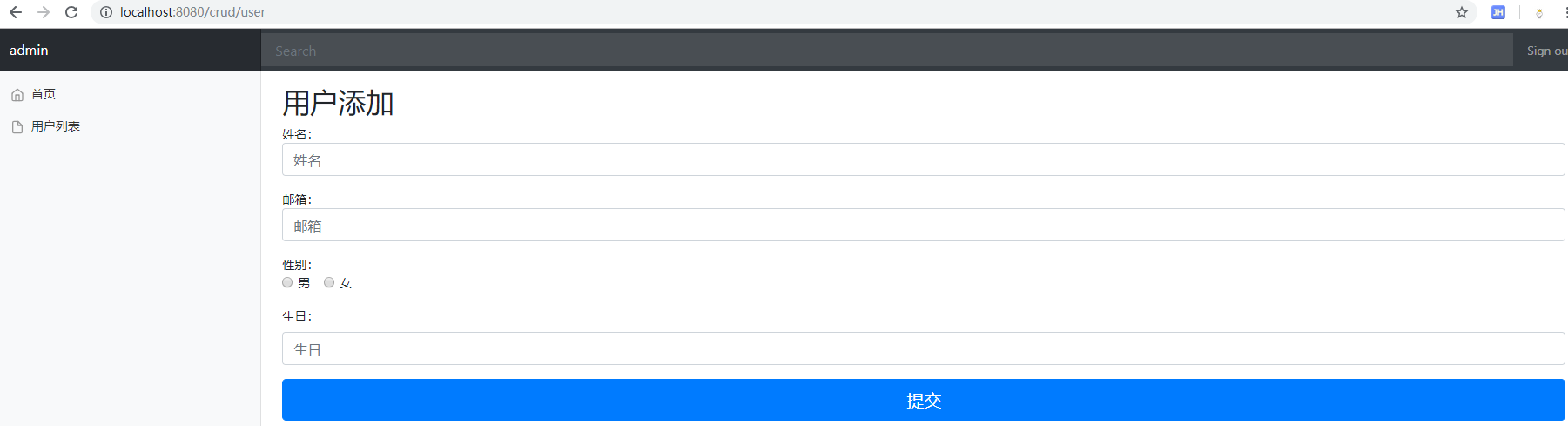
编辑:

test
- 在添加和修改时有提交日期类型数据,需要在配置文件中配置日期格式化规则 spring.mvc.date-format=yyyy-MM-dd 。
- 修改和删除操作提交时我们需要使用特殊请求( PUT 和 DELETE ),但表单本身又是不支持特殊请求的,SpringMVC 本身是给我们提供了一个 HTTP 方法过滤器(HiddenHttpMethodFilter),该过滤器的作用就是让 SpringMVC 将我们的普通请求当做特殊请求来处理,并且 SpringBoot 已经帮我们配置好了这个过滤器。使用该功能我们需要做一些额外的操作告知 SpringMVC 我们的请求是复杂请求:a、表单的请求方法必须为 POST,b、我们需要在表单中提供一个隐藏域,且该隐藏域 name 需指定为 "_method"(可修改配置),value 则为我们要使用的请求方式。
 @Bean
 @ConditionalOnMissingBean(HiddenHttpMethodFilter.class)
 public OrderedHiddenHttpMethodFilter hiddenHttpMethodFilter() {
   return new OrderedHiddenHttpMethodFilter();
 }
org.springframework.boot.autoconfigure.web.WebMvcAutoConfiguration#hiddenHttpMethodFilter : SpringBoot 自动配置的 HTTP 方法过滤器
java框架之SpringBoot(6)-Restful风格的CRUD示例的更多相关文章
- SpringBoot整合Redis使用Restful风格实现CRUD功能
前言 本篇文章主要介绍的是SpringBoot整合Redis,使用Restful风格实现的CRUD功能. Redis 介绍 Redis 是完全开源免费的,遵守BSD协议,是一个高性能的key-valu ...
- SpringBoot之RESTful风格
SpringBoot之RESTful风格 1.RESTful介绍 RESTful是一种软件架构风格,一种时尚! RESTful架构风格规定,数据的元操作,即CRUD(create, read, upd ...
- java框架之SpringBoot(13)-检索及整合Elasticsearch
ElasticSearch介绍 简介 我们的应用经常需要使用检索功能,开源的 Elasticsearch 是目前全文搜索引擎的首选.它可以快速的存储.搜索和分析海量数据.SpringBoot 通过整合 ...
- 使用SpringBoot编写Restful风格接口
一.简介 Restful是一种对url进行规范的编码风格,通常一个网址对应一个资源,访问形式类似http://xxx.com/xx/{id}/{id}. 举个栗子,当我们在某购物网站上买手机时会 ...
- 【java框架】SpringBoot(3) -- SpringBoot集成Swagger2
1.SpringBoot web项目集成Swagger2 1.1.认识Swagger2 Swagger 是一个规范和完整的框架,用于生成.描述.调用和可视化 RESTful 风格的 Web 服务.总体 ...
- 使用laraval框架和前端完成restful风格的请求对接(这里只是讨论restful的概念)
现在,在开发中restful风格的api是比较流行的,尤其是在前后端分离的架构中. 这些东西这一下这篇文章中说的很详细:RESTful接口设计原则和优点 下面,我们来讨论如何使用laraval和前端完 ...
- java之spring mvc之Restful风格开发及相关的配置
1. Restful : 表征状态状态转移. 传统 : url : http://localhost:8080/usersys/delete.do?user.id=12 Restful 风格:url ...
- SpringBoot 整合 MyBatis,实现 CRUD 示例
目录 前言 创建项目/模块 SpringBoot Console Application CommandLineRunner SpringBoot 集成 MyBatis 创建数据库/表 配置数据源/连 ...
- java框架之SpringBoot(1)-入门
简介 Spring Boot 用来简化 Spring 应用开发,约定大于配置,去繁从简,just run 就能创建一个独立的.产品级别的应用. 背景: J2EE 笨重的开发.繁多的配置.低下的开发效率 ...
随机推荐
- mongodb常用查询语法
一.查询 find方法 db.collection_name.find(); 查询所有的结果: select * from users; db.users.find(); 指定返回那些列(键): se ...
- Java分布式集群,使用synchronized和Redis保证Job的原子性
1.使用synchronized保证并发时,同时只会有一个请求执行该代码段: 2.在执行前先设置并获取Reids标记,先设置然后获取确保是否已经执行:SetOption.SET_IF_ABSENT 可 ...
- Ubuntu下安装open-falcon-v0.2.1
在Ubuntu下安装open-falcon和Centos下安装的方法有点区别,因为Ubuntu使用的包管理器是apt-get,而Centos下使用的是Yum,建议不要再Ubuntu下使用yum 建议自 ...
- Factory——工厂方法
一.定义 GOF上对工厂方法的意图如此描述:定义一个用于创建对象的接口,让子类决定实例化哪个类.Factory Method使一个类的实例化延迟到其子类. 作为类的开发者,我们通常会在类中提供构造器方 ...
- python数据分析及展示(三)
一.Pandas库入门 1. Pandas库的介绍 http://pandas.pydata.org Pandas是Python第三方库,提供高性能易用数据类型和分析工具 import pandas ...
- cc攻击和ddos攻击
DoS攻击.CC攻击的攻击方式和防御方法 DDoS介绍 DDoS是英文Distributed Denial of Service的缩写,意即“分布式拒绝服务”,那么什么又是拒绝服务(Denial of ...
- [Codis] Codis3部署流程
#0 前言 最近因为项目需要,研究了一下传说中的Codis.下面跟大家分享Codis3的搭建流程 https://github.com/CodisLabs/codis #1 Codis是什么 官方的介 ...
- IOS 圆形进度条
// // CCProgressView.h // Demo // // Created by leao on 2017/8/7. // Copyright © 2017年 zaodao. All r ...
- ubuntu 14.04 安装python包psycopg2
http://stackoverflow.com/questions/28253681/you-need-to-install-postgresql-server-dev-x-y-for-buildi ...
- python使用微信推送消息
from wxpy import * #该库主要是用来模拟与对接微信操作的 import requests from datetime import datetime import time impo ...