
Centos7 安装nginx1.14
一丶官网 http://nginx.org/en/download.html 至于安装那个版本首先要看清楚版本代表什么意思

Nginx官网提供了三个类型的版本
Mainline version:Mainline 是 Nginx 目前主力在做的版本,可以说是开发版
Stable version:最新稳定版,生产环境上建议使用的版本(毫无疑问,生产环境用于次版本)
Legacy versions:遗留的老版本的稳定版
编译安装前所需要的准备:
1.GCC编译器
首先检查GCC是否安装,命令:gcc -v ,如果显示有相关版本信息,则说明已经安装好,没有就安装:
yum install -y gcc # -y参数表示一直确认安装
2.PCRE库
Nginx的HTTP模块要用它来解析正则表达式。
yum install -y pcre pcre-devel
pcre-devel是使用PCRE做二次开发时所需要的开发库。类似的你可以想到安装LAMP时安装的php-devel。
3.zlib库
gzip格式的压缩会用到它。
yum install -y zlib zlib-devel
4.OpenSSL库
yum install -y openssl openssl-devel

wget http://nginx.org/download/nginx-1.14.0.tar.gz #这里安装的是1.14.0生产稳定版本
解压安装
tar -zxvf nginx-1.14.0.tar.gz
cd nginx-1.14.0/
./configure --prefix=/usr/local/nginx --pid-path=/run/nginx.pid --error-log-path=/var/log/nginx/error.log --http-log-path=/var/log/nginx/access.log --with-http_ssl_module --with-http_v2_module --with-http_stub_status_module --with-pcre #生成 Makefile,为下一步的编译做准备
make #编译
make install #安装
附(Nginx部分控制命令):
默认Nginx安装在/usr/local/nginx/中,因此
/usr/local/nginx/sbin/nginx #默认启动方式 start
/usr/local/nginx/sbin/nginx -t #测试配置信息
/usr/local/nginx/sbin/nginx -v #显示版本信息,-V(大V)显示编译时的参数
/usr/local/nginx/sbin/nginx -s stop #快速停止服务
/usr/local/nginx/sbin/nginx -s quit #正常停止服务
- /usr/local/nginx/sbin/nginx -s reload #重启
Q: nginx: [error] open() "/usr/local/nginx/logs/nginx.pid" failed (2: No such file or directory)
A: [root@localhost nginx]# /usr/local/nginx/sbin/nginx -c /usr/local/nginx/conf/nginx.conf
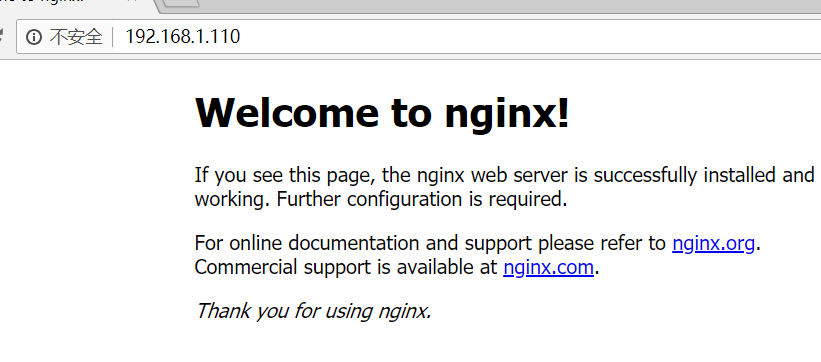
如果不行记得要打开端口
firewall-cmd --zone=public --add-port=80/tcp --permanent (--permanent永久生效,没有此参数重启后失效)
重新载入
firewall-cmd --reload
可选 创建方便启动命令
创建nginx启动命令脚本
vi /etc/init.d/nginx
插入以下内容:
#! /bin/bash

# chkconfig: - 85 15

PATH=/usr/local/nginx

DESC="nginx daemon"

NAME=nginx

DAEMON=$PATH/sbin/$NAME

CONFIGFILE=$PATH/conf/$NAME.conf

PIDFILE=$PATH/logs/$NAME.pid

SCRIPTNAME=/etc/init.d/$NAME

set -e

[ -x "$DAEMON" ] || exit 0

do_start() {

$DAEMON -c $CONFIGFILE || echo -n "nginx already running"

}

do_stop() {

$DAEMON -s stop || echo -n "nginx not running"

}

do_reload() {

$DAEMON -s reload || echo -n "nginx can't reload"

}

case "$1" in

start)

echo -n "Starting $DESC: $NAME"

do_start

echo "."

;;

stop)

echo -n "Stopping $DESC: $NAME"

do_stop

echo "."

;;

reload|graceful)

echo -n "Reloading $DESC configuration..."

do_reload

echo "."

;;

restart)

echo -n "Restarting $DESC: $NAME"

do_stop

do_start

echo "."

;;

*)

echo "Usage: $SCRIPTNAME {start|stop|reload|restart}" >&2

exit 3

;;

esac

exit 0
设置执行权限 chmod a+x /etc/init.d/nginx
注册成服务 chkconfig --add nginx
设置开机启动 chkconfig nginx on
Centos7 安装nginx1.14的更多相关文章
- (转)CentOS7安装Nginx1.14.2
原文:https://blog.csdn.net/zhyfyz/article/details/84957381 https://blog.csdn.net/q85795362/article/det ...
- CentOS7 安装nginx-1.14.0
nginx源码包:http://nginx.org/en/download.html 1.安装gcc gcc是用来编译下载下来的nginx源码 yum install gcc-c++ 2.安装pcre ...
- Centos7安装Nginx1.14.0
一.官网下载 http://nginx.org/en/download.html 版本说明: Nginx官网提供了三个类型的版本 Mainline version:Mainline 是 Nginx 目 ...
- 编译安装和apt安装Nginx1.14.0
安装依赖 yum -y install gcc gcc-c++yum -y install zlib zlib-devel openssl openssl-devel pcre-devel 在Ubun ...
- centos7.6 安装nginx-1.14.2
一.安装所需依赖环境 yum -y install gcc-c++ pcre pcre-devel zlib zlib-devel openssl openssl-devel 二.下载nginx官方源 ...
- CentOS 安装Nginx1.14.0
原文地址:http://www.cnblogs.com/ascd-eg/p/9275441.html 一.安装所需环境 1.gcc 安装 yum install gcc-c++ ...
- ubuntu16.04源码编译安装nginx1.14.2
1.下载nginx-1.14.2, 官网地址:nginx.org 2.解压nginx-1.14.2.tar.gz tar zxvf nginx-1.14.2.tar.gz 3.切到文件夹nginx-1 ...
- centos7.5下yum安装nginx-1.14.2
rpm -Uvh http://nginx.org/packages/centos/7/noarch/RPMS/nginx-release-centos-7-0.el7.ngx.noarch.rpm ...
- CentOS7安装Nginx-1.9.9+PHP5.6
linux系统CentOS7 Nginx 下载地址http://nginx.org/en/download.html wget下载路径http://nginx.org/download/nginx-1 ...
随机推荐
- E: Unable to locate package git
git can’t install 报错信息: root@281eef85bb5d:~# apt-get install git Reading package lists... Done Build ...
- ssm 整合(方案二 maven)
通过maven来整合ssm方便很多,至少不用去找jar包 具体架构如下: 1.配置pom.xml <project xmlns="http://maven.apache.org/POM ...
- angular-material(一)
1.引入文件(angular-material.css.angular.min.js.angular-animate.js.angular-aria.min.js.angular-material.j ...
- 力扣(LeetCode)463. 岛屿的周长
给定一个包含 0 和 1 的二维网格地图,其中 1 表示陆地 0 表示水域. 网格中的格子水平和垂直方向相连(对角线方向不相连).整个网格被水完全包围,但其中恰好有一个岛屿(或者说,一个或多个表示陆地 ...
- 使用qrcode输入信息生成二维码包含二维码说明信息,点击转化为图片并下载
说明:输入汉字和数字都可以识别并展示 <body> <h2 id="h2">二维码生成</h2> <br> <span id= ...
- [数据结构]P2.1 二叉搜索树
二叉树就是每个节点最多有两个分叉的树.这里我们写一写一个典型的例子二叉搜索树,它存在的实际意义是什么呢? 在P1.1链表中,我们清楚了链表的优势是善于删除添加节点,但是其取值很慢:数组的优势是善于取值 ...
- java poi excel操作 把第一列放到最后去
@Override public void adjustExcleColumnPosition(String filePath,int col) throws Exception{ File file ...
- npm下设置NODE_ENV下mac与windows的差异
linux & mac: export NODE_ENV=production windows:set NODE_ENV=production windows: mac:
- YAML基础语法
正如YAML所表示的YAML Ain’t Markup Language,YAML 是一种简洁的非标记语言.YAML以数据为中心,使用空白,缩进,分行组织数据,从而使得表示更加简洁易读. 一边学习规则 ...
- MapReduce的倒排索引
MapReduce的倒排索引 索引: 什么是索引:索引(Index)是帮助数据库高效获取数据的数据结构.索引是在基于数据库表创建的,它包含一个表中某些列的值以及记录对应的地址,并且把这些值存储在一个数 ...