
Centos7 安装nginx1.14
一丶官网 http://nginx.org/en/download.html 至于安装那个版本首先要看清楚版本代表什么意思

Nginx官网提供了三个类型的版本
Mainline version:Mainline 是 Nginx 目前主力在做的版本,可以说是开发版
Stable version:最新稳定版,生产环境上建议使用的版本(毫无疑问,生产环境用于次版本)
Legacy versions:遗留的老版本的稳定版
编译安装前所需要的准备:
1.GCC编译器
首先检查GCC是否安装,命令:gcc -v ,如果显示有相关版本信息,则说明已经安装好,没有就安装:
yum install -y gcc # -y参数表示一直确认安装
2.PCRE库
Nginx的HTTP模块要用它来解析正则表达式。
yum install -y pcre pcre-devel
pcre-devel是使用PCRE做二次开发时所需要的开发库。类似的你可以想到安装LAMP时安装的php-devel。
3.zlib库
gzip格式的压缩会用到它。
yum install -y zlib zlib-devel
4.OpenSSL库
yum install -y openssl openssl-devel

wget http://nginx.org/download/nginx-1.14.0.tar.gz #这里安装的是1.14.0生产稳定版本
解压安装
tar -zxvf nginx-1.14.0.tar.gz
cd nginx-1.14.0/
./configure --prefix=/usr/local/nginx --pid-path=/run/nginx.pid --error-log-path=/var/log/nginx/error.log --http-log-path=/var/log/nginx/access.log --with-http_ssl_module --with-http_v2_module --with-http_stub_status_module --with-pcre #生成 Makefile,为下一步的编译做准备
make #编译
make install #安装
附(Nginx部分控制命令):
默认Nginx安装在/usr/local/nginx/中,因此
/usr/local/nginx/sbin/nginx #默认启动方式 start
/usr/local/nginx/sbin/nginx -t #测试配置信息
/usr/local/nginx/sbin/nginx -v #显示版本信息,-V(大V)显示编译时的参数
/usr/local/nginx/sbin/nginx -s stop #快速停止服务
/usr/local/nginx/sbin/nginx -s quit #正常停止服务
- /usr/local/nginx/sbin/nginx -s reload #重启
Q: nginx: [error] open() "/usr/local/nginx/logs/nginx.pid" failed (2: No such file or directory)
A: [root@localhost nginx]# /usr/local/nginx/sbin/nginx -c /usr/local/nginx/conf/nginx.conf
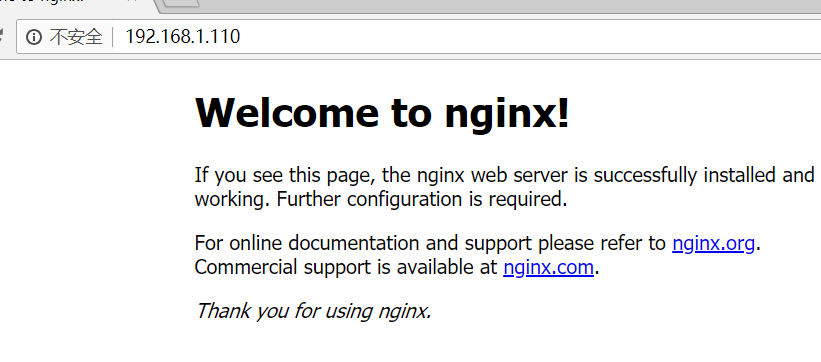
如果不行记得要打开端口
firewall-cmd --zone=public --add-port=80/tcp --permanent (--permanent永久生效,没有此参数重启后失效)
重新载入
firewall-cmd --reload
可选 创建方便启动命令
创建nginx启动命令脚本
vi /etc/init.d/nginx
插入以下内容:
#! /bin/bash

# chkconfig: - 85 15

PATH=/usr/local/nginx

DESC="nginx daemon"

NAME=nginx

DAEMON=$PATH/sbin/$NAME

CONFIGFILE=$PATH/conf/$NAME.conf

PIDFILE=$PATH/logs/$NAME.pid

SCRIPTNAME=/etc/init.d/$NAME

set -e

[ -x "$DAEMON" ] || exit 0

do_start() {

$DAEMON -c $CONFIGFILE || echo -n "nginx already running"

}

do_stop() {

$DAEMON -s stop || echo -n "nginx not running"

}

do_reload() {

$DAEMON -s reload || echo -n "nginx can't reload"

}

case "$1" in

start)

echo -n "Starting $DESC: $NAME"

do_start

echo "."

;;

stop)

echo -n "Stopping $DESC: $NAME"

do_stop

echo "."

;;

reload|graceful)

echo -n "Reloading $DESC configuration..."

do_reload

echo "."

;;

restart)

echo -n "Restarting $DESC: $NAME"

do_stop

do_start

echo "."

;;

*)

echo "Usage: $SCRIPTNAME {start|stop|reload|restart}" >&2

exit 3

;;

esac

exit 0
设置执行权限 chmod a+x /etc/init.d/nginx
注册成服务 chkconfig --add nginx
设置开机启动 chkconfig nginx on
Centos7 安装nginx1.14的更多相关文章
- (转)CentOS7安装Nginx1.14.2
原文:https://blog.csdn.net/zhyfyz/article/details/84957381 https://blog.csdn.net/q85795362/article/det ...
- CentOS7 安装nginx-1.14.0
nginx源码包:http://nginx.org/en/download.html 1.安装gcc gcc是用来编译下载下来的nginx源码 yum install gcc-c++ 2.安装pcre ...
- Centos7安装Nginx1.14.0
一.官网下载 http://nginx.org/en/download.html 版本说明: Nginx官网提供了三个类型的版本 Mainline version:Mainline 是 Nginx 目 ...
- 编译安装和apt安装Nginx1.14.0
安装依赖 yum -y install gcc gcc-c++yum -y install zlib zlib-devel openssl openssl-devel pcre-devel 在Ubun ...
- centos7.6 安装nginx-1.14.2
一.安装所需依赖环境 yum -y install gcc-c++ pcre pcre-devel zlib zlib-devel openssl openssl-devel 二.下载nginx官方源 ...
- CentOS 安装Nginx1.14.0
原文地址:http://www.cnblogs.com/ascd-eg/p/9275441.html 一.安装所需环境 1.gcc 安装 yum install gcc-c++ ...
- ubuntu16.04源码编译安装nginx1.14.2
1.下载nginx-1.14.2, 官网地址:nginx.org 2.解压nginx-1.14.2.tar.gz tar zxvf nginx-1.14.2.tar.gz 3.切到文件夹nginx-1 ...
- centos7.5下yum安装nginx-1.14.2
rpm -Uvh http://nginx.org/packages/centos/7/noarch/RPMS/nginx-release-centos-7-0.el7.ngx.noarch.rpm ...
- CentOS7安装Nginx-1.9.9+PHP5.6
linux系统CentOS7 Nginx 下载地址http://nginx.org/en/download.html wget下载路径http://nginx.org/download/nginx-1 ...
随机推荐
- 王之泰201771010131《面向对象程序设计(java)》第六周学习总结
第一部分:理论知识学习部分 第五章 第五章学习内容主要分为七个模块,分别为: 1.类.超类和子类: a. 类继承的格式: class 新类名extends已有类名. b. 已有类称为:超类(super ...
- C# ToLookup
下文参考翻译自: C#/.NET Little Wonders: The ToLookup() LINQ Extension Method 故事的背景 让我们先来创建一个简单的类来表示产品,产品有ID ...
- PHP钩子的简单介绍
<?php /** * 钩子类 */ class Hook { static public function execute($type, $model='') { if($model == ' ...
- QT中设置窗口背景颜色
QWidget是所有用户界面对象的基类,这意味着可以用同样的方法为其它子类控件改变背景颜色. Qt中窗口背景的设置,下面介绍三种方法. 1.使用QPalette 2.使用Style Sheet 3.绘 ...
- JS开发工具WebStorm使用快捷键
快捷键可以提高开发效率,最好用的就是这些! 代码编辑 Ctrl + d 复制整行 Ctrl + '-/+' 模块折叠 Ctrl + [ ] 括号匹配 Ctrl + F12 结构展示 Shif ...
- Java内存分配机制
内存分配,主要指的是在堆上的分配, 一般的,对象的内存分配都是在堆上进行,但现代技术也支持将对象拆成标量类型(标量类型即原子类型,表示单个值,可以是基本类型或String等),然后在栈上分配,在栈上分 ...
- Linux 环境下jmeter 安装和配置
1. 下载和安装JDK vim /etc/profile export JAVA_HOME=/usr/lib/jvm/jdk1.8.0_92 export JRE_HOME=$JAVA_HOME/jr ...
- 特效 左右滑动轮播图jQuery思路
<!DOCTYPE html> <html lang="en"> <head> <meta charset="UTF-8&quo ...
- 开机自动启动WEB服务,共享目录。
最近工作中,需要共享一个目录,每次重启总要手动执行一下 nohup python -m SimpleHTTPServer 8000这个命令,想着实现让它开机自动启动,就一劳永逸了. 手动步骤如下: ...
- fcn+caffe+voc2012实验记录
参考博客: http://blog.csdn.net/haoji007/article/details/77148374 http://blog.csdn.net/jacke121/article/d ...